Calculate a geodesic path between two points and measure its distance.
Use case
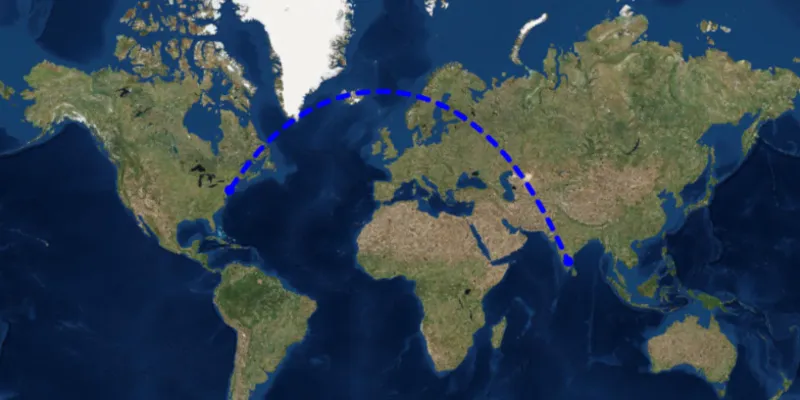
A geodesic distance provides an accurate, real-world distance between two points. Visualizing flight paths between cities is a common example of a geodesic operation since the flight path between two airports takes into account the curvature of the earth, rather than following the planar path between those points, which appears as a straight line on a projected map.
How to use the sample
Click anywhere on the map. A line graphic will display the geodesic line between the two points. In addition, text that indicates the geodesic distance between the two points will be updated. Click elsewhere and a new line will be created.
How it works
- Create a
Pointin and display it as aGraphic. - Obtain a new point when a click occurs on the
MapViewand add this point as a graphic. - Create a
Polylinefrom the two points. - Execute
GeometryEngine.densifyGeodetic()by passing in the created polyine then create a graphic from the returnedGeometry. - Execute
GeometryEngine.lengthGeodetic()by passing in the two points and display the returned length on the screen.
Relevant API
- GeometryEngine
About the data
The Imagery basemap style provides the global context for the displayed geodesic line.
Tags
densify, distance, geodesic, geodetic
Sample code
/* * Copyright 2018 Esri. * * Licensed under the Apache License, Version 2.0 (the "License"); you may not * use this file except in compliance with the License. You may obtain a copy of * the License at * * http://www.apache.org/licenses/LICENSE-2.0 * * Unless required by applicable law or agreed to in writing, software * distributed under the License is distributed on an "AS IS" BASIS, WITHOUT * WARRANTIES OR CONDITIONS OF ANY KIND, either express or implied. See the * License for the specific language governing permissions and limitations under * the License. */
package com.esri.samples.geodesic_operations;
import java.text.DecimalFormat;import java.util.Arrays;
import javafx.application.Application;import javafx.geometry.Insets;import javafx.geometry.Point2D;import javafx.geometry.Pos;import javafx.scene.Scene;import javafx.scene.control.Label;import javafx.scene.input.MouseButton;import javafx.scene.layout.Background;import javafx.scene.layout.BackgroundFill;import javafx.scene.layout.CornerRadii;import javafx.scene.layout.StackPane;import javafx.scene.layout.VBox;import javafx.scene.paint.Color;import javafx.scene.paint.Paint;import javafx.stage.Stage;
import com.esri.arcgisruntime.ArcGISRuntimeEnvironment;import com.esri.arcgisruntime.geometry.GeodeticCurveType;import com.esri.arcgisruntime.geometry.Geometry;import com.esri.arcgisruntime.geometry.GeometryEngine;import com.esri.arcgisruntime.geometry.LinearUnit;import com.esri.arcgisruntime.geometry.LinearUnitId;import com.esri.arcgisruntime.geometry.Point;import com.esri.arcgisruntime.geometry.PointCollection;import com.esri.arcgisruntime.geometry.Polyline;import com.esri.arcgisruntime.geometry.SpatialReference;import com.esri.arcgisruntime.geometry.SpatialReferences;import com.esri.arcgisruntime.mapping.ArcGISMap;import com.esri.arcgisruntime.mapping.BasemapStyle;import com.esri.arcgisruntime.mapping.view.Graphic;import com.esri.arcgisruntime.mapping.view.GraphicsOverlay;import com.esri.arcgisruntime.mapping.view.MapView;import com.esri.arcgisruntime.symbology.SimpleLineSymbol;import com.esri.arcgisruntime.symbology.SimpleMarkerSymbol;
public class GeodesicOperationsSample extends Application {
  private MapView mapView;  private final SpatialReference srWgs84 = SpatialReferences.getWgs84();
  @Override  public void start(Stage stage) {
    try {      // create stack pane and application scene      StackPane stackPane = new StackPane();      Scene fxScene = new Scene(stackPane);      fxScene.getStylesheets().add(getClass().getResource("/geodesic_operations/style.css").toExternalForm());
      // set title, size, and add scene to stage      stage.setTitle("Geodesic Operations Sample");      stage.setWidth(800);      stage.setHeight(700);      stage.setScene(fxScene);      stage.show();
      // authentication with an API key or named user is required to access basemaps and other location services      String yourAPIKey = System.getProperty("apiKey");      ArcGISRuntimeEnvironment.setApiKey(yourAPIKey);
      // create a map with the standard imagery basemap style      ArcGISMap map = new ArcGISMap(BasemapStyle.ARCGIS_IMAGERY_STANDARD);
      // create a map view and set the map to it      mapView = new MapView();      mapView.setMap(map);
      // create a graphics overlay      GraphicsOverlay graphicsOverlay = new GraphicsOverlay();      mapView.getGraphicsOverlays().add(graphicsOverlay);
      // add a graphic at JFK airport to represent the flight start location      Point start = new Point(-73.7781, 40.6413, srWgs84);      SimpleMarkerSymbol locationMarker = new SimpleMarkerSymbol(SimpleMarkerSymbol.Style.CIRCLE, Color.BLUE, 10);      Graphic startLocation = new Graphic(start, locationMarker);      graphicsOverlay.getGraphics().add(startLocation);
      // create a graphic for the destination      Graphic endLocation = new Graphic();      endLocation.setSymbol(locationMarker);      graphicsOverlay.getGraphics().add(endLocation);
      // create a graphic representing the geodesic path between the two locations      Graphic path = new Graphic();      path.setSymbol(new SimpleLineSymbol(SimpleLineSymbol.Style.DASH, Color.BLUE, 5));      graphicsOverlay.getGraphics().add(path);
      // create a label to show the distance      Label distanceLabel = new Label();      DecimalFormat formatter = new DecimalFormat("#0.00 km");      distanceLabel.setText(formatter.format(0.0));      VBox labelBox = new VBox(distanceLabel);      labelBox.setBackground(new Background(new BackgroundFill(Paint.valueOf("rgba(0,0,0,0.3)"), CornerRadii.EMPTY,              Insets.EMPTY)));      labelBox.setAlignment(Pos.CENTER);      labelBox.setPadding(new Insets(5));      labelBox.setMaxSize(80, 20);      labelBox.getStyleClass().add("panel-region");
      // create a linear unit for measuring the distance      LinearUnit unitOfMeasurement = new LinearUnit(LinearUnitId.KILOMETERS);
      // and a mouse click listener to get the user's input for the destination      mapView.setOnMouseClicked(e -> {        if (e.isStillSincePress() && e.getButton() == MouseButton.PRIMARY) {          // change the end location's geometry to the clicked location          Point2D point2D = new Point2D(e.getX(), e.getY());          Point destination = (Point) GeometryEngine.project(mapView.screenToLocation(point2D), srWgs84);          endLocation.setGeometry(destination);          // create a straight line path between the start and end locations          PointCollection points = new PointCollection(Arrays.asList(start, destination), srWgs84);          Polyline polyline = new Polyline(points);          // densify the path as a geodesic curve and show it with the path graphic          Geometry pathGeometry = GeometryEngine.densifyGeodetic(polyline, 1, unitOfMeasurement, GeodeticCurveType              .GEODESIC);          path.setGeometry(pathGeometry);          // calculate the path distance          double distance = GeometryEngine.lengthGeodetic(pathGeometry, unitOfMeasurement, GeodeticCurveType.GEODESIC);          distanceLabel.setText(formatter.format(distance));        }      });
      // add the scene view and label box to the stack pane      stackPane.getChildren().addAll(mapView, labelBox);      StackPane.setMargin(labelBox, new Insets(10, 0, 0, 10));      StackPane.setAlignment(labelBox, Pos.TOP_LEFT);    } catch (Exception e) {      // on any error, display the stack trace.      e.printStackTrace();    }  }
  /**   * Stops and releases all resources used in application.   */  @Override  public void stop() {
    if (mapView != null) {      mapView.dispose();    }  }
  /**   * Opens and runs application.   *   * @param args arguments passed to this application   */  public static void main(String[] args) {
    Application.launch(args);  }
}