Learn how to apply renderers
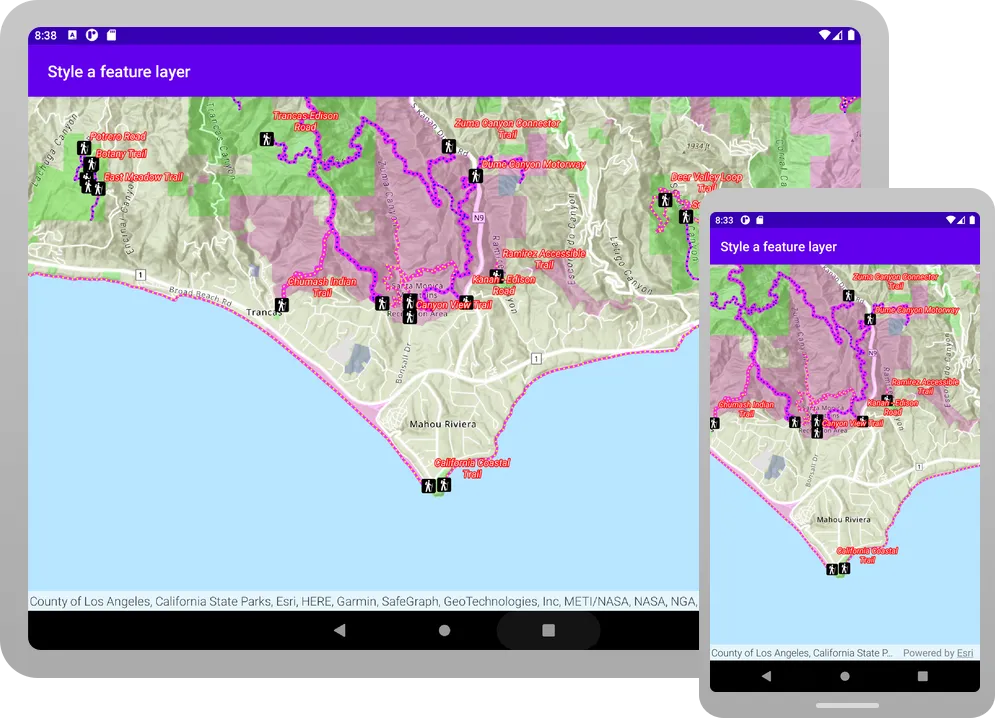
Applications can display feature layer data with different styles to enhance the visualization. The type of Renderer you choose depends on your application. A SimpleRenderer applies the same symbol to all features, a UniqueValueRenderer applies a different symbol to each unique attribute value, and a ClassBreaksRenderer applies a symbol to a range of numeric values. Renderers are responsible for accessing the data and applying the appropriate symbol to each feature when the layer draws. You can also use a LabelDefinition to show attribute information for features. Visit the Styles and data visualization documentation to learn more about styling layers.
You can also author, style and save web maps, web scenes, and layers as portal items and then add them to the map in your application. Visit the following tutorials to learn more about adding portal items.
In this tutorial, you will apply different renderers
Prerequisites
Before starting this tutorial, you need the following:
-
An ArcGIS Location Platform or ArcGIS Online account.
-
A development and deployment environment that meets the system requirements.
-
An IDE for Android development in Kotlin.
Develop or download
You have two options for completing this tutorial:
Option 1: Develop the code
Open an Android Studio project
-
Open the project you created by completing the Display a map tutorial.
-
Continue with the following instructions to apply renderers and label definitions to a feature layer based on attribute values.
-
Modify the old project for use in this new tutorial.
-
On your file system, delete the .idea folder, if present, at the top level of your project.
-
In the Android view, open app > res > values > strings.xml.
In the
<string name="app_name">element, change the text content to Style a feature layer.strings.xml<resources><string name="app_name">Style a feature layer</string></resources> -
In the Android view, open Gradle Scripts > settings.gradle.kts.
Change the value of
rootProject.nameto “Style a feature layer”.settings.gradle.kts14 collapsed linespluginManagement {repositories {google {content {includeGroupByRegex("com\\.android.*")includeGroupByRegex("com\\.google.*")includeGroupByRegex("androidx.*")}}mavenCentral()gradlePluginPortal()}}dependencyResolutionManagement {repositoriesMode.set(RepositoriesMode.FAIL_ON_PROJECT_REPOS)repositories {google()mavenCentral()maven { url = uri("https://esri.jfrog.io/artifactory/arcgis") }}}rootProject.name = "Style a feature layer"include(":app") -
Click File > Sync Project with Gradle files. Android Studio will recognize your changes and create a new .idea folder.
-
Add import statements
In the Android view, open app > kotlin+java > com.example.app > MainScreen.kt. Replace the import statements with the imports needed for this tutorial.
@file:OptIn(ExperimentalMaterial3Api::class)
package com.example.app.screens
import androidx.compose.foundation.layout.fillMaxSizeimport androidx.compose.foundation.layout.paddingimport androidx.compose.material3.ExperimentalMaterial3Apiimport androidx.compose.material3.Scaffoldimport androidx.compose.material3.Textimport androidx.compose.material3.TopAppBarimport androidx.compose.runtime.Composableimport androidx.compose.runtime.rememberimport androidx.compose.ui.Modifierimport androidx.compose.ui.res.stringResourceimport com.arcgismaps.Colorimport com.arcgismaps.data.ServiceFeatureTableimport com.arcgismaps.mapping.ArcGISMapimport com.arcgismaps.mapping.BasemapStyleimport com.arcgismaps.mapping.Viewpointimport com.arcgismaps.mapping.labeling.ArcadeLabelExpressionimport com.arcgismaps.mapping.labeling.LabelDefinitionimport com.arcgismaps.mapping.layers.FeatureLayerimport com.arcgismaps.mapping.symbology.ClassBreakimport com.arcgismaps.mapping.symbology.ClassBreaksRendererimport com.arcgismaps.mapping.symbology.FontStyleimport com.arcgismaps.mapping.symbology.FontWeightimport com.arcgismaps.mapping.symbology.PictureMarkerSymbolimport com.arcgismaps.mapping.symbology.SimpleFillSymbolimport com.arcgismaps.mapping.symbology.SimpleFillSymbolStyleimport com.arcgismaps.mapping.symbology.SimpleLineSymbolimport com.arcgismaps.mapping.symbology.SimpleLineSymbolStyleimport com.arcgismaps.mapping.symbology.SimpleRendererimport com.arcgismaps.mapping.symbology.TextSymbolimport com.arcgismaps.mapping.symbology.UniqueValueimport com.arcgismaps.mapping.symbology.UniqueValueRendererimport com.arcgismaps.toolkit.geoviewcompose.MapViewimport com.example.app.R
Create a function to add a feature layer
You can add a feature layerx,y coordinates and a spatial reference.
Define variables that store feature service URLs used by the app’s layers, and then create a helper function to add a layer to the map’s list of operational layers
-
In
createMap()add four read-onlyStringvariables: three for accessing feature layers, and a fourth for accessing a static image for use in a picture marker symbol. You will use these resources in future steps.MainScreen.kt53 collapsed lines@file:OptIn(ExperimentalMaterial3Api::class)package com.example.app.screensimport androidx.compose.foundation.layout.fillMaxSizeimport androidx.compose.foundation.layout.paddingimport androidx.compose.material3.ExperimentalMaterial3Apiimport androidx.compose.material3.Scaffoldimport androidx.compose.material3.Textimport androidx.compose.material3.TopAppBarimport androidx.compose.runtime.Composableimport androidx.compose.runtime.rememberimport androidx.compose.ui.Modifierimport androidx.compose.ui.res.stringResourceimport com.arcgismaps.Colorimport com.arcgismaps.data.ServiceFeatureTableimport com.arcgismaps.mapping.ArcGISMapimport com.arcgismaps.mapping.BasemapStyleimport com.arcgismaps.mapping.Viewpointimport com.arcgismaps.mapping.labeling.ArcadeLabelExpressionimport com.arcgismaps.mapping.labeling.LabelDefinitionimport com.arcgismaps.mapping.layers.FeatureLayerimport com.arcgismaps.mapping.symbology.ClassBreakimport com.arcgismaps.mapping.symbology.ClassBreaksRendererimport com.arcgismaps.mapping.symbology.FontStyleimport com.arcgismaps.mapping.symbology.FontWeightimport com.arcgismaps.mapping.symbology.PictureMarkerSymbolimport com.arcgismaps.mapping.symbology.SimpleFillSymbolimport com.arcgismaps.mapping.symbology.SimpleFillSymbolStyleimport com.arcgismaps.mapping.symbology.SimpleLineSymbolimport com.arcgismaps.mapping.symbology.SimpleLineSymbolStyleimport com.arcgismaps.mapping.symbology.SimpleRendererimport com.arcgismaps.mapping.symbology.TextSymbolimport com.arcgismaps.mapping.symbology.UniqueValueimport com.arcgismaps.mapping.symbology.UniqueValueRendererimport com.arcgismaps.toolkit.geoviewcompose.MapViewimport com.example.app.R@Composablefun MainScreen() {val map = remember {createMap()}Scaffold(topBar = { TopAppBar(title = { Text(text = stringResource(id = R.string.app_name)) }) }) {MapView(modifier = Modifier.fillMaxSize().padding(it),arcGISMap = map)}}fun createMap(): ArcGISMap {val parksAndOpenSpaces ="https://services3.arcgis.com/GVgbJbqm8hXASVYi/arcgis/rest/services/Parks_and_Open_Space/FeatureServer/0"val trails ="https://services3.arcgis.com/GVgbJbqm8hXASVYi/arcgis/rest/services/Trails/FeatureServer/0"val trailheads ="https://services3.arcgis.com/GVgbJbqm8hXASVYi/arcgis/rest/services/Trailheads/FeatureServer/0"val trailheadImage ="https://static.arcgis.com/images/Symbols/NPS/npsPictograph_0231b.png"return ArcGISMap(BasemapStyle.ArcGISTopographic).apply {initialViewpoint = Viewpoint(latitude = 34.0270,longitude = -118.8050,scale = 72000.0)}}7 collapsed linesfun createFeatureLayer(featureServiceUri: String): FeatureLayer {// Create a service feature table from a Urival serviceFeatureTable = ServiceFeatureTable(featureServiceUri)// Return a feature layer created from the service feature tablereturn FeatureLayer.createWithFeatureTable(serviceFeatureTable)} -
In the
applyblock forArcGISMap, insert code that addsFeatureLayers to the map’soperationalLayers. For now, thelistOf()function has no parameters. In this tutorial, you will be adding each new feature layer to the list of parameters.MainScreen.kt53 collapsed lines@file:OptIn(ExperimentalMaterial3Api::class)package com.example.app.screensimport androidx.compose.foundation.layout.fillMaxSizeimport androidx.compose.foundation.layout.paddingimport androidx.compose.material3.ExperimentalMaterial3Apiimport androidx.compose.material3.Scaffoldimport androidx.compose.material3.Textimport androidx.compose.material3.TopAppBarimport androidx.compose.runtime.Composableimport androidx.compose.runtime.rememberimport androidx.compose.ui.Modifierimport androidx.compose.ui.res.stringResourceimport com.arcgismaps.Colorimport com.arcgismaps.data.ServiceFeatureTableimport com.arcgismaps.mapping.ArcGISMapimport com.arcgismaps.mapping.BasemapStyleimport com.arcgismaps.mapping.Viewpointimport com.arcgismaps.mapping.labeling.ArcadeLabelExpressionimport com.arcgismaps.mapping.labeling.LabelDefinitionimport com.arcgismaps.mapping.layers.FeatureLayerimport com.arcgismaps.mapping.symbology.ClassBreakimport com.arcgismaps.mapping.symbology.ClassBreaksRendererimport com.arcgismaps.mapping.symbology.FontStyleimport com.arcgismaps.mapping.symbology.FontWeightimport com.arcgismaps.mapping.symbology.PictureMarkerSymbolimport com.arcgismaps.mapping.symbology.SimpleFillSymbolimport com.arcgismaps.mapping.symbology.SimpleFillSymbolStyleimport com.arcgismaps.mapping.symbology.SimpleLineSymbolimport com.arcgismaps.mapping.symbology.SimpleLineSymbolStyleimport com.arcgismaps.mapping.symbology.SimpleRendererimport com.arcgismaps.mapping.symbology.TextSymbolimport com.arcgismaps.mapping.symbology.UniqueValueimport com.arcgismaps.mapping.symbology.UniqueValueRendererimport com.arcgismaps.toolkit.geoviewcompose.MapViewimport com.example.app.R@Composablefun MainScreen() {val map = remember {createMap()}Scaffold(topBar = { TopAppBar(title = { Text(text = stringResource(id = R.string.app_name)) }) }) {MapView(modifier = Modifier.fillMaxSize().padding(it),arcGISMap = map)}}fun createMap(): ArcGISMap {val parksAndOpenSpaces ="https://services3.arcgis.com/GVgbJbqm8hXASVYi/arcgis/rest/services/Parks_and_Open_Space/FeatureServer/0"val trails ="https://services3.arcgis.com/GVgbJbqm8hXASVYi/arcgis/rest/services/Trails/FeatureServer/0"val trailheads ="https://services3.arcgis.com/GVgbJbqm8hXASVYi/arcgis/rest/services/Trailheads/FeatureServer/0"val trailheadImage ="https://static.arcgis.com/images/Symbols/NPS/npsPictograph_0231b.png"return ArcGISMap(BasemapStyle.ArcGISTopographic).apply {initialViewpoint = Viewpoint(latitude = 34.0270,longitude = -118.8050,scale = 72000.0)operationalLayers.addAll(listOf())}}7 collapsed linesfun createFeatureLayer(featureServiceUri: String): FeatureLayer {// Create a service feature table from a Urival serviceFeatureTable = ServiceFeatureTable(featureServiceUri)// Return a feature layer created from the service feature tablereturn FeatureLayer.createWithFeatureTable(serviceFeatureTable)} -
Add a top-level helper function named
createFeatureLayer()that takes a feature service URI as an argument and returns aFeatureLayercreated from the URI.MainScreen.kt82 collapsed lines@file:OptIn(ExperimentalMaterial3Api::class)package com.example.app.screensimport androidx.compose.foundation.layout.fillMaxSizeimport androidx.compose.foundation.layout.paddingimport androidx.compose.material3.ExperimentalMaterial3Apiimport androidx.compose.material3.Scaffoldimport androidx.compose.material3.Textimport androidx.compose.material3.TopAppBarimport androidx.compose.runtime.Composableimport androidx.compose.runtime.rememberimport androidx.compose.ui.Modifierimport androidx.compose.ui.res.stringResourceimport com.arcgismaps.Colorimport com.arcgismaps.data.ServiceFeatureTableimport com.arcgismaps.mapping.ArcGISMapimport com.arcgismaps.mapping.BasemapStyleimport com.arcgismaps.mapping.Viewpointimport com.arcgismaps.mapping.labeling.ArcadeLabelExpressionimport com.arcgismaps.mapping.labeling.LabelDefinitionimport com.arcgismaps.mapping.layers.FeatureLayerimport com.arcgismaps.mapping.symbology.ClassBreakimport com.arcgismaps.mapping.symbology.ClassBreaksRendererimport com.arcgismaps.mapping.symbology.FontStyleimport com.arcgismaps.mapping.symbology.FontWeightimport com.arcgismaps.mapping.symbology.PictureMarkerSymbolimport com.arcgismaps.mapping.symbology.SimpleFillSymbolimport com.arcgismaps.mapping.symbology.SimpleFillSymbolStyleimport com.arcgismaps.mapping.symbology.SimpleLineSymbolimport com.arcgismaps.mapping.symbology.SimpleLineSymbolStyleimport com.arcgismaps.mapping.symbology.SimpleRendererimport com.arcgismaps.mapping.symbology.TextSymbolimport com.arcgismaps.mapping.symbology.UniqueValueimport com.arcgismaps.mapping.symbology.UniqueValueRendererimport com.arcgismaps.toolkit.geoviewcompose.MapViewimport com.example.app.R@Composablefun MainScreen() {val map = remember {createMap()}Scaffold(topBar = { TopAppBar(title = { Text(text = stringResource(id = R.string.app_name)) }) }) {MapView(modifier = Modifier.fillMaxSize().padding(it),arcGISMap = map)}}fun createMap(): ArcGISMap {val parksAndOpenSpaces ="https://services3.arcgis.com/GVgbJbqm8hXASVYi/arcgis/rest/services/Parks_and_Open_Space/FeatureServer/0"val trails ="https://services3.arcgis.com/GVgbJbqm8hXASVYi/arcgis/rest/services/Trails/FeatureServer/0"val trailheads ="https://services3.arcgis.com/GVgbJbqm8hXASVYi/arcgis/rest/services/Trailheads/FeatureServer/0"val trailheadImage ="https://static.arcgis.com/images/Symbols/NPS/npsPictograph_0231b.png"return ArcGISMap(BasemapStyle.ArcGISTopographic).apply {initialViewpoint = Viewpoint(latitude = 34.0270,longitude = -118.8050,scale = 72000.0)operationalLayers.addAll(listOf())}}fun createFeatureLayer(featureServiceUri: String): FeatureLayer {// Create a service feature table from a Urival serviceFeatureTable = ServiceFeatureTable(featureServiceUri)// Return a feature layer created from the service feature tablereturn FeatureLayer.createWithFeatureTable(serviceFeatureTable)}
Add a layer with a unique value renderer
Create a method to apply a different symbol for each type of park area to the Parks and Open Spaces feature layer.
-
Add a top-level function named
createOpenSpaceLayer().UniqueValueassigns a symbol to a value or values. A unique value renderer uses a collection of unique values to assign the appropriate symbol for each feature it renderers.For this example, the renderer uses a feature’s
TYPEattribute value to apply the correct symbol.MainScreen.kt89 collapsed lines@file:OptIn(ExperimentalMaterial3Api::class)package com.example.app.screensimport androidx.compose.foundation.layout.fillMaxSizeimport androidx.compose.foundation.layout.paddingimport androidx.compose.material3.ExperimentalMaterial3Apiimport androidx.compose.material3.Scaffoldimport androidx.compose.material3.Textimport androidx.compose.material3.TopAppBarimport androidx.compose.runtime.Composableimport androidx.compose.runtime.rememberimport androidx.compose.ui.Modifierimport androidx.compose.ui.res.stringResourceimport com.arcgismaps.Colorimport com.arcgismaps.data.ServiceFeatureTableimport com.arcgismaps.mapping.ArcGISMapimport com.arcgismaps.mapping.BasemapStyleimport com.arcgismaps.mapping.Viewpointimport com.arcgismaps.mapping.labeling.ArcadeLabelExpressionimport com.arcgismaps.mapping.labeling.LabelDefinitionimport com.arcgismaps.mapping.layers.FeatureLayerimport com.arcgismaps.mapping.symbology.ClassBreakimport com.arcgismaps.mapping.symbology.ClassBreaksRendererimport com.arcgismaps.mapping.symbology.FontStyleimport com.arcgismaps.mapping.symbology.FontWeightimport com.arcgismaps.mapping.symbology.PictureMarkerSymbolimport com.arcgismaps.mapping.symbology.SimpleFillSymbolimport com.arcgismaps.mapping.symbology.SimpleFillSymbolStyleimport com.arcgismaps.mapping.symbology.SimpleLineSymbolimport com.arcgismaps.mapping.symbology.SimpleLineSymbolStyleimport com.arcgismaps.mapping.symbology.SimpleRendererimport com.arcgismaps.mapping.symbology.TextSymbolimport com.arcgismaps.mapping.symbology.UniqueValueimport com.arcgismaps.mapping.symbology.UniqueValueRendererimport com.arcgismaps.toolkit.geoviewcompose.MapViewimport com.example.app.R@Composablefun MainScreen() {val map = remember {createMap()}Scaffold(topBar = { TopAppBar(title = { Text(text = stringResource(id = R.string.app_name)) }) }) {MapView(modifier = Modifier.fillMaxSize().padding(it),arcGISMap = map)}}fun createMap(): ArcGISMap {val parksAndOpenSpaces ="https://services3.arcgis.com/GVgbJbqm8hXASVYi/arcgis/rest/services/Parks_and_Open_Space/FeatureServer/0"val trails ="https://services3.arcgis.com/GVgbJbqm8hXASVYi/arcgis/rest/services/Trails/FeatureServer/0"val trailheads ="https://services3.arcgis.com/GVgbJbqm8hXASVYi/arcgis/rest/services/Trailheads/FeatureServer/0"val trailheadImage ="https://static.arcgis.com/images/Symbols/NPS/npsPictograph_0231b.png"return ArcGISMap(BasemapStyle.ArcGISTopographic).apply {initialViewpoint = Viewpoint(latitude = 34.0270,longitude = -118.8050,scale = 72000.0)operationalLayers.addAll(listOf())}}fun createFeatureLayer(featureServiceUri: String): FeatureLayer {// Create a service feature table from a Urival serviceFeatureTable = ServiceFeatureTable(featureServiceUri)// Return a feature layer created from the service feature tablereturn FeatureLayer.createWithFeatureTable(serviceFeatureTable)}fun createOpenSpaceLayer(featureServiceUri: String): FeatureLayer {// Create fill symbol objects to represent the parks and open spaces layerval magentaFillSymbol = SimpleFillSymbol(SimpleFillSymbolStyle.Solid, Color.fromRgba(255, 0, 255), null)val greenFillSymbol = SimpleFillSymbol(SimpleFillSymbolStyle.Solid, Color.green, null)val blueFillSymbol = SimpleFillSymbol(SimpleFillSymbolStyle.Solid, Color.fromRgba(0, 0, 255), null)val redFillSymbol = SimpleFillSymbol(SimpleFillSymbolStyle.Solid, Color.red, null)// Create a unique value for natural areas, regional open spaces, local parks, and regional recreation parksval naturalAreas = UniqueValue(description = "Natural Areas",label = "Natural Areas",symbol = magentaFillSymbol,values = listOf("Natural Areas"))val regionalOpenSpace = UniqueValue(description = "Regional Open Space",label = "Regional Open Space",symbol = greenFillSymbol,values = listOf("Regional Open Space"))val localPark = UniqueValue(description = "Local Park",label = "Local Park",symbol = blueFillSymbol,values = listOf("Local Park"))val regionalRecreationPark = UniqueValue(description = "Regional Recreation Park",label = "Regional Recreation Park",symbol = redFillSymbol,values = listOf("Regional Recreation Park"))// Create a unique value list with the fill symbolsval uniqueValuesList = listOf(naturalAreas,regionalOpenSpace,localPark,regionalRecreationPark)// Create and assign a unique value renderer to the feature layerval openSpacesUniqueValueRenderer =UniqueValueRenderer(fieldNames = listOf("TYPE"),uniqueValues = uniqueValuesList,defaultLabel = "Open Spaces",defaultSymbol = null)// Create a parks and open spaces feature layerval featureLayer = createFeatureLayer(featureServiceUri).apply {// Style the feature layer using the unique value rendererrenderer = openSpacesUniqueValueRenderer// Set the layer opacity to semi-transparentopacity = 0.2f}return featureLayer} -
In
createMap(), add the Parks and Open Space feature layer to the map’s operational layers by callingcreateOpenSpaceLayer().MainScreen.kt53 collapsed lines@file:OptIn(ExperimentalMaterial3Api::class)package com.example.app.screensimport androidx.compose.foundation.layout.fillMaxSizeimport androidx.compose.foundation.layout.paddingimport androidx.compose.material3.ExperimentalMaterial3Apiimport androidx.compose.material3.Scaffoldimport androidx.compose.material3.Textimport androidx.compose.material3.TopAppBarimport androidx.compose.runtime.Composableimport androidx.compose.runtime.rememberimport androidx.compose.ui.Modifierimport androidx.compose.ui.res.stringResourceimport com.arcgismaps.Colorimport com.arcgismaps.data.ServiceFeatureTableimport com.arcgismaps.mapping.ArcGISMapimport com.arcgismaps.mapping.BasemapStyleimport com.arcgismaps.mapping.Viewpointimport com.arcgismaps.mapping.labeling.ArcadeLabelExpressionimport com.arcgismaps.mapping.labeling.LabelDefinitionimport com.arcgismaps.mapping.layers.FeatureLayerimport com.arcgismaps.mapping.symbology.ClassBreakimport com.arcgismaps.mapping.symbology.ClassBreaksRendererimport com.arcgismaps.mapping.symbology.FontStyleimport com.arcgismaps.mapping.symbology.FontWeightimport com.arcgismaps.mapping.symbology.PictureMarkerSymbolimport com.arcgismaps.mapping.symbology.SimpleFillSymbolimport com.arcgismaps.mapping.symbology.SimpleFillSymbolStyleimport com.arcgismaps.mapping.symbology.SimpleLineSymbolimport com.arcgismaps.mapping.symbology.SimpleLineSymbolStyleimport com.arcgismaps.mapping.symbology.SimpleRendererimport com.arcgismaps.mapping.symbology.TextSymbolimport com.arcgismaps.mapping.symbology.UniqueValueimport com.arcgismaps.mapping.symbology.UniqueValueRendererimport com.arcgismaps.toolkit.geoviewcompose.MapViewimport com.example.app.R@Composablefun MainScreen() {val map = remember {createMap()}Scaffold(topBar = { TopAppBar(title = { Text(text = stringResource(id = R.string.app_name)) }) }) {MapView(modifier = Modifier.fillMaxSize().padding(it),arcGISMap = map)}}fun createMap(): ArcGISMap {val parksAndOpenSpaces ="https://services3.arcgis.com/GVgbJbqm8hXASVYi/arcgis/rest/services/Parks_and_Open_Space/FeatureServer/0"val trails ="https://services3.arcgis.com/GVgbJbqm8hXASVYi/arcgis/rest/services/Trails/FeatureServer/0"val trailheads ="https://services3.arcgis.com/GVgbJbqm8hXASVYi/arcgis/rest/services/Trailheads/FeatureServer/0"val trailheadImage ="https://static.arcgis.com/images/Symbols/NPS/npsPictograph_0231b.png"return ArcGISMap(BasemapStyle.ArcGISTopographic).apply {initialViewpoint = Viewpoint(latitude = 34.0270,longitude = -118.8050,scale = 72000.0)operationalLayers.addAll(listOf(createOpenSpaceLayer(parksAndOpenSpaces),))}}67 collapsed linesfun createFeatureLayer(featureServiceUri: String): FeatureLayer {// Create a service feature table from a Urival serviceFeatureTable = ServiceFeatureTable(featureServiceUri)// Return a feature layer created from the service feature tablereturn FeatureLayer.createWithFeatureTable(serviceFeatureTable)}fun createOpenSpaceLayer(featureServiceUri: String): FeatureLayer {// Create fill symbol objects to represent the parks and open spaces layerval magentaFillSymbol = SimpleFillSymbol(SimpleFillSymbolStyle.Solid, Color.fromRgba(255, 0, 255), null)val greenFillSymbol = SimpleFillSymbol(SimpleFillSymbolStyle.Solid, Color.green, null)val blueFillSymbol = SimpleFillSymbol(SimpleFillSymbolStyle.Solid, Color.fromRgba(0, 0, 255), null)val redFillSymbol = SimpleFillSymbol(SimpleFillSymbolStyle.Solid, Color.red, null)// Create a unique value for natural areas, regional open spaces, local parks, and regional recreation parksval naturalAreas = UniqueValue(description = "Natural Areas",label = "Natural Areas",symbol = magentaFillSymbol,values = listOf("Natural Areas"))val regionalOpenSpace = UniqueValue(description = "Regional Open Space",label = "Regional Open Space",symbol = greenFillSymbol,values = listOf("Regional Open Space"))val localPark = UniqueValue(description = "Local Park",label = "Local Park",symbol = blueFillSymbol,values = listOf("Local Park"))val regionalRecreationPark = UniqueValue(description = "Regional Recreation Park",label = "Regional Recreation Park",symbol = redFillSymbol,values = listOf("Regional Recreation Park"))// Create a unique value list with the fill symbolsval uniqueValuesList = listOf(naturalAreas,regionalOpenSpace,localPark,regionalRecreationPark)// Create and assign a unique value renderer to the feature layerval openSpacesUniqueValueRenderer =UniqueValueRenderer(fieldNames = listOf("TYPE"),uniqueValues = uniqueValuesList,defaultLabel = "Open Spaces",defaultSymbol = null)// Create a parks and open spaces feature layerval featureLayer = createFeatureLayer(featureServiceUri).apply {// Style the feature layer using the unique value rendererrenderer = openSpacesUniqueValueRenderer// Set the layer opacity to semi-transparentopacity = 0.2f}return featureLayer} -
Click Run > Run > app to run the app.
When the app opens, Parks and Open Spaces feature layer is added to the map. The map displays the different types of parks and open spaces with four unique symbols.
Add a layer with a class breaks renderer
Create a method to apply a different symbol for each of the five ranges of elevation gain to the Trails feature layer.
-
Add a top-level function named
createTrailsLayer().A
ClassBreakassigns a symbol to a range of values.For this example, the renderer uses each feature’s
ELEV_GAINattribute value to classify it into a defined range (class break) and apply the corresponding symbol.MainScreen.kt151 collapsed lines@file:OptIn(ExperimentalMaterial3Api::class)package com.example.app.screensimport androidx.compose.foundation.layout.fillMaxSizeimport androidx.compose.foundation.layout.paddingimport androidx.compose.material3.ExperimentalMaterial3Apiimport androidx.compose.material3.Scaffoldimport androidx.compose.material3.Textimport androidx.compose.material3.TopAppBarimport androidx.compose.runtime.Composableimport androidx.compose.runtime.rememberimport androidx.compose.ui.Modifierimport androidx.compose.ui.res.stringResourceimport com.arcgismaps.Colorimport com.arcgismaps.data.ServiceFeatureTableimport com.arcgismaps.mapping.ArcGISMapimport com.arcgismaps.mapping.BasemapStyleimport com.arcgismaps.mapping.Viewpointimport com.arcgismaps.mapping.labeling.ArcadeLabelExpressionimport com.arcgismaps.mapping.labeling.LabelDefinitionimport com.arcgismaps.mapping.layers.FeatureLayerimport com.arcgismaps.mapping.symbology.ClassBreakimport com.arcgismaps.mapping.symbology.ClassBreaksRendererimport com.arcgismaps.mapping.symbology.FontStyleimport com.arcgismaps.mapping.symbology.FontWeightimport com.arcgismaps.mapping.symbology.PictureMarkerSymbolimport com.arcgismaps.mapping.symbology.SimpleFillSymbolimport com.arcgismaps.mapping.symbology.SimpleFillSymbolStyleimport com.arcgismaps.mapping.symbology.SimpleLineSymbolimport com.arcgismaps.mapping.symbology.SimpleLineSymbolStyleimport com.arcgismaps.mapping.symbology.SimpleRendererimport com.arcgismaps.mapping.symbology.TextSymbolimport com.arcgismaps.mapping.symbology.UniqueValueimport com.arcgismaps.mapping.symbology.UniqueValueRendererimport com.arcgismaps.toolkit.geoviewcompose.MapViewimport com.example.app.R@Composablefun MainScreen() {val map = remember {createMap()}Scaffold(topBar = { TopAppBar(title = { Text(text = stringResource(id = R.string.app_name)) }) }) {MapView(modifier = Modifier.fillMaxSize().padding(it),arcGISMap = map)}}fun createMap(): ArcGISMap {val parksAndOpenSpaces ="https://services3.arcgis.com/GVgbJbqm8hXASVYi/arcgis/rest/services/Parks_and_Open_Space/FeatureServer/0"val trails ="https://services3.arcgis.com/GVgbJbqm8hXASVYi/arcgis/rest/services/Trails/FeatureServer/0"val trailheads ="https://services3.arcgis.com/GVgbJbqm8hXASVYi/arcgis/rest/services/Trailheads/FeatureServer/0"val trailheadImage ="https://static.arcgis.com/images/Symbols/NPS/npsPictograph_0231b.png"return ArcGISMap(BasemapStyle.ArcGISTopographic).apply {initialViewpoint = Viewpoint(latitude = 34.0270,longitude = -118.8050,scale = 72000.0)operationalLayers.addAll(listOf(createOpenSpaceLayer(parksAndOpenSpaces),))}}fun createFeatureLayer(featureServiceUri: String): FeatureLayer {// Create a service feature table from a Urival serviceFeatureTable = ServiceFeatureTable(featureServiceUri)// Return a feature layer created from the service feature tablereturn FeatureLayer.createWithFeatureTable(serviceFeatureTable)}fun createOpenSpaceLayer(featureServiceUri: String): FeatureLayer {// Create fill symbol objects to represent the parks and open spaces layerval magentaFillSymbol = SimpleFillSymbol(SimpleFillSymbolStyle.Solid, Color.fromRgba(255, 0, 255), null)val greenFillSymbol = SimpleFillSymbol(SimpleFillSymbolStyle.Solid, Color.green, null)val blueFillSymbol = SimpleFillSymbol(SimpleFillSymbolStyle.Solid, Color.fromRgba(0, 0, 255), null)val redFillSymbol = SimpleFillSymbol(SimpleFillSymbolStyle.Solid, Color.red, null)// Create a unique value for natural areas, regional open spaces, local parks, and regional recreation parksval naturalAreas = UniqueValue(description = "Natural Areas",label = "Natural Areas",symbol = magentaFillSymbol,values = listOf("Natural Areas"))val regionalOpenSpace = UniqueValue(description = "Regional Open Space",label = "Regional Open Space",symbol = greenFillSymbol,values = listOf("Regional Open Space"))val localPark = UniqueValue(description = "Local Park",label = "Local Park",symbol = blueFillSymbol,values = listOf("Local Park"))val regionalRecreationPark = UniqueValue(description = "Regional Recreation Park",label = "Regional Recreation Park",symbol = redFillSymbol,values = listOf("Regional Recreation Park"))// Create a unique value list with the fill symbolsval uniqueValuesList = listOf(naturalAreas,regionalOpenSpace,localPark,regionalRecreationPark)// Create and assign a unique value renderer to the feature layerval openSpacesUniqueValueRenderer =UniqueValueRenderer(fieldNames = listOf("TYPE"),uniqueValues = uniqueValuesList,defaultLabel = "Open Spaces",defaultSymbol = null)// Create a parks and open spaces feature layerval featureLayer = createFeatureLayer(featureServiceUri).apply {// Style the feature layer using the unique value rendererrenderer = openSpacesUniqueValueRenderer// Set the layer opacity to semi-transparentopacity = 0.2f}return featureLayer}fun createTrailsLayer(featureServiceUri: String): FeatureLayer {// Create simple symbol objects to represent the trails layerval firstClassSymbol = SimpleLineSymbol(SimpleLineSymbolStyle.Solid, Color.fromRgba(255, 0, 255), 3.0f)val secondClassSymbol = SimpleLineSymbol(SimpleLineSymbolStyle.Solid, Color.fromRgba(255, 0, 255), 4.0f)val thirdClassSymbol = SimpleLineSymbol(SimpleLineSymbolStyle.Solid, Color.fromRgba(255, 0, 255), 5.0f)val fourthClassSymbol = SimpleLineSymbol(SimpleLineSymbolStyle.Solid, Color.fromRgba(255, 0, 255), 6.0f)val fifthClassSymbol = SimpleLineSymbol(SimpleLineSymbolStyle.Solid, Color.fromRgba(255, 0, 255), 7.0f)// Create 5 class breaksval firstClassBreak = ClassBreak(description = "Under 500",label = "0 - 500",minValue = 0.0,maxValue = 500.0,symbol = firstClassSymbol)val secondClassBreak = ClassBreak(description = "501 to 1000",label = "501 - 1000",minValue = 501.0,maxValue = 1000.0,symbol = secondClassSymbol)val thirdClassBreak = ClassBreak(description = "1001 to 1500",label = "1001 - 1500",minValue = 1001.0,maxValue = 1500.0,symbol = thirdClassSymbol)val fourthClassBreak = ClassBreak(description = "1501 to 2000",label = "1501 - 2000",minValue = 1501.0,maxValue = 2000.0,symbol = fourthClassSymbol)val fifthClassBreak = ClassBreak(description = "2001 to 2300",label = "2001 - 2300",minValue = 2001.0,maxValue = 2300.0,symbol = fifthClassSymbol)val elevationBreaks = listOf(firstClassBreak,secondClassBreak,thirdClassBreak,fourthClassBreak,fifthClassBreak)// Create and assign a class breaks renderer to the feature layerval elevationClassBreaksRenderer = ClassBreaksRenderer("ELEV_GAIN", elevationBreaks)// Create a trails feature layerval featureLayer = createFeatureLayer(featureServiceUri).apply {// Style the feature layer using the class breaks rendererrenderer = elevationClassBreaksRenderer// Set the layer opacity to semi-transparentopacity = 0.75f}return featureLayer} -
Update
createMap()to call the newcreateTrailsLayer()function.MainScreen.kt53 collapsed lines@file:OptIn(ExperimentalMaterial3Api::class)package com.example.app.screensimport androidx.compose.foundation.layout.fillMaxSizeimport androidx.compose.foundation.layout.paddingimport androidx.compose.material3.ExperimentalMaterial3Apiimport androidx.compose.material3.Scaffoldimport androidx.compose.material3.Textimport androidx.compose.material3.TopAppBarimport androidx.compose.runtime.Composableimport androidx.compose.runtime.rememberimport androidx.compose.ui.Modifierimport androidx.compose.ui.res.stringResourceimport com.arcgismaps.Colorimport com.arcgismaps.data.ServiceFeatureTableimport com.arcgismaps.mapping.ArcGISMapimport com.arcgismaps.mapping.BasemapStyleimport com.arcgismaps.mapping.Viewpointimport com.arcgismaps.mapping.labeling.ArcadeLabelExpressionimport com.arcgismaps.mapping.labeling.LabelDefinitionimport com.arcgismaps.mapping.layers.FeatureLayerimport com.arcgismaps.mapping.symbology.ClassBreakimport com.arcgismaps.mapping.symbology.ClassBreaksRendererimport com.arcgismaps.mapping.symbology.FontStyleimport com.arcgismaps.mapping.symbology.FontWeightimport com.arcgismaps.mapping.symbology.PictureMarkerSymbolimport com.arcgismaps.mapping.symbology.SimpleFillSymbolimport com.arcgismaps.mapping.symbology.SimpleFillSymbolStyleimport com.arcgismaps.mapping.symbology.SimpleLineSymbolimport com.arcgismaps.mapping.symbology.SimpleLineSymbolStyleimport com.arcgismaps.mapping.symbology.SimpleRendererimport com.arcgismaps.mapping.symbology.TextSymbolimport com.arcgismaps.mapping.symbology.UniqueValueimport com.arcgismaps.mapping.symbology.UniqueValueRendererimport com.arcgismaps.toolkit.geoviewcompose.MapViewimport com.example.app.R@Composablefun MainScreen() {val map = remember {createMap()}Scaffold(topBar = { TopAppBar(title = { Text(text = stringResource(id = R.string.app_name)) }) }) {MapView(modifier = Modifier.fillMaxSize().padding(it),arcGISMap = map)}}fun createMap(): ArcGISMap {val parksAndOpenSpaces ="https://services3.arcgis.com/GVgbJbqm8hXASVYi/arcgis/rest/services/Parks_and_Open_Space/FeatureServer/0"val trails ="https://services3.arcgis.com/GVgbJbqm8hXASVYi/arcgis/rest/services/Trails/FeatureServer/0"val trailheads ="https://services3.arcgis.com/GVgbJbqm8hXASVYi/arcgis/rest/services/Trailheads/FeatureServer/0"val trailheadImage ="https://static.arcgis.com/images/Symbols/NPS/npsPictograph_0231b.png"return ArcGISMap(BasemapStyle.ArcGISTopographic).apply {initialViewpoint = Viewpoint(latitude = 34.0270,longitude = -118.8050,scale = 72000.0)operationalLayers.addAll(listOf(createOpenSpaceLayer(parksAndOpenSpaces),createTrailsLayer(trails),))}}133 collapsed linesfun createFeatureLayer(featureServiceUri: String): FeatureLayer {// Create a service feature table from a Urival serviceFeatureTable = ServiceFeatureTable(featureServiceUri)// Return a feature layer created from the service feature tablereturn FeatureLayer.createWithFeatureTable(serviceFeatureTable)}fun createOpenSpaceLayer(featureServiceUri: String): FeatureLayer {// Create fill symbol objects to represent the parks and open spaces layerval magentaFillSymbol = SimpleFillSymbol(SimpleFillSymbolStyle.Solid, Color.fromRgba(255, 0, 255), null)val greenFillSymbol = SimpleFillSymbol(SimpleFillSymbolStyle.Solid, Color.green, null)val blueFillSymbol = SimpleFillSymbol(SimpleFillSymbolStyle.Solid, Color.fromRgba(0, 0, 255), null)val redFillSymbol = SimpleFillSymbol(SimpleFillSymbolStyle.Solid, Color.red, null)// Create a unique value for natural areas, regional open spaces, local parks, and regional recreation parksval naturalAreas = UniqueValue(description = "Natural Areas",label = "Natural Areas",symbol = magentaFillSymbol,values = listOf("Natural Areas"))val regionalOpenSpace = UniqueValue(description = "Regional Open Space",label = "Regional Open Space",symbol = greenFillSymbol,values = listOf("Regional Open Space"))val localPark = UniqueValue(description = "Local Park",label = "Local Park",symbol = blueFillSymbol,values = listOf("Local Park"))val regionalRecreationPark = UniqueValue(description = "Regional Recreation Park",label = "Regional Recreation Park",symbol = redFillSymbol,values = listOf("Regional Recreation Park"))// Create a unique value list with the fill symbolsval uniqueValuesList = listOf(naturalAreas,regionalOpenSpace,localPark,regionalRecreationPark)// Create and assign a unique value renderer to the feature layerval openSpacesUniqueValueRenderer =UniqueValueRenderer(fieldNames = listOf("TYPE"),uniqueValues = uniqueValuesList,defaultLabel = "Open Spaces",defaultSymbol = null)// Create a parks and open spaces feature layerval featureLayer = createFeatureLayer(featureServiceUri).apply {// Style the feature layer using the unique value rendererrenderer = openSpacesUniqueValueRenderer// Set the layer opacity to semi-transparentopacity = 0.2f}return featureLayer}fun createTrailsLayer(featureServiceUri: String): FeatureLayer {// Create simple symbol objects to represent the trails layerval firstClassSymbol = SimpleLineSymbol(SimpleLineSymbolStyle.Solid, Color.fromRgba(255, 0, 255), 3.0f)val secondClassSymbol = SimpleLineSymbol(SimpleLineSymbolStyle.Solid, Color.fromRgba(255, 0, 255), 4.0f)val thirdClassSymbol = SimpleLineSymbol(SimpleLineSymbolStyle.Solid, Color.fromRgba(255, 0, 255), 5.0f)val fourthClassSymbol = SimpleLineSymbol(SimpleLineSymbolStyle.Solid, Color.fromRgba(255, 0, 255), 6.0f)val fifthClassSymbol = SimpleLineSymbol(SimpleLineSymbolStyle.Solid, Color.fromRgba(255, 0, 255), 7.0f)// Create 5 class breaksval firstClassBreak = ClassBreak(description = "Under 500",label = "0 - 500",minValue = 0.0,maxValue = 500.0,symbol = firstClassSymbol)val secondClassBreak = ClassBreak(description = "501 to 1000",label = "501 - 1000",minValue = 501.0,maxValue = 1000.0,symbol = secondClassSymbol)val thirdClassBreak = ClassBreak(description = "1001 to 1500",label = "1001 - 1500",minValue = 1001.0,maxValue = 1500.0,symbol = thirdClassSymbol)val fourthClassBreak = ClassBreak(description = "1501 to 2000",label = "1501 - 2000",minValue = 1501.0,maxValue = 2000.0,symbol = fourthClassSymbol)val fifthClassBreak = ClassBreak(description = "2001 to 2300",label = "2001 - 2300",minValue = 2001.0,maxValue = 2300.0,symbol = fifthClassSymbol)val elevationBreaks = listOf(firstClassBreak,secondClassBreak,thirdClassBreak,fourthClassBreak,fifthClassBreak)// Create and assign a class breaks renderer to the feature layerval elevationClassBreaksRenderer = ClassBreaksRenderer("ELEV_GAIN", elevationBreaks)// Create a trails feature layerval featureLayer = createFeatureLayer(featureServiceUri).apply {// Style the feature layer using the class breaks rendererrenderer = elevationClassBreaksRenderer// Set the layer opacity to semi-transparentopacity = 0.75f}return featureLayer} -
Click Run > Run > app to run the app.
When the app opens, the Trails feature layer is added to the map. The map displays trails with different symbols depending on trail elevation.
Add layers with definition expressions
You can use a definition expression to define a subset of features to display. Features that do not meet the expression criteria are not displayed by the layer. In the following steps, you will create two methods that use a definition expression to apply a symbol to a subset of features in the Trails feature layer.
FeatureLayer.definitionExpression uses a SQL expression to limit the features available for query and display. Your code will create two layers that each display a different subset of trails based on the value for the USE_BIKE field. Trails that allow bikes will be symbolized with a blue symbol ("USE_BIKE = 'Yes'") and those that don’t will be yellowred ("USE_BIKE = 'No'"). Another way to symbolize these features would be to create a UniqueValueRenderer that applies a different symbol for these values.
-
Add a top-level function named
createBikeOnlyTrailsLayer()that uses adefinitionExpressionto filter for trails that permit bikes.MainScreen.kt219 collapsed lines@file:OptIn(ExperimentalMaterial3Api::class)package com.example.app.screensimport androidx.compose.foundation.layout.fillMaxSizeimport androidx.compose.foundation.layout.paddingimport androidx.compose.material3.ExperimentalMaterial3Apiimport androidx.compose.material3.Scaffoldimport androidx.compose.material3.Textimport androidx.compose.material3.TopAppBarimport androidx.compose.runtime.Composableimport androidx.compose.runtime.rememberimport androidx.compose.ui.Modifierimport androidx.compose.ui.res.stringResourceimport com.arcgismaps.Colorimport com.arcgismaps.data.ServiceFeatureTableimport com.arcgismaps.mapping.ArcGISMapimport com.arcgismaps.mapping.BasemapStyleimport com.arcgismaps.mapping.Viewpointimport com.arcgismaps.mapping.labeling.ArcadeLabelExpressionimport com.arcgismaps.mapping.labeling.LabelDefinitionimport com.arcgismaps.mapping.layers.FeatureLayerimport com.arcgismaps.mapping.symbology.ClassBreakimport com.arcgismaps.mapping.symbology.ClassBreaksRendererimport com.arcgismaps.mapping.symbology.FontStyleimport com.arcgismaps.mapping.symbology.FontWeightimport com.arcgismaps.mapping.symbology.PictureMarkerSymbolimport com.arcgismaps.mapping.symbology.SimpleFillSymbolimport com.arcgismaps.mapping.symbology.SimpleFillSymbolStyleimport com.arcgismaps.mapping.symbology.SimpleLineSymbolimport com.arcgismaps.mapping.symbology.SimpleLineSymbolStyleimport com.arcgismaps.mapping.symbology.SimpleRendererimport com.arcgismaps.mapping.symbology.TextSymbolimport com.arcgismaps.mapping.symbology.UniqueValueimport com.arcgismaps.mapping.symbology.UniqueValueRendererimport com.arcgismaps.toolkit.geoviewcompose.MapViewimport com.example.app.R@Composablefun MainScreen() {val map = remember {createMap()}Scaffold(topBar = { TopAppBar(title = { Text(text = stringResource(id = R.string.app_name)) }) }) {MapView(modifier = Modifier.fillMaxSize().padding(it),arcGISMap = map)}}fun createMap(): ArcGISMap {val parksAndOpenSpaces ="https://services3.arcgis.com/GVgbJbqm8hXASVYi/arcgis/rest/services/Parks_and_Open_Space/FeatureServer/0"val trails ="https://services3.arcgis.com/GVgbJbqm8hXASVYi/arcgis/rest/services/Trails/FeatureServer/0"val trailheads ="https://services3.arcgis.com/GVgbJbqm8hXASVYi/arcgis/rest/services/Trailheads/FeatureServer/0"val trailheadImage ="https://static.arcgis.com/images/Symbols/NPS/npsPictograph_0231b.png"return ArcGISMap(BasemapStyle.ArcGISTopographic).apply {initialViewpoint = Viewpoint(latitude = 34.0270,longitude = -118.8050,scale = 72000.0)operationalLayers.addAll(listOf(createOpenSpaceLayer(parksAndOpenSpaces),createTrailsLayer(trails),))}}fun createFeatureLayer(featureServiceUri: String): FeatureLayer {// Create a service feature table from a Urival serviceFeatureTable = ServiceFeatureTable(featureServiceUri)// Return a feature layer created from the service feature tablereturn FeatureLayer.createWithFeatureTable(serviceFeatureTable)}fun createOpenSpaceLayer(featureServiceUri: String): FeatureLayer {// Create fill symbol objects to represent the parks and open spaces layerval magentaFillSymbol = SimpleFillSymbol(SimpleFillSymbolStyle.Solid, Color.fromRgba(255, 0, 255), null)val greenFillSymbol = SimpleFillSymbol(SimpleFillSymbolStyle.Solid, Color.green, null)val blueFillSymbol = SimpleFillSymbol(SimpleFillSymbolStyle.Solid, Color.fromRgba(0, 0, 255), null)val redFillSymbol = SimpleFillSymbol(SimpleFillSymbolStyle.Solid, Color.red, null)// Create a unique value for natural areas, regional open spaces, local parks, and regional recreation parksval naturalAreas = UniqueValue(description = "Natural Areas",label = "Natural Areas",symbol = magentaFillSymbol,values = listOf("Natural Areas"))val regionalOpenSpace = UniqueValue(description = "Regional Open Space",label = "Regional Open Space",symbol = greenFillSymbol,values = listOf("Regional Open Space"))val localPark = UniqueValue(description = "Local Park",label = "Local Park",symbol = blueFillSymbol,values = listOf("Local Park"))val regionalRecreationPark = UniqueValue(description = "Regional Recreation Park",label = "Regional Recreation Park",symbol = redFillSymbol,values = listOf("Regional Recreation Park"))// Create a unique value list with the fill symbolsval uniqueValuesList = listOf(naturalAreas,regionalOpenSpace,localPark,regionalRecreationPark)// Create and assign a unique value renderer to the feature layerval openSpacesUniqueValueRenderer =UniqueValueRenderer(fieldNames = listOf("TYPE"),uniqueValues = uniqueValuesList,defaultLabel = "Open Spaces",defaultSymbol = null)// Create a parks and open spaces feature layerval featureLayer = createFeatureLayer(featureServiceUri).apply {// Style the feature layer using the unique value rendererrenderer = openSpacesUniqueValueRenderer// Set the layer opacity to semi-transparentopacity = 0.2f}return featureLayer}fun createTrailsLayer(featureServiceUri: String): FeatureLayer {// Create simple symbol objects to represent the trails layerval firstClassSymbol = SimpleLineSymbol(SimpleLineSymbolStyle.Solid, Color.fromRgba(255, 0, 255), 3.0f)val secondClassSymbol = SimpleLineSymbol(SimpleLineSymbolStyle.Solid, Color.fromRgba(255, 0, 255), 4.0f)val thirdClassSymbol = SimpleLineSymbol(SimpleLineSymbolStyle.Solid, Color.fromRgba(255, 0, 255), 5.0f)val fourthClassSymbol = SimpleLineSymbol(SimpleLineSymbolStyle.Solid, Color.fromRgba(255, 0, 255), 6.0f)val fifthClassSymbol = SimpleLineSymbol(SimpleLineSymbolStyle.Solid, Color.fromRgba(255, 0, 255), 7.0f)// Create 5 class breaksval firstClassBreak = ClassBreak(description = "Under 500",label = "0 - 500",minValue = 0.0,maxValue = 500.0,symbol = firstClassSymbol)val secondClassBreak = ClassBreak(description = "501 to 1000",label = "501 - 1000",minValue = 501.0,maxValue = 1000.0,symbol = secondClassSymbol)val thirdClassBreak = ClassBreak(description = "1001 to 1500",label = "1001 - 1500",minValue = 1001.0,maxValue = 1500.0,symbol = thirdClassSymbol)val fourthClassBreak = ClassBreak(description = "1501 to 2000",label = "1501 - 2000",minValue = 1501.0,maxValue = 2000.0,symbol = fourthClassSymbol)val fifthClassBreak = ClassBreak(description = "2001 to 2300",label = "2001 - 2300",minValue = 2001.0,maxValue = 2300.0,symbol = fifthClassSymbol)val elevationBreaks = listOf(firstClassBreak,secondClassBreak,thirdClassBreak,fourthClassBreak,fifthClassBreak)// Create and assign a class breaks renderer to the feature layerval elevationClassBreaksRenderer = ClassBreaksRenderer("ELEV_GAIN", elevationBreaks)// Create a trails feature layerval featureLayer = createFeatureLayer(featureServiceUri).apply {// Style the feature layer using the class breaks rendererrenderer = elevationClassBreaksRenderer// Set the layer opacity to semi-transparentopacity = 0.75f}return featureLayer}fun createBikeOnlyTrailsLayer(featureServiceUri: String): FeatureLayer {// Create blue dot style simple line symbol to represent the bike trailsval bikeTrailSymbol = SimpleLineSymbol(SimpleLineSymbolStyle.Dot, Color.fromRgba(0, 0, 255), 2.0f)// Create a simple renderer for the feature layerval bikeTrailRenderer = SimpleRenderer(bikeTrailSymbol)// Create a bike trails feature layerval featureLayer = createFeatureLayer(featureServiceUri).apply {// Style the feature layer using the simple rendererrenderer = bikeTrailRenderer// Write a definition expression to filter for trails that permit the use of bikesdefinitionExpression = "USE_BIKE = 'Yes'"}return featureLayer} -
Add another top-level function named
createNoBikeTrailsLayer()with a definition expression to filter for trails that don’t allow bikes.MainScreen.kt236 collapsed lines@file:OptIn(ExperimentalMaterial3Api::class)package com.example.app.screensimport androidx.compose.foundation.layout.fillMaxSizeimport androidx.compose.foundation.layout.paddingimport androidx.compose.material3.ExperimentalMaterial3Apiimport androidx.compose.material3.Scaffoldimport androidx.compose.material3.Textimport androidx.compose.material3.TopAppBarimport androidx.compose.runtime.Composableimport androidx.compose.runtime.rememberimport androidx.compose.ui.Modifierimport androidx.compose.ui.res.stringResourceimport com.arcgismaps.Colorimport com.arcgismaps.data.ServiceFeatureTableimport com.arcgismaps.mapping.ArcGISMapimport com.arcgismaps.mapping.BasemapStyleimport com.arcgismaps.mapping.Viewpointimport com.arcgismaps.mapping.labeling.ArcadeLabelExpressionimport com.arcgismaps.mapping.labeling.LabelDefinitionimport com.arcgismaps.mapping.layers.FeatureLayerimport com.arcgismaps.mapping.symbology.ClassBreakimport com.arcgismaps.mapping.symbology.ClassBreaksRendererimport com.arcgismaps.mapping.symbology.FontStyleimport com.arcgismaps.mapping.symbology.FontWeightimport com.arcgismaps.mapping.symbology.PictureMarkerSymbolimport com.arcgismaps.mapping.symbology.SimpleFillSymbolimport com.arcgismaps.mapping.symbology.SimpleFillSymbolStyleimport com.arcgismaps.mapping.symbology.SimpleLineSymbolimport com.arcgismaps.mapping.symbology.SimpleLineSymbolStyleimport com.arcgismaps.mapping.symbology.SimpleRendererimport com.arcgismaps.mapping.symbology.TextSymbolimport com.arcgismaps.mapping.symbology.UniqueValueimport com.arcgismaps.mapping.symbology.UniqueValueRendererimport com.arcgismaps.toolkit.geoviewcompose.MapViewimport com.example.app.R@Composablefun MainScreen() {val map = remember {createMap()}Scaffold(topBar = { TopAppBar(title = { Text(text = stringResource(id = R.string.app_name)) }) }) {MapView(modifier = Modifier.fillMaxSize().padding(it),arcGISMap = map)}}fun createMap(): ArcGISMap {val parksAndOpenSpaces ="https://services3.arcgis.com/GVgbJbqm8hXASVYi/arcgis/rest/services/Parks_and_Open_Space/FeatureServer/0"val trails ="https://services3.arcgis.com/GVgbJbqm8hXASVYi/arcgis/rest/services/Trails/FeatureServer/0"val trailheads ="https://services3.arcgis.com/GVgbJbqm8hXASVYi/arcgis/rest/services/Trailheads/FeatureServer/0"val trailheadImage ="https://static.arcgis.com/images/Symbols/NPS/npsPictograph_0231b.png"return ArcGISMap(BasemapStyle.ArcGISTopographic).apply {initialViewpoint = Viewpoint(latitude = 34.0270,longitude = -118.8050,scale = 72000.0)operationalLayers.addAll(listOf(createOpenSpaceLayer(parksAndOpenSpaces),createTrailsLayer(trails),))}}fun createFeatureLayer(featureServiceUri: String): FeatureLayer {// Create a service feature table from a Urival serviceFeatureTable = ServiceFeatureTable(featureServiceUri)// Return a feature layer created from the service feature tablereturn FeatureLayer.createWithFeatureTable(serviceFeatureTable)}fun createOpenSpaceLayer(featureServiceUri: String): FeatureLayer {// Create fill symbol objects to represent the parks and open spaces layerval magentaFillSymbol = SimpleFillSymbol(SimpleFillSymbolStyle.Solid, Color.fromRgba(255, 0, 255), null)val greenFillSymbol = SimpleFillSymbol(SimpleFillSymbolStyle.Solid, Color.green, null)val blueFillSymbol = SimpleFillSymbol(SimpleFillSymbolStyle.Solid, Color.fromRgba(0, 0, 255), null)val redFillSymbol = SimpleFillSymbol(SimpleFillSymbolStyle.Solid, Color.red, null)// Create a unique value for natural areas, regional open spaces, local parks, and regional recreation parksval naturalAreas = UniqueValue(description = "Natural Areas",label = "Natural Areas",symbol = magentaFillSymbol,values = listOf("Natural Areas"))val regionalOpenSpace = UniqueValue(description = "Regional Open Space",label = "Regional Open Space",symbol = greenFillSymbol,values = listOf("Regional Open Space"))val localPark = UniqueValue(description = "Local Park",label = "Local Park",symbol = blueFillSymbol,values = listOf("Local Park"))val regionalRecreationPark = UniqueValue(description = "Regional Recreation Park",label = "Regional Recreation Park",symbol = redFillSymbol,values = listOf("Regional Recreation Park"))// Create a unique value list with the fill symbolsval uniqueValuesList = listOf(naturalAreas,regionalOpenSpace,localPark,regionalRecreationPark)// Create and assign a unique value renderer to the feature layerval openSpacesUniqueValueRenderer =UniqueValueRenderer(fieldNames = listOf("TYPE"),uniqueValues = uniqueValuesList,defaultLabel = "Open Spaces",defaultSymbol = null)// Create a parks and open spaces feature layerval featureLayer = createFeatureLayer(featureServiceUri).apply {// Style the feature layer using the unique value rendererrenderer = openSpacesUniqueValueRenderer// Set the layer opacity to semi-transparentopacity = 0.2f}return featureLayer}fun createTrailsLayer(featureServiceUri: String): FeatureLayer {// Create simple symbol objects to represent the trails layerval firstClassSymbol = SimpleLineSymbol(SimpleLineSymbolStyle.Solid, Color.fromRgba(255, 0, 255), 3.0f)val secondClassSymbol = SimpleLineSymbol(SimpleLineSymbolStyle.Solid, Color.fromRgba(255, 0, 255), 4.0f)val thirdClassSymbol = SimpleLineSymbol(SimpleLineSymbolStyle.Solid, Color.fromRgba(255, 0, 255), 5.0f)val fourthClassSymbol = SimpleLineSymbol(SimpleLineSymbolStyle.Solid, Color.fromRgba(255, 0, 255), 6.0f)val fifthClassSymbol = SimpleLineSymbol(SimpleLineSymbolStyle.Solid, Color.fromRgba(255, 0, 255), 7.0f)// Create 5 class breaksval firstClassBreak = ClassBreak(description = "Under 500",label = "0 - 500",minValue = 0.0,maxValue = 500.0,symbol = firstClassSymbol)val secondClassBreak = ClassBreak(description = "501 to 1000",label = "501 - 1000",minValue = 501.0,maxValue = 1000.0,symbol = secondClassSymbol)val thirdClassBreak = ClassBreak(description = "1001 to 1500",label = "1001 - 1500",minValue = 1001.0,maxValue = 1500.0,symbol = thirdClassSymbol)val fourthClassBreak = ClassBreak(description = "1501 to 2000",label = "1501 - 2000",minValue = 1501.0,maxValue = 2000.0,symbol = fourthClassSymbol)val fifthClassBreak = ClassBreak(description = "2001 to 2300",label = "2001 - 2300",minValue = 2001.0,maxValue = 2300.0,symbol = fifthClassSymbol)val elevationBreaks = listOf(firstClassBreak,secondClassBreak,thirdClassBreak,fourthClassBreak,fifthClassBreak)// Create and assign a class breaks renderer to the feature layerval elevationClassBreaksRenderer = ClassBreaksRenderer("ELEV_GAIN", elevationBreaks)// Create a trails feature layerval featureLayer = createFeatureLayer(featureServiceUri).apply {// Style the feature layer using the class breaks rendererrenderer = elevationClassBreaksRenderer// Set the layer opacity to semi-transparentopacity = 0.75f}return featureLayer}fun createBikeOnlyTrailsLayer(featureServiceUri: String): FeatureLayer {// Create blue dot style simple line symbol to represent the bike trailsval bikeTrailSymbol = SimpleLineSymbol(SimpleLineSymbolStyle.Dot, Color.fromRgba(0, 0, 255), 2.0f)// Create a simple renderer for the feature layerval bikeTrailRenderer = SimpleRenderer(bikeTrailSymbol)// Create a bike trails feature layerval featureLayer = createFeatureLayer(featureServiceUri).apply {// Style the feature layer using the simple rendererrenderer = bikeTrailRenderer// Write a definition expression to filter for trails that permit the use of bikesdefinitionExpression = "USE_BIKE = 'Yes'"}return featureLayer}fun createNoBikeTrailsLayer(featureServiceUri: String): FeatureLayer {// Create a yellow dot style simple line symbol to represent no bike trailsval noBikeTrailSymbol = SimpleLineSymbol(SimpleLineSymbolStyle.Dot, Color.fromRgba(255, 255, 0), 2.0f)// Create a simple renderer for the feature layerval noBikeTrailRenderer = SimpleRenderer(noBikeTrailSymbol)// Create a no-bike trails feature layerval featureLayer = createFeatureLayer(featureServiceUri).apply {// Style the feature layer using the simple rendererrenderer = noBikeTrailRenderer// Write a definition expression to filter for trails that don't permit the use of bikesdefinitionExpression = "USE_BIKE = 'No'"}return featureLayer} -
Update
createMap()to call the newcreateBikeOnlyTrailsLayer()andcreateNoBikeTrailsLayer()functions.MainScreen.kt53 collapsed lines@file:OptIn(ExperimentalMaterial3Api::class)package com.example.app.screensimport androidx.compose.foundation.layout.fillMaxSizeimport androidx.compose.foundation.layout.paddingimport androidx.compose.material3.ExperimentalMaterial3Apiimport androidx.compose.material3.Scaffoldimport androidx.compose.material3.Textimport androidx.compose.material3.TopAppBarimport androidx.compose.runtime.Composableimport androidx.compose.runtime.rememberimport androidx.compose.ui.Modifierimport androidx.compose.ui.res.stringResourceimport com.arcgismaps.Colorimport com.arcgismaps.data.ServiceFeatureTableimport com.arcgismaps.mapping.ArcGISMapimport com.arcgismaps.mapping.BasemapStyleimport com.arcgismaps.mapping.Viewpointimport com.arcgismaps.mapping.labeling.ArcadeLabelExpressionimport com.arcgismaps.mapping.labeling.LabelDefinitionimport com.arcgismaps.mapping.layers.FeatureLayerimport com.arcgismaps.mapping.symbology.ClassBreakimport com.arcgismaps.mapping.symbology.ClassBreaksRendererimport com.arcgismaps.mapping.symbology.FontStyleimport com.arcgismaps.mapping.symbology.FontWeightimport com.arcgismaps.mapping.symbology.PictureMarkerSymbolimport com.arcgismaps.mapping.symbology.SimpleFillSymbolimport com.arcgismaps.mapping.symbology.SimpleFillSymbolStyleimport com.arcgismaps.mapping.symbology.SimpleLineSymbolimport com.arcgismaps.mapping.symbology.SimpleLineSymbolStyleimport com.arcgismaps.mapping.symbology.SimpleRendererimport com.arcgismaps.mapping.symbology.TextSymbolimport com.arcgismaps.mapping.symbology.UniqueValueimport com.arcgismaps.mapping.symbology.UniqueValueRendererimport com.arcgismaps.toolkit.geoviewcompose.MapViewimport com.example.app.R@Composablefun MainScreen() {val map = remember {createMap()}Scaffold(topBar = { TopAppBar(title = { Text(text = stringResource(id = R.string.app_name)) }) }) {MapView(modifier = Modifier.fillMaxSize().padding(it),arcGISMap = map)}}fun createMap(): ArcGISMap {val parksAndOpenSpaces ="https://services3.arcgis.com/GVgbJbqm8hXASVYi/arcgis/rest/services/Parks_and_Open_Space/FeatureServer/0"val trails ="https://services3.arcgis.com/GVgbJbqm8hXASVYi/arcgis/rest/services/Trails/FeatureServer/0"val trailheads ="https://services3.arcgis.com/GVgbJbqm8hXASVYi/arcgis/rest/services/Trailheads/FeatureServer/0"val trailheadImage ="https://static.arcgis.com/images/Symbols/NPS/npsPictograph_0231b.png"return ArcGISMap(BasemapStyle.ArcGISTopographic).apply {initialViewpoint = Viewpoint(latitude = 34.0270,longitude = -118.8050,scale = 72000.0)operationalLayers.addAll(listOf(createOpenSpaceLayer(parksAndOpenSpaces),createTrailsLayer(trails),createBikeOnlyTrailsLayer(trails),createNoBikeTrailsLayer(trails),))}}167 collapsed linesfun createFeatureLayer(featureServiceUri: String): FeatureLayer {// Create a service feature table from a Urival serviceFeatureTable = ServiceFeatureTable(featureServiceUri)// Return a feature layer created from the service feature tablereturn FeatureLayer.createWithFeatureTable(serviceFeatureTable)}fun createOpenSpaceLayer(featureServiceUri: String): FeatureLayer {// Create fill symbol objects to represent the parks and open spaces layerval magentaFillSymbol = SimpleFillSymbol(SimpleFillSymbolStyle.Solid, Color.fromRgba(255, 0, 255), null)val greenFillSymbol = SimpleFillSymbol(SimpleFillSymbolStyle.Solid, Color.green, null)val blueFillSymbol = SimpleFillSymbol(SimpleFillSymbolStyle.Solid, Color.fromRgba(0, 0, 255), null)val redFillSymbol = SimpleFillSymbol(SimpleFillSymbolStyle.Solid, Color.red, null)// Create a unique value for natural areas, regional open spaces, local parks, and regional recreation parksval naturalAreas = UniqueValue(description = "Natural Areas",label = "Natural Areas",symbol = magentaFillSymbol,values = listOf("Natural Areas"))val regionalOpenSpace = UniqueValue(description = "Regional Open Space",label = "Regional Open Space",symbol = greenFillSymbol,values = listOf("Regional Open Space"))val localPark = UniqueValue(description = "Local Park",label = "Local Park",symbol = blueFillSymbol,values = listOf("Local Park"))val regionalRecreationPark = UniqueValue(description = "Regional Recreation Park",label = "Regional Recreation Park",symbol = redFillSymbol,values = listOf("Regional Recreation Park"))// Create a unique value list with the fill symbolsval uniqueValuesList = listOf(naturalAreas,regionalOpenSpace,localPark,regionalRecreationPark)// Create and assign a unique value renderer to the feature layerval openSpacesUniqueValueRenderer =UniqueValueRenderer(fieldNames = listOf("TYPE"),uniqueValues = uniqueValuesList,defaultLabel = "Open Spaces",defaultSymbol = null)// Create a parks and open spaces feature layerval featureLayer = createFeatureLayer(featureServiceUri).apply {// Style the feature layer using the unique value rendererrenderer = openSpacesUniqueValueRenderer// Set the layer opacity to semi-transparentopacity = 0.2f}return featureLayer}fun createTrailsLayer(featureServiceUri: String): FeatureLayer {// Create simple symbol objects to represent the trails layerval firstClassSymbol = SimpleLineSymbol(SimpleLineSymbolStyle.Solid, Color.fromRgba(255, 0, 255), 3.0f)val secondClassSymbol = SimpleLineSymbol(SimpleLineSymbolStyle.Solid, Color.fromRgba(255, 0, 255), 4.0f)val thirdClassSymbol = SimpleLineSymbol(SimpleLineSymbolStyle.Solid, Color.fromRgba(255, 0, 255), 5.0f)val fourthClassSymbol = SimpleLineSymbol(SimpleLineSymbolStyle.Solid, Color.fromRgba(255, 0, 255), 6.0f)val fifthClassSymbol = SimpleLineSymbol(SimpleLineSymbolStyle.Solid, Color.fromRgba(255, 0, 255), 7.0f)// Create 5 class breaksval firstClassBreak = ClassBreak(description = "Under 500",label = "0 - 500",minValue = 0.0,maxValue = 500.0,symbol = firstClassSymbol)val secondClassBreak = ClassBreak(description = "501 to 1000",label = "501 - 1000",minValue = 501.0,maxValue = 1000.0,symbol = secondClassSymbol)val thirdClassBreak = ClassBreak(description = "1001 to 1500",label = "1001 - 1500",minValue = 1001.0,maxValue = 1500.0,symbol = thirdClassSymbol)val fourthClassBreak = ClassBreak(description = "1501 to 2000",label = "1501 - 2000",minValue = 1501.0,maxValue = 2000.0,symbol = fourthClassSymbol)val fifthClassBreak = ClassBreak(description = "2001 to 2300",label = "2001 - 2300",minValue = 2001.0,maxValue = 2300.0,symbol = fifthClassSymbol)val elevationBreaks = listOf(firstClassBreak,secondClassBreak,thirdClassBreak,fourthClassBreak,fifthClassBreak)// Create and assign a class breaks renderer to the feature layerval elevationClassBreaksRenderer = ClassBreaksRenderer("ELEV_GAIN", elevationBreaks)// Create a trails feature layerval featureLayer = createFeatureLayer(featureServiceUri).apply {// Style the feature layer using the class breaks rendererrenderer = elevationClassBreaksRenderer// Set the layer opacity to semi-transparentopacity = 0.75f}return featureLayer}fun createBikeOnlyTrailsLayer(featureServiceUri: String): FeatureLayer {// Create blue dot style simple line symbol to represent the bike trailsval bikeTrailSymbol = SimpleLineSymbol(SimpleLineSymbolStyle.Dot, Color.fromRgba(0, 0, 255), 2.0f)// Create a simple renderer for the feature layerval bikeTrailRenderer = SimpleRenderer(bikeTrailSymbol)// Create a bike trails feature layerval featureLayer = createFeatureLayer(featureServiceUri).apply {// Style the feature layer using the simple rendererrenderer = bikeTrailRenderer// Write a definition expression to filter for trails that permit the use of bikesdefinitionExpression = "USE_BIKE = 'Yes'"}return featureLayer}fun createNoBikeTrailsLayer(featureServiceUri: String): FeatureLayer {// Create a yellow dot style simple line symbol to represent no bike trailsval noBikeTrailSymbol = SimpleLineSymbol(SimpleLineSymbolStyle.Dot, Color.fromRgba(255, 255, 0), 2.0f)// Create a simple renderer for the feature layerval noBikeTrailRenderer = SimpleRenderer(noBikeTrailSymbol)// Create a no-bike trails feature layerval featureLayer = createFeatureLayer(featureServiceUri).apply {// Style the feature layer using the simple rendererrenderer = noBikeTrailRenderer// Write a definition expression to filter for trails that don't permit the use of bikesdefinitionExpression = "USE_BIKE = 'No'"}return featureLayer} -
Click Run > Run > app to run the app.
When the app opens, two Trails feature layers are added to the map. One shows where bikes are permitted and the other where they are prohibited.
Symbolize a layer with a picture symbol and label features with an attribute
Create a method to style trailheads with hiker images and labels for the Trailheads feature layer.
Feature layers
For feature layers, graphics overlays, and map image sublayers, labeling is implemented using a collection of LabelDefinition objects to define what labels look like (font, size, color, angle, and so on), the scale at which they display, the text they contain, how they handle overlaps, and so on.
If you want to label everything in your layer or overlay to look identical, you can define a single label definition. If you want to use different label formatting for different attribute values, you can add as many label definitions as you need to define distinct sets of geoelements
-
Add a top-level function named
createTrailheadsLayer().Use a
PictureMarkerSymbolto draw a trailhead hiker image. Use theLabelDefinitionto label each trailhead by its name.MainScreen.kt257 collapsed lines@file:OptIn(ExperimentalMaterial3Api::class)package com.example.app.screensimport androidx.compose.foundation.layout.fillMaxSizeimport androidx.compose.foundation.layout.paddingimport androidx.compose.material3.ExperimentalMaterial3Apiimport androidx.compose.material3.Scaffoldimport androidx.compose.material3.Textimport androidx.compose.material3.TopAppBarimport androidx.compose.runtime.Composableimport androidx.compose.runtime.rememberimport androidx.compose.ui.Modifierimport androidx.compose.ui.res.stringResourceimport com.arcgismaps.Colorimport com.arcgismaps.data.ServiceFeatureTableimport com.arcgismaps.mapping.ArcGISMapimport com.arcgismaps.mapping.BasemapStyleimport com.arcgismaps.mapping.Viewpointimport com.arcgismaps.mapping.labeling.ArcadeLabelExpressionimport com.arcgismaps.mapping.labeling.LabelDefinitionimport com.arcgismaps.mapping.layers.FeatureLayerimport com.arcgismaps.mapping.symbology.ClassBreakimport com.arcgismaps.mapping.symbology.ClassBreaksRendererimport com.arcgismaps.mapping.symbology.FontStyleimport com.arcgismaps.mapping.symbology.FontWeightimport com.arcgismaps.mapping.symbology.PictureMarkerSymbolimport com.arcgismaps.mapping.symbology.SimpleFillSymbolimport com.arcgismaps.mapping.symbology.SimpleFillSymbolStyleimport com.arcgismaps.mapping.symbology.SimpleLineSymbolimport com.arcgismaps.mapping.symbology.SimpleLineSymbolStyleimport com.arcgismaps.mapping.symbology.SimpleRendererimport com.arcgismaps.mapping.symbology.TextSymbolimport com.arcgismaps.mapping.symbology.UniqueValueimport com.arcgismaps.mapping.symbology.UniqueValueRendererimport com.arcgismaps.toolkit.geoviewcompose.MapViewimport com.example.app.R@Composablefun MainScreen() {val map = remember {createMap()}Scaffold(topBar = { TopAppBar(title = { Text(text = stringResource(id = R.string.app_name)) }) }) {MapView(modifier = Modifier.fillMaxSize().padding(it),arcGISMap = map)}}fun createMap(): ArcGISMap {val parksAndOpenSpaces ="https://services3.arcgis.com/GVgbJbqm8hXASVYi/arcgis/rest/services/Parks_and_Open_Space/FeatureServer/0"val trails ="https://services3.arcgis.com/GVgbJbqm8hXASVYi/arcgis/rest/services/Trails/FeatureServer/0"val trailheads ="https://services3.arcgis.com/GVgbJbqm8hXASVYi/arcgis/rest/services/Trailheads/FeatureServer/0"val trailheadImage ="https://static.arcgis.com/images/Symbols/NPS/npsPictograph_0231b.png"return ArcGISMap(BasemapStyle.ArcGISTopographic).apply {initialViewpoint = Viewpoint(latitude = 34.0270,longitude = -118.8050,scale = 72000.0)operationalLayers.addAll(listOf(createOpenSpaceLayer(parksAndOpenSpaces),createTrailsLayer(trails),createBikeOnlyTrailsLayer(trails),createNoBikeTrailsLayer(trails),))}}fun createFeatureLayer(featureServiceUri: String): FeatureLayer {// Create a service feature table from a Urival serviceFeatureTable = ServiceFeatureTable(featureServiceUri)// Return a feature layer created from the service feature tablereturn FeatureLayer.createWithFeatureTable(serviceFeatureTable)}fun createOpenSpaceLayer(featureServiceUri: String): FeatureLayer {// Create fill symbol objects to represent the parks and open spaces layerval magentaFillSymbol = SimpleFillSymbol(SimpleFillSymbolStyle.Solid, Color.fromRgba(255, 0, 255), null)val greenFillSymbol = SimpleFillSymbol(SimpleFillSymbolStyle.Solid, Color.green, null)val blueFillSymbol = SimpleFillSymbol(SimpleFillSymbolStyle.Solid, Color.fromRgba(0, 0, 255), null)val redFillSymbol = SimpleFillSymbol(SimpleFillSymbolStyle.Solid, Color.red, null)// Create a unique value for natural areas, regional open spaces, local parks, and regional recreation parksval naturalAreas = UniqueValue(description = "Natural Areas",label = "Natural Areas",symbol = magentaFillSymbol,values = listOf("Natural Areas"))val regionalOpenSpace = UniqueValue(description = "Regional Open Space",label = "Regional Open Space",symbol = greenFillSymbol,values = listOf("Regional Open Space"))val localPark = UniqueValue(description = "Local Park",label = "Local Park",symbol = blueFillSymbol,values = listOf("Local Park"))val regionalRecreationPark = UniqueValue(description = "Regional Recreation Park",label = "Regional Recreation Park",symbol = redFillSymbol,values = listOf("Regional Recreation Park"))// Create a unique value list with the fill symbolsval uniqueValuesList = listOf(naturalAreas,regionalOpenSpace,localPark,regionalRecreationPark)// Create and assign a unique value renderer to the feature layerval openSpacesUniqueValueRenderer =UniqueValueRenderer(fieldNames = listOf("TYPE"),uniqueValues = uniqueValuesList,defaultLabel = "Open Spaces",defaultSymbol = null)// Create a parks and open spaces feature layerval featureLayer = createFeatureLayer(featureServiceUri).apply {// Style the feature layer using the unique value rendererrenderer = openSpacesUniqueValueRenderer// Set the layer opacity to semi-transparentopacity = 0.2f}return featureLayer}fun createTrailsLayer(featureServiceUri: String): FeatureLayer {// Create simple symbol objects to represent the trails layerval firstClassSymbol = SimpleLineSymbol(SimpleLineSymbolStyle.Solid, Color.fromRgba(255, 0, 255), 3.0f)val secondClassSymbol = SimpleLineSymbol(SimpleLineSymbolStyle.Solid, Color.fromRgba(255, 0, 255), 4.0f)val thirdClassSymbol = SimpleLineSymbol(SimpleLineSymbolStyle.Solid, Color.fromRgba(255, 0, 255), 5.0f)val fourthClassSymbol = SimpleLineSymbol(SimpleLineSymbolStyle.Solid, Color.fromRgba(255, 0, 255), 6.0f)val fifthClassSymbol = SimpleLineSymbol(SimpleLineSymbolStyle.Solid, Color.fromRgba(255, 0, 255), 7.0f)// Create 5 class breaksval firstClassBreak = ClassBreak(description = "Under 500",label = "0 - 500",minValue = 0.0,maxValue = 500.0,symbol = firstClassSymbol)val secondClassBreak = ClassBreak(description = "501 to 1000",label = "501 - 1000",minValue = 501.0,maxValue = 1000.0,symbol = secondClassSymbol)val thirdClassBreak = ClassBreak(description = "1001 to 1500",label = "1001 - 1500",minValue = 1001.0,maxValue = 1500.0,symbol = thirdClassSymbol)val fourthClassBreak = ClassBreak(description = "1501 to 2000",label = "1501 - 2000",minValue = 1501.0,maxValue = 2000.0,symbol = fourthClassSymbol)val fifthClassBreak = ClassBreak(description = "2001 to 2300",label = "2001 - 2300",minValue = 2001.0,maxValue = 2300.0,symbol = fifthClassSymbol)val elevationBreaks = listOf(firstClassBreak,secondClassBreak,thirdClassBreak,fourthClassBreak,fifthClassBreak)// Create and assign a class breaks renderer to the feature layerval elevationClassBreaksRenderer = ClassBreaksRenderer("ELEV_GAIN", elevationBreaks)// Create a trails feature layerval featureLayer = createFeatureLayer(featureServiceUri).apply {// Style the feature layer using the class breaks rendererrenderer = elevationClassBreaksRenderer// Set the layer opacity to semi-transparentopacity = 0.75f}return featureLayer}fun createBikeOnlyTrailsLayer(featureServiceUri: String): FeatureLayer {// Create blue dot style simple line symbol to represent the bike trailsval bikeTrailSymbol = SimpleLineSymbol(SimpleLineSymbolStyle.Dot, Color.fromRgba(0, 0, 255), 2.0f)// Create a simple renderer for the feature layerval bikeTrailRenderer = SimpleRenderer(bikeTrailSymbol)// Create a bike trails feature layerval featureLayer = createFeatureLayer(featureServiceUri).apply {// Style the feature layer using the simple rendererrenderer = bikeTrailRenderer// Write a definition expression to filter for trails that permit the use of bikesdefinitionExpression = "USE_BIKE = 'Yes'"}return featureLayer}fun createNoBikeTrailsLayer(featureServiceUri: String): FeatureLayer {// Create a yellow dot style simple line symbol to represent no bike trailsval noBikeTrailSymbol = SimpleLineSymbol(SimpleLineSymbolStyle.Dot, Color.fromRgba(255, 255, 0), 2.0f)// Create a simple renderer for the feature layerval noBikeTrailRenderer = SimpleRenderer(noBikeTrailSymbol)// Create a no-bike trails feature layerval featureLayer = createFeatureLayer(featureServiceUri).apply {// Style the feature layer using the simple rendererrenderer = noBikeTrailRenderer// Write a definition expression to filter for trails that don't permit the use of bikesdefinitionExpression = "USE_BIKE = 'No'"}return featureLayer}fun createTrailheadsLayer(featureServiceUri: String, trailheadImage: String): FeatureLayer {// Create a new picture marker symbol that uses the trailhead imageval pictureMarkerSymbol = PictureMarkerSymbol(trailheadImage).apply {height = 18.0fwidth = 18.0f}// Create a new simple renderer based on the picture marker symbolval simpleRenderer = SimpleRenderer(pictureMarkerSymbol)// Create the label definitionval trailHeadsDefinition = makeLabelDefinition(labelAttribute = "TRL_NAME")// Create a trail heads feature layerval featureLayer: FeatureLayer = createFeatureLayer(featureServiceUri).apply {// Style the feature layer using the simple rendererrenderer = simpleRenderer// Set labeling on the layer to be enabledlabelsEnabled = true// Add the label definition to the layer's label definition collectionlabelDefinitions.add(trailHeadsDefinition)}return featureLayer} -
Create a top-level function named
makeLabelDefinition()that defines a label definition based on the passed in feature layer attribute. This helper function will also define the label placement and text symbol.MainScreen.kt281 collapsed lines@file:OptIn(ExperimentalMaterial3Api::class)package com.example.app.screensimport androidx.compose.foundation.layout.fillMaxSizeimport androidx.compose.foundation.layout.paddingimport androidx.compose.material3.ExperimentalMaterial3Apiimport androidx.compose.material3.Scaffoldimport androidx.compose.material3.Textimport androidx.compose.material3.TopAppBarimport androidx.compose.runtime.Composableimport androidx.compose.runtime.rememberimport androidx.compose.ui.Modifierimport androidx.compose.ui.res.stringResourceimport com.arcgismaps.Colorimport com.arcgismaps.data.ServiceFeatureTableimport com.arcgismaps.mapping.ArcGISMapimport com.arcgismaps.mapping.BasemapStyleimport com.arcgismaps.mapping.Viewpointimport com.arcgismaps.mapping.labeling.ArcadeLabelExpressionimport com.arcgismaps.mapping.labeling.LabelDefinitionimport com.arcgismaps.mapping.layers.FeatureLayerimport com.arcgismaps.mapping.symbology.ClassBreakimport com.arcgismaps.mapping.symbology.ClassBreaksRendererimport com.arcgismaps.mapping.symbology.FontStyleimport com.arcgismaps.mapping.symbology.FontWeightimport com.arcgismaps.mapping.symbology.PictureMarkerSymbolimport com.arcgismaps.mapping.symbology.SimpleFillSymbolimport com.arcgismaps.mapping.symbology.SimpleFillSymbolStyleimport com.arcgismaps.mapping.symbology.SimpleLineSymbolimport com.arcgismaps.mapping.symbology.SimpleLineSymbolStyleimport com.arcgismaps.mapping.symbology.SimpleRendererimport com.arcgismaps.mapping.symbology.TextSymbolimport com.arcgismaps.mapping.symbology.UniqueValueimport com.arcgismaps.mapping.symbology.UniqueValueRendererimport com.arcgismaps.toolkit.geoviewcompose.MapViewimport com.example.app.R@Composablefun MainScreen() {val map = remember {createMap()}Scaffold(topBar = { TopAppBar(title = { Text(text = stringResource(id = R.string.app_name)) }) }) {MapView(modifier = Modifier.fillMaxSize().padding(it),arcGISMap = map)}}fun createMap(): ArcGISMap {val parksAndOpenSpaces ="https://services3.arcgis.com/GVgbJbqm8hXASVYi/arcgis/rest/services/Parks_and_Open_Space/FeatureServer/0"val trails ="https://services3.arcgis.com/GVgbJbqm8hXASVYi/arcgis/rest/services/Trails/FeatureServer/0"val trailheads ="https://services3.arcgis.com/GVgbJbqm8hXASVYi/arcgis/rest/services/Trailheads/FeatureServer/0"val trailheadImage ="https://static.arcgis.com/images/Symbols/NPS/npsPictograph_0231b.png"return ArcGISMap(BasemapStyle.ArcGISTopographic).apply {initialViewpoint = Viewpoint(latitude = 34.0270,longitude = -118.8050,scale = 72000.0)operationalLayers.addAll(listOf(createOpenSpaceLayer(parksAndOpenSpaces),createTrailsLayer(trails),createBikeOnlyTrailsLayer(trails),createNoBikeTrailsLayer(trails),))}}fun createFeatureLayer(featureServiceUri: String): FeatureLayer {// Create a service feature table from a Urival serviceFeatureTable = ServiceFeatureTable(featureServiceUri)// Return a feature layer created from the service feature tablereturn FeatureLayer.createWithFeatureTable(serviceFeatureTable)}fun createOpenSpaceLayer(featureServiceUri: String): FeatureLayer {// Create fill symbol objects to represent the parks and open spaces layerval magentaFillSymbol = SimpleFillSymbol(SimpleFillSymbolStyle.Solid, Color.fromRgba(255, 0, 255), null)val greenFillSymbol = SimpleFillSymbol(SimpleFillSymbolStyle.Solid, Color.green, null)val blueFillSymbol = SimpleFillSymbol(SimpleFillSymbolStyle.Solid, Color.fromRgba(0, 0, 255), null)val redFillSymbol = SimpleFillSymbol(SimpleFillSymbolStyle.Solid, Color.red, null)// Create a unique value for natural areas, regional open spaces, local parks, and regional recreation parksval naturalAreas = UniqueValue(description = "Natural Areas",label = "Natural Areas",symbol = magentaFillSymbol,values = listOf("Natural Areas"))val regionalOpenSpace = UniqueValue(description = "Regional Open Space",label = "Regional Open Space",symbol = greenFillSymbol,values = listOf("Regional Open Space"))val localPark = UniqueValue(description = "Local Park",label = "Local Park",symbol = blueFillSymbol,values = listOf("Local Park"))val regionalRecreationPark = UniqueValue(description = "Regional Recreation Park",label = "Regional Recreation Park",symbol = redFillSymbol,values = listOf("Regional Recreation Park"))// Create a unique value list with the fill symbolsval uniqueValuesList = listOf(naturalAreas,regionalOpenSpace,localPark,regionalRecreationPark)// Create and assign a unique value renderer to the feature layerval openSpacesUniqueValueRenderer =UniqueValueRenderer(fieldNames = listOf("TYPE"),uniqueValues = uniqueValuesList,defaultLabel = "Open Spaces",defaultSymbol = null)// Create a parks and open spaces feature layerval featureLayer = createFeatureLayer(featureServiceUri).apply {// Style the feature layer using the unique value rendererrenderer = openSpacesUniqueValueRenderer// Set the layer opacity to semi-transparentopacity = 0.2f}return featureLayer}fun createTrailsLayer(featureServiceUri: String): FeatureLayer {// Create simple symbol objects to represent the trails layerval firstClassSymbol = SimpleLineSymbol(SimpleLineSymbolStyle.Solid, Color.fromRgba(255, 0, 255), 3.0f)val secondClassSymbol = SimpleLineSymbol(SimpleLineSymbolStyle.Solid, Color.fromRgba(255, 0, 255), 4.0f)val thirdClassSymbol = SimpleLineSymbol(SimpleLineSymbolStyle.Solid, Color.fromRgba(255, 0, 255), 5.0f)val fourthClassSymbol = SimpleLineSymbol(SimpleLineSymbolStyle.Solid, Color.fromRgba(255, 0, 255), 6.0f)val fifthClassSymbol = SimpleLineSymbol(SimpleLineSymbolStyle.Solid, Color.fromRgba(255, 0, 255), 7.0f)// Create 5 class breaksval firstClassBreak = ClassBreak(description = "Under 500",label = "0 - 500",minValue = 0.0,maxValue = 500.0,symbol = firstClassSymbol)val secondClassBreak = ClassBreak(description = "501 to 1000",label = "501 - 1000",minValue = 501.0,maxValue = 1000.0,symbol = secondClassSymbol)val thirdClassBreak = ClassBreak(description = "1001 to 1500",label = "1001 - 1500",minValue = 1001.0,maxValue = 1500.0,symbol = thirdClassSymbol)val fourthClassBreak = ClassBreak(description = "1501 to 2000",label = "1501 - 2000",minValue = 1501.0,maxValue = 2000.0,symbol = fourthClassSymbol)val fifthClassBreak = ClassBreak(description = "2001 to 2300",label = "2001 - 2300",minValue = 2001.0,maxValue = 2300.0,symbol = fifthClassSymbol)val elevationBreaks = listOf(firstClassBreak,secondClassBreak,thirdClassBreak,fourthClassBreak,fifthClassBreak)// Create and assign a class breaks renderer to the feature layerval elevationClassBreaksRenderer = ClassBreaksRenderer("ELEV_GAIN", elevationBreaks)// Create a trails feature layerval featureLayer = createFeatureLayer(featureServiceUri).apply {// Style the feature layer using the class breaks rendererrenderer = elevationClassBreaksRenderer// Set the layer opacity to semi-transparentopacity = 0.75f}return featureLayer}fun createBikeOnlyTrailsLayer(featureServiceUri: String): FeatureLayer {// Create blue dot style simple line symbol to represent the bike trailsval bikeTrailSymbol = SimpleLineSymbol(SimpleLineSymbolStyle.Dot, Color.fromRgba(0, 0, 255), 2.0f)// Create a simple renderer for the feature layerval bikeTrailRenderer = SimpleRenderer(bikeTrailSymbol)// Create a bike trails feature layerval featureLayer = createFeatureLayer(featureServiceUri).apply {// Style the feature layer using the simple rendererrenderer = bikeTrailRenderer// Write a definition expression to filter for trails that permit the use of bikesdefinitionExpression = "USE_BIKE = 'Yes'"}return featureLayer}fun createNoBikeTrailsLayer(featureServiceUri: String): FeatureLayer {// Create a yellow dot style simple line symbol to represent no bike trailsval noBikeTrailSymbol = SimpleLineSymbol(SimpleLineSymbolStyle.Dot, Color.fromRgba(255, 255, 0), 2.0f)// Create a simple renderer for the feature layerval noBikeTrailRenderer = SimpleRenderer(noBikeTrailSymbol)// Create a no-bike trails feature layerval featureLayer = createFeatureLayer(featureServiceUri).apply {// Style the feature layer using the simple rendererrenderer = noBikeTrailRenderer// Write a definition expression to filter for trails that don't permit the use of bikesdefinitionExpression = "USE_BIKE = 'No'"}return featureLayer}fun createTrailheadsLayer(featureServiceUri: String, trailheadImage: String): FeatureLayer {// Create a new picture marker symbol that uses the trailhead imageval pictureMarkerSymbol = PictureMarkerSymbol(trailheadImage).apply {height = 18.0fwidth = 18.0f}// Create a new simple renderer based on the picture marker symbolval simpleRenderer = SimpleRenderer(pictureMarkerSymbol)// Create the label definitionval trailHeadsDefinition = makeLabelDefinition(labelAttribute = "TRL_NAME")// Create a trail heads feature layerval featureLayer: FeatureLayer = createFeatureLayer(featureServiceUri).apply {// Style the feature layer using the simple rendererrenderer = simpleRenderer// Set labeling on the layer to be enabledlabelsEnabled = true// Add the label definition to the layer's label definition collectionlabelDefinitions.add(trailHeadsDefinition)}return featureLayer}fun makeLabelDefinition(labelAttribute: String): LabelDefinition {// Create a text symbol for the label definitionval labelTextSymbol = TextSymbol().apply {color = Color.whitesize = 12.0fhaloColor = Color.redhaloWidth = 1.0ffontFamily = "Arial"fontStyle = FontStyle.ItalicfontWeight = FontWeight.Normal}// Create an Arcade label expression based on the field nameval labelExpression = ArcadeLabelExpression("\$feature.$labelAttribute")// Create and return the label definitionreturn LabelDefinition(labelExpression, labelTextSymbol)} -
Update
createMap()to call the newcreateTrailheadsLayer()function.MainScreen.kt53 collapsed lines@file:OptIn(ExperimentalMaterial3Api::class)package com.example.app.screensimport androidx.compose.foundation.layout.fillMaxSizeimport androidx.compose.foundation.layout.paddingimport androidx.compose.material3.ExperimentalMaterial3Apiimport androidx.compose.material3.Scaffoldimport androidx.compose.material3.Textimport androidx.compose.material3.TopAppBarimport androidx.compose.runtime.Composableimport androidx.compose.runtime.rememberimport androidx.compose.ui.Modifierimport androidx.compose.ui.res.stringResourceimport com.arcgismaps.Colorimport com.arcgismaps.data.ServiceFeatureTableimport com.arcgismaps.mapping.ArcGISMapimport com.arcgismaps.mapping.BasemapStyleimport com.arcgismaps.mapping.Viewpointimport com.arcgismaps.mapping.labeling.ArcadeLabelExpressionimport com.arcgismaps.mapping.labeling.LabelDefinitionimport com.arcgismaps.mapping.layers.FeatureLayerimport com.arcgismaps.mapping.symbology.ClassBreakimport com.arcgismaps.mapping.symbology.ClassBreaksRendererimport com.arcgismaps.mapping.symbology.FontStyleimport com.arcgismaps.mapping.symbology.FontWeightimport com.arcgismaps.mapping.symbology.PictureMarkerSymbolimport com.arcgismaps.mapping.symbology.SimpleFillSymbolimport com.arcgismaps.mapping.symbology.SimpleFillSymbolStyleimport com.arcgismaps.mapping.symbology.SimpleLineSymbolimport com.arcgismaps.mapping.symbology.SimpleLineSymbolStyleimport com.arcgismaps.mapping.symbology.SimpleRendererimport com.arcgismaps.mapping.symbology.TextSymbolimport com.arcgismaps.mapping.symbology.UniqueValueimport com.arcgismaps.mapping.symbology.UniqueValueRendererimport com.arcgismaps.toolkit.geoviewcompose.MapViewimport com.example.app.R@Composablefun MainScreen() {val map = remember {createMap()}Scaffold(topBar = { TopAppBar(title = { Text(text = stringResource(id = R.string.app_name)) }) }) {MapView(modifier = Modifier.fillMaxSize().padding(it),arcGISMap = map)}}fun createMap(): ArcGISMap {val parksAndOpenSpaces ="https://services3.arcgis.com/GVgbJbqm8hXASVYi/arcgis/rest/services/Parks_and_Open_Space/FeatureServer/0"val trails ="https://services3.arcgis.com/GVgbJbqm8hXASVYi/arcgis/rest/services/Trails/FeatureServer/0"val trailheads ="https://services3.arcgis.com/GVgbJbqm8hXASVYi/arcgis/rest/services/Trailheads/FeatureServer/0"val trailheadImage ="https://static.arcgis.com/images/Symbols/NPS/npsPictograph_0231b.png"return ArcGISMap(BasemapStyle.ArcGISTopographic).apply {initialViewpoint = Viewpoint(latitude = 34.0270,longitude = -118.8050,scale = 72000.0)operationalLayers.addAll(listOf(createOpenSpaceLayer(parksAndOpenSpaces),createTrailsLayer(trails),createBikeOnlyTrailsLayer(trails),createNoBikeTrailsLayer(trails),createTrailheadsLayer(trailheads, trailheadImage)))}}210 collapsed linesfun createFeatureLayer(featureServiceUri: String): FeatureLayer {// Create a service feature table from a Urival serviceFeatureTable = ServiceFeatureTable(featureServiceUri)// Return a feature layer created from the service feature tablereturn FeatureLayer.createWithFeatureTable(serviceFeatureTable)}fun createOpenSpaceLayer(featureServiceUri: String): FeatureLayer {// Create fill symbol objects to represent the parks and open spaces layerval magentaFillSymbol = SimpleFillSymbol(SimpleFillSymbolStyle.Solid, Color.fromRgba(255, 0, 255), null)val greenFillSymbol = SimpleFillSymbol(SimpleFillSymbolStyle.Solid, Color.green, null)val blueFillSymbol = SimpleFillSymbol(SimpleFillSymbolStyle.Solid, Color.fromRgba(0, 0, 255), null)val redFillSymbol = SimpleFillSymbol(SimpleFillSymbolStyle.Solid, Color.red, null)// Create a unique value for natural areas, regional open spaces, local parks, and regional recreation parksval naturalAreas = UniqueValue(description = "Natural Areas",label = "Natural Areas",symbol = magentaFillSymbol,values = listOf("Natural Areas"))val regionalOpenSpace = UniqueValue(description = "Regional Open Space",label = "Regional Open Space",symbol = greenFillSymbol,values = listOf("Regional Open Space"))val localPark = UniqueValue(description = "Local Park",label = "Local Park",symbol = blueFillSymbol,values = listOf("Local Park"))val regionalRecreationPark = UniqueValue(description = "Regional Recreation Park",label = "Regional Recreation Park",symbol = redFillSymbol,values = listOf("Regional Recreation Park"))// Create a unique value list with the fill symbolsval uniqueValuesList = listOf(naturalAreas,regionalOpenSpace,localPark,regionalRecreationPark)// Create and assign a unique value renderer to the feature layerval openSpacesUniqueValueRenderer =UniqueValueRenderer(fieldNames = listOf("TYPE"),uniqueValues = uniqueValuesList,defaultLabel = "Open Spaces",defaultSymbol = null)// Create a parks and open spaces feature layerval featureLayer = createFeatureLayer(featureServiceUri).apply {// Style the feature layer using the unique value rendererrenderer = openSpacesUniqueValueRenderer// Set the layer opacity to semi-transparentopacity = 0.2f}return featureLayer}fun createTrailsLayer(featureServiceUri: String): FeatureLayer {// Create simple symbol objects to represent the trails layerval firstClassSymbol = SimpleLineSymbol(SimpleLineSymbolStyle.Solid, Color.fromRgba(255, 0, 255), 3.0f)val secondClassSymbol = SimpleLineSymbol(SimpleLineSymbolStyle.Solid, Color.fromRgba(255, 0, 255), 4.0f)val thirdClassSymbol = SimpleLineSymbol(SimpleLineSymbolStyle.Solid, Color.fromRgba(255, 0, 255), 5.0f)val fourthClassSymbol = SimpleLineSymbol(SimpleLineSymbolStyle.Solid, Color.fromRgba(255, 0, 255), 6.0f)val fifthClassSymbol = SimpleLineSymbol(SimpleLineSymbolStyle.Solid, Color.fromRgba(255, 0, 255), 7.0f)// Create 5 class breaksval firstClassBreak = ClassBreak(description = "Under 500",label = "0 - 500",minValue = 0.0,maxValue = 500.0,symbol = firstClassSymbol)val secondClassBreak = ClassBreak(description = "501 to 1000",label = "501 - 1000",minValue = 501.0,maxValue = 1000.0,symbol = secondClassSymbol)val thirdClassBreak = ClassBreak(description = "1001 to 1500",label = "1001 - 1500",minValue = 1001.0,maxValue = 1500.0,symbol = thirdClassSymbol)val fourthClassBreak = ClassBreak(description = "1501 to 2000",label = "1501 - 2000",minValue = 1501.0,maxValue = 2000.0,symbol = fourthClassSymbol)val fifthClassBreak = ClassBreak(description = "2001 to 2300",label = "2001 - 2300",minValue = 2001.0,maxValue = 2300.0,symbol = fifthClassSymbol)val elevationBreaks = listOf(firstClassBreak,secondClassBreak,thirdClassBreak,fourthClassBreak,fifthClassBreak)// Create and assign a class breaks renderer to the feature layerval elevationClassBreaksRenderer = ClassBreaksRenderer("ELEV_GAIN", elevationBreaks)// Create a trails feature layerval featureLayer = createFeatureLayer(featureServiceUri).apply {// Style the feature layer using the class breaks rendererrenderer = elevationClassBreaksRenderer// Set the layer opacity to semi-transparentopacity = 0.75f}return featureLayer}fun createBikeOnlyTrailsLayer(featureServiceUri: String): FeatureLayer {// Create blue dot style simple line symbol to represent the bike trailsval bikeTrailSymbol = SimpleLineSymbol(SimpleLineSymbolStyle.Dot, Color.fromRgba(0, 0, 255), 2.0f)// Create a simple renderer for the feature layerval bikeTrailRenderer = SimpleRenderer(bikeTrailSymbol)// Create a bike trails feature layerval featureLayer = createFeatureLayer(featureServiceUri).apply {// Style the feature layer using the simple rendererrenderer = bikeTrailRenderer// Write a definition expression to filter for trails that permit the use of bikesdefinitionExpression = "USE_BIKE = 'Yes'"}return featureLayer}fun createNoBikeTrailsLayer(featureServiceUri: String): FeatureLayer {// Create a yellow dot style simple line symbol to represent no bike trailsval noBikeTrailSymbol = SimpleLineSymbol(SimpleLineSymbolStyle.Dot, Color.fromRgba(255, 255, 0), 2.0f)// Create a simple renderer for the feature layerval noBikeTrailRenderer = SimpleRenderer(noBikeTrailSymbol)// Create a no-bike trails feature layerval featureLayer = createFeatureLayer(featureServiceUri).apply {// Style the feature layer using the simple rendererrenderer = noBikeTrailRenderer// Write a definition expression to filter for trails that don't permit the use of bikesdefinitionExpression = "USE_BIKE = 'No'"}return featureLayer}fun createTrailheadsLayer(featureServiceUri: String, trailheadImage: String): FeatureLayer {// Create a new picture marker symbol that uses the trailhead imageval pictureMarkerSymbol = PictureMarkerSymbol(trailheadImage).apply {height = 18.0fwidth = 18.0f}// Create a new simple renderer based on the picture marker symbolval simpleRenderer = SimpleRenderer(pictureMarkerSymbol)// Create the label definitionval trailHeadsDefinition = makeLabelDefinition(labelAttribute = "TRL_NAME")// Create a trail heads feature layerval featureLayer: FeatureLayer = createFeatureLayer(featureServiceUri).apply {// Style the feature layer using the simple rendererrenderer = simpleRenderer// Set labeling on the layer to be enabledlabelsEnabled = true// Add the label definition to the layer's label definition collectionlabelDefinitions.add(trailHeadsDefinition)}return featureLayer}fun makeLabelDefinition(labelAttribute: String): LabelDefinition {// Create a text symbol for the label definitionval labelTextSymbol = TextSymbol().apply {color = Color.whitesize = 12.0fhaloColor = Color.redhaloWidth = 1.0ffontFamily = "Arial"fontStyle = FontStyle.ItalicfontWeight = FontWeight.Normal}// Create an Arcade label expression based on the field nameval labelExpression = ArcadeLabelExpression("\$feature.$labelAttribute")// Create and return the label definitionreturn LabelDefinition(labelExpression, labelTextSymbol)} -
Click Run > Run > app to run the app.
When the app opens, all the layers you’ve created and symbolized are displayed on the map.
- Parks and open spaces are displayed with four unique symbols
- Trails use different symbols (line widths) depending on trail elevation
- Trails are blue where bikes are permitted and red where they are prohibited
- Trailheads are displayed with a hiker icon and labels display each trail’s name
Alternatively, you can download the tutorial solution, as follows.
Option 2: Download the solution
-
Click the Download solution link in the right-hand side of this page.
-
Unzip the file to a location on your machine.
-
Run Android Studio.
-
Go to File > Open…. Navigate to the solution folder and click Open.
On Windows: If you are in the Welcome to Android Studio dialog, click Open and navigate to the solution folder. Then click Open.
Since the downloaded solution does not contain authentication credentials, you must first set up authentication to create credentials, and then add the developer credentials to the solution.
Set up authentication
To access the secure ArcGIS location services
You can implement API key authentication or user authentication in this tutorial. Compare the differences below:
API key authentication
- Users are not required to sign in.
- Requires creating an API key credential
API key credentials are an item that contains the parameters used to create and manage long-lived access tokens for API key authentication. They are a type of developer credential. with the correct privileges. - API keys
An API key is a long-lived access token created using API key credentials. They are valid for up to one year and are typically embedded directly into client applications. are long-lived access tokens. - Service usage is billed to the API key owner/developer.
- Simplest authentication method to implement.
- Recommended approach for new ArcGIS developers.
Learn more in API key authentication.
User authentication
- Users are required to sign in with an ArcGIS account
An ArcGIS account is an identity with a user type and set of privileges that can access specific ArcGIS products, tools, APIs, services, and resources. The main account types that can be used for development are an ArcGIS Location Platform account, ArcGIS Online account, and ArcGIS Enterprise account. ArcGIS Location Platform and ArcGIS Online accounts are also associated with a subscription. . - User accounts must have privilege
Privileges are a set of permissions assigned to ArcGIS accounts, developer credentials, and applications that grant access to secure resources and functionality in ArcGIS. to access the ArcGIS servicesA service, also known as an ArcGIS service, is software that supports an ArcGIS REST API and provides geospatial functionality or data. A service can be hosted by Esri or in ArcGIS Enterprise. used in application. - Requires creating OAuth credentials
OAuth credentials are an item that contains parameters required to implement user authentication or app authentication, including a .client_id,client_secret, and redirect URIs. They are a type of developer credential. - Application uses a redirect URL and client ID.
- Service usage is billed to the organization of the user signed into the application.
Learn more in User authentication.
To complete this tutorial, click on the tab in the switcher below for your authentication type of choice, either API key authentication or User authentication.
Create a new API key access token
-
Complete the Create an API key tutorial and create an API key with the following privilege(s)
Privileges are a set of permissions assigned to ArcGIS accounts, developer credentials, and applications that grant access to secure resources and functionality in ArcGIS. :- Privileges
- Location services > Basemaps
- Privileges
-
Copy and paste the API key access token into a safe location. It will be used in a later step.
Create new OAuth credentials to access the secure resources used in this tutorial.
-
Complete the Create OAuth credentials for user authentication tutorial to obtain a Client ID and Redirect URL.
A
Client IDuniquely identifies your app on the authenticating server. If the server cannot find an app with the provided Client ID, it will not proceed with authentication.The
Redirect URL(also referred to as a callback url) is used to identify a response from the authenticating server when the system returns control back to your app after an OAuth login. Since it does not necessarily represent a valid endpoint that a user could navigate to, the redirect URL can use a custom scheme, such asmy-app://auth. It is important to make sure the redirect URL used in your app’s code matches a redirect URL configured on the authenticating server. -
Copy and paste the Client ID and Redirect URL into a safe location. They will be used in a later step.
All users that access this application need account privileges
Set developer credentials in the solution
To allow your app users to access ArcGIS location services
-
In the Android view of Android Studio, open app > kotlin+java > com.example.app > MainActivity. Set the
AuthenticationModeto.API_KEY.MainActivity.kt14 collapsed linespackage com.example.appimport android.os.Bundleimport androidx.activity.ComponentActivityimport androidx.activity.compose.setContentimport androidx.activity.enableEdgeToEdgeimport com.arcgismaps.ApiKeyimport com.arcgismaps.ArcGISEnvironmentimport com.arcgismaps.httpcore.authentication.OAuthUserConfigurationimport com.arcgismaps.toolkit.authentication.AuthenticatorStateimport com.arcgismaps.toolkit.authentication.DialogAuthenticatorimport com.example.app.screens.MainScreenimport com.example.app.ui.theme.TutorialThemeclass MainActivity : ComponentActivity() {private enum class AuthenticationMode { API_KEY, USER_AUTH }private val authenticationMode = AuthenticationMode.API_KEY42 collapsed linesprivate val authenticatorState = AuthenticatorState()override fun onCreate(savedInstanceState: Bundle?) {super.onCreate(savedInstanceState)when (authenticationMode) {AuthenticationMode.API_KEY -> {ArcGISEnvironment.apiKey = ApiKey.create("YOUR_ACCESS_TOKEN")}AuthenticationMode.USER_AUTH -> {authenticatorState.oAuthUserConfigurations = listOf(OAuthUserConfiguration(portalUrl = "https://www.arcgis.com",clientId = "YOUR_CLIENT_ID",redirectUrl = "YOUR_REDIRECT_URL"))}}enableEdgeToEdge()setContent {TutorialTheme {MainScreen()if (authenticationMode == AuthenticationMode.USER_AUTH) {DialogAuthenticator(authenticatorState)}}}}} -
Set the
apiKeyproperty with your API key access token.MainActivity.kt22 collapsed linespackage com.example.appimport android.os.Bundleimport androidx.activity.ComponentActivityimport androidx.activity.compose.setContentimport androidx.activity.enableEdgeToEdgeimport com.arcgismaps.ApiKeyimport com.arcgismaps.ArcGISEnvironmentimport com.arcgismaps.httpcore.authentication.OAuthUserConfigurationimport com.arcgismaps.toolkit.authentication.AuthenticatorStateimport com.arcgismaps.toolkit.authentication.DialogAuthenticatorimport com.example.app.screens.MainScreenimport com.example.app.ui.theme.TutorialThemeclass MainActivity : ComponentActivity() {private enum class AuthenticationMode { API_KEY, USER_AUTH }private val authenticationMode = AuthenticationMode.API_KEYprivate val authenticatorState = AuthenticatorState()override fun onCreate(savedInstanceState: Bundle?) {super.onCreate(savedInstanceState)when (authenticationMode) {AuthenticationMode.API_KEY -> {ArcGISEnvironment.apiKey = ApiKey.create("YOUR_ACCESS_TOKEN")}30 collapsed linesAuthenticationMode.USER_AUTH -> {authenticatorState.oAuthUserConfigurations = listOf(OAuthUserConfiguration(portalUrl = "https://www.arcgis.com",clientId = "YOUR_CLIENT_ID",redirectUrl = "YOUR_REDIRECT_URL"))}}enableEdgeToEdge()setContent {TutorialTheme {MainScreen()if (authenticationMode == AuthenticationMode.USER_AUTH) {DialogAuthenticator(authenticatorState)}}}}}
Best Practice: The access token is stored directly in the code as a convenience for this tutorial. Do not store credentials directly in source code in a production environment.
-
In the Android view of Android Studio, open app > kotlin+java > com.example.app > MainActivity. Set the
AuthenticationModeto.USER_AUTH.MainActivity.ktclass MainActivity : ComponentActivity() {private enum class AuthenticationMode { API_KEY, USER_AUTH }private val authenticationMode = AuthenticationMode.USER_AUTH -
Set your
clientIDandredirectURLvalues. You must use the RedirectURL that you supplied for your app in theuser authenticationpart of the Set up authentication step.MainActivity.ktAuthenticationMode.USER_AUTH -> {authenticatorState.oAuthUserConfigurations = listOf(OAuthUserConfiguration(portalUrl = "https://www.arcgis.com",clientId = "YOUR_CLIENT_ID",redirectUrl = "YOUR_REDIRECT_URL")) -
Open app > manifests > AndroidManifest.xml.
-
Set the
android:schemeandandroid:hostusing the scheme and host from your RedirectURL.A redirectURL is composed of a scheme and a host component. The format for the redirect url is
scheme://host. For example, if the redirect url ismyscheme://myhostthen the scheme ismyschemeand the host ismyhost.AndroidManifest.xml41 collapsed lines<?xml version="1.0" encoding="utf-8"?><manifest xmlns:android="http://schemas.android.com/apk/res/android"xmlns:tools="http://schemas.android.com/tools"><uses-permission android:name="android.permission.INTERNET" /><applicationandroid:allowBackup="true"android:dataExtractionRules="@xml/data_extraction_rules"android:fullBackupContent="@xml/backup_rules"android:icon="@mipmap/ic_launcher"android:label="@string/app_name"android:roundIcon="@mipmap/ic_launcher_round"android:supportsRtl="true"android:theme="@style/Theme.Tutorial"tools:targetApi="31"><activityandroid:name=".MainActivity"android:exported="true"android:label="@string/app_name"android:theme="@style/Theme.Tutorial"><intent-filter><action android:name="android.intent.action.MAIN" /><category android:name="android.intent.category.LAUNCHER" /></intent-filter></activity><activityandroid:name="com.arcgismaps.toolkit.authentication.AuthenticationActivity"android:configChanges="keyboard|keyboardHidden|orientation|screenSize"android:exported="true"android:launchMode="singleTop" ><intent-filter><action android:name="android.intent.action.VIEW" /><category android:name="android.intent.category.DEFAULT" /><category android:name="android.intent.category.BROWSABLE" /><dataandroid:scheme="your_redirect_url_scheme"android:host="your_redirect_url_host" />6 collapsed lines</intent-filter></activity></application></manifest>
Best Practice: The OAuth credentials are stored directly in the code as a convenience for this tutorial. Do not store credentials directly in source code in a production environment.
Run the app
Click Run > Run > app to run the app.
When the app opens, all the layers you’ve created and symbolized are displayed on the map.
- Parks and open spaces are displayed with four unique symbols
- Trails use different symbols (line widths) depending on trail elevation
- Trails are blue where bikes are permitted and red where they are prohibited
- Trailheads are displayed with a hiker icon and labels display each trail’s name
What’s next?
Learn how to use additional API features, ArcGIS location services, and ArcGIS tools in these tutorials: