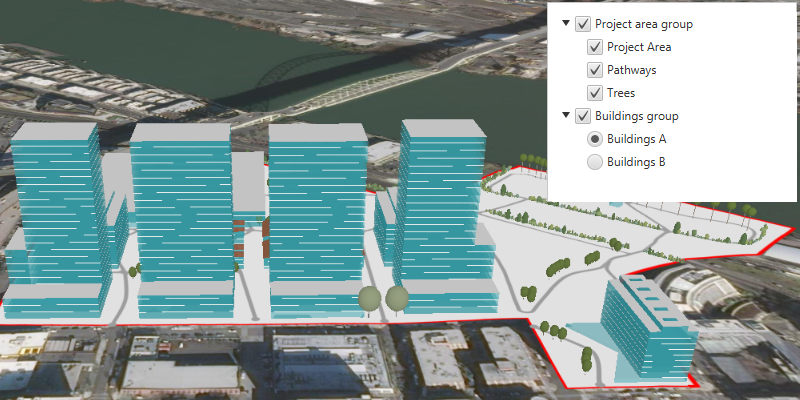
Group a collection of layers together and toggle their visibility as a group.
Use case
Group layers communicate to the user that layers are related and can be managed together.
In a land development project, you might group layers according to the phase of development.
How to use the sample
The layers in the map will be displayed in a table of contents. Toggle the checkbox next to a layer’s name to change its visibility. Turning a group layer’s visibility off will override the visibility of its child layers.
How it works
- Create an empty
GroupLayer. - Add a child layer to the group layer’s layers collection.
- Set the group layer’s
GroupVisibilityModeto change its behavior.
GroupVisibilityMode.INDEPENDENTallows each sublayer to change its visibility independently.GroupVisibilityMode.EXCLUSIVEallows only one sublayer to be visible at a time.GroupVisibilityMode.INHERITEDtreats the group layer as if it is one merged layer.
- To toggle the visibility of the group, simply change the group layer’s visibility property using
layer.setVisible(boolean).
Relevant API
- GroupLayer
- GroupVisibilityMode
Additional information
The full extent of a group layer may change when child layers are added/removed. Group layers do not have a spatial reference, but the full extent will have the spatial reference of the first child layer.
Group layers can be saved to web scenes. In web maps, group layers will be ignored.
The implementation shown here makes use of a custom tree cell for displaying layers in a tree view. In the custom tree cell, toggling the checkbox of the group layer cell does not also toggle the child cell’s checkbox. If you desire this behavior, use or extend JavaFX’s CheckBoxTreeCell and CheckBoxTreeItem.
Tags
group layer, layers
Sample Code
/* * Copyright 2022 Esri. * * Licensed under the Apache License, Version 2.0 (the "License"); * you may not use this file except in compliance with the License. * You may obtain a copy of the License at * * http://www.apache.org/licenses/LICENSE-2.0 * * Unless required by applicable law or agreed to in writing, software * distributed under the License is distributed on an "AS IS" BASIS, * WITHOUT WARRANTIES OR CONDITIONS OF ANY KIND, either express or implied. * See the License for the specific language governing permissions and * limitations under the License. */
module com.esri.samples.group_layers {  // require ArcGIS Maps SDK for Java module  requires com.esri.arcgisruntime;
  // handle SLF4J http://www.slf4j.org/codes.html#StaticLoggerBinder  requires org.slf4j.nop;
  // require JavaFX modules that the application uses  requires javafx.graphics;  requires javafx.controls;
  exports com.esri.samples.group_layers;}
/* * Copyright 2019 Esri. * * Licensed under the Apache License, Version 2.0 (the "License"); you may not * use this file except in compliance with the License. You may obtain a copy of * the License at * * http://www.apache.org/licenses/LICENSE-2.0 * * Unless required by applicable law or agreed to in writing, software * distributed under the License is distributed on an "AS IS" BASIS, WITHOUT * WARRANTIES OR CONDITIONS OF ANY KIND, either express or implied. See the * License for the specific language governing permissions and limitations under * the License. */
package com.esri.samples.group_layers;
import java.util.Arrays;import java.util.List;
import javafx.application.Application;import javafx.geometry.Insets;import javafx.geometry.Pos;import javafx.scene.Scene;import javafx.scene.control.Alert;import javafx.scene.control.ToggleGroup;import javafx.scene.control.TreeItem;import javafx.scene.control.TreeView;import javafx.scene.layout.StackPane;import javafx.stage.Stage;
import com.esri.arcgisruntime.ArcGISRuntimeEnvironment;import com.esri.arcgisruntime.data.ServiceFeatureTable;import com.esri.arcgisruntime.layers.ArcGISSceneLayer;import com.esri.arcgisruntime.layers.FeatureLayer;import com.esri.arcgisruntime.layers.GroupLayer;import com.esri.arcgisruntime.layers.GroupVisibilityMode;import com.esri.arcgisruntime.layers.Layer;import com.esri.arcgisruntime.loadable.LoadStatus;import com.esri.arcgisruntime.mapping.ArcGISScene;import com.esri.arcgisruntime.mapping.ArcGISTiledElevationSource;import com.esri.arcgisruntime.mapping.BasemapStyle;import com.esri.arcgisruntime.mapping.Surface;import com.esri.arcgisruntime.mapping.view.Camera;import com.esri.arcgisruntime.mapping.view.SceneView;
public class GroupLayersSample extends Application {
private SceneView sceneView; static ToggleGroup buildingsToggleGroup;
@Override public void start(Stage stage) {
try {
// set the title and size of the stage and show it StackPane stackPane = new StackPane(); Scene fxScene = new Scene(stackPane); stage.setTitle("Group Layers Sample"); stage.setWidth(800); stage.setHeight(700);
// create a JavaFX scene with a stackpane and set it to the stage stage.setScene(fxScene); stage.show();
// authentication with an API key or named user is required to access basemaps and other location services String yourAPIKey = System.getProperty("apiKey"); ArcGISRuntimeEnvironment.setApiKey(yourAPIKey);
// create a scene view and add it to the stack pane sceneView = new SceneView(); stackPane.getChildren().add(sceneView);
// create a scene with a basemap style and add it to the scene view ArcGISScene scene = new ArcGISScene(BasemapStyle.ARCGIS_IMAGERY); sceneView.setArcGISScene(scene);
// set the base surface with world elevation Surface surface = new Surface(); surface.getElevationSources().add(new ArcGISTiledElevationSource( "https://elevation3d.arcgis.com/arcgis/rest/services/WorldElevation3D/Terrain3D/ImageServer")); scene.setBaseSurface(surface);
// create a group layer for project areas, set the visibility mode and add layers to it GroupLayer projectAreaGroupLayer = new GroupLayer(); projectAreaGroupLayer.setName("Project area group"); projectAreaGroupLayer.setVisibilityMode(GroupVisibilityMode.INDEPENDENT); projectAreaGroupLayer.getLayers().addAll(Arrays.asList( (new FeatureLayer(new ServiceFeatureTable( "https://services.arcgis.com/P3ePLMYs2RVChkJx/arcgis/rest/services/DevelopmentProjectArea/FeatureServer/0"))), (new FeatureLayer(new ServiceFeatureTable( "https://services.arcgis.com/P3ePLMYs2RVChkJx/arcgis/rest/services/DevA_Pathways/FeatureServer/1"))), (new ArcGISSceneLayer( "https://tiles.arcgis.com/tiles/P3ePLMYs2RVChkJx/arcgis/rest/services/DevA_Trees/SceneServer")) ));
// create a group layer for buildings, set the visibility mode and add layers to it GroupLayer buildingsGroupLayer = new GroupLayer(); buildingsGroupLayer.setName("Buildings group"); buildingsGroupLayer.setVisibilityMode(GroupVisibilityMode.EXCLUSIVE); buildingsGroupLayer.getLayers().addAll(Arrays.asList( (new ArcGISSceneLayer( "https://tiles.arcgis.com/tiles/P3ePLMYs2RVChkJx/arcgis/rest/services/DevA_BuildingShells/SceneServer")), (new ArcGISSceneLayer( "https://tiles.arcgis.com/tiles/P3ePLMYs2RVChkJx/arcgis/rest/services/DevB_BuildingShells/SceneServer")) ));
// add the group layers to the scene as operational layers scene.getOperationalLayers().addAll(Arrays.asList(projectAreaGroupLayer, buildingsGroupLayer));
// display an alert if the child layers in the group layers fail to load projectAreaGroupLayer.getLayers().forEach(childLayer -> childLayer.addDoneLoadingListener(() -> { if (childLayer.getLoadStatus() == LoadStatus.LOADED) { // zoom to the extent of the project area group layer when the child layers are loaded sceneView.setViewpointCamera(new Camera(projectAreaGroupLayer.getFullExtent().getCenter(), 700, 0, 60, 0)); } }) );
// create a JavaFX tree view to show the layers in the scene TreeView<Layer> layerTreeView = new TreeView<>(); layerTreeView.setMaxSize(250, 200); layerTreeView.setPadding(new Insets(10, 0, 0, 5)); TreeItem<Layer> rootTreeItem = new TreeItem<>(); layerTreeView.setRoot(rootTreeItem); layerTreeView.setShowRoot(false); StackPane.setAlignment(layerTreeView, Pos.TOP_RIGHT); StackPane.setMargin(layerTreeView, new Insets(10)); stackPane.getChildren().add(layerTreeView);
// create a toggle group for the tree view UI buildingsToggleGroup = new ToggleGroup();
// display each layer with a custom tree cell layerTreeView.setCellFactory(p -> new LayerTreeCell());
// recursively build the table of contents from the scene's operational layers buildLayersView(rootTreeItem, scene.getOperationalLayers());
} catch (Exception e) { // on any error, display the stack trace. e.printStackTrace(); } }
/** * Recursively builds a tree from a parent tree item using a list of operational layers (including group layers). * * @param parentItem tree item to build tree from * @param operationalLayers a list of operational layers */ private void buildLayersView(TreeItem<Layer> parentItem, List<Layer> operationalLayers) { for (Layer layer : operationalLayers) { // load each layer before adding to ensure all metadata is ready for display layer.loadAsync(); layer.addDoneLoadingListener(() -> { if (layer.getLoadStatus() == LoadStatus.LOADED) { // add a tree item for the layer to the parent tree item if (layer.canShowInLegend()) { TreeItem<Layer> layerItem = new TreeItem<>(layer); layerItem.setExpanded(true); parentItem.getChildren().add(layerItem); // if the layer is a group layer, continue building with its children if (layer instanceof GroupLayer && ((GroupLayer) layer).isShowChildrenInLegend()) { buildLayersView(layerItem, ((GroupLayer) layer).getLayers()); } } } else new Alert(Alert.AlertType.ERROR, "Layer failed to load:\n" + layer.getLoadError().getCause().getMessage()).show(); }); } }
/** * Stops and releases all resources used in application. */ @Override public void stop() {
if (sceneView != null) { sceneView.dispose(); } }
/** * Opens and runs application. * * @param args arguments passed to this application */ public static void main(String[] args) {
Application.launch(args); }}/* * Copyright 2019 Esri. * * Licensed under the Apache License, Version 2.0 (the "License"); you may not * use this file except in compliance with the License. You may obtain a copy of * the License at * * http://www.apache.org/licenses/LICENSE-2.0 * * Unless required by applicable law or agreed to in writing, software * distributed under the License is distributed on an "AS IS" BASIS, WITHOUT * WARRANTIES OR CONDITIONS OF ANY KIND, either express or implied. See the * License for the specific language governing permissions and limitations under * the License. */
package com.esri.samples.group_layers;
import javafx.scene.control.CheckBox;import javafx.scene.control.RadioButton;import javafx.scene.control.TreeCell;
import com.esri.arcgisruntime.layers.Layer;
/** * A custom tree cell for displaying a layer in a tree view. Includes a check box or radio button * for toggling the layer's visibility. */public class LayerTreeCell extends TreeCell<Layer> {
@Override public void updateItem(Layer layer, boolean empty) { super.updateItem(layer, empty); if (!empty) {
// set the label to the layer's name setText(formatName(layer.getName()));
if (layer.getName().equals("DevA_BuildingShells") || layer.getName().equals("DevB_BuildingShells")) {
// if the layer is a building shell create a radio button and assign to the toggle group RadioButton radioButton = new RadioButton(); setGraphic(radioButton); radioButton.setToggleGroup(GroupLayersSample.buildingsToggleGroup);
// toggle the layer's visibility when the radio button is selected radioButton.setSelected(layer.isVisible()); radioButton.selectedProperty().addListener(e -> layer.setVisible(radioButton.isSelected())); } else {
// if the layer is not a building shell, create a checkbox CheckBox checkBox = new CheckBox(); setGraphic(checkBox);
// toggle the layer's visibility when the check box is toggled checkBox.setSelected(layer.isVisible()); checkBox.selectedProperty().addListener(e -> layer.setVisible(checkBox.isSelected())); } } else { setText(null); setGraphic(null); } }
/** * Format the layer's name property to a user-friendly string. * * @param layerName the name of the layer * @return a formatted string */ private String formatName(String layerName) { switch (layerName) { case "DevA_Trees": return "Trees"; case "DevA_Pathways": return "Pathways"; case "DevA_BuildingShells": return "Buildings A"; case "DevB_BuildingShells": return "Buildings B"; case "DevelopmentProjectArea": return "Project Area"; default: return layerName; } }}