What is a map?
A map is a container for layers
You can use a map and a map view to:
- Display basemap layers
A basemap layer is the layer in a map or scene that displays basemap data. The data source for a basemap layer is typically a basemap service. such as streets, topographic, light gray canvas, or satellite imagery. - Display basemap layers
A basemap layer is the layer in a map or scene that displays basemap data. The data source for a basemap layer is typically a basemap service. with custom stylesA basemap style is a definition that controls the visual appearance of how geographic data in a basemap are displayed. It includes colors, backgrounds, outlines, labels, and other visual elements. Each basemap style emphasizes a specific type of cartographic theme and data. . - Display data layers
A data layer is a layer that references geographic data from a file or a service and is used to visualize the data in a map or scene. that contain feature, vector tile, or tile layer data. - Display temporary points, lines, polygons, or text as graphics
A graphic is a visual element composed of a geometry, symbol, and attributes that is displayed on a map or scene. . - Provide an interface with which your users can zoom, pan, and interact.
- Inspect layers
A layer is a reference to a collection of geographic data that is used to access and display data. The data for layers are typically provided by the basemap layer service and data services. and display attribute information. - Display layers
A layer is a reference to a collection of geographic data that is used to access and display data. The data for layers are typically provided by the basemap layer service and data services. in a web mapA web map is a map stored as a JSON object that defines properties such as the basemap layer, data layers, layer styles, and pop-up styles. Its JSON structure is defined by the web map specification. .
How a map works
A map
Data sources
Each layer
Layer order
When a map view
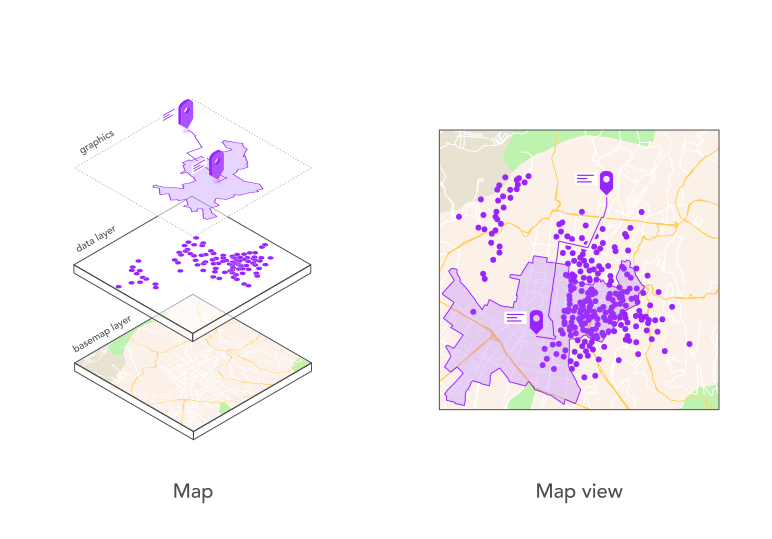
Figure 1: A map and map view work together to display layers and graphics.
Map
A map contains a collection of layers
A basemap layer is the most important layer in a map as it provides the overall visual context for the map. Most APIs provide an enumeration to make it easier to access a basemap layer's data source. Other APIs require you to reference the service URL and style for the desired basemap.
esriConfig.apiKey = "YOUR_ACCESS_TOKEN";
const map = new Map({
basemap: "arcgis/navigation"
});
Map view
A map view is responsible for displaying the layers
A map view also provides a user interface for the map
To create a map view, you typically set the following:
-
Map: A map
A map is a collection of layers that are displayed in 2D. It is typically composed of a basemap layer and data layers. defines the layers that need to be displayed. -
Center point: A point
A point is a type of geometry containing a single set of defines the center position of the map view that is displayed. It typically contains longitude and latitude or x/y coordinates for the current spatial referencex,ycoordinates and a spatial reference.A spatial reference is a set of parameters, typically defined by a WKID, that define the coordinate system and spatial properties for geographic data. Applications use a spatial reference to correctly display the position of geographic data in a map or scene. . -
Zoom level: The zoom level
Zoom level is a value that sets the scale for a map view or a scene view. is a value used to set the level of detail and the scale of the geographic data displayed in the view. It is typically set to a value between 0 (global) and 23 (local). -
Scale: Setting the scale is an alternate way of setting the level of detail and the scale of the geographic data displayed in the view. Some APIs require using a scale value instead of a zoom level value. See the calculator below:
To display the map, you also need to set the container to connect the view to a visible component.
const view = new MapView({
map: map,
center: [-118.805, 34.027], // Longitude, latitude
zoom: 13, // scale: 72223.819286
container: "viewDiv",
constraints: {
snapToZoom: false
}
});Code examples
Display a map
This example uses a map
Steps
- Create a map
A map is a collection of layers that are displayed in 2D. It is typically composed of a basemap layer and data layers. and add a basemap layerA basemap layer is the layer in a map or scene that displays basemap data. The data source for a basemap layer is typically a basemap service. . - Create a map view
A map view is a user interface that displays map layers and graphics in 2D. It controls the area (extent) of the map that is visible and supports user interactions such as pan and zoom. and set the center point and zoom level (or scale).
esriConfig.apiKey = "YOUR_ACCESS_TOKEN";
const map = new Map({
basemap: "arcgis/topographic", // Basemap layer
});
const view = new MapView({
map: map,
center: [-118.805, 34.027],
zoom: 13, // scale: 72223.819286
container: "viewDiv",
constraints: {
snapToZoom: false,
},
});
Tutorials

Display a map
Create and display a map with the ArcGIS Basemap Styles service.