What is a scene?
A scene is a container for layers
You can use a scene and a scene view to:
- Display basemap layers
A basemap layer is the layer in a map or scene that displays basemap data. The data source for a basemap layer is typically a basemap service. such as streets, topographic, light gray canvas, or satellite imagery. - Display basemap layers
A basemap layer is the layer in a map or scene that displays basemap data. The data source for a basemap layer is typically a basemap service. with custom stylesA basemap style is a definition that controls the visual appearance of how geographic data in a basemap are displayed. It includes colors, backgrounds, outlines, labels, and other visual elements. Each basemap style emphasizes a specific type of cartographic theme and data. . - Display data layers
A data layer is a layer that references geographic data from a file or a service and is used to visualize the data in a map or scene. that contain feature, vector tile, or tile layer data. - Display temporary points, lines, polygons, or text as graphics
A graphic is a visual element composed of a geometry, symbol, and attributes that is displayed on a map or scene. . - Display terrain with elevation.
- Display real-world objects such as buildings, cars, and trees.
- Display 3D visualizations of 2D objects.
- Provide an interface with which your users can zoom, pan, and interact.
- Inspect layers
A layer is a reference to a collection of geographic data that is used to access and display data. The data for layers are typically provided by the basemap layer service and data services. and display attribute information. - Display layers
A layer is a reference to a collection of geographic data that is used to access and display data. The data for layers are typically provided by the basemap layer service and data services. in a web sceneA web scene is a scene stored as a JSON object that defines properties such as the basemap layer, data layers, layer styles, and pop-up styles. Its JSON structure is defined by the web scene specification. .
How a scene works
A scene
Data sources
Each layer
Scene layers
Scenes can also contain scene layers
Layer order
When a scene view
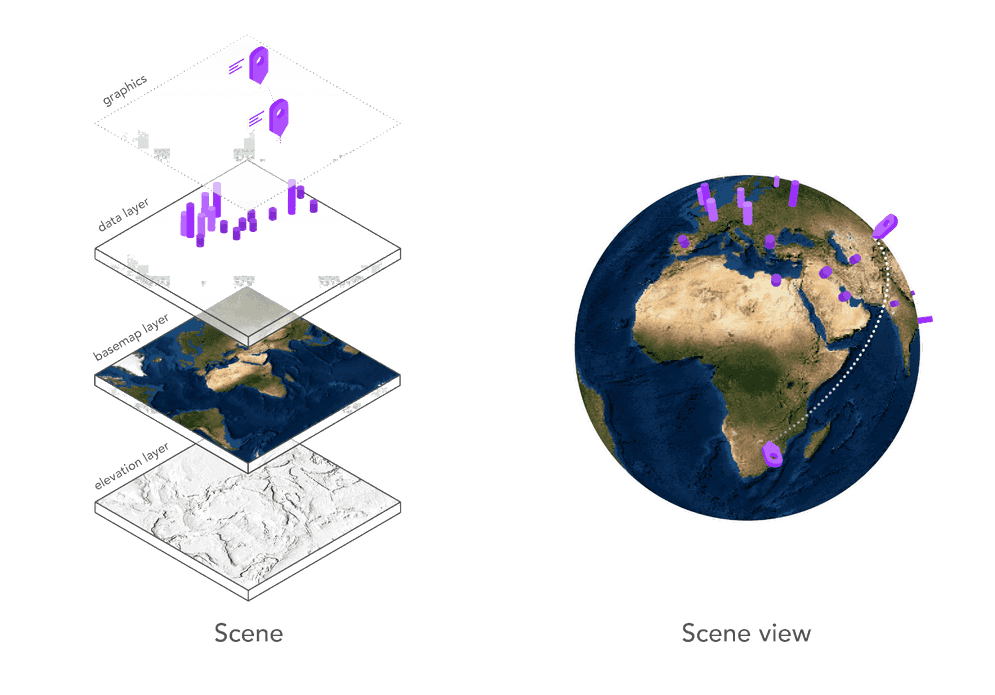
Figure 1: A scene and scene view work together to display layers and graphics.
Scene
A scene contains a collection of layers
A basemap layer
esriConfig.apiKey = "YOUR_ACCESS_TOKEN";
const scene = new Map({
basemap: "arcgis/topographic", // Basemap layer
ground: "world-elevation" // Elevation service
});
Scene view
A scene view is a user interface that displays layers in a scene and graphics in 3D. Its primary role is to display all of the geographic data for a specific area of the scene. The visible area is known as the extent
A scene view also provides a user interface for the scene
To create a scene view, you typically set the scene
const view = new SceneView({
map: scene,
camera: {
position: {
x: -118.808,
y: 33.961,
z: 2000 // meters
},
tilt: 75
},
container: "viewDiv"
});Code examples
Display a scene with elevation
This example uses a scene
Steps
- Create a map or scene and add a basemap layer
A basemap layer is the layer in a map or scene that displays basemap data. The data source for a basemap layer is typically a basemap service. and elevation layer (or service). - Create a scene view
A scene view is a user interface that displays scene layers and graphics in 3D. It uses a camera to control the visible area of the scene and supports user interactions such as pan, zoom, tilt, and rotate. and set the camera position.
Topographic basemap layer
esriConfig.apiKey = "YOUR_ACCESS_TOKEN";
const map = new Map({
basemap: "arcgis/topographic",
ground: "world-elevation",
});
const view = new SceneView({
map: map,
camera: {
position: {
x: -118.808,
y: 33.961,
z: 2000, // meters
},
tilt: 75,
},
container: "viewDiv",
});
Satellite imagery basemap layer
const map = new Map({
basemap: "arcgis/imagery", //Basemap styles service
ground: "world-elevation", //Elevation service
});
const view = new SceneView({
container: "viewDiv",
map: map,
camera: {
position: {
x: -118.808, //Longitude
y: 33.961, //Latitude
z: 2000, // Meters
},
tilt: 75,
},
});
Display 2D data in 3D
This example illustrates how to use a renderer
Steps
- Create a map or scene and add a basemap layer
A basemap layer is the layer in a map or scene that displays basemap data. The data source for a basemap layer is typically a basemap service. and reference an elevation layer (or service). - Add a data layer
A data layer is a layer that references geographic data from a file or a service and is used to visualize the data in a map or scene. or graphicsA graphic is a visual element composed of a geometry, symbol, and attributes that is displayed on a map or scene. with points, lines, or polygons. - Set a layer renderer
A renderer is a collection of rules and symbols used to display the data in a layer. style the points with 3D symbols. - Set the scene to the scene view.
- Set the camera position.
const transitLayer = new FeatureLayer({
url: "http://services.arcgis.com/V6ZHFr6zdgNZuVG0/arcgis/rest/services/subway_tcl_stations_lines_wgs84/FeatureServer/0",
copyright:
"Data from <a href='https://data.beta.grandlyon.com/en/datasets/lignes-metro-funiculaire-reseau-transports-commun-lyonnais/info'>Data Grand Lyon - Sytral</a>",
elevationInfo: {
mode: "relative-to-ground",
offset: 10,
},
title: "Transit lines in Lyon",
definitionExpression: "sens='Aller'",
outFields: ["*"],
});
webscene.add(transitLayer);
//Render unique path symbol for each transit line
function renderTransitLayer() {
const renderer = new UniqueValueRenderer({
field: "ligne",
});
for (let property in colors) {
if (colors.hasOwnProperty(property)) {
renderer.addUniqueValueInfo({
value: property,
symbol: {
type: "line-3d",
symbolLayers: [
{
type: "path",
profile: options.profile,
material: {
color: colors[property],
},
width: options.width,
height: options.height,
join: options.join,
cap: options.cap,
anchor: "bottom",
profileRotation: options.profileRotation,
},
],
},
});
}
}
transitLayer.renderer = renderer;
}
Display a scene service with textured buildings
This example shows to display 3D objects such as building, trees, and cars using a scene layer that references a scene service data source. The scene service must be created and published with ArcGIS prior to creating the application. Once created, the service can be referenced by URL or by its item
Steps
- Create a map or scene and add a basemap layer
A basemap layer is the layer in a map or scene that displays basemap data. The data source for a basemap layer is typically a basemap service. and reference an elevation layer (or service). - Add a scene layer that references a scene service with textured buildings.
- Set the scene to the scene view.
- Set the camera position.
const sceneLayer = new SceneLayer({
portalItem: {
id: "2342ab7928834076a1240fb93c60e978",
},
elevationInfo: {
mode: "absolute-height",
offset: 6,
},
});
// Create Map
const map = new Map({
basemap: "hybrid", //Basemap styles service
ground: "world-elevation", //Elevation service
layers: [sceneLayer],
});
// Create the SceneView
const view = new SceneView({
container: "viewDiv",
map: map,
camera: {
position: [4.84361, 45.75561, 270],
tilt: 82,
heading: 304,
},
});
Display a scene service with an integrated mesh
This example displays a 3D integrated mesh surface by using a scene layer that references a scene service data source. The scene service must be created and published with ArcGIS prior to creating the application. Once created, the service can be referenced by URL or by its item
Steps
- Create a scene and add an elevation layer
An elevation layer is a layer that defines the ground height or the surface for a scene. and a basemap layerA basemap layer is the layer in a map or scene that displays basemap data. The data source for a basemap layer is typically a basemap service. . - Add a scene layer that references a scene service with an integrated mesh.
- Set the scene to the scene view.
- Set the camera position.
const meshLayer = new IntegratedMeshLayer({
url: "https://tiles.arcgis.com/tiles/cFEFS0EWrhfDeVw9/arcgis/rest/services/Buildings_Frankfurt_2021/SceneServer/layers/0",
copyright: "Aerowest GmbH",
title: "Integrated Mesh Frankfurt",
});
Tutorials

Display a scene
Display a scene with a basemap layer.