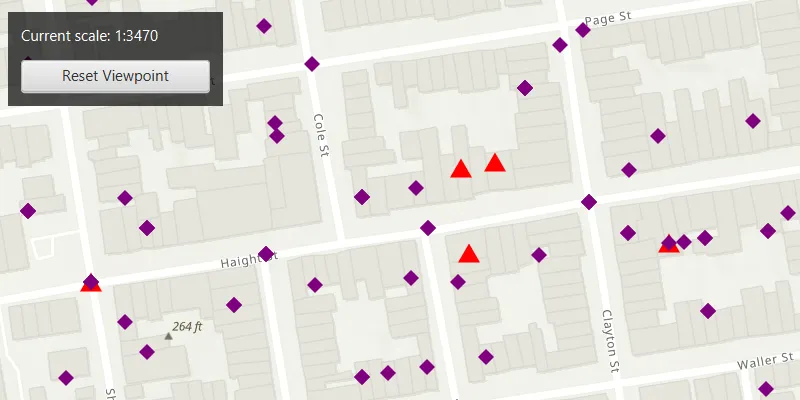
Apply a unique value with alternate symbols at different scales.
Use case
When a layer is symbolized with unique value symbology, you can specify the visible scale range for each unique value. This is an effective strategy to limit the amount of detailed data at smaller scales without having to make multiple versions of the layer, each with a unique definition query.
Once scale ranges are applied to unique values, you can further refine the appearance of features within those scale ranges by establishing alternate symbols to different parts of the symbol class scale range.
How to use the sample
Zoom in and out of the map to see alternate symbols at each scale. The symbology changes according to the following scale ranges: 1:0-1:5000, 1:5000-1:10000, 1:10000-1:20000. To go back to the initial viewpoint, click “Reset Viewpoint”.
How it works
- Create a
FeatureLayerusing the service url and add it to the map’s list of operational layers. - Create two alternate symbols:
- Create a symbol using
SimpleMarkerSymbol. - Convert the simple marker symbol to a
MultilayerPointSymbolusingSimpleMarkerSymbol.toMultilayerSymbol(). - Set the valid scale range through reference properties on the multilayer point symbols by calling
multilayerPointSymbol.setReferenceProperties(new SymbolReferenceProperties(double minScale, double maxScale)).
- Create a symbol using
- Create a new
UniqueValue, and add it to a newUniqueValueRendererwithuniqueValueRenderer.getUniqueValues.add(uniqueValue). - Set the field name, unique values, and the default symbol on the unique value renderer with
new UniqueValueRenderer(List.of("req_type"), List.of(uniqueValue), "", multilayerPurpleDiamondSymbol);. - Apply this unique value renderer to the feature layer with
featureLayer.setRenderer(uniqueValueRenderer).
Relevant API
- MultilayerPointSymbol
- SimpleMarkerSymbol
- SymbolReferenceProperties
- UniqueValue
- UniqueValueRenderer
About the data
The San Francisco 311 incidents layer used in this sample displays point features related to crime incidents such as graffiti and tree damage that have been reported by city residents.
Tags
alternate symbols, multilayer symbol, scale based rendering, simple marker symbol, symbol reference properties, symbology, unique value, unique value renderer
Sample code
/* * Copyright 2022 Esri. * * Licensed under the Apache License, Version 2.0 (the "License"); you may not * use this file except in compliance with the License. You may obtain a copy of * the License at * * http://www.apache.org/licenses/LICENSE-2.0 * * Unless required by applicable law or agreed to in writing, software * distributed under the License is distributed on an "AS IS" BASIS, WITHOUT * WARRANTIES OR CONDITIONS OF ANY KIND, either express or implied. See the * License for the specific language governing permissions and limitations under * the License. */
package com.esri.samples.apply_unique_values_with_alternate_symbols;
import java.util.List;
import javafx.application.Application;import javafx.geometry.Insets;import javafx.geometry.Pos;import javafx.scene.Scene;import javafx.scene.control.Alert;import javafx.scene.control.Button;import javafx.scene.control.Label;import javafx.scene.layout.Background;import javafx.scene.layout.BackgroundFill;import javafx.scene.layout.CornerRadii;import javafx.scene.layout.StackPane;import javafx.scene.layout.VBox;import javafx.scene.paint.Color;import javafx.scene.paint.Paint;import javafx.stage.Stage;
import com.esri.arcgisruntime.loadable.LoadStatus;import com.esri.arcgisruntime.ArcGISRuntimeEnvironment;import com.esri.arcgisruntime.mapping.view.AnimationCurve;import com.esri.arcgisruntime.mapping.ArcGISMap;import com.esri.arcgisruntime.mapping.BasemapStyle;import com.esri.arcgisruntime.mapping.view.MapView;import com.esri.arcgisruntime.mapping.Viewpoint;import com.esri.arcgisruntime.data.ServiceFeatureTable;import com.esri.arcgisruntime.geometry.Point;import com.esri.arcgisruntime.geometry.SpatialReferences;import com.esri.arcgisruntime.layers.FeatureLayer;import com.esri.arcgisruntime.symbology.MultilayerPointSymbol;import com.esri.arcgisruntime.symbology.SimpleMarkerSymbol;import com.esri.arcgisruntime.symbology.SymbolReferenceProperties;import com.esri.arcgisruntime.symbology.UniqueValueRenderer;
public class ApplyUniqueValuesWithAlternateSymbolsSample extends Application {
  private MapView mapView;  private ServiceFeatureTable serviceFeatureTable; // keep loadable in scope to avoid garbage collection  private final static String FEATURE_SERVICE_URL = "https://sampleserver6.arcgisonline.com/arcgis/rest/services/SF311/FeatureServer/0";  private Button button;  private Label label;  private VBox vBox;
  @Override  public void start(Stage stage) {
    try {      // create stack pane and application scene      StackPane stackPane = new StackPane();      Scene scene = new Scene(stackPane);
      // set title, size, and add scene to stage      stage.setTitle("Apply Unique Values With Alternate Symbols");      stage.setWidth(800);      stage.setHeight(700);      stage.setScene(scene);      stage.show();
      // authentication with an API key or named user is required to access base maps and other location services      String yourAPIKey = System.getProperty("apiKey");      ArcGISRuntimeEnvironment.setApiKey(yourAPIKey);
      // create a controls vbox, button, and label UI components      setUpControlsVBox();
      // create a map with the topographic imagery basemap style      ArcGISMap map = new ArcGISMap(BasemapStyle.ARCGIS_TOPOGRAPHIC);
      // create a map view and set the map to it      mapView = new MapView();      mapView.setMap(map);
      // create a point located at San Francisco, CA to be used as the viewpoint for the map      var point = new Point(-13631205.660131, 4546829.846004, SpatialReferences.getWebMercator());      var viewpoint = new Viewpoint(point, 25000);
      // set the viewpoint to the map view      mapView.setViewpointCenterAsync(point, 25000.0);
      button.setOnAction(event -> {        // reset the map viewpoint        mapView.setViewpointAsync(viewpoint, 1.5f, AnimationCurve.EASE_IN_OUT_SINE);      });
      mapView.addViewpointChangedListener(event-> {        // update label text and formatting scale values        label.setText("Current scale: 1:" + Math.round(mapView.getMapScale()));      });
      // create simple marker symbols where the blue square and yellow diamond are alternate symbols      // the red triangle is used to create a unique symbol and the purple diamond is the default symbol for the unique value renderer      SimpleMarkerSymbol simpleBlueSquareSymbol = new SimpleMarkerSymbol(SimpleMarkerSymbol.Style.SQUARE, Color.BLUE, 15);      SimpleMarkerSymbol simpleYellowDiamondSymbol = new SimpleMarkerSymbol(SimpleMarkerSymbol.Style.DIAMOND, Color.YELLOW, 15);      SimpleMarkerSymbol simpleRedTriangleSymbol = new SimpleMarkerSymbol(SimpleMarkerSymbol.Style.TRIANGLE, Color.RED, 15);      SimpleMarkerSymbol simplePurpleDiamondSymbol = new SimpleMarkerSymbol(SimpleMarkerSymbol.Style.DIAMOND, Color.PURPLE, 12);
      // convert simple marker symbols to multilayer point symbols      MultilayerPointSymbol multilayerBlueSquareSymbol = simpleBlueSquareSymbol.toMultilayerSymbol();      MultilayerPointSymbol multilayerYellowDiamondSymbol = simpleYellowDiamondSymbol.toMultilayerSymbol();      MultilayerPointSymbol multilayerRedTriangleSymbol = simpleRedTriangleSymbol.toMultilayerSymbol();      MultilayerPointSymbol multilayerPurpleDiamondSymbol = simplePurpleDiamondSymbol.toMultilayerSymbol();
      // set scale range values through reference properties for the multilayer symbols      multilayerBlueSquareSymbol.setReferenceProperties(new SymbolReferenceProperties(10000.0, 5000.0));      multilayerYellowDiamondSymbol.setReferenceProperties(new SymbolReferenceProperties(20000.0, 10000.0));      multilayerRedTriangleSymbol.setReferenceProperties(new SymbolReferenceProperties(5000.0, 0.0));
      // create unique value for the red triangle and list of alternate symbols      var uniqueValue = new UniqueValueRenderer.UniqueValue("unique values based on request type", "unique value",          multilayerRedTriangleSymbol, List.of("Damaged Property"), List.of(multilayerBlueSquareSymbol, multilayerYellowDiamondSymbol));
      // create unique value renderer      var uniqueValRenderer = new UniqueValueRenderer(List.of("req_type"), List.of(uniqueValue), "", multilayerPurpleDiamondSymbol);
      // create a service feature table using the feature service url      serviceFeatureTable = new ServiceFeatureTable(FEATURE_SERVICE_URL);
      // check the service feature table has loaded before adding the feature layer to the map      serviceFeatureTable.addDoneLoadingListener( () -> {        if (serviceFeatureTable.getLoadStatus() == LoadStatus.LOADED) {          // create a feature layer from the service feature table          var featureLayer = new FeatureLayer(serviceFeatureTable);          // set the unique value renderer on the feature layer          featureLayer.setRenderer(uniqueValRenderer);          map.getOperationalLayers().add(featureLayer);          vBox.setDisable(false);        } else {          new Alert(Alert.AlertType.ERROR,            "Error loading Feature Table from Service: " + serviceFeatureTable.getLoadError().getMessage()).show();        }      });      // load the service feature table      serviceFeatureTable.loadAsync();
      // add the map view and UI elements to the stack pane      stackPane.getChildren().addAll(mapView, vBox);      StackPane.setAlignment(vBox, Pos.TOP_LEFT);      StackPane.setMargin(vBox, new Insets(10, 0, 0, 10));
    } catch (Exception e) {      // on any error, display the stack trace.      e.printStackTrace();    }  }
  /**   * Creates a UI with three buttons and a label.   */  private void setUpControlsVBox() {
    // create label to show scale values and button to reset viewpoint    label = new Label("Current scale: 1:25000");    label.setStyle("-fx-text-fill: white");    button = new Button("Reset Viewpoint");
    // create and configure a VBox    vBox = new VBox(10);    vBox.setBackground(new Background(new BackgroundFill(Paint.valueOf("rgba(0,0,0,0.6)"),      CornerRadii.EMPTY, Insets.EMPTY)));    vBox.setPadding(new Insets(10.0));    vBox.setMaxSize(180, 75);    vBox.setDisable(true);
    // add the label and button to the VBos    vBox.getChildren().addAll(label, button);
  }
  /**   * Stops and releases all resources used in application.   */  @Override  public void stop() {
    if (mapView != null) {      mapView.dispose();    }  }
  /**   * Opens and runs application.   *   * @param args arguments passed to this application   */  public static void main(String[] args) {
    Application.launch(args);  }
}