Create graphics from an XML file with key-value pairs for each graphic, and display the military symbols using a MIL-STD-2525D web style in 3D.
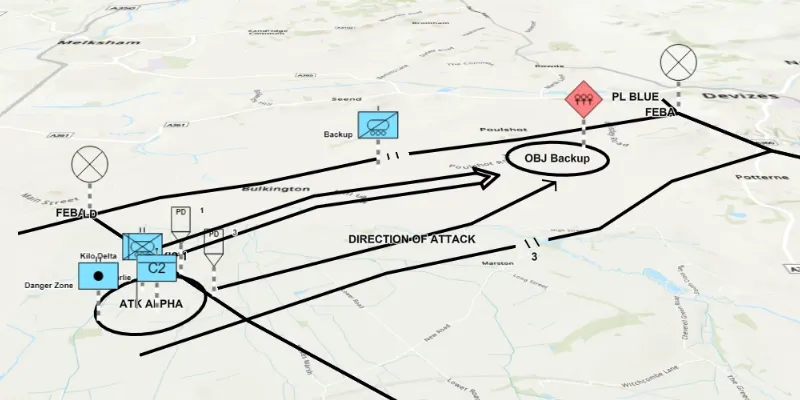
Use case
Use a dictionary renderer on a graphics overlay to display more transient data, such as military messages coming through a local tactical network.
How to use the sample
When launched, this sample displays a scene with a dictionary renderer. Pan and zoom to explore the scene.
How it works
- Create a new
DictionarySymbolStyle(portalItem)with a portal item containing a MIL-STD-2525D dictionary web style. - Create a new
DictionaryRendererfrom the dictionary symbol style. - Set the renderer on a graphics overlay with
graphicsOverlay.setRenderer(dictionaryRenderer). - Parse through the local XML file creating a map of key/value pairs for each block of attributes:
- Use the name of the XML node as the attribute key and the content of the node as the attribute value.
- Get the WKID and coordinates from the XML to create the graphic’s geometry.
- The other attributes such as “symbolentity” and “symbolset” will describe the symbology for the graphic.
- Create the graphic with the geometry and attributes and add it to the graphics overlay.
Relevant API
- DictionaryRenderer
- DictionarySymbolStyle
- GraphicsOverlay
Additional information
The dictionary symbol style in this sample is constructed from a portal item containing a MIL-STD-2525D symbol dictionary web style. This ArcGIS Web Style is used to build custom applications that incorporate the MIL-STD-2525D symbol dictionary. This style supports a configuration for modeling locations as ordered anchor points or full geometries.
Tags
defense, military, situational awareness, tactical, visualization
Sample code
/* * Copyright 2018 Esri. * * Licensed under the Apache License, Version 2.0 (the "License"); you may not * use this file except in compliance with the License. You may obtain a copy of * the License at * * http://www.apache.org/licenses/LICENSE-2.0 * * Unless required by applicable law or agreed to in writing, software * distributed under the License is distributed on an "AS IS" BASIS, WITHOUT * WARRANTIES OR CONDITIONS OF ANY KIND, either express or implied. See the * License for the specific language governing permissions and limitations under * the License. */
package com.esri.samples.graphics_overlay_dictionary_renderer_3D;
import javafx.application.Application;import javafx.scene.Scene;import javafx.scene.control.Alert;import javafx.scene.layout.StackPane;import javafx.stage.Stage;import org.w3c.dom.Node;import org.w3c.dom.NodeList;
import javax.xml.parsers.DocumentBuilderFactory;import java.io.File;import java.util.*;import java.util.stream.Collectors;import java.util.stream.Stream;
import com.esri.arcgisruntime.ArcGISRuntimeEnvironment;import com.esri.arcgisruntime.loadable.LoadStatus;import com.esri.arcgisruntime.geometry.GeometryEngine;import com.esri.arcgisruntime.geometry.Multipoint;import com.esri.arcgisruntime.geometry.Point;import com.esri.arcgisruntime.geometry.PointCollection;import com.esri.arcgisruntime.geometry.SpatialReference;import com.esri.arcgisruntime.geometry.SpatialReferences;import com.esri.arcgisruntime.mapping.ArcGISScene;import com.esri.arcgisruntime.mapping.BasemapStyle;import com.esri.arcgisruntime.mapping.view.Camera;import com.esri.arcgisruntime.mapping.view.Graphic;import com.esri.arcgisruntime.mapping.view.GraphicsOverlay;import com.esri.arcgisruntime.mapping.view.SceneView;import com.esri.arcgisruntime.portal.Portal;import com.esri.arcgisruntime.portal.PortalItem;import com.esri.arcgisruntime.symbology.DictionaryRenderer;import com.esri.arcgisruntime.symbology.DictionarySymbolStyle;
public class GraphicsOverlayDictionaryRenderer3DSample extends Application {
  private SceneView sceneView;
  @Override  public void start(Stage stage) {    try {      // create stack pane and application scene      var stackPane = new StackPane();      Scene fxScene = new Scene(stackPane);
      // set title, size, and add scene to stage      stage.setTitle("Graphics Overlay Dictionary Renderer 3D Sample");      stage.setWidth(800);      stage.setHeight(700);      stage.setScene(fxScene);      stage.show();
      // authentication with an API key or named user is required to access basemaps and other location services      String yourAPIKey = System.getProperty("apiKey");      ArcGISRuntimeEnvironment.setApiKey(yourAPIKey);
      // create a scene view      sceneView = new SceneView();      // create a scene with the topographic basemap style      ArcGISScene scene = new ArcGISScene(BasemapStyle.ARCGIS_TOPOGRAPHIC);
      var graphicsOverlay = new GraphicsOverlay(GraphicsOverlay.RenderingMode.DYNAMIC);      sceneView.getGraphicsOverlays().add(graphicsOverlay);
      // create the dictionary symbol style from the Joint Military Symbology MIL-STD-2525D portal item      var portalItem = new PortalItem(new Portal("https://www.arcgis.com/", false), "d815f3bdf6e6452bb8fd153b654c94ca");      var dictionarySymbolStyle = new DictionarySymbolStyle(portalItem);
      // add done loading listeners to the scene and dictionary symbol style and check they have loaded      scene.addDoneLoadingListener(() -> {        if (scene.getLoadStatus() == LoadStatus.LOADED) {          dictionarySymbolStyle.addDoneLoadingListener(() -> {            if (dictionarySymbolStyle.getLoadStatus() == LoadStatus.LOADED) {
              // find the first configuration setting which has the property name "model",              // and set its value to "ORDERED ANCHOR POINTS"              dictionarySymbolStyle.getConfigurations().stream()                .filter(configuration -> configuration.getName().equals("model"))                .findFirst()                .ifPresent(modelConfiguration -> modelConfiguration.setValue("ORDERED ANCHOR POINTS"));
              // create a new dictionary renderer from the dictionary symbol style to render graphics              // with symbol dictionary attributes and set it to the graphics overlay renderer              var dictionaryRenderer = new DictionaryRenderer(dictionarySymbolStyle);              graphicsOverlay.setRenderer(dictionaryRenderer);
              // parse graphic attributes from an XML file following the mil2525d specification              try {                List<Map<String, Object>> messages = parseMessages();
                // create graphics with attributes and add to graphics overlay                List<Graphic> graphics = messages.stream()                  .map(GraphicsOverlayDictionaryRenderer3DSample::createGraphic)                  .collect(Collectors.toList());                graphicsOverlay.getGraphics().addAll(graphics);                // set the viewpoint to the extent of the graphics overlay                sceneView.setViewpointCamera(new Camera((graphicsOverlay.getExtent().getCenter()), 15000, 0, 70, 0));
              } catch (Exception e) {                e.printStackTrace();              }            } else {              new Alert(Alert.AlertType.ERROR,                "Failed to load symbol style " + dictionarySymbolStyle.getLoadError().getCause().getMessage()).show();            }          });        } else {          new Alert(Alert.AlertType.ERROR, "Scene failed to load" + scene.getLoadError().getCause().getMessage()).show();        }        // load the dictionary symbol style once the map has loaded        dictionarySymbolStyle.loadAsync();      });
      // set the scene to the scene view and add the scene view to the stack pane      sceneView.setArcGISScene(scene);      stackPane.getChildren().add(sceneView);
    } catch (Exception ex) {      // on any exception, print the stacktrace      ex.printStackTrace();    }  }
  /**   * Parses a XML file following the mil2525d specification and creates a message for each block of attributes found.   */  private List<Map<String, Object>> parseMessages() throws Exception {
    File mil2525dFile = new File(System.getProperty("data.dir"), "./samples-data/xml/Mil2525DMessages.xml");    var documentBuilderFactory = DocumentBuilderFactory.newInstance();    var documentBuilder = documentBuilderFactory.newDocumentBuilder();    var document = documentBuilder.parse(mil2525dFile);    document.getDocumentElement().normalize();
    final List<Map<String, Object>> messages = new ArrayList<>();
    for (int i = 0; i < document.getElementsByTagName("message").getLength() ; i++) {      Node message = document.getElementsByTagName("message").item(i);
      Map<String, Object> attributes = new HashMap<>();
      NodeList childNodes = message.getChildNodes();      for (int j = 0; j < childNodes.getLength() ; j++) {        attributes.put(childNodes.item(j).getNodeName(), childNodes.item(j).getTextContent());      }      messages.add(attributes);    }
    return messages;  }
  /**   * Creates a graphic using a symbol dictionary and the attributes that were passed.   *   * @param attributes tells symbol dictionary what symbol to apply to graphic   */  private static Graphic createGraphic(Map<String, Object> attributes) {    // get spatial reference    int wkid = Integer.parseInt((String) attributes.get("_wkid"));    SpatialReference sr = SpatialReference.create(wkid);
    // get points from the coordinate string in the "_control_points" attribute (delimited with ';')    String[] coordinates = ((String) attributes.get("_control_points")).split(";");    List<Point> points = Stream.of(coordinates)        .map(cs -> cs.split(",")) // get each ordinate        .map(c -> new Point(Double.parseDouble(c[0]), Double.parseDouble(c[1]), sr))// create a Point with the ordinates        .map(c -> (Point) GeometryEngine.project(c, SpatialReferences.getWgs84())) // project to display in scene        .collect(Collectors.toList());
    // create a point collection with the points    var pointCollection = new PointCollection(SpatialReferences.getWgs84());    pointCollection.addAll(points);
    // remove unneeded attributes, use geometry for graphic positioning instead    attributes.remove("_control_points");    attributes.remove("_wkid");
    // return a graphic with a multipoint geometry (some have more than one point)    return new Graphic(new Multipoint(pointCollection), attributes);  }
  /**   * Stops and releases all resources used in application.   */  @Override  public void stop() {
    if (sceneView != null) {      sceneView.dispose();    }  }
  /**   * Opens and runs application.   *   * @param args arguments passed to this application   */  public static void main(String[] args) {
    Application.launch(args);  }}