Display common symbols for all graphics in a graphics overlay with a renderer.
Use case
Graphics are often used to display data that changes location regularly because they are held in memory instead of being persisted to the map. When a number of graphics are required to share the same style, a simple renderer can be applied to the graphics overlay containing the graphics. For example, the location of mobile taxis from a same company could be plotted on a map with each taxi marked by a relevant symbol.
How to use the sample
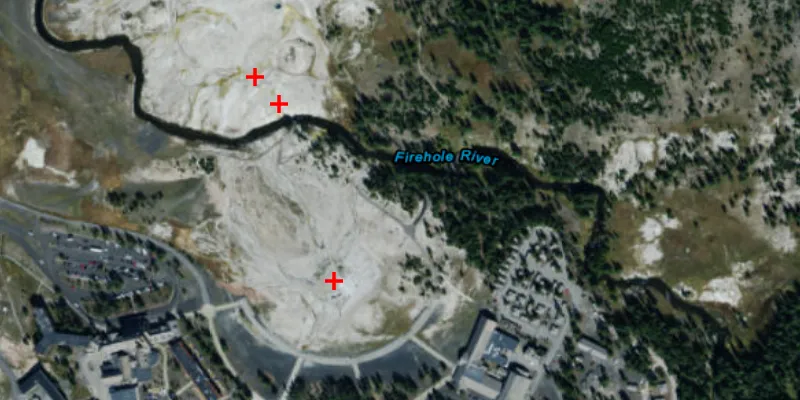
The sample loads with a predefined simple renderer, which displays a red cross simple marker symbol for the graphics in the graphics overlay.
How it works
- Create a
GraphicsOverlay. - Create a number of
Pointobjects with x, y and spatial reference parameters. - Create a
SimpleMarkerSymbolpassing in aSimpleMarkerSymbol.Style, color and size as parameters. - Create a simple renderer with
SimpleRenderer(simpleMarkerSymbol). - Set the simple renderer to the graphics overlay using
graphicsOverlay.setRenderer(simpleRenderer). - Create a number of
Graphicobjects with the points initiated in step 2. - Add the graphics to the graphics overlay with
graphicsOverlay.getGraphics().add(graphic).
Relevant API
- Graphic
- GraphicsOverlay
- Point
- SimpleMarkerSymbol
- SimpleRenderer
Additional information
Renderers are used to display graphics that don’t already have a symbol set. A renderer will not override a graphic’s symbol if one has been set.
Tags
graphics, marker, renderer, symbol, symbolize, symbology
Sample code
/* * Copyright 2017 Esri. * * Licensed under the Apache License, Version 2.0 (the "License"); you may not * use this file except in compliance with the License. You may obtain a copy of * the License at * * http://www.apache.org/licenses/LICENSE-2.0 * * Unless required by applicable law or agreed to in writing, software * distributed under the License is distributed on an "AS IS" BASIS, WITHOUT * WARRANTIES OR CONDITIONS OF ANY KIND, either express or implied. See the * License for the specific language governing permissions and limitations under * the License. */
package com.esri.samples.simple_renderer;
import javafx.application.Application;import javafx.scene.Scene;import javafx.scene.layout.StackPane;import javafx.scene.paint.Color;import javafx.stage.Stage;
import com.esri.arcgisruntime.ArcGISRuntimeEnvironment;import com.esri.arcgisruntime.geometry.Envelope;import com.esri.arcgisruntime.geometry.Point;import com.esri.arcgisruntime.geometry.SpatialReference;import com.esri.arcgisruntime.geometry.SpatialReferences;import com.esri.arcgisruntime.mapping.ArcGISMap;import com.esri.arcgisruntime.mapping.BasemapStyle;import com.esri.arcgisruntime.mapping.view.Graphic;import com.esri.arcgisruntime.mapping.view.GraphicsOverlay;import com.esri.arcgisruntime.mapping.view.MapView;import com.esri.arcgisruntime.symbology.SimpleMarkerSymbol;import com.esri.arcgisruntime.symbology.SimpleRenderer;
public class SimpleRendererSample extends Application {
  private MapView mapView;
  @Override  public void start(Stage stage) {
    try {      // create stack pane and application scene      StackPane stackPane = new StackPane();      Scene scene = new Scene(stackPane);
      // size the stage, add a title, and set scene to stage      stage.setTitle("Simple Renderer Sample");      stage.setWidth(800);      stage.setHeight(700);      stage.setScene(scene);      stage.show();
      // authentication with an API key or named user is required to access basemaps and other location services      String yourAPIKey = System.getProperty("apiKey");      ArcGISRuntimeEnvironment.setApiKey(yourAPIKey);
      // create a map with the imagery basemap style      final ArcGISMap map = new ArcGISMap(BasemapStyle.ARCGIS_IMAGERY);
      // create a map view and set the map to it      mapView = new MapView();      mapView.setMap(map);
      // create a spatial reference for the points      final SpatialReference spatialReference = SpatialReferences.getWgs84();
      // create points for displaying graphics      Point oldFaithfulPoint = new Point(-110.828140, 44.460458, spatialReference);      Point cascadeGeyserPoint = new Point(-110.829004, 44.462438, spatialReference);      Point plumeGeyserPoint = new Point(-110.829381, 44.462735, spatialReference);
      // create initial viewpoint using an envelope      Envelope envelope = new Envelope(oldFaithfulPoint, plumeGeyserPoint);
      // set viewpoint on map view with padding      mapView.setViewpointGeometryAsync(envelope, 100.0);
      // create a graphics overlay and add it to the map view      GraphicsOverlay graphicsOverlay = new GraphicsOverlay();      mapView.getGraphicsOverlays().add(graphicsOverlay);
      // create a red simple symbol for use in a simple renderer      SimpleMarkerSymbol symbol = new SimpleMarkerSymbol(SimpleMarkerSymbol.Style.CROSS, Color.RED, 12);      SimpleRenderer renderer = new SimpleRenderer(symbol);
      // apply the renderer to the graphics overlay      graphicsOverlay.setRenderer(renderer);
      // create graphics from the location points.      Graphic oldFaithfulGraphic = new Graphic(oldFaithfulPoint);
      Graphic cascadeGeyserGraphic = new Graphic(cascadeGeyserPoint);      Graphic plumeGeyserGraphic = new Graphic(plumeGeyserPoint);      graphicsOverlay.getGraphics().add(oldFaithfulGraphic);      graphicsOverlay.getGraphics().add(cascadeGeyserGraphic);      graphicsOverlay.getGraphics().add(plumeGeyserGraphic);
      // add the map view and control box to stack pane      stackPane.getChildren().add(mapView);    } catch (Exception e) {      // on any error, display stack trace      e.printStackTrace();    }  }
  /**   * Stops and releases all resources used in application.   */  @Override  public void stop() {
    // release resources when the application closes    if (mapView != null) {      mapView.dispose();    }  }
  /**   * Opens and runs application.   *   * @param args arguments passed to this application   */  public static void main(String[] args) {
    Application.launch(args);  }}