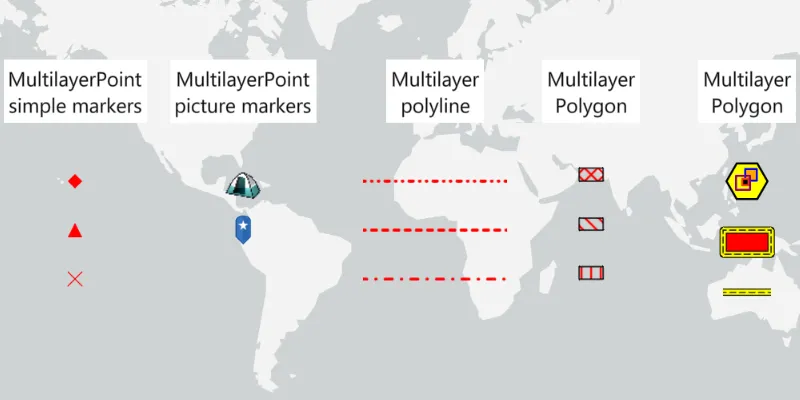
Show different kinds of multilayer symbols on a map.
Use case
Allows you to customize a graphic with a multilayer symbol. For example, you may want more customizable symbols than those that are provided with the API to display a unique representation of a landmark.
How to use the sample
The sample loads with multilayer symbols displayed for points, polylines, and polygons.
How it works
- Create multilayer symbols for each predefined 2D simple symbol style.
- For multilayer point symbols, use the
MultilayerPointSymbolconstructor. - For multilayer polyline symbols, use the
MultilayerPolylineSymbolconstructor. - For multilayer polygon symbols, use the
MultilayerPolygonSymbolconstructor.
- For multilayer point symbols, use the
- Create
Graphics by passing in aGeometryand the associated multilayer symbol. - Add graphics to the graphics overlay with
graphicsOverlay.getGraphics.add(graphic)
Relevant API
- Graphic
- GraphicsOverlay
- MultiLayerPoint
- MultiLayerPolygon
- MultiLayerPolyline
- PictureMarkerSymbolLayer
- SolidFillSymbolLayer
- SolidStrokeSymbolLayer
- VectorMarkerSymbolLayer
Tags
graphic, marker, multilayer, picture, symbol
Sample code
RenderMultilayerSymbolsSample.java
/* * Copyright 2022 Esri. * * Licensed under the Apache License, Version 2.0 (the "License"); you may not * use this file except in compliance with the License. You may obtain a copy of * the License at * * http://www.apache.org/licenses/LICENSE-2.0 * * Unless required by applicable law or agreed to in writing, software * distributed under the License is distributed on an "AS IS" BASIS, WITHOUT * WARRANTIES OR CONDITIONS OF ANY KIND, either express or implied. See the * License for the specific language governing permissions and limitations under * the License. */
package com.esri.samples.render_multilayer_symbols;
import java.util.ArrayList;import java.util.List;import java.util.Objects;
import javafx.application.Application;import javafx.scene.Scene;import javafx.scene.control.Alert;import javafx.scene.image.Image;import javafx.scene.layout.StackPane;import javafx.scene.paint.Color;import javafx.stage.Stage;
import com.esri.arcgisruntime.ArcGISRuntimeEnvironment;import com.esri.arcgisruntime.geometry.Envelope;import com.esri.arcgisruntime.geometry.Geometry;import com.esri.arcgisruntime.geometry.Point;import com.esri.arcgisruntime.geometry.PolygonBuilder;import com.esri.arcgisruntime.geometry.PolylineBuilder;import com.esri.arcgisruntime.geometry.SpatialReferences;import com.esri.arcgisruntime.loadable.LoadStatus;import com.esri.arcgisruntime.mapping.ArcGISMap;import com.esri.arcgisruntime.mapping.BasemapStyle;import com.esri.arcgisruntime.mapping.view.Graphic;import com.esri.arcgisruntime.mapping.view.GraphicsOverlay;import com.esri.arcgisruntime.mapping.view.MapView;import com.esri.arcgisruntime.symbology.DashGeometricEffect;import com.esri.arcgisruntime.symbology.HatchFillSymbolLayer;import com.esri.arcgisruntime.symbology.MultilayerPointSymbol;import com.esri.arcgisruntime.symbology.MultilayerPolygonSymbol;import com.esri.arcgisruntime.symbology.MultilayerPolylineSymbol;import com.esri.arcgisruntime.symbology.MultilayerSymbol;import com.esri.arcgisruntime.symbology.PictureMarkerSymbolLayer;import com.esri.arcgisruntime.symbology.SolidFillSymbolLayer;import com.esri.arcgisruntime.symbology.SolidStrokeSymbolLayer;import com.esri.arcgisruntime.symbology.StrokeSymbolLayer;import com.esri.arcgisruntime.symbology.SymbolAnchor;import com.esri.arcgisruntime.symbology.SymbolLayer;import com.esri.arcgisruntime.symbology.TextSymbol;import com.esri.arcgisruntime.symbology.VectorMarkerSymbolElement;import com.esri.arcgisruntime.symbology.VectorMarkerSymbolLayer;
public class RenderMultilayerSymbolsSample extends Application {
  private GraphicsOverlay graphicsOverlay;  private MapView mapView;
  @Override  public void start(Stage stage) {    try {      // create stack pane and application scene      var stackPane = new StackPane();      var scene = new Scene(stackPane);
      // set title, size, and add scene to stage      stage.setTitle("Render Multilayer Symbols Sample");      stage.setWidth(800);      stage.setHeight(700);      stage.setScene(scene);      stage.show();
      // authentication with an API key or named user is required to access basemaps and other location services      String yourAPIKey = System.getProperty("apiKey");      ArcGISRuntimeEnvironment.setApiKey(yourAPIKey);
      // create a map with the light gray basemap style      ArcGISMap map = new ArcGISMap(BasemapStyle.ARCGIS_LIGHT_GRAY);
      // create a map view and set the map to it      mapView = new MapView();      mapView.setMap(map);
      // create a graphics overlay and add it to the map view      graphicsOverlay = new GraphicsOverlay();      mapView.getGraphicsOverlays().add(graphicsOverlay);
      // define offset used to keep a consistent distance between symbols in the same column      double offset = 20;
      // create labels to go above each category of graphic      addTextGraphics();
      // create picture marker symbol from URI      PictureMarkerSymbolLayer pictureMarkerFromUri = new PictureMarkerSymbolLayer((        "https://static.arcgis.com/images/Symbols/OutdoorRecreation/Camping.png"));
      // wait for picture marker symbol to load before creating graphics from it      pictureMarkerFromUri.addDoneLoadingListener(() -> {        if (pictureMarkerFromUri.getLoadStatus() == LoadStatus.LOADED) {          addGraphicFromPictureMarkerSymbolLayer(pictureMarkerFromUri, 0);        } else if (pictureMarkerFromUri.getLoadStatus() == LoadStatus.FAILED_TO_LOAD) {          new Alert(Alert.AlertType.ERROR, "Picture marker symbol layer failed to load from URI").show();        }      });      pictureMarkerFromUri.loadAsync();
      // create picture marker symbol from embedded resources      PictureMarkerSymbolLayer pictureMarkerFromImage = new PictureMarkerSymbolLayer(        new Image(Objects.requireNonNull(getClass().getResourceAsStream("/blue_pin.png")),          0, 50, true, true));
      // wait for picture marker symbol to load before creating graphics from it      pictureMarkerFromImage.addDoneLoadingListener(() -> {        if (pictureMarkerFromImage.getLoadStatus() == LoadStatus.LOADED) {          addGraphicFromPictureMarkerSymbolLayer(pictureMarkerFromImage, offset);        } else if (pictureMarkerFromImage.getLoadStatus() == LoadStatus.FAILED_TO_LOAD) {          new Alert(Alert.AlertType.ERROR, "Picture marker symbol layer failed to load from image").show();        }      });      pictureMarkerFromImage.loadAsync();
      // add graphics with simple vector marker symbol elements (MultilayerPoint Simple Markers on app UI)      var solidFillSymbolLayer = new SolidFillSymbolLayer(Color.RED);      var multilayerPolygonSymbol = new MultilayerPolygonSymbol(List.of(solidFillSymbolLayer));      var solidStrokeSymbolLayer = new SolidStrokeSymbolLayer(1, Color.RED,        List.of(new DashGeometricEffect()));      var multilayerPolylineSymbol = new MultilayerPolylineSymbol(List.of(solidStrokeSymbolLayer));
      // define vector element for a diamond, triangle and cross      var diamondGeometry = Geometry.fromJson("{\"rings\":[[[0.0,2.5],[2.5,0.0],[0.0,-2.5],[-2.5,0.0],[0.0,2.5]]]}");      var triangleGeometry = Geometry.fromJson("{\"rings\":[[[0.0,5.0],[5,-5.0],[-5,-5.0],[0.0,5.0]]]}");      var crossGeometry = Geometry.fromJson("{\"paths\":[[[-1,1],[0,0],[1,-1]],[[1,1],[0,0],[-1,-1]]]}");
      addGraphicsWithVectorMarkerSymbolElements(multilayerPolygonSymbol, diamondGeometry, 0);      addGraphicsWithVectorMarkerSymbolElements(multilayerPolygonSymbol, triangleGeometry, offset);      addGraphicsWithVectorMarkerSymbolElements(multilayerPolylineSymbol, crossGeometry, 2 * offset);
      // create line marker symbols      addLineGraphicsWithMarkerSymbols(List.of(4.0, 6.0, 0.5, 6.0, 0.5, 6.0), 0); // similar to SimpleLineSymbolStyle.SHORTDASHDOTDOT      addLineGraphicsWithMarkerSymbols(List.of(4.0, 6.0), offset); // similar to SimpleLineSymbolStyle.SHORTDASH      addLineGraphicsWithMarkerSymbols(List.of(7.0, 9.0, 0.5, 9.0), 2 * offset); // similar to SimpleLineSymbolStyle.DASHDOTDOT
      // create polygon marker symbols      addPolygonGraphicsWithMarkerSymbols(List.of(-45.0,45.0),0); // cross-hatched diagonal lines      addPolygonGraphicsWithMarkerSymbols(List.of(-45.0), offset); // hatched diagonal lines      addPolygonGraphicsWithMarkerSymbols(List.of(90.0), 2 * offset); // hatched vertical lines
      // define vector element for a hexagon which will be used as the basis of a complex point      var complexPointGeometry = Geometry.fromJson("{\"rings\":" +        "[[[-2.89,5.0],[2.89,5.0],[5.77,0.0],[2.89,-5.0],[-2.89,-5.0],[-5.77,0.0],[-2.89,5.0]]]}");
      // create the more complex multilayer graphics: a point, polygon, and polyline      addComplexPoint(complexPointGeometry);      addComplexPolygon();      addComplexPolyline();
      // add the map view to the stack pane      stackPane.getChildren().addAll(mapView);    } catch (Exception e) {      // on any error, display the stack trace.      e.printStackTrace();    }  }
  /**   * Creates the label graphics to be displayed above each category of symbol,   * and adds them to the graphics overlay.   */  private void addTextGraphics() {    graphicsOverlay.getGraphics().addAll(      List.of(        new Graphic(new Point(-150, 50, SpatialReferences.getWgs84()),          createTextSymbol("MultilayerPoint\nSimple Markers")),        new Graphic(new Point(-80, 50, SpatialReferences.getWgs84()),          createTextSymbol("MultilayerPoint\nPicture Markers")),        new Graphic(new Point(0, 50, SpatialReferences.getWgs84()),          createTextSymbol("Multilayer\nPolyline")),        new Graphic(new Point(65, 50, SpatialReferences.getWgs84()),          createTextSymbol("Multilayer\nPolygon")),        new Graphic(new Point(130, 50, SpatialReferences.getWgs84()),          createTextSymbol("Multilayer\nComplex Symbols"))));  }
  /**   * Creates a text symbol with the provided text and consistent styling.   *   * @param text text to be displayed by the text symbol   * @return the constructed text symbol   */  private TextSymbol createTextSymbol(String text) {    var textSymbol = new TextSymbol(      20,      text,      Color.BLACK,      TextSymbol.HorizontalAlignment.CENTER,      TextSymbol.VerticalAlignment.MIDDLE    );
    // give the text symbol a white background    textSymbol.setBackgroundColor(Color.WHITE);    return textSymbol;  }
  /**   * Adds a new graphic constructed from a loaded picture marker symbol layer.   *   * @param pictureMarkerSymbolLayer a loaded picture marker symbol layer   * @param offset the value used to keep a consistent distance between symbols in the same column   */  private void addGraphicFromPictureMarkerSymbolLayer(PictureMarkerSymbolLayer pictureMarkerSymbolLayer, double offset) {        // set the size of the layer and create a new multilayer point symbol from it        pictureMarkerSymbolLayer.setSize(40);        var multilayerPointSymbol = new MultilayerPointSymbol(List.of(pictureMarkerSymbolLayer));
        // create location for the symbol        var point = new Point(-80, 20 - offset, SpatialReferences.getWgs84());
        // create graphic with the location and symbol and add it to the graphics overlay        var graphic = new Graphic(point, multilayerPointSymbol);        graphicsOverlay.getGraphics().add(graphic);  }
  /**   * Adds new graphics constructed from multilayer point symbols.   *   * @param multilayerSymbol the multilayer symbol to construct the vector marker symbol element with   * @param geometry the input geometry for the vector marker symbol element   * @param offset the value used to keep a consistent distance between symbols in the same column   */  private void addGraphicsWithVectorMarkerSymbolElements(MultilayerSymbol multilayerSymbol, Geometry geometry, double offset) {    // define a vector element and create a new multilayer point symbol from it    var vectorMarkerSymbolElement = new VectorMarkerSymbolElement(geometry, multilayerSymbol);    var vectorMarkerSymbolLayer = new VectorMarkerSymbolLayer(List.of(vectorMarkerSymbolElement));    var multilayerPointSymbol = new MultilayerPointSymbol(List.of(vectorMarkerSymbolLayer));
    // create point graphic using the symbol and add it to the graphics overlay    var graphic = new Graphic(new Point(-150, 20 - offset, SpatialReferences.getWgs84()), multilayerPointSymbol);    graphicsOverlay.getGraphics().add(graphic);  }
  /**   * Adds new graphics constructed from multilayer polyline symbols.   *   * @param dashSpacing the pattern of dots/dashes used by the line   * @param offset the value used to keep a consistent distance between symbols in the same column   */  private void addLineGraphicsWithMarkerSymbols(List<Double> dashSpacing, double offset) {    // create a dash effect from the provided values    var dashGeometricEffect = new DashGeometricEffect(dashSpacing);
    // create stroke used by line symbols    var solidStrokeSymbolLayer = new SolidStrokeSymbolLayer(3.0, Color.RED, List.of(dashGeometricEffect));    solidStrokeSymbolLayer.setCapStyle(StrokeSymbolLayer.CapStyle.ROUND);
    // create a polyline for the multilayer polyline symbol    var polylineBuilder = new PolylineBuilder(SpatialReferences.getWgs84());    polylineBuilder.addPoint(new Point(-30, 20 - offset));    polylineBuilder.addPoint(new Point(30, 20 - offset));
    // create a multilayer polyline symbol from the solidStrokeSymbolLayer    var multilayerPolylineSymbol = new MultilayerPolylineSymbol(List.of(solidStrokeSymbolLayer));
    // create a polyline graphic with geometry using the symbol created above, and add it to the graphics overlay    graphicsOverlay.getGraphics().add(new Graphic(polylineBuilder.toGeometry(), multilayerPolylineSymbol));  }
  /**   * Adds new graphics constructed from multilayer polygon symbols.   *   * @param angles a list containing the angle at which to draw any fill lines within the polygon   * @param offset the value used to keep a consistent distance between symbols in the same column   */  private void addPolygonGraphicsWithMarkerSymbols(List<Double> angles, double offset) {    var polygonBuilder = new PolygonBuilder(SpatialReferences.getWgs84());    polygonBuilder.addPoint(new Point(60, 25 - offset));    polygonBuilder.addPoint(new Point(70, 25 - offset));    polygonBuilder.addPoint(new Point(70, 20 - offset));    polygonBuilder.addPoint(new Point(60, 20 - offset));
    // create a stroke symbol layer to be used by patterns    SolidStrokeSymbolLayer strokeForHatches = new SolidStrokeSymbolLayer(2, Color.RED,      List.of(new DashGeometricEffect()));
    // create a stroke symbol layer to be used as an outline for aforementioned patterns    SolidStrokeSymbolLayer strokeForOutline = new SolidStrokeSymbolLayer(1, Color.BLACK,      List.of(new DashGeometricEffect()));
    // create an array to hold one symbol layer for each angle, and one for the outline    var symbolLayerArray = new ArrayList<SymbolLayer>();
    // for each angle, create a symbol layer using the pattern stroke, with hatched lines at the given angle    for (Double angle: angles) {      var hatchFillSymbolLayer = new HatchFillSymbolLayer(new MultilayerPolylineSymbol(List.of(strokeForHatches)), angle);
      // define separation distance for lines and add them to the symbol layer list      hatchFillSymbolLayer.setSeparation(9);      symbolLayerArray.add(hatchFillSymbolLayer);    }
    // assign the outline layer to the last element of the symbol layer list    symbolLayerArray.add(strokeForOutline);
    // create a multilayer polygon symbol from the symbol layer array    var multilayerPolygonSymbol = new MultilayerPolygonSymbol(symbolLayerArray);
    // create a polygon graphic with geometry using the symbol created above, and add it to the graphics overlay    var graphic = new Graphic(polygonBuilder.toGeometry(), multilayerPolygonSymbol);    graphicsOverlay.getGraphics().add(graphic);  }
  /**   * Creates a complex point from multiple symbol layers and a provided geometry   *   * @param complexPointGeometry a base geometry upon which other symbol layers are drawn   */  private void addComplexPoint(Geometry complexPointGeometry) {    // create marker layers for complex point    VectorMarkerSymbolLayer orangeSquareVectorMarkerLayer = getLayerForComplexPoint(Color.ORANGE, Color.BLUE, 11);    VectorMarkerSymbolLayer blackSquareVectorMarkerLayer = getLayerForComplexPoint(Color.BLACK, Color.ORANGERED, 6);    VectorMarkerSymbolLayer purpleSquareVectorMarkerLayer = getLayerForComplexPoint(Color.TRANSPARENT, Color.PURPLE, 14);
    // set anchors for marker layers    orangeSquareVectorMarkerLayer.setAnchor(new SymbolAnchor(-4, -6, SymbolAnchor.PlacementMode.ABSOLUTE));    blackSquareVectorMarkerLayer.setAnchor(new SymbolAnchor(2, 1, SymbolAnchor.PlacementMode.ABSOLUTE));    purpleSquareVectorMarkerLayer.setAnchor(new SymbolAnchor(4, 2, SymbolAnchor.PlacementMode.ABSOLUTE));
    // create a yellow hexagon with a black outline    SolidFillSymbolLayer yellowFillLayer = new SolidFillSymbolLayer(Color.YELLOW);    SolidStrokeSymbolLayer blackOutline = new SolidStrokeSymbolLayer(2, Color.BLACK,      List.of(new DashGeometricEffect()));    VectorMarkerSymbolElement hexagonVectorElement = new VectorMarkerSymbolElement(complexPointGeometry,      new MultilayerPolylineSymbol(List.of(yellowFillLayer, blackOutline)));    VectorMarkerSymbolLayer hexagonVectorMarkerLayer = new VectorMarkerSymbolLayer(List.of(hexagonVectorElement));    hexagonVectorMarkerLayer.setSize(35);
    // create the multilayer point symbol    var multilayerPointSymbol = new MultilayerPointSymbol(List.of(      hexagonVectorMarkerLayer,      orangeSquareVectorMarkerLayer,      blackSquareVectorMarkerLayer,      purpleSquareVectorMarkerLayer    ));
    // create the multilayer point graphic using the symbols created above    Graphic complexPointGraphic = new Graphic(new Point(130, 20, SpatialReferences.getWgs84()), multilayerPointSymbol);    graphicsOverlay.getGraphics().add(complexPointGraphic);  }
  /**   * Creates a symbol layer for use in the composition of a complex point.   *   * @param fillColor fill colour of the symbol   * @param outlineColor outline colour of the symbol   * @param size size of the symbol   * @return the vector marker symbol layer   */  private VectorMarkerSymbolLayer getLayerForComplexPoint(Color fillColor, Color outlineColor, double size){    // create the fill layer and outline    SolidFillSymbolLayer fillLayer = new SolidFillSymbolLayer(fillColor);    SolidStrokeSymbolLayer outline = new SolidStrokeSymbolLayer(2, outlineColor,      List.of(new DashGeometricEffect()));
    // create a geometry from an envelope    var geometry =  new Envelope(new Point(-0.5, -0.5, SpatialReferences.getWgs84()),      new Point(0.5, 0.5, SpatialReferences.getWgs84()));
    //create a symbol element using the geometry, fill layer, and outline    var vectorMarkerSymbolElement = new VectorMarkerSymbolElement(geometry,      new MultilayerPolygonSymbol(List.of(fillLayer, outline)));
    // create a symbol layer containing just the above symbol element, set its size, and return it    var vectorMarkerSymbolLayer = new VectorMarkerSymbolLayer(List.of(vectorMarkerSymbolElement));    vectorMarkerSymbolLayer.setSize(size);    return vectorMarkerSymbolLayer;  }
  /**   * Adds a complex polyline generated with multiple symbol layers.   */  private void addComplexPolyline() {    // create the multilayer polyline symbol    var multilayerPolylineSymbol = new MultilayerPolylineSymbol(getLayersForComplexPolys(false));    PolylineBuilder polylineBuilder = new PolylineBuilder(SpatialReferences.getWgs84());    polylineBuilder.addPoint(new Point(120, -25));    polylineBuilder.addPoint(new Point(140, -25));
    // create the multilayer polyline graphic with geometry using the symbols created above and add it to the graphics overlay    graphicsOverlay.getGraphics().add(new Graphic(polylineBuilder.toGeometry(), multilayerPolylineSymbol));  }
  /**   * Adds a complex polygon generated with multiple symbol layers.   */  private void addComplexPolygon() {    // create the multilayer polygon symbol    var multilayerPolygonSymbol = new MultilayerPolygonSymbol(getLayersForComplexPolys(true));
    // create the polygon    var polygonBuilder = new PolygonBuilder(SpatialReferences.getWgs84());    polygonBuilder.addPoint(new Point(120, 0));    polygonBuilder.addPoint(new Point(140, 0));    polygonBuilder.addPoint(new Point(140, -10));    polygonBuilder.addPoint(new Point(120, -10));
    // create a multilayer polygon graphic with geometry using the symbols created above and add it to the graphics    // overlay    graphicsOverlay.getGraphics().add(new Graphic(polygonBuilder.toGeometry(), multilayerPolygonSymbol));  }
  /**   * Generates and returns the symbol layers used by the addComplexPolygon and addComplexPolyline methods.   *   * @param includeRedFill boolean indicating whether to include the red fill needed by the complex polygon   * @return a list of symbol layers including the necessary effects   */  private List<SymbolLayer> getLayersForComplexPolys(boolean includeRedFill){    // create a black dash effect    SolidStrokeSymbolLayer blackDashes = new SolidStrokeSymbolLayer(1, Color.BLACK,      List.of(new DashGeometricEffect(List.of(5.0, 3.0))));    blackDashes.setCapStyle(StrokeSymbolLayer.CapStyle.SQUARE);
    // create a black outline    SolidStrokeSymbolLayer blackOutline = new SolidStrokeSymbolLayer(7, Color.BLACK,      List.of(new DashGeometricEffect()));    blackOutline.setCapStyle(StrokeSymbolLayer.CapStyle.ROUND);
    // create a yellow stroke inside    SolidStrokeSymbolLayer yellowStroke = new SolidStrokeSymbolLayer(5, Color.YELLOW,      List.of(new DashGeometricEffect()));    yellowStroke.setCapStyle(StrokeSymbolLayer.CapStyle.ROUND);
    if (includeRedFill) {      // create a red filling for the polygon      SolidFillSymbolLayer redFillLayer = new SolidFillSymbolLayer(Color.RED);      return List.of(redFillLayer, blackOutline, yellowStroke, blackDashes);    } else {      return List.of(blackOutline, yellowStroke, blackDashes);    }  }
  /**   * Stops and releases all resources used in application.   */  @Override  public void stop() {    if (mapView != null) {      mapView.dispose();    }  }
  /**   * Opens and runs application.   *   * @param args arguments passed to this application   */  public static void main(String[] args) {    Application.launch(args);  }}