Create symbol styles from a style file hosted on a portal.
Use case
Style files hosted on an ArcGIS Online or Enterprise portal are known as web styles. They can be used to style symbols on a feature layer or graphic overlay. Since styles are published from ArcGIS Pro, you can author and design your own beautiful multilayer vector symbols. These vector symbols look good at any resolution and scale well. ArcGIS Maps SDKs for Native Apps users can now access these styles from their native application, and make use of the vector symbols within them to enhance features and graphics in the map.
How to use the sample
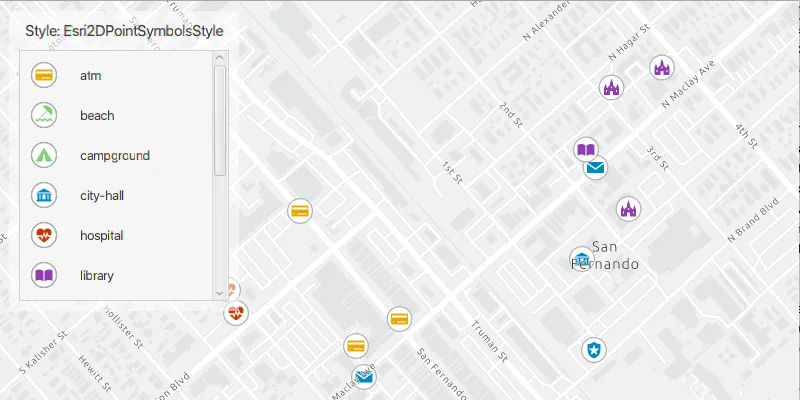
The sample displays a map with a set of symbols that represent the categories of the features within the dataset. Pan and zoom on the map and view the legend to explore the appearance and names of the different symbols from the selected symbol style.
How it works
- Create a
FeatureLayerand add it to the map. - Create a
UniqueValueRendererand set it to the feature layer. - Create a
SymbolStylefrom a portal by passing in the web style name and portal URL. * Note: passingnullas the portal will default to ArcGIS.com. - Search for symbols in the symbol style by name using
symbolStyle.getSymbolAsync(symbolName). - Create a
Symbolfrom the search result. - Create
UniqueValueobjects for each symbol with defined values to map the symbol to features on the feature layer. - Add each
UniqueValueto theUniqueValueRenderer.
Relevant API
- FeatureLayer
- Symbol
- SymbolStyle
- UniqueValue
- UniqueValueRenderer
About the data
The sample uses the ‘Esri2DPointSymbolsStyle’ Web Style.
The map shows features from the LA County Points of Interest service hosted on ArcGIS Online.
Additional information
2D web styles, dictionary web styles, and 3D web styles can all be hosted on an ArcGIS Online or Enterprise portal.
Tags
renderer, symbol, symbology, web style
Sample code
/* * Copyright 2021 Esri. * * Licensed under the Apache License, Version 2.0 (the "License"); you may not * use this file except in compliance with the License. You may obtain a copy of * the License at * * http://www.apache.org/licenses/LICENSE-2.0 * * Unless required by applicable law or agreed to in writing, software * distributed under the License is distributed on an "AS IS" BASIS, WITHOUT * WARRANTIES OR CONDITIONS OF ANY KIND, either express or implied. See the * License for the specific language governing permissions and limitations under * the License. */
package com.esri.samples.create_symbol_styles_from_web_styles;
import java.util.ArrayList;import java.util.Arrays;import java.util.Collections;import java.util.List;import java.util.concurrent.ExecutionException;
import javafx.application.Application;import javafx.geometry.Insets;import javafx.geometry.Pos;import javafx.scene.Scene;import javafx.scene.control.Alert;import javafx.scene.control.Label;import javafx.scene.control.ScrollPane;import javafx.scene.image.Image;import javafx.scene.image.ImageView;import javafx.scene.layout.Background;import javafx.scene.layout.BackgroundFill;import javafx.scene.layout.ColumnConstraints;import javafx.scene.layout.CornerRadii;import javafx.scene.layout.GridPane;import javafx.scene.layout.StackPane;import javafx.scene.layout.VBox;import javafx.scene.paint.Color;import javafx.scene.paint.Paint;import javafx.stage.Stage;
import com.esri.arcgisruntime.ArcGISRuntimeEnvironment;import com.esri.arcgisruntime.concurrent.ListenableFuture;import com.esri.arcgisruntime.data.ServiceFeatureTable;import com.esri.arcgisruntime.layers.FeatureLayer;import com.esri.arcgisruntime.loadable.LoadStatus;import com.esri.arcgisruntime.mapping.ArcGISMap;import com.esri.arcgisruntime.mapping.BasemapStyle;import com.esri.arcgisruntime.mapping.Viewpoint;import com.esri.arcgisruntime.mapping.view.MapView;import com.esri.arcgisruntime.symbology.Symbol;import com.esri.arcgisruntime.symbology.SymbolStyle;import com.esri.arcgisruntime.symbology.UniqueValueRenderer;
public class CreateSymbolStylesFromWebStylesSample extends Application {
  private MapView mapView;  private GridPane legendGridPane;  private SymbolStyle symbolStyle;  private VBox vBox;
  @Override  public void start(Stage stage) {
    try {      // create stack pane and application scene      StackPane stackPane = new StackPane();      Scene scene = new Scene(stackPane);
      // set title, size, and add scene to stage      stage.setTitle("Create Symbol Styles From Web Styles Sample");      stage.setWidth(800);      stage.setHeight(700);      stage.setScene(scene);      stage.show();
      // authentication with an API key or named user is required to access basemaps and other location services      String yourAPIKey = System.getProperty("apiKey");      ArcGISRuntimeEnvironment.setApiKey(yourAPIKey);
      // create a map with the light gray basemap style      ArcGISMap map = new ArcGISMap(BasemapStyle.ARCGIS_LIGHT_GRAY);
      // set an initial reference scale on the map for controlling symbol size      map.setReferenceScale(100000);
      // create a map view and set the map to it      mapView = new MapView();      mapView.setMap(map);
      // set a viewpoint on the map view      mapView.setViewpoint(new Viewpoint(34.28301, -118.44186, 7000));
      // create a feature layer from a service      FeatureLayer featureLayer = new FeatureLayer(new ServiceFeatureTable(        "http://services.arcgis.com/V6ZHFr6zdgNZuVG0/arcgis/rest/services/LA_County_Points_of_Interest/FeatureServer/0"));
      // add the feature layer to the map's operational layers      map.getOperationalLayers().add(featureLayer);
      // display an error if the feature layer fails to load      featureLayer.addDoneLoadingListener(() -> {        if (featureLayer.getLoadStatus() == LoadStatus.FAILED_TO_LOAD) {          new Alert(Alert.AlertType.ERROR, "Feature layer failed to load. Details: \n"            + featureLayer.getLoadError().getCause().getMessage()).show();        }      });
      // create a unique value renderer      UniqueValueRenderer uniqueValueRenderer = new UniqueValueRenderer();
      // add the name of a field from the feature layer data that symbols will be mapped to      uniqueValueRenderer.getFieldNames().add("cat2");
      // set the unique value renderer on the feature layer      featureLayer.setRenderer(uniqueValueRenderer);
      // create a symbol style from a web style      // note: ArcGIS Online is used as the default portal when null is passed as the portal parameter      symbolStyle = new SymbolStyle("Esri2DPointSymbolsStyle", null);
      // display an error if the symbol style fails to load      symbolStyle.addDoneLoadingListener(() -> {        if (symbolStyle.getLoadStatus() == LoadStatus.FAILED_TO_LOAD) {          new Alert(Alert.AlertType.ERROR, "Error: could not load symbol style. Details: \n"            + symbolStyle.getLoadError().getMessage()).show();        }      });
      // setup the UI for the legend      setupLegend();
      // create a list of the required symbol names from the web style      ArrayList<String> symbolNames = new ArrayList<>(Arrays.asList("atm", "beach", "campground", "city-hall", "hospital",        "library", "park", "place-of-worship", "police-station", "post-office", "school", "trail"));
      // create unique values for the renderer and construct a symbol for each feature      for (String symbolName : symbolNames) {
        // search for each symbol in the symbol style        ListenableFuture<Symbol> searchResult = symbolStyle.getSymbolAsync(Collections.singletonList(symbolName));        searchResult.addDoneListener(() -> {          try {            // get the symbol from the search result            Symbol symbol = searchResult.get();
            // get a list of all categories to be mapped to the symbol            List<String> categories = mapSymbolNameToField(symbolName);
            for (String category : categories) {
              // create a unique value for each category              UniqueValueRenderer.UniqueValue uniqueValue = new UniqueValueRenderer.UniqueValue(                "", symbolName, symbol, Collections.singletonList(category));
              // add each unique value to the unique value renderer              uniqueValueRenderer.getUniqueValues().add(uniqueValue);            }
            // create and add an image view and a label for the symbol to the legend on the UI            ImageView imageView = createImageView(symbol);            Label gridPaneLabel = new Label(symbolName);            legendGridPane.add(imageView, 0, symbolNames.indexOf(symbolName));            legendGridPane.add(gridPaneLabel, 1, symbolNames.indexOf(symbolName));
          } catch (Exception e) {            // on any error, display the stack trace.            e.printStackTrace();          }        });      }
      // add a map scale listener on the map view to control the symbol sizes at different scales      mapView.mapScaleProperty().addListener((observable, oldValue, newValue) -> {        featureLayer.setScaleSymbols((double) newValue >= 80000);      });
      // add the map view and vbox to the stack pane      stackPane.getChildren().addAll(mapView, vBox);      StackPane.setAlignment(vBox, Pos.TOP_LEFT);      StackPane.setMargin(vBox, new Insets(10, 0, 0, 10));
    } catch (Exception e) {      // on any error, display the stack trace.      e.printStackTrace();    }
  }
  /**   * Creates a legend on the UI for the symbol styles.   */  private void setupLegend() {
    // create a box to show the legend    vBox = new VBox();    vBox.setMaxSize(250, 300);    vBox.setBackground(new Background(new BackgroundFill(Paint.valueOf("rgba(255, 255, 255 , 0.7)"), CornerRadii.EMPTY,      Insets.EMPTY)));    vBox.setPadding(new Insets(10.0));    vBox.setAlignment(Pos.TOP_CENTER);    vBox.setSpacing(10);
    // create a grid pane    legendGridPane = new GridPane();    legendGridPane.getColumnConstraints().add(new ColumnConstraints(50));    legendGridPane.setPadding(new Insets(10));    legendGridPane.setMaxWidth(175);    legendGridPane.setVgap(12);
    // create a label to display the symbol style name as the title of the legend and add to the grid pane    Label legendHeader = new Label("Style: " + symbolStyle.getStyleName());    legendHeader.setStyle("-fx-font-size: 12; -fx-font-weight: bold;");
    // create a scroll pane to contain the legend    ScrollPane scrollPane = new ScrollPane();    scrollPane.setContent(legendGridPane);    vBox.getChildren().addAll(legendHeader, scrollPane);  }
  /**   * Returns a list of categories to be matched to a symbol name.   *   * @param symbolName the name of a symbol from a symbol style   * @return categories a list of categories matched to the provided symbol name   */  private List<String> mapSymbolNameToField(String symbolName) {
    List<String> categories = new ArrayList<>();
    switch (symbolName) {      case "atm":        categories.add("Banking and Finance");        break;      case "beach":        categories.add("Beaches and Marinas");        break;      case "campground":        categories.add("Campgrounds");        break;      case "city-hall":        categories.addAll(Arrays.asList("City Halls", "Government Offices"));        break;      case "hospital":        categories.addAll(Arrays.asList("Hospitals and Medical Centers", "Health Screening and Testing", "Health Centers",          "Mental Health Centers"));        break;      case "library":        categories.add("Libraries");        break;      case "park":        categories.add("Parks and Gardens");        break;      case "place-of-worship":        categories.add("Churches");        break;      case "police-station":        categories.add("Sheriff and Police Stations");        break;      case "post-office":        categories.addAll(Arrays.asList("DHL Locations", "Federal Express Locations"));        break;      case "school":        categories.addAll(Arrays.asList("Public High Schools", "Public Elementary Schools", "Private and Charter Schools"));        break;      case "trail":        categories.add("Trails");        break;    }    return categories;  }
  /**   * Returns an image view populated with a symbol.   *   * @param symbol the symbol to display in the image view   * @return imageView the image view populated with the symbol   */  private ImageView createImageView(Symbol symbol) {
    // create an image view for displaying the symbol in the legend    ImageView imageView = new ImageView();    ListenableFuture<Image> imageOfSymbol = symbol.createSwatchAsync(Color.TRANSPARENT, 1f);    imageOfSymbol.addDoneListener(() -> {      try {        // add the symbol image to the image view        imageView.setImage(imageOfSymbol.get());      } catch (InterruptedException | ExecutionException e) {        new Alert(Alert.AlertType.ERROR, "Error creating preview ImageView from provided symbol").show();      }    });    return imageView;  }
  /**   * Stops and releases all resources used in application.   */  @Override  public void stop() {
    if (mapView != null) {      mapView.dispose();    }  }
  /**   * Opens and runs application.   *   * @param args arguments passed to this application   */  public static void main(String[] args) {
    Application.launch(args);  }
}