Use pictures for markers.
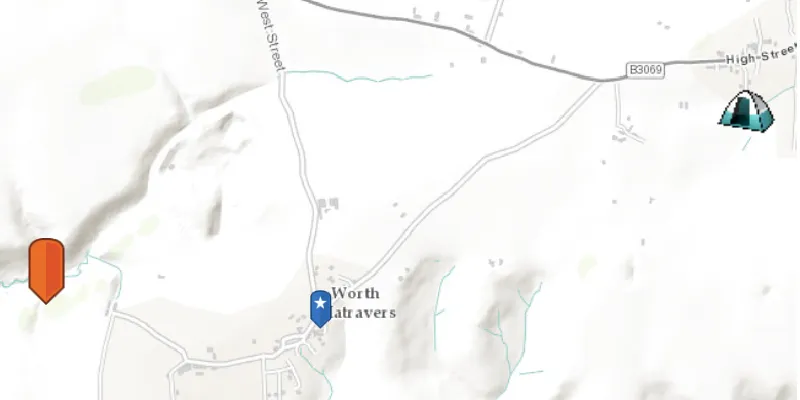
Use case
When marking geoelements on a map, using custom, unique symbols can be helpful for highlighting and differentiating between locations. For example, a tourism office may use pictures of landmarks as symbols on an online map or app, to help prospective visitors to orient themselves more easily around a city.
How to use the sample
When launched, this sample displays a map with three picture marker symbols. Pan and zoom to explore the map.
How it works
- Create a
PictureMarkerSymbolusing the URI to an online or local image. - Create a
Graphicand set its symbol to thePictureMarkerSymbol.
Relevant API
- PictureMarkerSymbol
About the data
The picture marker symbols in this sample are all constructed from different types of resources:
- Campsite symbol constructed from a URL
- Blue pin with a star and orange pin stored in the resources folder that comes with the application

Tags
graphics, marker, picture, symbol, visualization
Sample code
PictureMarkerSymbolSample.java
/* * Copyright 2017 Esri. * * Licensed under the Apache License, Version 2.0 (the "License"); you may not * use this file except in compliance with the License. You may obtain a copy of * the License at * * http://www.apache.org/licenses/LICENSE-2.0 * * Unless required by applicable law or agreed to in writing, software * distributed under the License is distributed on an "AS IS" BASIS, WITHOUT * WARRANTIES OR CONDITIONS OF ANY KIND, either express or implied. See the * License for the specific language governing permissions and limitations under * the License. */
package com.esri.samples.picture_marker_symbol;
import java.io.File;
import com.esri.arcgisruntime.ArcGISRuntimeEnvironment;import com.esri.arcgisruntime.geometry.Envelope;import com.esri.arcgisruntime.geometry.Point;import com.esri.arcgisruntime.geometry.SpatialReferences;import com.esri.arcgisruntime.loadable.LoadStatus;import com.esri.arcgisruntime.mapping.ArcGISMap;import com.esri.arcgisruntime.mapping.BasemapStyle;import com.esri.arcgisruntime.mapping.view.Graphic;import com.esri.arcgisruntime.mapping.view.GraphicsOverlay;import com.esri.arcgisruntime.mapping.view.MapView;import com.esri.arcgisruntime.symbology.PictureMarkerSymbol;import javafx.application.Application;import javafx.scene.Scene;import javafx.scene.control.Alert;import javafx.scene.image.Image;import javafx.scene.layout.StackPane;import javafx.stage.Stage;
public class PictureMarkerSymbolSample extends Application {
  private MapView mapView;  private GraphicsOverlay graphicsOverlay;
  // keep loadables in scope to avoid garbage collection  private ArcGISMap map;  private PictureMarkerSymbol campsiteSymbol;  private PictureMarkerSymbol blueSymbol;  private PictureMarkerSymbol orangeSymbol;
  private static final String CAMPSITE_SYMBOL = "https://static.arcgis.com/images/Symbols/OutdoorRecreation/Camping.png";
  @Override  public void start(Stage stage) {
    try {      // create stack pane and application scene      StackPane stackPane = new StackPane();      Scene scene = new Scene(stackPane);
      // set title, size, and add scene to stage      stage.setTitle("Picture Marker Symbol Sample");      stage.setWidth(800);      stage.setHeight(700);      stage.setScene(scene);      stage.show();
      // authentication with an API key or named user is required to access basemaps and other location services      String yourAPIKey = System.getProperty("apiKey");      ArcGISRuntimeEnvironment.setApiKey(yourAPIKey);
      // create a map with the topographic basemap style      map = new ArcGISMap(BasemapStyle.ARCGIS_TOPOGRAPHIC);
      // create a map view and set the map to it      mapView = new MapView();      mapView.setMap(map);
      // create graphics overlay and add it to the map view      graphicsOverlay = new GraphicsOverlay();      mapView.getGraphicsOverlays().add(graphicsOverlay);
      // create points for displaying graphics      Point leftPoint = new Point(-228835, 6550763, SpatialReferences.getWebMercator()); // Disk      Point rightPoint = new Point(-223560, 6552021, SpatialReferences.getWebMercator()); // URL      Point middlePoint = new Point(-226773, 6550477, SpatialReferences.getWebMercator());
      // create orange picture marker symbol from disk      File orangeSymbolImage = new File(System.getProperty("data.dir"), "./samples-data/symbol/orange_symbol.png");      orangeSymbol = new PictureMarkerSymbol(orangeSymbolImage.getAbsolutePath());      // place orange picture marker symbol on ArcGISMap      placePictureMarkerSymbol(orangeSymbol, leftPoint);
      // create blue picture marker symbol from local      Image newImage = new Image("/blue_symbol.png");      blueSymbol = new PictureMarkerSymbol(newImage);      // place blue picture marker symbol on ArcGISMap      placePictureMarkerSymbol(blueSymbol, middlePoint);
      // create campsite picture marker symbol from URL      campsiteSymbol = new PictureMarkerSymbol(CAMPSITE_SYMBOL);
      // place campsite picture marker symbol on ArcGISMap      map.addDoneLoadingListener(() -> {        if (map.getLoadStatus() == LoadStatus.LOADED) {          placePictureMarkerSymbol(campsiteSymbol, rightPoint);        } else {          Alert alert = new Alert(Alert.AlertType.ERROR, "Map Failed to Load!");          alert.show();        }      });
      // set viewpoint on mapview with padding      Envelope envelope = new Envelope(leftPoint, rightPoint);      mapView.setViewpointGeometryAsync(envelope, 100.0);
      // add the map view and control panel to stack pane      stackPane.getChildren().add(mapView);    } catch (Exception e) {      e.printStackTrace();    }  }
  /**   * Adds a Graphic to the Graphics Overlay using a Point and a Picture Marker   * Symbol.   *   * @param markerSymbol PictureMarkerSymbol to be used   * @param graphicPoint where the Graphic is going to be placed   */  private void placePictureMarkerSymbol(PictureMarkerSymbol markerSymbol, Point graphicPoint) {
    // set size of the image    markerSymbol.setHeight(40);    markerSymbol.setWidth(40);
    // load symbol asynchronously    markerSymbol.loadAsync();
    // add to the graphic overlay once done loading    markerSymbol.addDoneLoadingListener(() -> {      if (markerSymbol.getLoadStatus() == LoadStatus.LOADED) {        Graphic symbolGraphic = new Graphic(graphicPoint, markerSymbol);        graphicsOverlay.getGraphics().add(symbolGraphic);      } else {        Alert alert = new Alert(Alert.AlertType.ERROR, "Picture Marker Symbol Failed to Load!");        alert.show();      }    });
  }
  /**   * Stops and releases all resources used in application.   */  @Override  public void stop() {
    // release resources when the application closes    if (mapView != null) {      mapView.dispose();    }  }
  /**   * Opens and runs application.   *   * @param args arguments passed to this application   */  public static void main(String[] args) {
    Application.launch(args);  }
}