Display a shapefile with custom symbology.
Use case
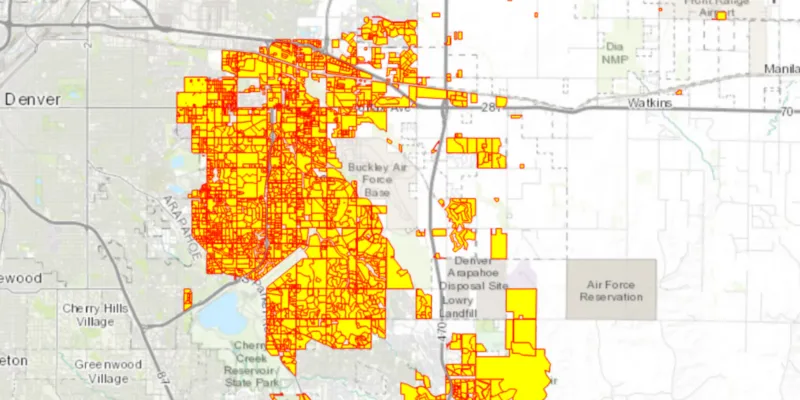
Feature layers created from shapefiles do not possess any rendering information, and will be assigned with a default symbology. You can apply custom styling to ensure that the content is visible and usable in the context of a specific map. For example, you could use this to visually differentiate between features originating from two different shapefiles, by applying a blue color to one, and a red color to the other.
How to use the sample
Press the toggle button to switch between the red and yellow symbology renderer and the default renderer, set to the feature layer created from the shapefile.
How it works
- Create a
ShapefileFeatureTable, providing the path to a shapefile. - Create a
FeatureLayerfrom aShapeFileFeatureTable. - Create a
SimpleRendererto override the default symbology. The simple renderer takes a symbol and applies that to all features in a layer. - Apply the renderer to the
FeatureLayerby setting the renderer.
Relevant API
- FeatureLayer
- ShapefileFeatureTable
- SimpleFillSymbol
- SimpleLineSymbol
- SimpleRenderer
About the data
This sample displays a shapefile containing subdivisions in Aurora, CO.
Additional information
While shapefiles contain no rendering information, other data sources such as Service Feature Tables or Geodatabase Feature Tables can contain such information. As a result, the rendering properties of the other data sources can be pre-defined by the author.
Tags
package, shape file, shapefile, symbology, visualization
Sample code
/* * Copyright 2018 Esri. * * Licensed under the Apache License, Version 2.0 (the "License"); you may not * use this file except in compliance with the License. You may obtain a copy of * the License at * * http://www.apache.org/licenses/LICENSE-2.0 * * Unless required by applicable law or agreed to in writing, software * distributed under the License is distributed on an "AS IS" BASIS, WITHOUT * WARRANTIES OR CONDITIONS OF ANY KIND, either express or implied. See the * License for the specific language governing permissions and limitations under * the License. */
package com.esri.samples.symbolize_shapefile;
import java.io.File;
import javafx.application.Application;import javafx.geometry.Insets;import javafx.geometry.Pos;import javafx.scene.Scene;import javafx.scene.control.Alert;import javafx.scene.control.ToggleButton;import javafx.scene.layout.StackPane;import javafx.scene.paint.Color;import javafx.stage.Stage;
import com.esri.arcgisruntime.ArcGISRuntimeEnvironment;import com.esri.arcgisruntime.data.ShapefileFeatureTable;import com.esri.arcgisruntime.layers.FeatureLayer;import com.esri.arcgisruntime.loadable.LoadStatus;import com.esri.arcgisruntime.mapping.ArcGISMap;import com.esri.arcgisruntime.mapping.BasemapStyle;import com.esri.arcgisruntime.mapping.view.MapView;import com.esri.arcgisruntime.symbology.SimpleFillSymbol;import com.esri.arcgisruntime.symbology.SimpleLineSymbol;import com.esri.arcgisruntime.symbology.SimpleRenderer;
public class SymbolizeShapefileSample extends Application {
  private MapView mapView;  private FeatureLayer featureLayer; // keep loadable in scope to avoid garbage collection
  @Override  public void start(Stage stage) {
    try {      // create stack pane and application scene      StackPane stackPane = new StackPane();      Scene scene = new Scene(stackPane);
      // set title, size, and add scene to stage      stage.setTitle("Symbolize Shapefile Sample");      stage.setWidth(800);      stage.setHeight(700);      stage.setScene(scene);      stage.show();
      // authentication with an API key or named user is required to access basemaps and other location services      String yourAPIKey = System.getProperty("apiKey");      ArcGISRuntimeEnvironment.setApiKey(yourAPIKey);
      // create a map with the topographic basemap style      ArcGISMap map = new ArcGISMap(BasemapStyle.ARCGIS_TOPOGRAPHIC);
      // create a map view and set the map to it      mapView = new MapView();      mapView.setMap(map);
      // create a shapefile feature table from the local data      File shapefile = new File(System.getProperty("data.dir"), "./samples-data/auroraCO/Subdivisions.shp");      ShapefileFeatureTable shapefileFeatureTable = new ShapefileFeatureTable(shapefile.getAbsolutePath());
      // use the shapefile feature table to create a feature layer      featureLayer = new FeatureLayer(shapefileFeatureTable);      featureLayer.addDoneLoadingListener(() -> {        if (featureLayer.getLoadStatus() == LoadStatus.LOADED) {          // zoom to the feature layer's extent          mapView.setViewpointGeometryAsync(featureLayer.getFullExtent());        } else {          Alert alert = new Alert(Alert.AlertType.ERROR, featureLayer.getLoadError().getMessage());          alert.show();        }      });
      // add the feature layer to the map's operational layers      map.getOperationalLayers().add(featureLayer);
      // create the symbols and renderer      SimpleLineSymbol lineSymbol = new SimpleLineSymbol(SimpleLineSymbol.Style.SOLID, Color.RED, 1.0f);      SimpleFillSymbol fillSymbol = new SimpleFillSymbol(SimpleFillSymbol.Style.SOLID, Color.YELLOW, lineSymbol);      SimpleRenderer renderer = new SimpleRenderer(fillSymbol);
      // create a toggle button to switch between renderers      ToggleButton symbolizeButton = new ToggleButton("Toggle Symbology");      symbolizeButton.setOnAction(e -> {        if (symbolizeButton.isSelected()) {          featureLayer.setRenderer(renderer);        } else {          // switch back to the default renderer          featureLayer.resetRenderer();        }      });
      // add the map view and toggle button to the stack pane      stackPane.getChildren().addAll(mapView, symbolizeButton);      StackPane.setAlignment(symbolizeButton, Pos.TOP_LEFT);      StackPane.setMargin(symbolizeButton, new Insets(10, 0, 0, 10));    } catch (Exception e) {      // on any error, display the stack trace.      e.printStackTrace();    }  }
  /**   * Stops and releases all resources used in application.   */  @Override  public void stop() {
    if (mapView != null) {      mapView.dispose();    }  }
  /**   * Opens and runs application.   *   * @param args arguments passed to this application   */  public static void main(String[] args) {
    Application.launch(args);  }
}