Change a graphic’s fill color, outline color, and fill style properties.
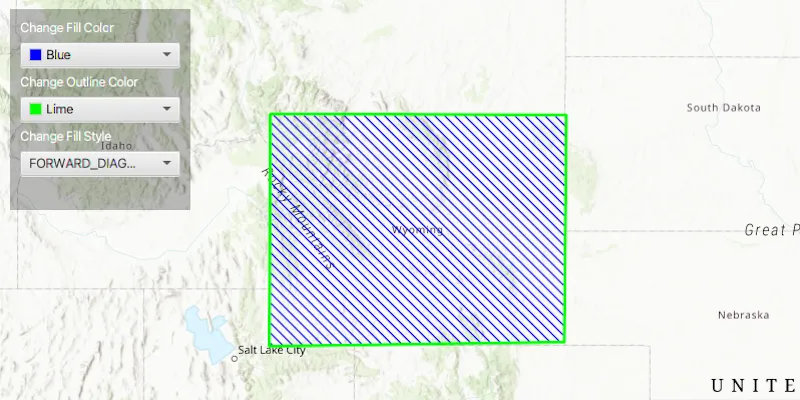
Use case
Customize the appearance of a graphic with a color and style scheme suitable for the data. For example, a polygon with a brown ‘forward-diagonal’ fill style could represent an area of artificial ground mapped on a geological map.
How to use the sample
Use the drop down menus in the control panel to change the fill color, outline color and fill style of the polygon.
How it works
- Create a
Polygonusing aPointCollectionto define its boundaries. - Create a
SimpleLineSymbol(SimpleLineSymbol.Style, color, width). - Create a
SimpleFillSymbol(SimpleFillSymbol.Style, color, outline). - Set the color, outline and style of the simple fill symbol object with:
setColor();setOutline(simpleLineSymbol);setStyle();
- Create a new
Graphicobject, passing in the polygon and simple fill symbol as parameters, and add the graphic to the graphics overlay withgraphicsOverlay.getGraphics().add(new Graphic(polygon, fillSymbol)).
Relevant API
- Graphic
- GraphicsOverlay
- PointCollection
- Polygon
- SimpleFillSymbol
- SimpleLineSymbol
Tags
fill, line, graphic, symbol
Sample code
SimpleFillSymbolSample.java
/* * Copyright 2017 Esri. * * Licensed under the Apache License, Version 2.0 (the "License"); you may not * use this file except in compliance with the License. You may obtain a copy of * the License at * * http://www.apache.org/licenses/LICENSE-2.0 * * Unless required by applicable law or agreed to in writing, software * distributed under the License is distributed on an "AS IS" BASIS, WITHOUT * WARRANTIES OR CONDITIONS OF ANY KIND, either express or implied. See the * License for the specific language governing permissions and limitations under * the License. */
package com.esri.samples.simple_fill_symbol;
import com.esri.arcgisruntime.ArcGISRuntimeEnvironment;import com.esri.arcgisruntime.geometry.PointCollection;import com.esri.arcgisruntime.geometry.Polygon;import com.esri.arcgisruntime.geometry.SpatialReferences;import com.esri.arcgisruntime.mapping.ArcGISMap;import com.esri.arcgisruntime.mapping.BasemapStyle;import com.esri.arcgisruntime.mapping.Viewpoint;import com.esri.arcgisruntime.mapping.view.Graphic;import com.esri.arcgisruntime.mapping.view.GraphicsOverlay;import com.esri.arcgisruntime.mapping.view.MapView;import com.esri.arcgisruntime.symbology.SimpleFillSymbol;import com.esri.arcgisruntime.symbology.SimpleFillSymbol.Style;import com.esri.arcgisruntime.symbology.SimpleLineSymbol;import javafx.application.Application;import javafx.geometry.Insets;import javafx.geometry.Pos;import javafx.scene.Scene;import javafx.scene.control.ColorPicker;import javafx.scene.control.ComboBox;import javafx.scene.control.Label;import javafx.scene.layout.Background;import javafx.scene.layout.BackgroundFill;import javafx.scene.layout.CornerRadii;import javafx.scene.layout.StackPane;import javafx.scene.layout.VBox;import javafx.scene.paint.Color;import javafx.scene.paint.Paint;import javafx.stage.Stage;
public class SimpleFillSymbolSample extends Application {
  private MapView mapView;
  @Override  public void start(Stage stage) {
    try {      // create stack pane and application scene      StackPane stackPane = new StackPane();      Scene scene = new Scene(stackPane);      scene.getStylesheets().add(getClass().getResource("/simple_fill_symbol/style.css").toExternalForm());
      // set title, size, and add scene to stage      stage.setTitle("Simple Fill Symbol Sample");      stage.setWidth(800);      stage.setHeight(700);      stage.setScene(scene);      stage.show();
      // authentication with an API key or named user is required to access basemaps and other location services      String yourAPIKey = System.getProperty("apiKey");      ArcGISRuntimeEnvironment.setApiKey(yourAPIKey);
      // create a control panel      var controlsVBox = new VBox(6);      controlsVBox.setBackground(new Background(new BackgroundFill(Paint.valueOf("rgba(0,0,0,0.3)"), CornerRadii.EMPTY,        Insets.EMPTY)));      controlsVBox.setPadding(new Insets(10.0));      controlsVBox.setMaxSize(180, 200);      controlsVBox.getStyleClass().add("panel-region");
      // create a fill symbol with an outline      var fillSymbol = new SimpleFillSymbol(Style.SOLID, Color.RED, new SimpleLineSymbol(SimpleLineSymbol.Style.SOLID, Color.BLUE, 3));
      // create a color picker that updates the fill symbol's color property      var fillLabel = new Label("Change Fill Color");      fillLabel.getStyleClass().add("panel-label");      var fillColorPicker = new ColorPicker();      fillColorPicker.setMaxWidth(Double.MAX_VALUE);      fillColorPicker.valueProperty().bindBidirectional(fillSymbol.colorProperty());
      // create a color picker that updates the fill symbol's outline color property      var outlineLabel = new Label("Change Outline Color");      outlineLabel.getStyleClass().add("panel-label");      var outlineColorPicker = new ColorPicker();      outlineColorPicker.setMaxWidth(Double.MAX_VALUE);      outlineColorPicker.valueProperty().bindBidirectional(fillSymbol.getOutline().colorProperty());
      // create a combobox that updates the fill symbol's fill style      var styleLabel = new Label("Change Fill Style");      styleLabel.getStyleClass().add("panel-label");      ComboBox<Style> styleBox = new ComboBox<>();      styleBox.getItems().addAll(Style.BACKWARD_DIAGONAL, Style.FORWARD_DIAGONAL, Style.DIAGONAL_CROSS, Style.HORIZONTAL,        Style.VERTICAL, Style.CROSS, Style.SOLID, Style.NULL);      styleBox.setMaxWidth(Double.MAX_VALUE);      styleBox.getSelectionModel().select(Style.SOLID);      styleBox.getSelectionModel().selectedItemProperty().addListener((observable, oldValue, newValue) ->        fillSymbol.setStyle(newValue));
      // add all the controls to the control panel      controlsVBox.getChildren().addAll(fillLabel, fillColorPicker, outlineLabel, outlineColorPicker, styleLabel, styleBox);
      // create a map with the topographic basemap style      final ArcGISMap map = new ArcGISMap(BasemapStyle.ARCGIS_TOPOGRAPHIC);
      // create a map view and set the map to it      mapView = new MapView();      mapView.setMap(map);
      // set a viewpoint on the map view      mapView.setViewpoint(new Viewpoint(43.03922, -108.55818, 10000000));
      // render graphics to the GeoView      var graphicsOverlay = new GraphicsOverlay();      mapView.getGraphicsOverlays().add(graphicsOverlay);
      // create a graphic from a square and fill symbol and add to the graphics overlay      PointCollection points = new PointCollection(SpatialReferences.getWebMercator());      points.add(-1.1579397849033352E7, 5618494.623878779);      points.add(-1.158486021463032E7, 5020365.591010623);      points.add(-1.236324731219847E7, 5009440.859816683);      points.add(-1.2360516129399985E7, 5621225.806677263);      Polygon square = new Polygon(points);      graphicsOverlay.getGraphics().add(new Graphic(square, fillSymbol));
      // add the map view and control panel to the stack pane      stackPane.getChildren().addAll(mapView, controlsVBox);      StackPane.setAlignment(controlsVBox, Pos.TOP_LEFT);      StackPane.setMargin(controlsVBox, new Insets(10, 0, 0, 10));
    } catch (Exception e) {      // on any error, display the stack trace      e.printStackTrace();    }  }
  /**   * Stops and releases all resources used in application.   */  @Override  public void stop() {
    if (mapView != null) {      mapView.dispose();    }  }
  /**   * Opens and runs application.   *   * @param args arguments passed to this application   */  public static void main(String[] args) {
    Application.launch(args);  }
}