Find symbols within the mil2525d specification that match a keyword.
Use case
You can use support for military symbology to allow users to report changes in the field using the correct military symbols.
How to use the sample
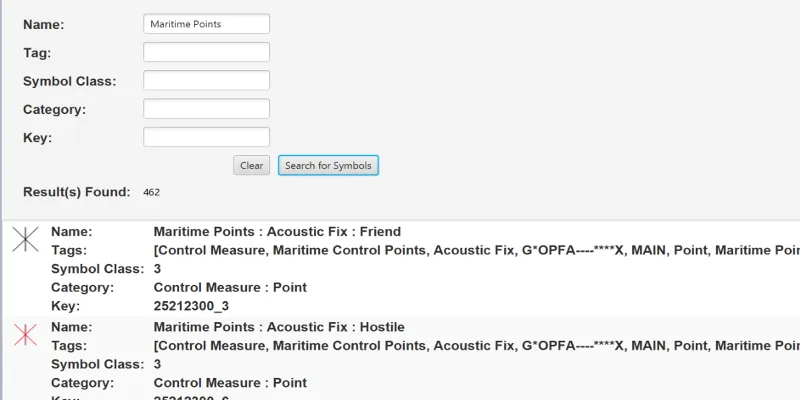
By default, leaving the fields blank and hitting search will find all symbols.
To search for certain symbols, enter text into one or more search boxes and click “Search for symbols”. Results are shown in a list. Pressing “Clear” will reset the search.
How it works
- Create a symbol dictionary with the mil2525d specification by passing the path to a .stylx file to the
SymbolDictionary.createFromFile(path)constructor. - Create
StyleSymbolSearchParameters. - Add members to the names, tags, symbolClasses, categories, and keys list fields of the search parameters.
- Search for symbols using the parameters with
symbolDictionary.searchSymbolsAsync(styleSymbolSearchParameters). - Get the
Symbolfrom the list of returnedStyleSymbolSearchResults.
Relevant API
- StyleSymbolSearchParameters
- StyleSymbolSearchResult
- Symbol
- SymbolDictionary
Additional information
This sample features the mil2525D specification. ArcGIS Maps SDKs for Native Apps supports other military symbology standards, including mil2525C and mil2525B(change 2). See the Military Symbology Styles overview on ArcGIS Solutions for Defense for more information about support for military symbology.
While developing, you can omit the path to the .stylx style file; ArcGIS Maps SDKs for Native Apps will refer to a copy installed with the SDK. For production, you should take care to deploy the proper style files and explicitly specify the path to that file when creating the symbol dictionary. See the Military Symbology Styles overview on ArcGIS Solutions for Defense for more information about support for military symbology.
Tags
CIM, defense, look up, MIL-STD-2525B, MIL-STD-2525C, MIL-STD-2525D, mil2525b, mil2525c, mil2525d, military, military symbology, search, symbology
Sample code
/* * Copyright 2017 Esri. * * Licensed under the Apache License, Version 2.0 (the "License"); you may not * use this file except in compliance with the License. You may obtain a copy of * the License at * * http://www.apache.org/licenses/LICENSE-2.0 * * Unless required by applicable law or agreed to in writing, software * distributed under the License is distributed on an "AS IS" BASIS, WITHOUT * WARRANTIES OR CONDITIONS OF ANY KIND, either express or implied. See the * License for the specific language governing permissions and limitations under * the License. */
package com.esri.samples.symbol_dictionary;
import java.io.File;import java.nio.file.Path;import java.util.List;import java.util.stream.Collectors;
import javafx.collections.FXCollections;import javafx.collections.ListChangeListener;import javafx.collections.ObservableList;import javafx.fxml.FXML;import javafx.scene.control.Alert;import javafx.scene.control.Alert.AlertType;import javafx.scene.control.ListView;import javafx.scene.control.Pagination;import javafx.scene.control.TextField;import javafx.scene.text.Text;
import com.esri.arcgisruntime.symbology.DictionarySymbolStyle;import com.esri.arcgisruntime.symbology.SymbolStyleSearchParameters;import com.esri.arcgisruntime.symbology.SymbolStyleSearchResult;
public class SymbolDictionaryController {
  @FXML private TextField nameField;  @FXML private TextField tagField;  @FXML private TextField symbolClassField;  @FXML private TextField categoryField;  @FXML private TextField keyField;  @FXML private Text searchResultsFound;  @FXML private Pagination resultPages;
  private ObservableList<SymbolStyleSearchResult> results;  private DictionarySymbolStyle dictionarySymbol;  private static final int MAX_RESULTS_PER_PAGE = 20;
  public void initialize() {    // loads a specification for the symbol dictionary    var stylxFile = new File(System.getProperty("data.dir"), Path.of("samples-data", "stylx", "mil2525d.stylx").toString());    dictionarySymbol = DictionarySymbolStyle.createFromFile(stylxFile.getAbsolutePath());    dictionarySymbol.loadAsync();
    // initialize result list    results = FXCollections.observableArrayList();
    // add listener to update pagination control when results change    results.addListener((ListChangeListener<SymbolStyleSearchResult>) e -> {      int resultSize = results.size();      resultPages.setPageCount(resultSize / MAX_RESULTS_PER_PAGE + 1);      resultPages.setCurrentPageIndex(0);      resultPages.setPageFactory(pageIndex -> {        ListView<SymbolView> resultsList = new ListView<>();        int start = pageIndex * MAX_RESULTS_PER_PAGE;        List<SymbolView> resultViews = results.subList(start, Math.min(start + MAX_RESULTS_PER_PAGE, results.size()))          .stream()          .map(SymbolView::new)          .collect(Collectors.toList());        resultsList.getItems().addAll(resultViews);        return resultsList;      });    });  }
  /**   * Searches through the symbol dictionary using the text from the search fields.   */  @FXML  private void handleSearchAction() {    // get parameters from input fields    var searchParameters = new SymbolStyleSearchParameters();    searchParameters.getNames().add(nameField.getText());    searchParameters.getTags().add(tagField.getText());    searchParameters.getSymbolClasses().add(symbolClassField.getText());    searchParameters.getCategories().add(categoryField.getText());    searchParameters.getKeys().add(keyField.getText());
    // search for any matching symbols    dictionarySymbol.searchSymbolsAsync(searchParameters).toCompletableFuture().whenComplete(      (searchResults, ex) -> {        if (ex == null) {          // update the result list          searchResultsFound.setText(String.valueOf(searchResults.size()));          results.clear();          results.addAll(searchResults);        } else {          // display an error if the symbol search completed with an exception          new Alert(AlertType.ERROR, "Error searching symbol dictionary.").show();        }      });  }
  /**   * Clears search results and any text in the search fields.   */  @FXML  private void handleClearAction() {    nameField.clear();    tagField.clear();    symbolClassField.clear();    categoryField.clear();    keyField.clear();    results.clear();    searchResultsFound.setText("");  }}
/* * Copyright 2017 Esri. * * Licensed under the Apache License, Version 2.0 (the "License"); you may not * use this file except in compliance with the License. You may obtain a copy of * the License at * * http://www.apache.org/licenses/LICENSE-2.0 * * Unless required by applicable law or agreed to in writing, software * distributed under the License is distributed on an "AS IS" BASIS, WITHOUT * WARRANTIES OR CONDITIONS OF ANY KIND, either express or implied. See the * License for the specific language governing permissions and limitations under * the License. */
package com.esri.samples.symbol_dictionary;
import javafx.application.Application;import javafx.fxml.FXMLLoader;import javafx.scene.Parent;import javafx.scene.Scene;import javafx.stage.Stage;
public class SymbolDictionarySample extends Application {
@Override public void start(Stage stage) throws Exception { Parent root = FXMLLoader.load(getClass().getResource("/symbol_dictionary/main.fxml")); Scene scene = new Scene(root);
// set title, size, and add scene to stage stage.setTitle("Symbol Dictionary Sample"); stage.setWidth(800); stage.setHeight(700); stage.setScene(scene); stage.show(); }
/** * Opens and runs application. * * @param args arguments passed to this application */ public static void main(String[] args) {
Application.launch(args); }
}/* * Copyright 2016 Esri. * * Licensed under the Apache License, Version 2.0 (the "License"); you may not * use this file except in compliance with the License. You may obtain a copy of * the License at * * http://www.apache.org/licenses/LICENSE-2.0 * * Unless required by applicable law or agreed to in writing, software * distributed under the License is distributed on an "AS IS" BASIS, WITHOUT * WARRANTIES OR CONDITIONS OF ANY KIND, either express or implied. See the * License for the specific language governing permissions and limitations under * the License. */
package com.esri.samples.symbol_dictionary;
import java.io.IOException;import java.net.URL;import java.util.ResourceBundle;
import javafx.fxml.FXML;import javafx.fxml.FXMLLoader;import javafx.fxml.Initializable;import javafx.scene.control.Alert;import javafx.scene.control.Label;import javafx.scene.image.ImageView;import javafx.scene.layout.HBox;import javafx.scene.paint.Color;
import com.esri.arcgisruntime.geometry.Point;import com.esri.arcgisruntime.symbology.SymbolStyleSearchResult;
class SymbolView extends HBox implements Initializable {
@FXML private ImageView imageView; @FXML private Label name; @FXML private Label tags; @FXML private Label symbolClass; @FXML private Label category; @FXML private Label key;
private final SymbolStyleSearchResult styleSymbolSearchResult;
/** * Creates a view of a symbol with a picture and description. * * @param symbolResult symbol result from a symbol dictionary search */ SymbolView(SymbolStyleSearchResult symbolResult) { styleSymbolSearchResult = symbolResult;
// Set the view of this component to the fxml file var loader = new FXMLLoader(getClass().getResource("/symbol_dictionary/symbol_view.fxml")); loader.setRoot(this); loader.setController(this);
try { loader.load(); } catch (IOException e) { e.printStackTrace(); } }
@Override public void initialize(URL location, ResourceBundle resources) { // initialize the component values name.setText(styleSymbolSearchResult.getName()); tags.setText(styleSymbolSearchResult.getTags().toString()); symbolClass.setText(styleSymbolSearchResult.getSymbolClass()); category.setText(styleSymbolSearchResult.getCategory()); key.setText(styleSymbolSearchResult.getKey());
// set image for non-text symbols if (!category.getText().startsWith("Text")) { // get the symbol and create a swatch from it styleSymbolSearchResult.getSymbolAsync().toCompletableFuture() .thenCompose(symbol -> symbol.createSwatchAsync(40, 40, Color.color(1.0, 1.0, 1.0, 0.0), new Point(0, 0, 0)).toCompletableFuture()) .whenComplete((image, ex) -> { if (ex == null) { // if the symbol fetch and swatch creation complete successfully, add the resulting image to the ImageView imageView.setImage(image); } else { // display an error if the symbol search or swatch creation completed with an exception new Alert(Alert.AlertType.ERROR, "Error creating swatch from symbol" + ex.getMessage()).show(); } }); } }}