Render features in a layer using a distinct symbol for each unique attribute value.
Use case
A unique value renderer allows you to symbolize features in a layer based on one or more matching attributes. This is typically done by using unique colors, fill styles, or images to represent features with equal values in a string field. A unique value renderer could be used to show different types of trees on a vegetation map by using symbols corresponding to matching name attributes.
How to use the sample
The map with the symbolized feature layer will be shown automatically when the sample loads.
How it works
Using the UniqueValueRenderer, separate symbols can be used to display features that have a specific value for a given field. In this case, the field is subregions of the USA. While multiple fields can be used, this sample only uses one.
- A
SimpleFillSymbolis defined for each type of feature. SimpleFillSymbolcan be applied to polygon features, which is the type of feature contained by thisServiceFeatureTable.- Separate
UniqueValueobjects are created which define the values in the renderer field and the symbol used to render matching features. - A default symbol is created to render all features that do not match any of the
UniqueValueobjects defined.
Relevant API
- FeatureLayer
- ServiceFeatureTable
- SimpleFillSymbol
- SimpleLineSymbol
- UniqueValue
- UniqueValueRenderer
About the data
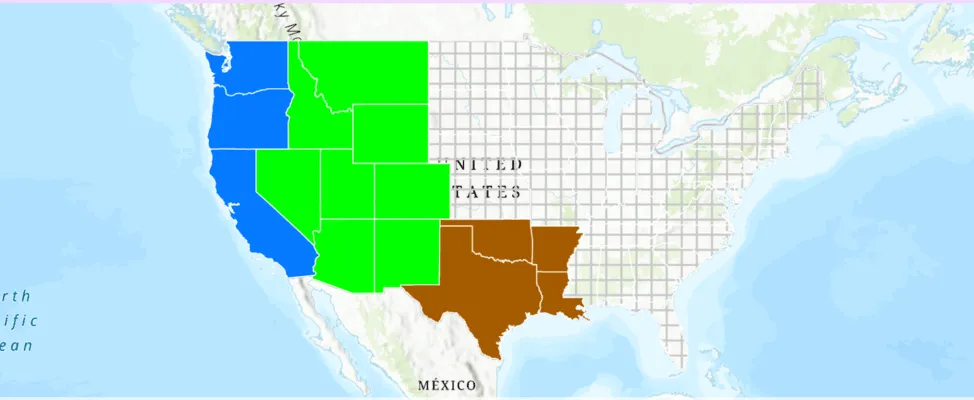
The map shows U.S. states symbolized by subregion. Symbols are defined for Pacific, Mountain, and West South Central states. All other features are symbolized with the default symbol.
Tags
draw, renderer, symbol, symbology, values
Sample code
/* Copyright 2025 Esri * * Licensed under the Apache License, Version 2.0 (the "License"); * you may not use this file except in compliance with the License. * You may obtain a copy of the License at * *    http://www.apache.org/licenses/LICENSE-2.0 * * Unless required by applicable law or agreed to in writing, software * distributed under the License is distributed on an "AS IS" BASIS, * WITHOUT WARRANTIES OR CONDITIONS OF ANY KIND, either express or implied. * See the License for the specific language governing permissions and * limitations under the License. * */
package com.esri.arcgismaps.sample.applyuniquevaluerenderer.components
import android.app.Applicationimport androidx.lifecycle.AndroidViewModelimport androidx.lifecycle.viewModelScopeimport com.arcgismaps.Colorimport com.arcgismaps.data.ServiceFeatureTableimport com.arcgismaps.geometry.Pointimport com.arcgismaps.geometry.SpatialReferenceimport com.arcgismaps.mapping.ArcGISMapimport com.arcgismaps.mapping.BasemapStyleimport com.arcgismaps.mapping.Viewpointimport com.arcgismaps.mapping.layers.FeatureLayerimport com.arcgismaps.mapping.symbology.SimpleFillSymbolimport com.arcgismaps.mapping.symbology.SimpleFillSymbolStyleimport com.arcgismaps.mapping.symbology.SimpleLineSymbolimport com.arcgismaps.mapping.symbology.SimpleLineSymbolStyleimport com.arcgismaps.mapping.symbology.UniqueValueimport com.arcgismaps.mapping.symbology.UniqueValueRendererimport com.esri.arcgismaps.sample.sampleslib.components.MessageDialogViewModelimport kotlinx.coroutines.launch
/** * ViewModel for the ApplyUniqueValueRenderer sample. * * This ViewModel builds an ArcGISMap, adds a FeatureLayer from a service, and * applies a UniqueValueRenderer based on the SUB_REGION field. The map and * layer are created during initialization and loaded in initialization. Errors are * reported through message dialog. */class ApplyUniqueValueRendererViewModel(application: Application) : AndroidViewModel(application) {
    // Create the map with a Topographic basemap and an initial viewpoint    var arcGISMap = ArcGISMap(BasemapStyle.ArcGISTopographic).apply {            // Center and scale the map to show the US            initialViewpoint = Viewpoint(                center = Point(                    x = -12356253.6,                    y = 3842795.4,                    spatialReference = SpatialReference.webMercator()                ),                scale = 52681563.2            )    }

    // Create a service feature table from the census feature service    private val censusFeatureTable = ServiceFeatureTable(        uri = "https://sampleserver6.arcgisonline.com/arcgis/rest/services/Census/MapServer/3"    )
    // Feature layer created from the service feature table    private val statesFeatureLayer = FeatureLayer.createWithFeatureTable(censusFeatureTable)
    // Message dialog helper for presenting errors to the user    val messageDialogVM = MessageDialogViewModel()
    init {        // Set a unique value renderer to the feature layer        configureUniqueValueRenderer()
        // Add the feature layer to the map's operational layers        arcGISMap.operationalLayers.add(statesFeatureLayer)
        // Load the map and the feature layer        viewModelScope.launch {            arcGISMap.load().onFailure { throwable ->                messageDialogVM.showMessageDialog(throwable)            }        }    }
    /**     * Creates a unique value renderer configured to render the Pacific states     * as blue, the Mountain states as green, and the West South Central states     * as brown.     *     * Build and apply a [UniqueValueRenderer] object to the [statesFeatureLayer].     */    private fun configureUniqueValueRenderer() {        // Outline used for all fill symbols        val stateOutline = SimpleLineSymbol(            style = SimpleLineSymbolStyle.Solid,            color = Color.white,            width = 0.7f        )
        // Region fill symbols        val pacificFill = SimpleFillSymbol(            style = SimpleFillSymbolStyle.Solid,            color = Color.fromRgba(4, 122, 255, 255), // blue            outline = stateOutline        )
        val mountainFill = SimpleFillSymbol(            style = SimpleFillSymbolStyle.Solid,            color = Color.green,            outline = stateOutline        )
        val westSouthCentralFill = SimpleFillSymbol(            style = SimpleFillSymbolStyle.Solid,            color = Color.fromRgba(165, 90, 0, 255), // brown            outline = stateOutline        )
        // Unique values for the renderer, based on SUB_REGION values        val pacificValue = UniqueValue(            description = "Pacific Region",            label = "Pacific",            symbol = pacificFill,            values = listOf("Pacific")        )
        val mountainValue = UniqueValue(            description = "Rocky Mountain Region",            label = "Mountain",            symbol = mountainFill,            values = listOf("Mountain")        )
        val westSouthCentralValue = UniqueValue(            description = "West South Central Region",            label = "West South Central",            symbol = westSouthCentralFill,            values = listOf("West South Central")        )
        // Default symbol for any other regions not explicitly defined        val defaultFill = SimpleFillSymbol(            style = SimpleFillSymbolStyle.Cross,            color = Color.fromRgba(200, 200, 200, 255), // gray            outline = stateOutline        )
        // Create the renderer and apply it to the feature layer        val uniqueValueRenderer = UniqueValueRenderer(            fieldNames = listOf("SUB_REGION"),            uniqueValues = listOf(pacificValue, mountainValue, westSouthCentralValue),            defaultLabel = "Other",            defaultSymbol = defaultFill        )
        statesFeatureLayer.renderer = uniqueValueRenderer    }}
/* Copyright 2025 Esri * * Licensed under the Apache License, Version 2.0 (the "License"); * you may not use this file except in compliance with the License. * You may obtain a copy of the License at * * http://www.apache.org/licenses/LICENSE-2.0 * * Unless required by applicable law or agreed to in writing, software * distributed under the License is distributed on an "AS IS" BASIS, * WITHOUT WARRANTIES OR CONDITIONS OF ANY KIND, either express or implied. * See the License for the specific language governing permissions and * limitations under the License. * */
package com.esri.arcgismaps.sample.applyuniquevaluerenderer
import android.os.Bundleimport androidx.activity.ComponentActivityimport androidx.activity.enableEdgeToEdgeimport androidx.activity.compose.setContentimport androidx.compose.material3.MaterialThemeimport androidx.compose.material3.Surfaceimport androidx.compose.runtime.Composableimport com.esri.arcgismaps.sample.sampleslib.theme.SampleAppThemeimport com.esri.arcgismaps.sample.applyuniquevaluerenderer.screens.ApplyUniqueValueRendererScreen
class MainActivity : ComponentActivity() {
override fun onCreate(savedInstanceState: Bundle?) { super.onCreate(savedInstanceState)
enableEdgeToEdge() setContent { SampleAppTheme { ApplyUniqueValueRendererApp() } } }
@Composable private fun ApplyUniqueValueRendererApp() { Surface(color = MaterialTheme.colorScheme.background) { ApplyUniqueValueRendererScreen( sampleName = getString(R.string.apply_unique_value_renderer_app_name) ) } }}/* Copyright 2025 Esri * * Licensed under the Apache License, Version 2.0 (the "License"); * you may not use this file except in compliance with the License. * You may obtain a copy of the License at * * http://www.apache.org/licenses/LICENSE-2.0 * * Unless required by applicable law or agreed to in writing, software * distributed under the License is distributed on an "AS IS" BASIS, * WITHOUT WARRANTIES OR CONDITIONS OF ANY KIND, either express or implied. * See the License for the specific language governing permissions and * limitations under the License. * */
package com.esri.arcgismaps.sample.applyuniquevaluerenderer.screens
import androidx.compose.foundation.layout.Columnimport androidx.compose.foundation.layout.fillMaxSizeimport androidx.compose.foundation.layout.paddingimport androidx.compose.material3.Scaffoldimport androidx.compose.runtime.Composableimport androidx.compose.ui.Modifierimport androidx.lifecycle.viewmodel.compose.viewModelimport com.arcgismaps.toolkit.geoviewcompose.MapViewimport com.esri.arcgismaps.sample.applyuniquevaluerenderer.components.ApplyUniqueValueRendererViewModelimport com.esri.arcgismaps.sample.sampleslib.components.MessageDialogimport com.esri.arcgismaps.sample.sampleslib.components.SampleTopAppBar
/** * Main screen layout for the Apply Unique Value Renderer sample. * The ViewModel constructs the map, adds the feature layer and applies * the UniqueValueRenderer. The screen simply displays the MapView and * presents any message dialogs emitted by the ViewModel. */@Composablefun ApplyUniqueValueRendererScreen(sampleName: String) { val mapViewModel: ApplyUniqueValueRendererViewModel = viewModel()
Scaffold( topBar = { SampleTopAppBar(title = sampleName) } ) { paddingValues -> Column( modifier = Modifier .fillMaxSize() .padding(paddingValues) ) { // MapView expects the ArcGISMap instance produced by the ViewModel MapView( modifier = Modifier .fillMaxSize() .weight(1f), arcGISMap = mapViewModel.arcGISMap )
// Display any error messages from the ViewModel mapViewModel.messageDialogVM.apply { if (dialogStatus) { MessageDialog( title = messageTitle, description = messageDescription, onDismissRequest = ::dismissDialog ) } } } }}