Render features statically or dynamically by setting the feature layer rendering mode.
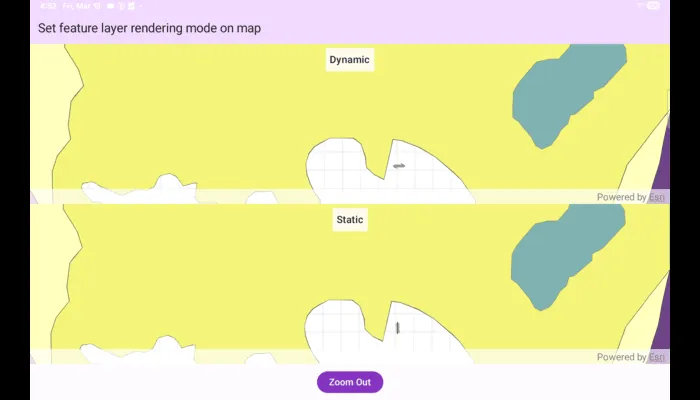
Use case
In dynamic rendering mode, features and graphics are stored on the GPU. As a result, dynamic rendering mode is good for moving objects and for maintaining graphical fidelity during extent changes, since individual graphic changes can be efficiently applied directly to the GPU state. This gives the map or scene a seamless look and feel when interacting with it. The number of features and graphics has a direct impact on GPU resources, so large numbers of features or graphics can affect the responsiveness of maps or scenes to user interaction. Ultimately, the number and complexity of features and graphics that can be rendered in dynamic rendering mode is dependent on the power and memory of the device’s GPU.
In static rendering mode, features and graphics are rendered only when needed (for example, after an extent change) and offloads a significant portion of the graphical processing onto the CPU. As a result, less work is required by the GPU to draw the graphics, and the GPU can spend its resources on keeping the UI interactive. Use this mode for stationary graphics, complex geometries, and very large numbers of features or graphics. The number of features and graphics has little impact on frame render time, meaning it scales well, and pushes a constant GPU payload. However, rendering updates is CPU and system memory intensive, which can have an impact on device battery life.
How to use the sample
Use the ‘Zoom In’/‘Zoom Out’ button to trigger the zoom animation on both static and dynamic maps.
How it works
- Create a map with operational layers and set the
FeatureRenderingModefor each layer. - The
FeatureRenderingModecan be set toStatic,Dynamic, orAutomatic.
- In Static rendering mode, the number of features and graphics has little impact on frame render time, meaning it scales well, however points don’t stay screen-aligned and point/polyline/polygon objects are only redrawn once map view navigation is complete.
- In Dynamic rendering mode, large numbers of features or graphics can affect the responsiveness of maps or scenes to user interaction, however points remain screen-aligned and point/polyline/polygon objects are continually redrawn while the map view is navigating.
- When left to automatic rendering, points are drawn dynamically and polylines and polygons statically.
Relevant API
- FeatureLayer
- FeatureRenderingMode
- Map
- MapView
Tags
dynamic, feature layer, features, rendering, static
Sample code
/* Copyright 2025 Esri * * Licensed under the Apache License, Version 2.0 (the "License"); * you may not use this file except in compliance with the License. * You may obtain a copy of the License at * *    http://www.apache.org/licenses/LICENSE-2.0 * * Unless required by applicable law or agreed to in writing, software * distributed under the License is distributed on an "AS IS" BASIS, * WITHOUT WARRANTIES OR CONDITIONS OF ANY KIND, either express or implied. * See the License for the specific language governing permissions and * limitations under the License. * */
package com.esri.arcgismaps.sample.setfeaturelayerrenderingmodeonmap.components
import android.app.Applicationimport androidx.lifecycle.AndroidViewModelimport androidx.lifecycle.viewModelScopeimport com.arcgismaps.data.ServiceFeatureTableimport com.arcgismaps.geometry.Pointimport com.arcgismaps.geometry.SpatialReferenceimport com.arcgismaps.mapping.ArcGISMapimport com.arcgismaps.mapping.Viewpointimport com.arcgismaps.mapping.layers.FeatureLayerimport com.arcgismaps.mapping.layers.FeatureRenderingModeimport com.arcgismaps.toolkit.geoviewcompose.MapViewProxyimport com.esri.arcgismaps.sample.sampleslib.components.MessageDialogViewModelimport kotlinx.coroutines.flow.MutableStateFlowimport kotlinx.coroutines.flow.asStateFlowimport kotlinx.coroutines.launchimport kotlin.time.Duration.Companion.seconds
/** * ViewModel for the "Set feature layer rendering mode on map" sample. * * Creates two ArcGISMap instances: one where feature layers use dynamic rendering, * and another that uses static rendering. Exposes MapViewProxy instances for each * MapView so the UI can animate the viewpoint using the same target viewpoint. */class SetFeatureLayerRenderingModeOnMapViewModel(app: Application) : AndroidViewModel(app) {
    // Message dialog VM used to report loading errors    val messageDialogVM = MessageDialogViewModel()
    // Map and proxy for the dynamic-rendered map    val mapViewProxyDynamic = MapViewProxy()    val arcGISMapDynamic: ArcGISMap = ArcGISMap()
    // Map and proxy for the static-rendered map    val mapViewProxyStatic = MapViewProxy()    val arcGISMapStatic: ArcGISMap = ArcGISMap()
    private val _isZoomedIn = MutableStateFlow(true)    val isZoomedIn = _isZoomedIn.asStateFlow()
    // Lazy properties for zoomed in and zoomed out viewpoints    private val zoomedInViewpoint by lazy {        Viewpoint(            center = Point(x = -118.45, y = 34.395, spatialReference = SpatialReference.wgs84()),            scale = 50000.0,            rotation = 90.0        )    }
    private val zoomedOutViewpoint by lazy {        Viewpoint(            center = Point(x = -118.37, y = 34.46, spatialReference = SpatialReference.wgs84()),            scale = 650000.0,            rotation = 0.0        )    }
    init {        // Define service URLs for point, polyline and polygon feature services        val pointServiceUrl = "https://sampleserver6.arcgisonline.com/arcgis/rest/services/Energy/Geology/FeatureServer/0"        val polylineServiceUrl = "https://sampleserver6.arcgisonline.com/arcgis/rest/services/Energy/Geology/FeatureServer/8"        val polygonServiceUrl = "https://sampleserver6.arcgisonline.com/arcgis/rest/services/Energy/Geology/FeatureServer/9"
        // Create ServiceFeatureTable instances and FeatureLayers for the dynamic map        val pointTableDynamic = ServiceFeatureTable(uri = pointServiceUrl)        val polylineTableDynamic = ServiceFeatureTable(uri = polylineServiceUrl)        val polygonTableDynamic = ServiceFeatureTable(uri = polygonServiceUrl)
        val pointLayerDynamic = FeatureLayer.createWithFeatureTable(pointTableDynamic).apply {            renderingMode = FeatureRenderingMode.Dynamic        }        val polylineLayerDynamic = FeatureLayer.createWithFeatureTable(polylineTableDynamic).apply {            renderingMode = FeatureRenderingMode.Dynamic        }        val polygonLayerDynamic = FeatureLayer.createWithFeatureTable(polygonTableDynamic).apply {            renderingMode = FeatureRenderingMode.Dynamic        }
        // Add dynamic layers to the dynamic map        arcGISMapDynamic.operationalLayers.addAll(            listOf(pointLayerDynamic, polylineLayerDynamic, polygonLayerDynamic)        )
        // Create ServiceFeatureTable instances and FeatureLayers for the static map        val pointTableStatic = ServiceFeatureTable(uri = pointServiceUrl)        val polylineTableStatic = ServiceFeatureTable(uri = polylineServiceUrl)        val polygonTableStatic = ServiceFeatureTable(uri = polygonServiceUrl)
        val pointLayerStatic = FeatureLayer.createWithFeatureTable(pointTableStatic).apply {            renderingMode = FeatureRenderingMode.Static        }        val polylineLayerStatic = FeatureLayer.createWithFeatureTable(polylineTableStatic).apply {            renderingMode = FeatureRenderingMode.Static        }        val polygonLayerStatic = FeatureLayer.createWithFeatureTable(polygonTableStatic).apply {            renderingMode = FeatureRenderingMode.Static        }
        // Add static layers to the static map        arcGISMapStatic.operationalLayers.addAll(            listOf(pointLayerStatic, polylineLayerStatic, polygonLayerStatic)        )
        // Set a shared initial viewpoint for both maps        val initialViewpoint = Viewpoint(            center = Point(x = -118.45, y = 34.395, spatialReference = SpatialReference.wgs84()),            scale = 50000.0        )        arcGISMapDynamic.initialViewpoint = initialViewpoint        arcGISMapStatic.initialViewpoint = initialViewpoint
        // Load maps and handle any failures        viewModelScope.launch {            arcGISMapDynamic.load().onFailure { messageDialogVM.showMessageDialog(it) }            arcGISMapStatic.load().onFailure { messageDialogVM.showMessageDialog(it) }        }    }
    /**     * Called by the UI when the zoom button is pressed. Animates both map views to the     * target viewpoint (zoomed in or zoomed out) using their respective MapViewProxy.     */    fun onZoomButtonClicked() {        val targetViewpoint = if (_isZoomedIn.value) zoomedOutViewpoint else zoomedInViewpoint
        viewModelScope.launch {            mapViewProxyDynamic.setViewpointAnimated(targetViewpoint, 5.seconds)        }        viewModelScope.launch {            mapViewProxyStatic.setViewpointAnimated(targetViewpoint, 5.seconds)        }        _isZoomedIn.value = !_isZoomedIn.value    }}
/* Copyright 2026 Esri * * Licensed under the Apache License, Version 2.0 (the "License"); * you may not use this file except in compliance with the License. * You may obtain a copy of the License at * * http://www.apache.org/licenses/LICENSE-2.0 * * Unless required by applicable law or agreed to in writing, software * distributed under the License is distributed on an "AS IS" BASIS, * WITHOUT WARRANTIES OR CONDITIONS OF ANY KIND, either express or implied. * See the License for the specific language governing permissions and * limitations under the License. * */
package com.esri.arcgismaps.sample.setfeaturelayerrenderingmodeonmap
import android.os.Bundleimport androidx.activity.ComponentActivityimport androidx.activity.enableEdgeToEdgeimport androidx.activity.compose.setContentimport androidx.compose.material3.MaterialThemeimport androidx.compose.material3.Surfaceimport androidx.compose.runtime.Composableimport com.esri.arcgismaps.sample.sampleslib.theme.SampleAppThemeimport com.esri.arcgismaps.sample.setfeaturelayerrenderingmodeonmap.screens.SetFeatureLayerRenderingModeOnMapScreen
class MainActivity : ComponentActivity() {
override fun onCreate(savedInstanceState: Bundle?) { super.onCreate(savedInstanceState)
enableEdgeToEdge() setContent { SampleAppTheme { SetFeatureLayerRenderingModeOnMapApp() } } }
@Composable private fun SetFeatureLayerRenderingModeOnMapApp() { Surface(color = MaterialTheme.colorScheme.background) { SetFeatureLayerRenderingModeOnMapScreen( sampleName = getString(R.string.set_feature_layer_rendering_mode_on_map_app_name) ) } }}/* Copyright 2025 Esri * * Licensed under the Apache License, Version 2.0 (the "License"); * you may not use this file except in compliance with the License. * You may obtain a copy of the License at * * http://www.apache.org/licenses/LICENSE-2.0 * * Unless required by applicable law or agreed to in writing, software * distributed under the License is distributed on an "AS IS" BASIS, * WITHOUT WARRANTIES OR CONDITIONS OF ANY KIND, either express or implied. * See the License for the specific language governing permissions and * limitations under the License. * */
package com.esri.arcgismaps.sample.setfeaturelayerrenderingmodeonmap.screens
import androidx.compose.foundation.layout.Boximport androidx.compose.foundation.layout.Columnimport androidx.compose.foundation.layout.fillMaxSizeimport androidx.compose.foundation.layout.fillMaxWidthimport androidx.compose.foundation.layout.paddingimport androidx.compose.material3.Buttonimport androidx.compose.material3.MaterialThemeimport androidx.compose.material3.Scaffoldimport androidx.compose.material3.Surfaceimport androidx.compose.material3.Textimport androidx.compose.runtime.Composableimport androidx.compose.runtime.getValueimport androidx.compose.ui.Alignmentimport androidx.compose.ui.Modifierimport androidx.compose.ui.unit.dpimport androidx.lifecycle.compose.collectAsStateWithLifecycleimport androidx.lifecycle.viewmodel.compose.viewModelimport com.arcgismaps.toolkit.geoviewcompose.MapViewimport com.esri.arcgismaps.sample.setfeaturelayerrenderingmodeonmap.components.SetFeatureLayerRenderingModeOnMapViewModelimport com.esri.arcgismaps.sample.sampleslib.components.MessageDialogimport com.esri.arcgismaps.sample.sampleslib.components.SampleTopAppBar
/** * Main screen showing two MapViews: one with dynamic rendering and one with static rendering. * A single Zoom button animates both maps to the same viewpoint to compare * differences in rendering behavior. */@Composablefun SetFeatureLayerRenderingModeOnMapScreen(sampleName: String) { val viewModel: SetFeatureLayerRenderingModeOnMapViewModel = viewModel() val isZoomedIn by viewModel.isZoomedIn.collectAsStateWithLifecycle()
Scaffold( topBar = { SampleTopAppBar(title = sampleName) } ) { paddingValues -> Column( modifier = Modifier .fillMaxSize() .padding(paddingValues), horizontalAlignment = Alignment.CenterHorizontally ) {
// Dynamic rendering MapView Box(modifier = Modifier .weight(1f) .fillMaxWidth()) { MapView( modifier = Modifier .fillMaxSize(), arcGISMap = viewModel.arcGISMapDynamic, mapViewProxy = viewModel.mapViewProxyDynamic )
// Label overlay Surface( modifier = Modifier .align(Alignment.TopCenter) .padding(8.dp), color = MaterialTheme.colorScheme.surface.copy(alpha = 0.85f) ) { Text( modifier = Modifier.padding(8.dp), text = "Dynamic", style = MaterialTheme.typography.titleMedium ) } }
// Static rendering MapView Box(modifier = Modifier .weight(1f) .fillMaxWidth()) { MapView( modifier = Modifier .fillMaxSize(), arcGISMap = viewModel.arcGISMapStatic, mapViewProxy = viewModel.mapViewProxyStatic )
// Label overlay Surface( modifier = Modifier .align(Alignment.TopCenter) .padding(8.dp), color = MaterialTheme.colorScheme.surface.copy(alpha = 0.85f) ) { Text( modifier = Modifier.padding(8.dp), text = "Static", style = MaterialTheme.typography.titleMedium ) } }
Button(modifier = Modifier.padding(12.dp), onClick = viewModel::onZoomButtonClicked) { Text(if (isZoomedIn) "Zoom Out" else "Zoom In") }
// Display any message dialogs raised by the ViewModel viewModel.messageDialogVM.apply { if (dialogStatus) { MessageDialog( title = messageTitle, description = messageDescription, onDismissRequest = ::dismissDialog ) } } } }}