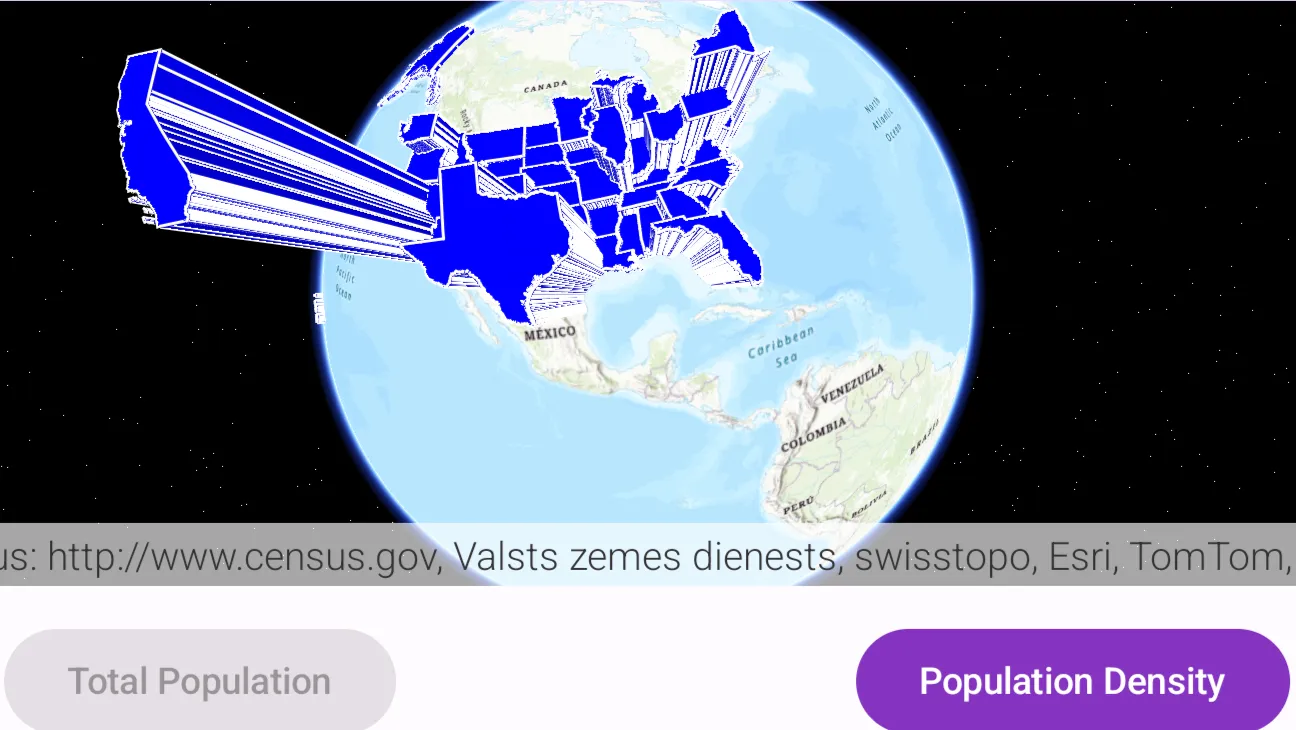
Extrude features based on their attributes.
Use case
Extrusion is the process of stretching a flat, 2D shape vertically to create a 3D object in a scene. For example, you can extrude building polygons by a height value to create three-dimensional building shapes.
How to use the sample
Press the button to switch between using population density and total population for extrusion. Higher extrusion directly corresponds to higher attribute values.
How it works
- Create a
ServiceFeatureTablefrom a URL. - Create a feature layer from the service feature table.
- Make sure to set the rendering mode to dynamic,
statesFeatureLayer.renderingMode = FeatureRenderingMode.Dynamic.
- Make sure to set the rendering mode to dynamic,
- Apply a
SimpleRendererto the feature layer. - Set
ExtrusionModeof render,RendererSceneProperties.extrusionMode = ExtrusionMode.BaseHeight. - Set extrusion expression of renderer,
RendererSceneProperties.extrusionExpression.
Relevant API
- ExtrusionExpression
- ExtrusionMode
- FeatureLayer
- SceneProperties
- ServiceFeatureTable
- SimpleRenderer
Tags
3D, extrude, extrusion, extrusion expression, height, renderer, scene
Sample code
/* Copyright 2025 Esri * * Licensed under the Apache License, Version 2.0 (the "License"); * you may not use this file except in compliance with the License. * You may obtain a copy of the License at * *    http://www.apache.org/licenses/LICENSE-2.0 * * Unless required by applicable law or agreed to in writing, software * distributed under the License is distributed on an "AS IS" BASIS, * WITHOUT WARRANTIES OR CONDITIONS OF ANY KIND, either express or implied. * See the License for the specific language governing permissions and * limitations under the License. * */
package com.esri.arcgismaps.sample.showextrudedfeatures.components
import android.app.Applicationimport androidx.compose.runtime.getValueimport androidx.compose.runtime.mutableStateOfimport androidx.compose.runtime.setValueimport androidx.lifecycle.AndroidViewModelimport androidx.lifecycle.viewModelScopeimport com.arcgismaps.Colorimport com.arcgismaps.LoadStatusimport com.arcgismaps.data.ServiceFeatureTableimport com.arcgismaps.geometry.Pointimport com.arcgismaps.mapping.ArcGISSceneimport com.arcgismaps.mapping.BasemapStyleimport com.arcgismaps.mapping.Viewpointimport com.arcgismaps.mapping.layers.FeatureLayerimport com.arcgismaps.mapping.layers.FeatureRenderingModeimport com.arcgismaps.mapping.symbology.ExtrusionModeimport com.arcgismaps.mapping.symbology.SimpleFillSymbolimport com.arcgismaps.mapping.symbology.SimpleFillSymbolStyleimport com.arcgismaps.mapping.symbology.SimpleLineSymbolimport com.arcgismaps.mapping.symbology.SimpleLineSymbolStyleimport com.arcgismaps.mapping.symbology.SimpleRendererimport com.arcgismaps.mapping.view.Cameraimport com.esri.arcgismaps.sample.sampleslib.components.MessageDialogViewModelimport kotlinx.coroutines.launch
private const val CENSUS_STATES_FEATURE_LAYER_URL =    "https://sampleserver6.arcgisonline.com/arcgis/rest/services/Census/MapServer/3"
/** * ViewModel for the ShowExtrudedFeatures sample. */class ShowExtrudedFeaturesViewModel(application: Application) : AndroidViewModel(application) {
    // The scene shown in the SceneView composable.    var arcGISScene = ArcGISScene(basemapStyle = BasemapStyle.ArcGISTopographic)
    // The service feature table and feature layer for the US states (used for extrusion)    private val serviceFeatureTable = ServiceFeatureTable(uri = CENSUS_STATES_FEATURE_LAYER_URL)    private val statesFeatureLayer: FeatureLayer =        FeatureLayer.createWithFeatureTable(featureTable = serviceFeatureTable).apply {            // Feature layer must be rendered dynamically for 3D extrusion to work.            renderingMode = FeatureRenderingMode.Dynamic        }
    // A simple renderer and its scene properties used to extrude features    private val fillSymbol = SimpleFillSymbol(        style = SimpleFillSymbolStyle.Solid,        color = Color.fromRgba(0, 0, 255, 255), //blue        outline = SimpleLineSymbol(            style = SimpleLineSymbolStyle.Solid,            color = Color.white,            width = 1f        )    )
    private val renderer = SimpleRenderer(symbol = fillSymbol)
    // Message dialog view model for surfacing errors    val messageDialogVM = MessageDialogViewModel()
    // Keep track of the currently selected statistic for extrusion    enum class Statistic(val label: String, val expression: String) {        TotalPopulation("Total Population", "[POP2007] / 10"),        PopulationDensity("Population Density", "([POP07_SQMI] * 5000) + 100000")    }
    // Public snapshot of the current statistic    var currentStatistic by mutableStateOf(Statistic.TotalPopulation)
    init {        // Build the scene initial viewpoint and add the feature layer.        // Set a viewpoint using a camera that frames the United States        val centerPoint = Point(x = -99.659448, y = 20.513652, z = 12_940_924.0)        val camera = Camera(            lookAtPoint = centerPoint,            distance = 0.0,            heading = 0.0,            pitch = 15.0,            roll = 0.0        )        arcGISScene.initialViewpoint = Viewpoint(center = centerPoint, camera = camera, scale = 5000.0)
        // Add the feature layer that will be extruded        arcGISScene.operationalLayers.add(statesFeatureLayer)
        // Configure renderer scene properties (extrusion mode & expression) and apply to the layer.        renderer.sceneProperties.apply {            // Use base height extrusion so polygons extrude from the ground up            extrusionMode = ExtrusionMode.BaseHeight            // Default extrusion expression            extrusionExpression = currentStatistic.expression        }        statesFeatureLayer.renderer = renderer
        // Load the scene and the feature layer, handle any errors by showing a message dialog        viewModelScope.launch {            arcGISScene.load().onFailure { throwable ->                messageDialogVM.showMessageDialog(throwable.message.toString())            }            statesFeatureLayer.loadStatus.collect { loadStatus ->                if(loadStatus is LoadStatus.FailedToLoad) {                    messageDialogVM.showMessageDialog(loadStatus.error.message.toString())                }            }        }    }
    /**     * Update the extrusion expression used by the renderer based on the selected [statistic].     */    fun updateExtrusionStatistic(statistic: Statistic) {        currentStatistic = statistic        // Update the renderer's extrusion expression        renderer.sceneProperties.extrusionExpression = statistic.expression        // If the layer is loaded, trigger a redraw by reassigning the renderer        statesFeatureLayer.renderer = renderer    }}
/* Copyright 2025 Esri * * Licensed under the Apache License, Version 2.0 (the "License"); * you may not use this file except in compliance with the License. * You may obtain a copy of the License at * * http://www.apache.org/licenses/LICENSE-2.0 * * Unless required by applicable law or agreed to in writing, software * distributed under the License is distributed on an "AS IS" BASIS, * WITHOUT WARRANTIES OR CONDITIONS OF ANY KIND, either express or implied. * See the License for the specific language governing permissions and * limitations under the License. * */
package com.esri.arcgismaps.sample.showextrudedfeatures
import android.os.Bundleimport androidx.activity.ComponentActivityimport androidx.activity.enableEdgeToEdgeimport androidx.activity.compose.setContentimport androidx.compose.material3.MaterialThemeimport androidx.compose.material3.Surfaceimport androidx.compose.runtime.Composableimport com.esri.arcgismaps.sample.sampleslib.theme.SampleAppThemeimport com.esri.arcgismaps.sample.showextrudedfeatures.screens.ShowExtrudedFeaturesScreen
class MainActivity : ComponentActivity() {
override fun onCreate(savedInstanceState: Bundle?) { super.onCreate(savedInstanceState)
enableEdgeToEdge() setContent { SampleAppTheme { ShowExtrudedFeaturesApp() } } }
@Composable private fun ShowExtrudedFeaturesApp() { Surface(color = MaterialTheme.colorScheme.background) { ShowExtrudedFeaturesScreen( sampleName = getString(R.string.show_extruded_features_app_name) ) } }}/* Copyright 2025 Esri * * Licensed under the Apache License, Version 2.0 (the "License"); * you may not use this file except in compliance with the License. * You may obtain a copy of the License at * * http://www.apache.org/licenses/LICENSE-2.0 * * Unless required by applicable law or agreed to in writing, software * distributed under the License is distributed on an "AS IS" BASIS, * WITHOUT WARRANTIES OR CONDITIONS OF ANY KIND, either express or implied. * See the License for the specific language governing permissions and * limitations under the License. * */
package com.esri.arcgismaps.sample.showextrudedfeatures.screens
import androidx.compose.foundation.layout.Arrangementimport androidx.compose.foundation.layout.Boximport androidx.compose.foundation.layout.Columnimport androidx.compose.foundation.layout.Rowimport androidx.compose.foundation.layout.fillMaxSizeimport androidx.compose.foundation.layout.fillMaxWidthimport androidx.compose.foundation.layout.paddingimport androidx.compose.material.icons.Iconsimport androidx.compose.material.icons.filled.Infoimport androidx.compose.material3.Buttonimport androidx.compose.material3.Scaffoldimport androidx.compose.material3.Textimport androidx.compose.runtime.Composableimport androidx.compose.ui.Modifierimport androidx.compose.ui.unit.dpimport androidx.lifecycle.viewmodel.compose.viewModelimport com.arcgismaps.toolkit.geoviewcompose.SceneViewimport com.esri.arcgismaps.sample.showextrudedfeatures.components.ShowExtrudedFeaturesViewModelimport com.esri.arcgismaps.sample.sampleslib.components.MessageDialogimport com.esri.arcgismaps.sample.sampleslib.components.SampleTopAppBar
/** * Main screen containing a SceneView and simple UI to switch extrusion expressions. */@Composablefun ShowExtrudedFeaturesScreen(sampleName: String) { val viewModel: ShowExtrudedFeaturesViewModel = viewModel()
Scaffold( topBar = { SampleTopAppBar(title = sampleName) }, content = { paddingValues -> Column(modifier = Modifier .fillMaxSize() .padding(paddingValues)) {
// SceneView composable from the toolkit renders the 3D scene Box(modifier = Modifier .fillMaxSize() .weight(1f)) { SceneView( modifier = Modifier.fillMaxSize(), arcGISScene = viewModel.arcGISScene ) }
// Controls for switching the extrusion statistic Row( modifier = Modifier .fillMaxWidth() .padding(12.dp), horizontalArrangement = Arrangement.SpaceEvenly ) { val current = viewModel.currentStatistic Button( onClick = { viewModel.updateExtrusionStatistic(ShowExtrudedFeaturesViewModel.Statistic.TotalPopulation) }, enabled = current != ShowExtrudedFeaturesViewModel.Statistic.TotalPopulation ) { Text(text = ShowExtrudedFeaturesViewModel.Statistic.TotalPopulation.label) }
Button( onClick = { viewModel.updateExtrusionStatistic(ShowExtrudedFeaturesViewModel.Statistic.PopulationDensity) }, enabled = current != ShowExtrudedFeaturesViewModel.Statistic.PopulationDensity ) { Text(text = ShowExtrudedFeaturesViewModel.Statistic.PopulationDensity.label) } }
// Show a message dialog if an error occurred in the ViewModel viewModel.messageDialogVM.apply { if (dialogStatus) { MessageDialog( title = messageTitle, description = messageDescription, icon = Icons.Default.Info, onDismissRequest = ::dismissDialog ) } } } } )}