Perform an exploratory line of sight analysis between two points in real time.
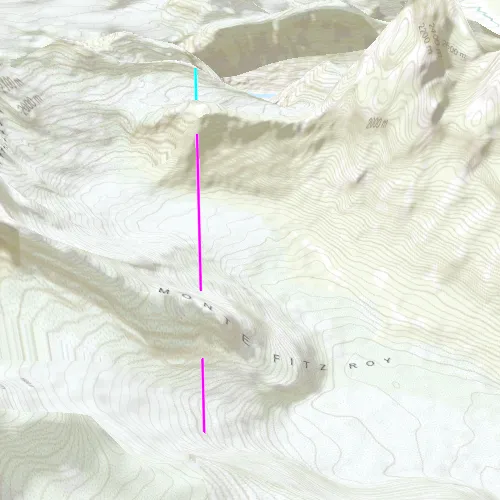
Use case
An exploratory line of sight analysis can be used to assess whether a view is obstructed between an observer and a target. Obstructing features could either be natural, like topography, or man-made, like buildings. Consider an events planning company wanting to commemorate a national event by lighting sequential beacons across hill summits or roof tops. To guarantee a successful event, ensuring an unobstructed line of sight between neighboring beacons would allow each beacon to be activated as intended.
Note: This analysis is a form of “exploratory analysis”, which means the results are calculated on the current scale of the data, and the results are generated very quickly but not persisted. If persisted analysis performed at the full resolution of the data is required, consider using a LineOfSightFunction to perform a line of sight calculation instead.
How to use the sample
The sample loads with a preset observer and target location, linked by a colored line. A red segment on the line means the view between observer and target is obstructed, whereas green means the view is unobstructed.
Click to turn on the mouse move event listener, then move the mouse to update the target location in real time. Click again to lock the target location.
How it works
- Create an
AnalysisOverlayand add it to the scene view. - Create an
ExploratoryLocationLineOfSightwith initial observer and target locations and add it to the analysis overlay. - Connect to the
SceneQuickView::mouseClickedslot to capture to capture mouse movement. Turn the screen point into a scene point withSceneView::screenToLocation(screenPoint). - Update the target location with
ExploratoryLocationLineOfSight::setTargetLocation(scenePoint).
Relevant API
- AnalysisOverlay
- ExploratoryLocationLineOfSight
- SceneView
Tags
3D, exploratory line of sight, visibility, visibility analysis
Sample code
// [WriteFile Name=ShowExploratoryLineOfSightBetweenPoints, Category=Analysis]// [Legal]// Copyright 2017 Esri.//// Licensed under the Apache License, Version 2.0 (the "License");// you may not use this file except in compliance with the License.// You may obtain a copy of the License at// http://www.apache.org/licenses/LICENSE-2.0//// Unless required by applicable law or agreed to in writing, software// distributed under the License is distributed on an "AS IS" BASIS,// WITHOUT WARRANTIES OR CONDITIONS OF ANY KIND, either express or implied.// See the License for the specific language governing permissions and// limitations under the License.// [Legal]
#ifdef PCH_BUILD#include "pch.hpp"#endif // PCH_BUILD
// sample headers#include "ShowExploratoryLineOfSightBetweenPoints.h"
// ArcGIS Maps SDK headers#include "AnalysisListModel.h"#include "AnalysisOverlay.h"#include "AnalysisOverlayListModel.h"#include "ArcGISTiledElevationSource.h"#include "Camera.h"#include "ElevationSourceListModel.h"#include "ExploratoryLocationLineOfSight.h"#include "MapTypes.h"#include "Point.h"#include "Scene.h"#include "SceneQuickView.h"#include "SpatialReference.h"#include "Surface.h"
// Qt headers#include <QFuture>
using namespace Esri::ArcGISRuntime;
ShowExploratoryLineOfSightBetweenPoints::ShowExploratoryLineOfSightBetweenPoints(QQuickItem* parent /* = nullptr */) :  QQuickItem(parent){}
void ShowExploratoryLineOfSightBetweenPoints::init(){  // Register classes for QML  qmlRegisterType<SceneQuickView>("Esri.Samples", 1, 0, "SceneView");  qmlRegisterType<ShowExploratoryLineOfSightBetweenPoints>("Esri.Samples", 1, 0, "ShowExploratoryLineOfSightBetweenPointsSample");}
void ShowExploratoryLineOfSightBetweenPoints::componentComplete(){  QQuickItem::componentComplete();
  // Create a scene and give it to the SceneView  m_sceneView = findChild<SceneQuickView*>("sceneView");
  Scene* scene = new Scene(BasemapStyle::ArcGISTopographic, this);  Surface* surface = new Surface(this);  surface->elevationSources()->append(    new ArcGISTiledElevationSource(QUrl("https://elevation3d.arcgis.com/arcgis/rest/services/WorldElevation3D/Terrain3D/ImageServer"), this));  scene->setBaseSurface(surface);  m_sceneView->setArcGISScene(scene);
  // Add an Analysis Overlay  m_analysisOverlay = new AnalysisOverlay(this);  m_sceneView->analysisOverlays()->append(m_analysisOverlay);
  // set initial viewpoint  setInitialViewpoint();
  // create LocationLineOfSight  createLineOfSight();
  // connect signals  connectSignals();}
void ShowExploratoryLineOfSightBetweenPoints::createLineOfSight(){  // create the observer/target points  const Point observerPt(-73.06958032962375, -49.253112971555446, 2000, SpatialReference::wgs84());  const Point targetPt(-73.079266999709162, -49.300457676730559, 1312, SpatialReference::wgs84());
  // create the line of sight  m_lineOfSight = new ExploratoryLocationLineOfSight(observerPt, targetPt, this);  m_analysisOverlay->analyses()->append(m_lineOfSight);
  // configure the LoS color and width  ExploratoryLineOfSight::setVisibleColor(QColor("cyan"));  ExploratoryLineOfSight::setObstructedColor(QColor("magenta"));  ExploratoryLineOfSight::setLineWidth(2.0f);}
void ShowExploratoryLineOfSightBetweenPoints::setInitialViewpoint(){  // Set a viewpoint  Point point(-73.0815, -49.3272, 4059, SpatialReference::wgs84());  const double heading = 11;  const double pitch = 62;  const double roll = 0;  Camera camera(point, heading, pitch, roll);  m_sceneView->setViewpointCameraAsync(camera);}
void ShowExploratoryLineOfSightBetweenPoints::connectSignals(){  // on mouse click perform the location viewshed  connect(m_sceneView, &SceneQuickView::mouseClicked, this, [this](QMouseEvent& event)  {    const Point pt = m_sceneView->screenToBaseSurface(event.position().x(), event.position().y());    m_lineOfSight->setTargetLocation(pt);  });
  connect(m_sceneView, &SceneQuickView::mousePressedAndHeld, this, [this]  {    m_calculating = true;  });
  connect(m_sceneView, &SceneQuickView::mouseMoved, this, [this](QMouseEvent& event)  {    if (m_calculating)    {      const Point pt = m_sceneView->screenToBaseSurface(event.position().x(), event.position().y());      m_lineOfSight->setTargetLocation(pt);    }  });
  connect(m_sceneView, &SceneQuickView::mouseReleased, this, [this]  {    m_calculating = false;  });}
// [WriteFile Name=ShowExploratoryLineOfSightBetweenPoints, Category=Analysis]// [Legal]// Copyright 2017 Esri.//// Licensed under the Apache License, Version 2.0 (the "License");// you may not use this file except in compliance with the License.// You may obtain a copy of the License at// http://www.apache.org/licenses/LICENSE-2.0//// Unless required by applicable law or agreed to in writing, software// distributed under the License is distributed on an "AS IS" BASIS,// WITHOUT WARRANTIES OR CONDITIONS OF ANY KIND, either express or implied.// See the License for the specific language governing permissions and// limitations under the License.// [Legal]
#ifndef ShowExploratoryLineOfSightBetweenPoints_H#define ShowExploratoryLineOfSightBetweenPoints_H
// Qt headers#include <QQuickItem>
namespace Esri::ArcGISRuntime{ class SceneQuickView; class AnalysisOverlay; class ExploratoryLocationLineOfSight;} // namespace Esri::ArcGISRuntime
class ShowExploratoryLineOfSightBetweenPoints : public QQuickItem{ Q_OBJECT
public: explicit ShowExploratoryLineOfSightBetweenPoints(QQuickItem* parent = nullptr); ~ShowExploratoryLineOfSightBetweenPoints() override = default;
void componentComplete() override; static void init();
private: Esri::ArcGISRuntime::SceneQuickView* m_sceneView = nullptr; Esri::ArcGISRuntime::AnalysisOverlay* m_analysisOverlay = nullptr; Esri::ArcGISRuntime::ExploratoryLocationLineOfSight* m_lineOfSight = nullptr;
bool m_calculating = false;
void setInitialViewpoint(); void connectSignals(); void createLineOfSight();};
#endif // ShowExploratoryLineOfSightBetweenPoints_H// [WriteFile Name=ShowExploratoryLineOfSightBetweenPoints, Category=Analysis]// [Legal]// Copyright 2017 Esri.//// Licensed under the Apache License, Version 2.0 (the "License");// you may not use this file except in compliance with the License.// You may obtain a copy of the License at// http://www.apache.org/licenses/LICENSE-2.0//// Unless required by applicable law or agreed to in writing, software// distributed under the License is distributed on an "AS IS" BASIS,// WITHOUT WARRANTIES OR CONDITIONS OF ANY KIND, either express or implied.// See the License for the specific language governing permissions and// limitations under the License.// [Legal]
import QtQuickimport QtQuick.Controlsimport Esri.Samples
ShowExploratoryLineOfSightBetweenPointsSample { id: rootRectangle clip: true width: 800 height: 600
SceneView { objectName: "sceneView" anchors.fill: parent
Component.onCompleted: { // Set the focus on SceneView to initially enable keyboard navigation forceActiveFocus(); } }}