Analyze the exploratory viewshed for a camera showing the visible and obstructed areas from an observer’s vantage point.
Use case
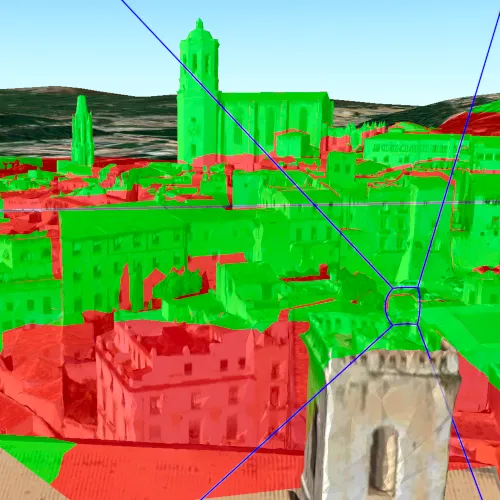
An exploratory viewshed analysis is a type of visual analysis you can perform at the current rendered resolution of a scene. The exploratory viewshed aims to answer the question ‘What can I see from a given location?’. The output is an overlay with two different colors - one representing the visible areas (green) and the other representing the obstructed areas (red).
Note: This analysis is a form of “exploratory analysis”, which means the results are calculated on the current scale of the data, and the results are generated very quickly but not persisted. If persisted analysis performed at the full resolution of the data is required, consider using a ViewshedFunction to perform a viewshed calculation instead.
How to use the sample
The sample will start with an exploratory viewshed created from the initial camera location, so only the visible (green) portion of the exploratory viewshed will be visible. Move around the scene to see the obstructed (red) portions. Click the ‘Update from Camera’ button to update the exploratory viewshed to the current camera position.
How it works
- Get the current camera from the scene with
SceneView::currentViewpointCamera. - Create an
ExploratoryLocationViewshed, passing in theCameraand a min/max distance. - Update the viewshed from a camera.
Relevant API
- AnalysisOverlay
- ArcGISScene
- ArcGISTiledElevationSource
- Camera
- ExploratoryLocationViewshed
- IntegratedMeshLayer
- SceneView
About the data
The scene shows an integrated mesh layer of Girona, Spain with the World Elevation source image service both hosted on ArcGIS Online.
Tags
3D, exploratory viewshed, integrated mesh, Scene, visibility analysis
Sample code
// [WriteFile Name=ShowExploratoryViewshedFromCameraInScene, Category=Analysis]// [Legal]// Copyright 2017 Esri.//// Licensed under the Apache License, Version 2.0 (the "License");// you may not use this file except in compliance with the License.// You may obtain a copy of the License at// http://www.apache.org/licenses/LICENSE-2.0//// Unless required by applicable law or agreed to in writing, software// distributed under the License is distributed on an "AS IS" BASIS,// WITHOUT WARRANTIES OR CONDITIONS OF ANY KIND, either express or implied.// See the License for the specific language governing permissions and// limitations under the License.// [Legal]
#ifdef PCH_BUILD#include "pch.hpp"#endif // PCH_BUILD
// sample headers#include "ShowExploratoryViewshedFromCameraInScene.h"
// ArcGIS Maps SDK headers#include "AnalysisListModel.h"#include "AnalysisOverlay.h"#include "AnalysisOverlayListModel.h"#include "ArcGISTiledElevationSource.h"#include "Camera.h"#include "ElevationSourceListModel.h"#include "ExploratoryLocationViewshed.h"#include "IntegratedMeshLayer.h"#include "LayerListModel.h"#include "MapTypes.h"#include "Point.h"#include "Scene.h"#include "SceneQuickView.h"#include "SpatialReference.h"#include "Surface.h"#include "Viewpoint.h"
using namespace Esri::ArcGISRuntime;
ShowExploratoryViewshedFromCameraInScene::ShowExploratoryViewshedFromCameraInScene(QQuickItem* parent /* = nullptr */) :  QQuickItem(parent){}
void ShowExploratoryViewshedFromCameraInScene::init(){  // Register classes for QML  qmlRegisterType<SceneQuickView>("Esri.Samples", 1, 0, "SceneView");  qmlRegisterType<ShowExploratoryViewshedFromCameraInScene>("Esri.Samples", 1, 0, "ShowExploratoryViewshedFromCameraInSceneSample");}
void ShowExploratoryViewshedFromCameraInScene::componentComplete(){  QQuickItem::componentComplete();
  // Create a scene  m_sceneView = findChild<SceneQuickView*>("sceneView");  m_scene = new Scene(BasemapStyle::ArcGISImageryStandard, this);
  // Set a base surface  Surface* surface = new Surface(this);  surface->elevationSources()->append(    new ArcGISTiledElevationSource(QUrl("https://elevation3d.arcgis.com/arcgis/rest/services/WorldElevation3D/Terrain3D/ImageServer"), this));  m_scene->setBaseSurface(surface);
  // Create and add the Girona, Spain integrated mesh layer  IntegratedMeshLayer* gironaMeshLayer =    new IntegratedMeshLayer(QUrl("https://tiles.arcgis.com/tiles/z2tnIkrLQ2BRzr6P/arcgis/rest/services/Girona_Spain/SceneServer"), this);  m_scene->operationalLayers()->append(gironaMeshLayer);
  // Add an AnalysisOverlay to display the viewshed analysis result  m_analysisOverlay = new AnalysisOverlay(this);  m_sceneView->analysisOverlays()->append(m_analysisOverlay);
  // Set initial viewpoint  setInitialViewpoint();
  // Add the Scene to the Sceneview  m_sceneView->setArcGISScene(m_scene);}
void ShowExploratoryViewshedFromCameraInScene::calculateViewshed(){  if (!m_viewshed)  {    // Create the viewshed    const double minDistance = 1;    const double maxDistance = 1000;    m_viewshed = new ExploratoryLocationViewshed(m_sceneView->currentViewpointCamera(), minDistance, maxDistance, this);
    // display the frustum    m_viewshed->setFrustumOutlineVisible(true);
    // Add the viewshed to the overlay    m_analysisOverlay->analyses()->append(m_viewshed);  }  else  {    m_viewshed->updateFromCamera(m_sceneView->currentViewpointCamera());  }}
void ShowExploratoryViewshedFromCameraInScene::setInitialViewpoint(){  const double x_longitude = 2.82691;  const double y_latitude = 41.985;  const double z_altitude = 124.987;  Point pt(x_longitude, y_latitude, z_altitude, SpatialReference(4326));
  const double heading = 332.131;  const double pitch = 82.4732;  const double roll = 0;  Camera camera(pt, heading, pitch, roll);
  Viewpoint initViewpoint(pt, camera);  m_scene->setInitialViewpoint(initViewpoint);}
// [WriteFile Name=ShowExploratoryViewshedFromCameraInScene, Category=Analysis]// [Legal]// Copyright 2017 Esri.//// Licensed under the Apache License, Version 2.0 (the "License");// you may not use this file except in compliance with the License.// You may obtain a copy of the License at// http://www.apache.org/licenses/LICENSE-2.0//// Unless required by applicable law or agreed to in writing, software// distributed under the License is distributed on an "AS IS" BASIS,// WITHOUT WARRANTIES OR CONDITIONS OF ANY KIND, either express or implied.// See the License for the specific language governing permissions and// limitations under the License.// [Legal]
#ifndef ShowExploratoryViewshedFromCameraInScene_H#define ShowExploratoryViewshedFromCameraInScene_H
// Qt headers#include <QQuickItem>
namespace Esri::ArcGISRuntime{ class Scene; class SceneQuickView; class AnalysisOverlay; class ExploratoryLocationViewshed;} // namespace Esri::ArcGISRuntime
class ShowExploratoryViewshedFromCameraInScene : public QQuickItem{ Q_OBJECT
public: explicit ShowExploratoryViewshedFromCameraInScene(QQuickItem* parent = nullptr); ~ShowExploratoryViewshedFromCameraInScene() override = default;
void componentComplete() override; static void init(); Q_INVOKABLE void calculateViewshed();
private: void setInitialViewpoint();
Esri::ArcGISRuntime::Scene* m_scene = nullptr; Esri::ArcGISRuntime::SceneQuickView* m_sceneView = nullptr; Esri::ArcGISRuntime::AnalysisOverlay* m_analysisOverlay = nullptr; Esri::ArcGISRuntime::ExploratoryLocationViewshed* m_viewshed = nullptr;};
#endif // ShowExploratoryViewshedFromCameraInScene_H// [WriteFile Name=ShowExploratoryViewshedFromCameraInScene, Category=Analysis]// [Legal]// Copyright 2017 Esri.//// Licensed under the Apache License, Version 2.0 (the "License");// you may not use this file except in compliance with the License.// You may obtain a copy of the License at// http://www.apache.org/licenses/LICENSE-2.0//// Unless required by applicable law or agreed to in writing, software// distributed under the License is distributed on an "AS IS" BASIS,// WITHOUT WARRANTIES OR CONDITIONS OF ANY KIND, either express or implied.// See the License for the specific language governing permissions and// limitations under the License.// [Legal]
import QtQuickimport QtQuick.Controlsimport Esri.Samples
ShowExploratoryViewshedFromCameraInSceneSample { id: rootRectangle clip: true width: 800 height: 600
SceneView { id: view objectName: "sceneView" anchors.fill: parent
Component.onCompleted: { // Set the focus on SceneView to initially enable keyboard navigation forceActiveFocus(); }
Button { anchors { horizontalCenter: parent.horizontalCenter bottom: view.attributionTop margins: 5 } text: qsTr("Calculate Viewshed") onClicked: calculateViewshed(); } }}