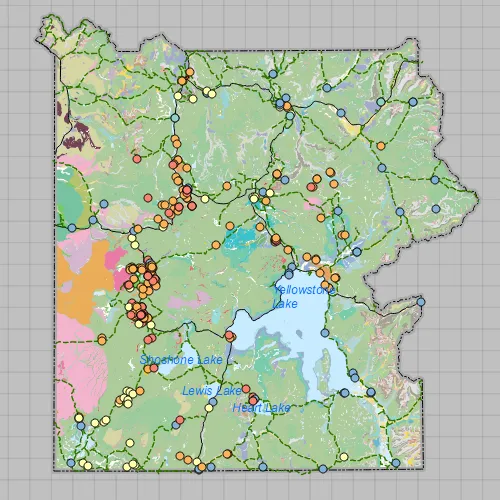
Display a map from a mobile map package.
Use case
An .mmpk file is an archive containing the data (specifically, basemaps and features) used to display an offline map.
How to use the sample
When the sample opens, it will automatically display the map in the mobile map package. Pan and zoom to observe the data from the mobile map package.
How it works
- Create a
MobileMapPackagespecifying the path to the .mmpk file. - Load the mobile map package with
mmpk::load(). - After it successfully loads, get the map from the .mmpk and add it to the map view:
mapView::setMap(mmpk::maps()::at(0)).
Relevant API
- MapView
- MobileMapPackage
Offline Data
Read more about how to set up the sample’s offline data here.
| Link | Local Location |
|---|---|
| Yellowstone Mobile Map Package | <userhome>/ArcGIS/Runtime/Data/mmpk/Yellowstone.mmpk |
Tags
mmpk, mobile map package, offline
Sample code
// [WriteFile Name=OpenMobileMap_MapPackage, Category=Maps]// [Legal]// Copyright 2016 Esri.//// Licensed under the Apache License, Version 2.0 (the "License");// you may not use this file except in compliance with the License.// You may obtain a copy of the License at// http://www.apache.org/licenses/LICENSE-2.0//// Unless required by applicable law or agreed to in writing, software// distributed under the License is distributed on an "AS IS" BASIS,// WITHOUT WARRANTIES OR CONDITIONS OF ANY KIND, either express or implied.// See the License for the specific language governing permissions and// limitations under the License.// [Legal]
#ifdef PCH_BUILD#include "pch.hpp"#endif // PCH_BUILD
// sample headers#include "OpenMobileMap_MapPackage.h"
// ArcGIS Maps SDK headers#include "Basemap.h"#include "Error.h"#include "MapQuickView.h"#include "MobileMapPackage.h"
// Qt headers#include <QStandardPaths>#include <QtCore/qglobal.h>
using namespace Esri::ArcGISRuntime;
// helper method to get cross platform data pathnamespace{QString defaultDataPath(){  QString dataPath;
#ifdef Q_OS_IOS  dataPath = QStandardPaths::writableLocation(QStandardPaths::DocumentsLocation);#else  dataPath = QStandardPaths::writableLocation(QStandardPaths::HomeLocation);#endif
  return dataPath;}
// sample MMPK locationconst QString sampleFileYellowstone {"/ArcGIS/Runtime/Data/mmpk/Yellowstone.mmpk"};
} // namespace
OpenMobileMap_MapPackage::OpenMobileMap_MapPackage(QQuickItem* parent) :  QQuickItem(parent){  // connect to the Mobile Map Package instance to know when errors occur  connect(MobileMapPackage::instance(), &MobileMapPackage::errorOccurred,          [](const Error& e)  {    if (e.isEmpty())    {      return;    }
    qDebug() << QString("Error: %1 %2").arg(e.message(), e.additionalMessage());  });}
OpenMobileMap_MapPackage::~OpenMobileMap_MapPackage() = default;
void OpenMobileMap_MapPackage::init(){  qmlRegisterType<MapQuickView>("Esri.Samples", 1, 0, "MapView");  qmlRegisterType<OpenMobileMap_MapPackage>("Esri.Samples", 1, 0, "OpenMobileMap_MapPackageSample");}
void OpenMobileMap_MapPackage::componentComplete(){  QQuickItem::componentComplete();
  // find QML MapView component  m_mapView = findChild<MapQuickView*>("mapView");
  // create the MMPK data path  // data is downloaded automatically by the sample viewer app. Instructions to download  // separately are specified in the readme.  const QString dataPath = defaultDataPath() + sampleFileYellowstone;
  // Load the MMPK  createMapPackage(dataPath);}
// create map packagevoid OpenMobileMap_MapPackage::createMapPackage(const QString& path){  //! [open mobile map package cpp snippet]  // instatiate a mobile map package  m_mobileMapPackage = new MobileMapPackage(path, this);
  // wait for the mobile map package to load  connect(m_mobileMapPackage, &MobileMapPackage::doneLoading, this, [this](const Error& error)  {    if (!error.isEmpty())    {      qDebug() << QString("Package load error: %1 %2").arg(error.message(), error.additionalMessage());      return;    }
    if (!m_mobileMapPackage || !m_mapView || m_mobileMapPackage->maps().isEmpty())    {      return;    }
    // The package contains a list of maps that could be shown in the UI for selection.    // For simplicity, obtain the first map in the list of maps.    // set the map on the map view to display    m_mapView->setMap(m_mobileMapPackage->maps().at(0));
  });
  m_mobileMapPackage->load();  //! [open mobile map package cpp snippet]}
// [WriteFile Name=OpenMobileMap_MapPackage, Category=Maps]// [Legal]// Copyright 2016 Esri.//// Licensed under the Apache License, Version 2.0 (the "License");// you may not use this file except in compliance with the License.// You may obtain a copy of the License at// http://www.apache.org/licenses/LICENSE-2.0//// Unless required by applicable law or agreed to in writing, software// distributed under the License is distributed on an "AS IS" BASIS,// WITHOUT WARRANTIES OR CONDITIONS OF ANY KIND, either express or implied.// See the License for the specific language governing permissions and// limitations under the License.// [Legal]
#ifndef OPEN_MOBILE_MAP_MAP_PACKAGE_H#define OPEN_MOBILE_MAP_MAP_PACKAGE_H
// Qt headers#include <QQuickItem>
namespace Esri::ArcGISRuntime{ class Error; class Map; class MapQuickView; class MobileMapPackage;}
class OpenMobileMap_MapPackage : public QQuickItem{ Q_OBJECT
public: explicit OpenMobileMap_MapPackage(QQuickItem* parent = nullptr); ~OpenMobileMap_MapPackage() override;
void componentComplete() override; static void init();
private: void createMapPackage(const QString& path);
Esri::ArcGISRuntime::MapQuickView* m_mapView = nullptr; Esri::ArcGISRuntime::MobileMapPackage* m_mobileMapPackage = nullptr;};
#endif // OPEN_MOBILE_MAP_MAP_PACKAGE_H// [WriteFile Name=OpenMobileMap_MapPackage, Category=Maps]// [Legal]// Copyright 2016 Esri.//// Licensed under the Apache License, Version 2.0 (the "License");// you may not use this file except in compliance with the License.// You may obtain a copy of the License at// http://www.apache.org/licenses/LICENSE-2.0//// Unless required by applicable law or agreed to in writing, software// distributed under the License is distributed on an "AS IS" BASIS,// WITHOUT WARRANTIES OR CONDITIONS OF ANY KIND, either express or implied.// See the License for the specific language governing permissions and// limitations under the License.// [Legal]
import QtQuickimport Esri.Samples
OpenMobileMap_MapPackageSample { width: 800 height: 600
// add a mapView component MapView { anchors.fill: parent objectName: "mapView"
Component.onCompleted: { // Set the focus on MapView to initially enable keyboard navigation forceActiveFocus(); } }}