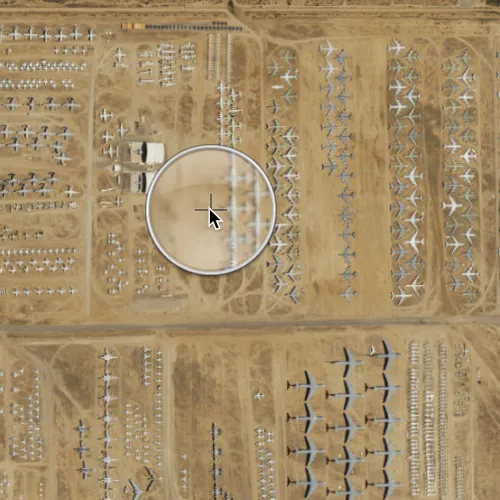
Tap and hold on a map to show a magnifier.
Use case
Due to the limited screen size of some mobile devices, it may be difficult to identify individual features on a map where there is a high density of information, or the scale is very small. This can be the case when a mobile device is used for navigation, and the user wishes to magnify a particular area to better identify a road intersection.
How to use the sample
Tap and hold on the map to show a magnifier, then drag across the map to move the magnifier. You can also pan the map while holding the magnifier, by dragging the magnifier to the edge of the map.
How it works
- Create a new
MapView, and add aMapto it:mapView::setMap(map). - Enable the magnifier using
mapView::setMagnifierEnabled(true). This will set the magnifier to be shown on the map when the user performs a long press gesture. Note: The default value isfalse. MapView::setMagnifierMapPanningEnabled()is set totrueby default to allow you to pan the map when the magnifier get’s near the edge of the map.
Relevant API
- Map
- MapView
- MapView::setMagnifierMapPanningEnabled()
- MapView::setMagnifierEnabled()
Additional information
This sample only works on a device with a touch screen. The magnifier will not appear via a mouse click.
Tags
magnify, map, zoom
Sample code
// [WriteFile Name=ShowMagnifier, Category=Maps]// [Legal]// Copyright 2016 Esri.//// Licensed under the Apache License, Version 2.0 (the "License");// you may not use this file except in compliance with the License.// You may obtain a copy of the License at// http://www.apache.org/licenses/LICENSE-2.0//// Unless required by applicable law or agreed to in writing, software// distributed under the License is distributed on an "AS IS" BASIS,// WITHOUT WARRANTIES OR CONDITIONS OF ANY KIND, either express or implied.// See the License for the specific language governing permissions and// limitations under the License.// [Legal]
#ifdef PCH_BUILD#include "pch.hpp"#endif // PCH_BUILD
// sample headers#include "ShowMagnifier.h"
// ArcGIS Maps SDK headers#include "Basemap.h"#include "Map.h"#include "MapQuickView.h"#include "MapTypes.h"#include "Point.h"#include "SpatialReference.h"#include "Viewpoint.h"
using namespace Esri::ArcGISRuntime;
ShowMagnifier::ShowMagnifier(QQuickItem* parent) :  QQuickItem(parent){}
ShowMagnifier::~ShowMagnifier() = default;
void ShowMagnifier::init(){  qmlRegisterType<MapQuickView>("Esri.Samples", 1, 0, "MapView");  qmlRegisterType<ShowMagnifier>("Esri.Samples", 1, 0, "ShowMagnifierSample");}
void ShowMagnifier::componentComplete(){  QQuickItem::componentComplete();
  // find QML MapView component  m_mapView = findChild<MapQuickView*>("mapView");
  // create a new basemap instance  Basemap* basemap = new Basemap(BasemapStyle::ArcGISImageryStandard, this);
  // create a new map instance  m_map = new Map(basemap, this);  m_map->setInitialViewpoint(Viewpoint(Point(-110.8258, 32.1545089, SpatialReference::wgs84()), 2e4));
  // set map on the map view  m_mapView->setMap(m_map);
  // enable magnifier  m_mapView->setMagnifierEnabled(true);}
// [WriteFile Name=ShowMagnifier, Category=Maps]// [Legal]// Copyright 2016 Esri.//// Licensed under the Apache License, Version 2.0 (the "License");// you may not use this file except in compliance with the License.// You may obtain a copy of the License at// http://www.apache.org/licenses/LICENSE-2.0//// Unless required by applicable law or agreed to in writing, software// distributed under the License is distributed on an "AS IS" BASIS,// WITHOUT WARRANTIES OR CONDITIONS OF ANY KIND, either express or implied.// See the License for the specific language governing permissions and// limitations under the License.// [Legal]
#ifndef SHOW_MAGNIFIER_H#define SHOW_MAGNIFIER_H
// Qt headers#include <QQuickItem>
namespace Esri::ArcGISRuntime{ class Map; class MapQuickView;}
class ShowMagnifier : public QQuickItem{ Q_OBJECT
public: explicit ShowMagnifier(QQuickItem* parent = nullptr); ~ShowMagnifier() override;
void componentComplete() override; static void init();
private: Esri::ArcGISRuntime::Map* m_map = nullptr; Esri::ArcGISRuntime::MapQuickView* m_mapView = nullptr;};
#endif // SHOW_MAGNIFIER_H// [WriteFile Name=ShowMagnifier, Category=Maps]// [Legal]// Copyright 2016 Esri.//// Licensed under the Apache License, Version 2.0 (the "License");// you may not use this file except in compliance with the License.// You may obtain a copy of the License at// http://www.apache.org/licenses/LICENSE-2.0//// Unless required by applicable law or agreed to in writing, software// distributed under the License is distributed on an "AS IS" BASIS,// WITHOUT WARRANTIES OR CONDITIONS OF ANY KIND, either express or implied.// See the License for the specific language governing permissions and// limitations under the License.// [Legal]
import QtQuickimport QtQuick.Controlsimport Esri.Samples
ShowMagnifierSample { width: 800 height: 600
// add a mapView component MapView { anchors.fill: parent objectName: "mapView"
Component.onCompleted: { // Set the focus on MapView to initially enable keyboard navigation forceActiveFocus(); } }}