Version 2.2.0 - December, 2025.
This page provides details about enhancements, deprecations, resolved issues, and known issues in the 2.2 release of ArcGIS Maps SDK for Unity.
Enhancements
This section outlines new features and improvements (what's new).
Identify support for 3D object scene layers
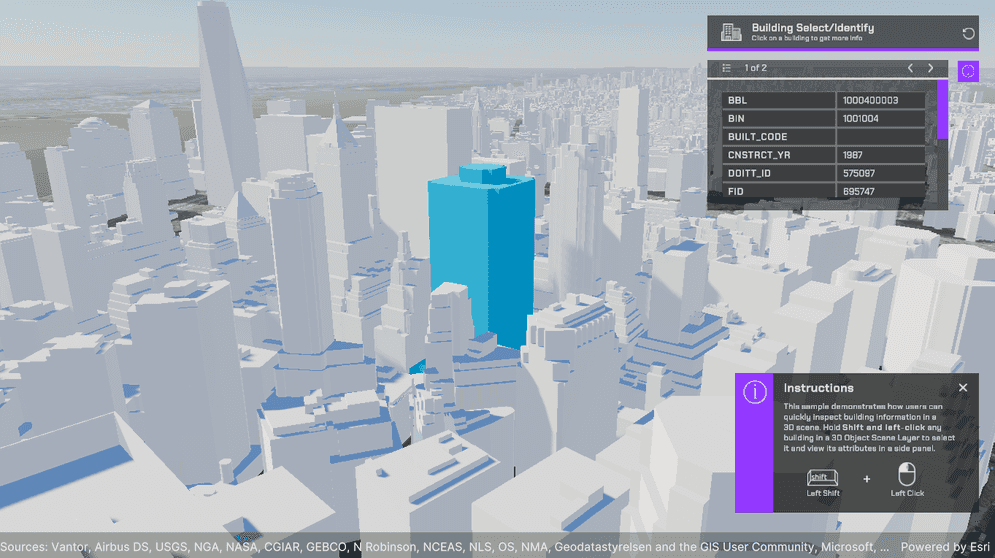
This release introduces support for the identify operation in 3D object scene layers.
Developers can now implement an identify workflow, where a click or tap on a feature—such as a building—in a 3D object scene layer invokes an operation that returns the feature’s attribute set and geometry reference. The identify result can be used to:
- Display pop-ups or information panels containing attribute data.
- Highlight the identified feature. For example, when a building is selected, its feature ID is written into a material parameter collection and the material highlights any pixels with a feature ID that matches the one selected.
- Initiate downstream actions such as zooming or flying to the identified feature, comparing attributes between features, or querying related business systems.
This enhancement removes the need for manual ray-casting or hit-testing logic to map screen coordinates to 3D features and query their attributes separately. It simplifies 3D interactivity, enabling a more efficient, integrated approach to data exploration and visualization. This feature is particularly beneficial to users in urban planning, architecture, and environmental studies, where understanding the attributes of various objects is crucial. For more information, see the Identify topic and the Identify sample.
Point cloud scene layers support
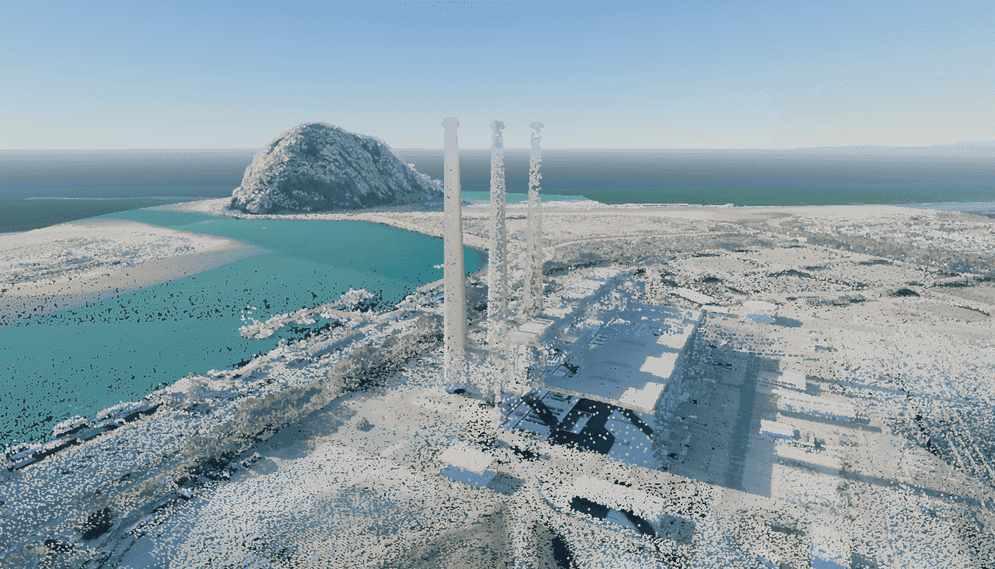
Support for point cloud scene layers has been added in this release, allowing users to visualize and interact with large collections of 3D points. Point cloud data consists of x, y, z spatial points captured by airborne or terrestrial sensors such as lidar and collected photogrammetrically. The points represent sampled surfaces and structures and are used to model 3D geometry, rather than depicting objects directly. Point cloud data is widely used in fields such as GIS, urban planning, and environmental monitoring, where detailed and accurate 3D representations are essential.
With this new capability, you can explore large point cloud datasets in 3D by panning, zooming, rotating, and tilting the view to focus on specific areas and gain a clearer understanding of spatial relationships within the data. Point cloud scene layers can be seamlessly integrated into applications, supporting immersive 3D visualizations such as simulations, training environments, and other advanced visualization workflows.
Although APIs for overriding or defining point cloud renderers and filters are not yet supported in this release, you can configure these properties using Scene Viewer. To do so, open the layer in Scene Viewer, adjust the rendering and filter settings as needed, and save your changes. The updated layer can be published and subsequently viewed in the SDK with the applied settings. For more information and detailed steps, see the Point cloud scene layer topic.
Custom materials support on building scene layers
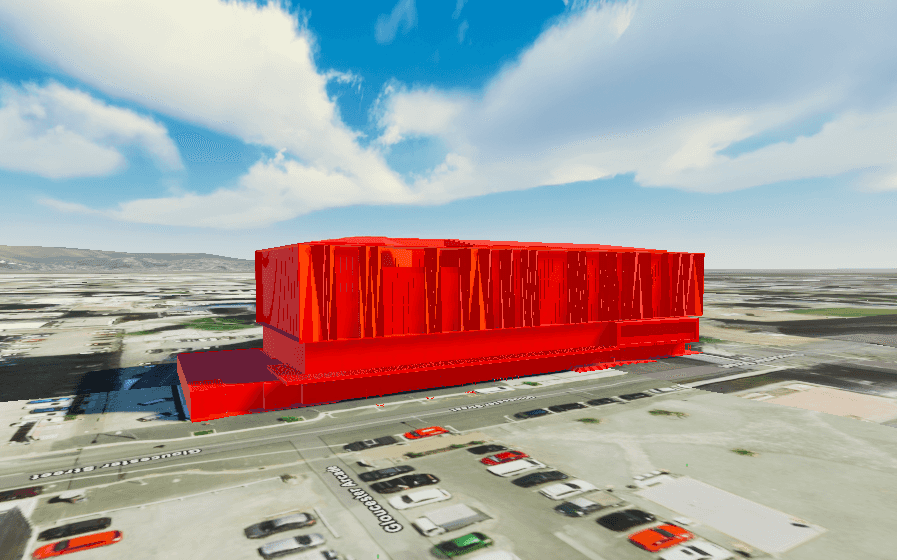
The ArcGIS Maps SDK for Unity now supports custom materials in building scene layers. This enhancement allows developers to colorize these layers using custom materials to better convey the meaning of the data and tailor their appearance to the intended audience.
C# API
ArcGISclass has been added, which represents geographic entities in a map, scene, map view or scene view.Geo Element ArcGISclass has been added, which contains the identified geoelements of a layer.Identify Layer Result ArcGISclass has been added to support point cloud layers.Point Cloud Layer ArcGISenum value has been added toPoint Cloud Layer ArcGISenum.Layer Type Featureclass has been introduced, which is a representation of a real-world geographic entity.Materialproperty has been added toReference ArcGISclass to support custom materials in this layer.Building Scene Layer
Components
- A Point Cloud Layer option has been added to the ArcGISMap component in the layer type drop-down under the Layers section. Users can now add point cloud layers to their maps from the ArcGISMap component.
Map Creator UI
- A Point Cloud Layer option has been added to the layer type drop-down under the Layers tab in the Map Creator UI. Users can now add point cloud layers to their maps directly from the UI.
Breaking API changes
-
The following enums have been removed from the
ArcGISclass in this release:Basemap Style OSMStandard OSMStandard Relief OSMStandard Relief Base OSMStreets OSMStreets Relief OSMStreets Relief Base OSMLight Gray OSMLight Gray Base OSMLight Gray Labels OSMDark Gray OSMDark Gray Base OSMDark Gray Labels OSMBlue Print OSMHybrid OSMHybrid Detail OSMNavigation OSMNavigation Dark
-
We recommend replacing your OSM basemap style with the equivalent Open basemap style, as follows:
| OSM Basemap style | Open Basemap style |
|---|---|
| OSMStandard | openOSMStyle |
| OSMStandardRelief | openOSMStyleRelief |
| OSMStandardReliefBase | openOSMStyleReliefBase |
| OSMStreets | openStreets |
| OSMStreetsRelief | openStreetsRelief |
| OSMLightGray | openLightGray |
| OSMLightGrayBase | openLightGrayBase |
| OSMLightGrayLabels | openLightGrayLabels |
| OSMDarkGray | openDarkGray |
| OSMDarkGrayBase | openDarkGrayBase |
| OSMDarkGrayLabels | openDarkGrayLabels |
| OSMStreetsReliefBase | openStreetsReliefBase |
| OSMBlueprint | openBlueprint |
| OSMHybrid | openHybrid |
| OSMHybridDetail | openHybridDetail |
| OSMNavigation | openNavigation |
| OSMNavigationDark | openNavigationDark |
Deprecations
This section lists OS and framework deprecation information.
OS and framework deprecations
- Windows 10 reached end of servicing from Microsoft on October 14, 2025. When reporting an issue with the ArcGIS Maps SDK for Unity running on a version of the Windows 10 operating system, you must be able to reproduce the issue using a version of Windows supported by Microsoft for general or public use.
Issues resolved
- BUG-000181117: Identify results are returned even when the mesh/geometry is located beyond the ray’s end point.
Known issues
-
Question on Esri Community: ArcGIS Maps SDK for Unity integrated mesh layer is rendered behind mountains when using the Universal Render Pipeline (URP).
Summary: When an integrated mesh scene layer is behind terrain such as behind a mountain, the layer is visible.
Workaround: None available.
-
BUG-000169956: Custom basemaps disappear from the basemap gallery after entering Play mode.
Summary: After adding custom basemaps from the Map Creator UI, click Play once removes all custom basemaps that are not currently selected.
Workaround: None available.
-
BUG-000169776: Custom basemap name is lost after clicking Play.
Summary: The name for the custom basemap that is added from the Map Creator UI is automatically changed to User Basemap after clicking Play.
Workaround: None available.
-
BUG-000169957: Local file packages cannot be added from the ArcGIS Map component using the ellipsis menu (three dots icon).
Summary: Adding local file packages from the ArcGIS Map component using the ellipsis menu does not add the file path to the Source field, and an
Invalidmessage is logged in the Unity Console.Operation Exception : Stack empty Workaround: Set the file path manually in the Source field. For example:
C.:/ Users/my _username/my _folder/example.slpk -
Question on Esri Community: Collider offsets in rendered OSM 3D buildings.
Summary: The collision mesh is not properly aligned with the corresponding rendered OSM 3D building, which can result in inaccurate collision detection or unexpected behavior when interacting with the 3D environment.
Workaround: None available.
-
BUG-000181005: Identify returns incorrect date and time attribute values on certain services.
Summary: When identifying a feature, date/time attributes that use non-ISO formats (e.g., M/DD/YYYY) are parsed incorrectly, resulting in invalid DateTime values (e.g. the value
6/2/2010may be interpreted as year0010because the DateTime parser only supports ISO 8601 (YYYY-MM-DD)).Workaround: None available.
Related topics
- Product life cycle (Esri Support Site)