This example shows how to use an app generation prompt to create a JavaScript or Python client application to access MCP for ArcGIS Location Services. The application is responsible for establishing a connection to the MCP server and invoking the available tools including geocoding, reverse geocoding, routing, and elevation.
No mapping library is needed for this example and the application generates static map images from the MCP server to display results.
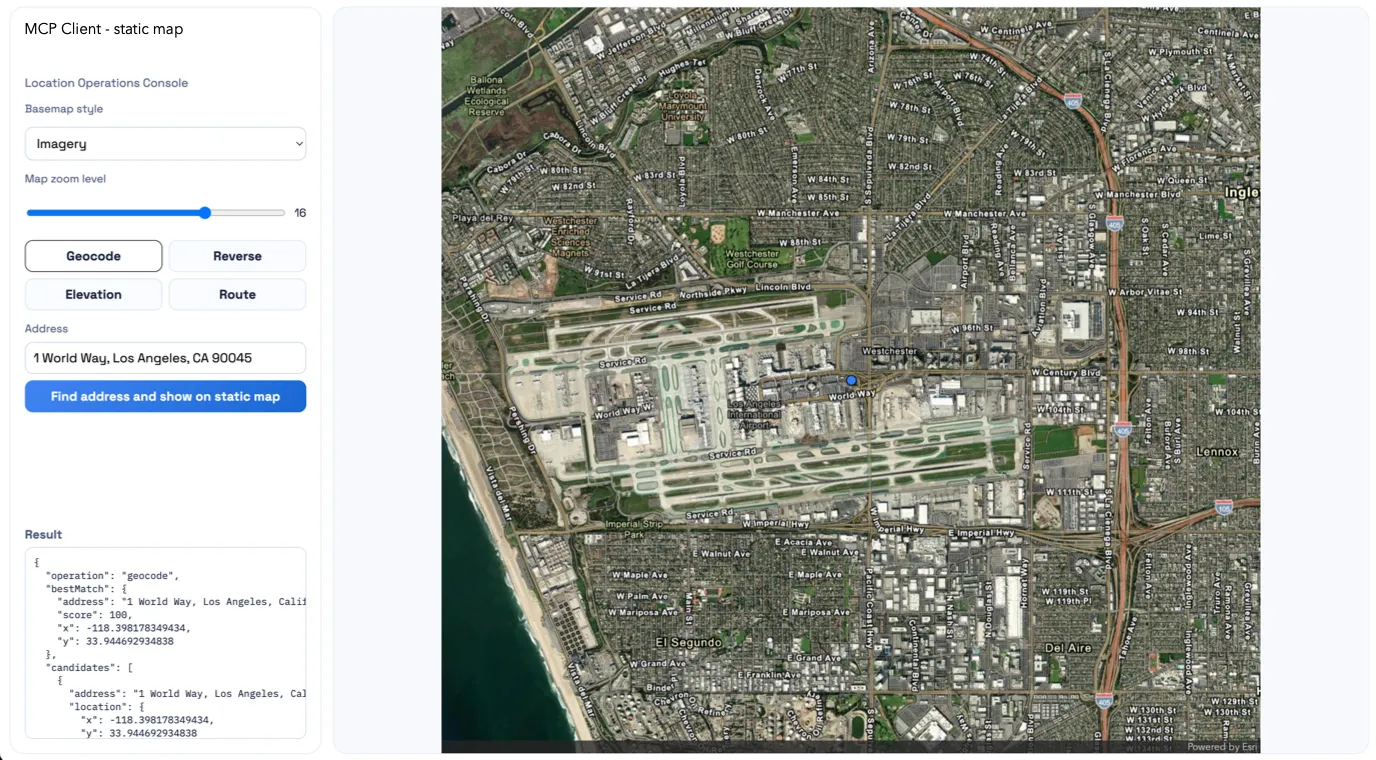
Resulting static map application built using MCP for ArcGIS Location Services.
Prerequisites
Your MCP client must be properly configured to access MCP for ArcGIS Location Services. For setup instructions, go to Get started.
Example
Run the following prompt to build the application. Use the dropdown to select the language you want to use.
Build a standalone Node.js + Express static map app using MCP for ArcGIS Location Services.
Create:- server.js- package.json- mcp.example.json- README.md- public/index.html- public/app.js- public/styles.css
Core features:- Geocode (find_address_candidates)- Reverse geocode (reverse_geocode)- Route solve (solve_route)- Elevation (elevation_at_locations)- Static map rendering via MCP (map_with_overlay)
MCP requirements:- Read mcp.json from local folder, fallback to ../mcp.json- Use servers.alp-mcp-server.url + headers- JSON-RPC initialize + tools/call- Support JSON and SSE responses- Normalize errors/output
API endpoints:- GET /api/health- GET /api/tools- POST /api/geocode- POST /api/reverse- POST /api/route- POST /api/elevation- POST /api/static-map
Map/render behavior:- Use MCP image output only (base64 PNG)- Blue circle markers from MCP args (not client overlays)- Marker color 3284FF, scale 0.5- Route style: line color 4285F4, width 5, blue start/end markers scale 0.5- If route has >1024 vertices, simplify/downsample before 'map_with_overlay' used
Zoom/layout/UX:- Zoom slider 1-22- Convert zoom to radius on server (effective zoom = zoom - 2, clamped)- For route maps, prefer polyline fit + padding instead of forced radius- Responsive split layout: controls + result panel + map viewport- Busy overlay while requests run; disable controls during requests
Run:- express dependency- scripts: start/dev = node server.js- default port 3001 with PORT override
Acceptance:- All operations work end-to-end- Route displays reliably even when original route geometry exceeds 1024 vertices- Navigation and navigation-night styles work- Zoom, busy indicator, and responsive layout behave correctly
Build a standalone Python static map app using FastAPI and MCP for ArcGIS Location Services.
This is a pure static-map application. Do not use the ArcGIS Maps SDK for JavaScript, do not render interactive client-side map overlays, and do not require a browser map API key. The UI should collect inputs with standard HTML controls and display the final MCP-generated PNG image in the result area.
Create:- app.py- requirements.txt- mcp.example.json- README.md- templates/index.html- static/app.js- static/styles.css
Core features:- Geocode (find_address_candidates)- Reverse geocode (reverse_geocode)- Route solve (solve_route)- Elevation (elevation_at_locations)- Static map rendering via MCP (map_with_overlay)
MCP requirements:- Read mcp.json from local folder, fallback to ../mcp.json- Use servers.alp-mcp-server.url + headers- JSON-RPC initialize + tools/call- Support JSON and SSE responses- Parse SSE data lines and use the last valid JSON payload- Normalize errors/output- Implement a reusable MCP client/helper for initialize and tool calls instead of duplicating request logic per route
API endpoints:- GET /- GET /api/health- GET /api/tools- POST /api/geocode- POST /api/reverse- POST /api/route- POST /api/elevation- POST /api/static-map
Credentials:- Use only the MCP server configuration and headers from mcp.json- Do not require MAP_API_KEY, ARCGIS_API_KEY, or any browser credential- Do not hardcode secrets
Map/render behavior:- Use MCP image output only (base64 PNG)- Blue circle markers from MCP args (not client overlays)- Marker color 3284FF, scale 0.5- Route style: line color 4285F4, width 5, blue start/end markers scale 0.5- If route has >1024 vertices, simplify/downsample before map_with_overlay- Display the returned PNG in the page as the primary visual result
Zoom/layout/UX:- Zoom slider 1-22- Convert zoom to radius on server (effective zoom = zoom - 2, clamped)- For route maps, prefer polyline fit + padding instead of forced radius- Responsive split layout: controls + result panel + map image preview- Busy overlay while requests run; disable controls during requests
Python implementation expectations:- Use Python for the MCP bridge, routing, config loading, and static map request shaping- Use FastAPI with Jinja2 templates for the HTML shell and FastAPI static file serving for `/static`- Use `httpx` for outbound HTTP requests to the MCP server- Keep dependencies minimal: `fastapi`, `uvicorn`, `httpx`, `jinja2`, and only add others if clearly needed- Default port 3001 with PORT override- Start the app with `uvicorn app:app --host 0.0.0.0 --port ${PORT:-3001}`- Initialize the MCP session once at startup if practical; otherwise lazily initialize and cache the session state for reuse across requests- If `mcp.json` is missing, malformed, or missing `servers.alp-mcp-server`, fail clearly with a readable startup or request error- Document required configuration in README, including where `mcp.json` should live and how to run the app
Route contracts:- `GET /` serves the main HTML page- `GET /api/health` returns a simple JSON health response- `GET /api/tools` returns the discovered MCP tools or a normalized error- `POST /api/geocode` accepts a search string and returns normalized candidate results plus enough normalized point data for the client to call `POST /api/static-map` without additional coordinate transformation- `POST /api/reverse` accepts x/y coordinates and returns a normalized reverse geocode result plus enough normalized point data for the client to call `POST /api/static-map`- `POST /api/route` accepts start/end and optional ordered stops and returns normalized route geometry, directions, summary fields, and enough normalized route/style data for the client to call `POST /api/static-map`- `POST /api/elevation` accepts one or more x/y points and returns normalized elevation results plus enough normalized point data for the client to call `POST /api/static-map`- `POST /api/static-map` accepts a mode-aware payload and returns normalized base64 PNG image output plus supporting metadata needed by the UI
Static map request contract:- Request JSON: - `mode`: one of `geocode`, `reverse`, `route`, `elevation` - `arcgisStyle`: one of `streets`, `streets-night`, `navigation`, `navigation-night`, `imagery` - `zoom`: integer 1-22 - `imageWidth`: integer - `imageHeight`: integer - `points`: optional array of `{ x, y, label? }` - `route`: optional route geometry and symbols derived from the solved route - `padding`: optional array for MCP map padding- The server is responsible for translating UI input into MCP tool arguments
Static map response contract:- Success JSON: - `imageBase64`: PNG payload without data URL prefix - `mimeType`: `image/png` - `width`: numeric image width - `height`: numeric image height - `mode`: echoed mode - `meta`: optional normalized details such as resolved radius, point count, or route simplification status- Error JSON: - `error`: object with `message`, `code`, and optional `details`
Input and error handling:- Validate request bodies with explicit FastAPI/Pydantic models- Return clear 4xx errors for invalid input and 5xx errors for upstream MCP failures- Surface MCP error messages in a normalized JSON shape the frontend can display- Handle empty results without crashing the UI- Keep response shapes consistent across success and error cases- If route geometry exceeds 1024 vertices, simplify or downsample it before calling `map_with_overlay` while preserving overall route shape and endpoints- When simplification is needed, preserve the first and last vertices, retain major bends, and avoid collapsing the route into an oversimplified straight line
Acceptance:- All operations work end-to-end- Route displays reliably even when original route geometry exceeds 1024 vertices- Navigation and navigation-night styles work- Zoom, busy indicator, and responsive layout behave correctly- The app runs as a proper FastAPI project and does not depend on browser-side ArcGIS authentication or the ArcGIS JS SDKThe agent should:
- Create a folder containing the application.
- Provide instructions on how to run the application.
- Implement a custom connector to MCP for ArcGIS Location Services using the provided URL and access token.
- Use the connector to call MCP tools for geocoding, reverse geocoding, routing, and elevation based on user input.
- Generate and display static map images from MCP-driven results instead of using an interactive map.
- Ask the user for missing implementation decisions before writing code.