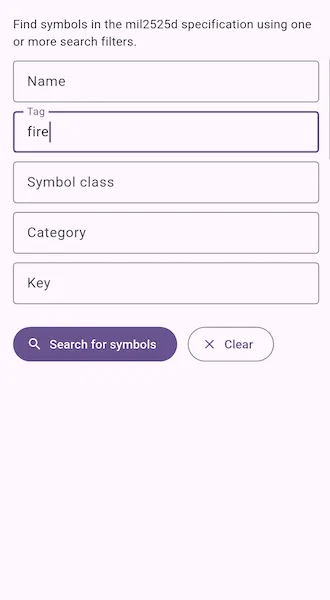
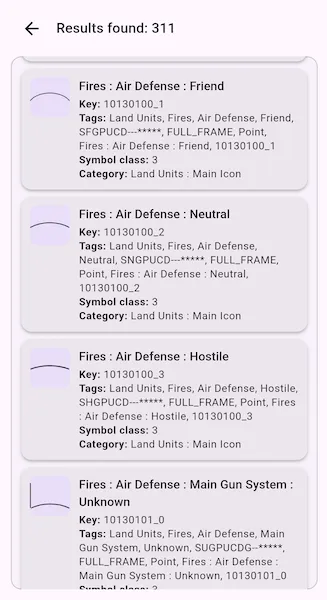
Find symbols within the mil2525d specification using one or more search criteria, such as name, tag, symbol class, category, or key.
| Search form | Search results |
|---|---|
 |  |
Use case
You can use support for military symbology to allow users to report changes in the field using the correct military symbols.
How to use the sample
By default, leaving the fields blank and hitting search will find all symbols.
To search for certain symbols, enter text into one or more search boxes and tap ‘Search for symbols’. Results are shown on a separate page, and the back button returns to the search form. Pressing ‘Clear’ will reset the search.
How it works
- Create a
DictionarySymbolStylefrom the military symbology.stylxfile usingDictionarySymbolStyle.withFileUri(...). - Create
SymbolStyleSearchParameters. - Add values to the
names,tags,symbolClasses,categories, andkeyslists on the search parameters. - Search for matching symbols with
DictionarySymbolStyle.searchSymbols(...). - Get the
ArcGISSymbolfrom each returnedSymbolStyleSearchResult. - Display the symbols in detail in a list.
Relevant API
- ArcGISSymbol
- DictionarySymbolStyle
- SymbolStyleSearchParameters
- SymbolStyleSearchResult
Additional information
This sample features the mil2525D specification. ArcGIS Maps SDK supports other military symbology standards, including mil2525C and mil2525B (change 2). See the Military Symbology Styles overview on ArcGIS Solutions for Defense for more information about support for military symbology.
Tags
CIM, defense, look up, MIL-STD-2525B, MIL-STD-2525C, MIL-STD-2525D, mil2525b, mil2525c, mil2525d, military, military symbology, search, symbology
Sample code
// Copyright 2026 Esri//// Licensed under the Apache License, Version 2.0 (the "License");// you may not use this file except in compliance with the License.// You may obtain a copy of the License at////   https://www.apache.org/licenses/LICENSE-2.0//// Unless required by applicable law or agreed to in writing, software// distributed under the License is distributed on an "AS IS" BASIS,// WITHOUT WARRANTIES OR CONDITIONS OF ANY KIND, either express or implied.// See the License for the specific language governing permissions and// limitations under the License.//
import 'dart:io';
import 'package:arcgis_maps/arcgis_maps.dart';import 'package:arcgis_maps_sdk_flutter_samples/common/common.dart';import 'package:flutter/material.dart';import 'package:go_router/go_router.dart';
class SearchSymbolStyleDictionary extends StatefulWidget {  const SearchSymbolStyleDictionary({super.key});
  @override  State<SearchSymbolStyleDictionary> createState() =>      _SearchSymbolStyleDictionaryState();}
class _SearchSymbolStyleDictionaryState    extends State<SearchSymbolStyleDictionary>    with SampleStateSupport {  // Text editing controllers for the name, tag, symbol class, category, and key search fields.  final _nameController = TextEditingController();  final _tagController = TextEditingController();  final _symbolClassController = TextEditingController();  final _categoryController = TextEditingController();  final _keyController = TextEditingController();
  // A flag to prevent interaction when a search is in progress.  var _ready = true;
  // Number of results found in the most recent search.  var _resultCount = 0;
  // List of symbol search results to show in the UI.  final _results = <_SymbolSearchPreview>[];
  // Whether to show the search form page or the results page.  var _showResultsPage = false;
  // A symbol style dictionary for MIL2525D symbols.  DictionarySymbolStyle? _dictionarySymbolStyle;
  // Message to show when there are no results to display.  var _statusMessage = 'No symbols to display. Run a search to see results.';
  @override  void dispose() {    _nameController.dispose();    _tagController.dispose();    _symbolClassController.dispose();    _categoryController.dispose();    _keyController.dispose();    super.dispose();  }
  @override  Widget build(BuildContext context) {    return Scaffold(      body: SafeArea(        child: Stack(          children: [            // When search results are available, show the search results page.            if (_showResultsPage)              _SearchResultsPage(                resultCount: _resultCount,                results: _results,                statusMessage: _statusMessage,                onBack: _showSearchPage,              )            // Otherwise, show the search form page.            else              _SearchFormPage(                nameController: _nameController,                tagController: _tagController,                symbolClassController: _symbolClassController,                categoryController: _categoryController,                keyController: _keyController,                onSearch: _performSearch,                onClear: _clear,              ),            LoadingIndicator(visible: !_ready),          ],        ),      ),    );  }
  // Load the symbol style dictionary from the file URI passed in the route parameters.  Future<void> _loadDictionarySymbolStyle() async {    try {      // Obtain the downloaded sample data.      final listPaths = GoRouter.of(context).state.extra! as List<String>;      final file = File(listPaths.first);
      // Load the symbol style dictionary from the file URI.      _dictionarySymbolStyle = DictionarySymbolStyle.withFileUri(file.uri);      await _dictionarySymbolStyle!.load();    } on Exception catch (e) {      _showResultsMessage('Failed to load the symbol style dictionary: $e');    }  }
  // Create a search filter using the parameters entered in the search fields.  SymbolStyleSearchParameters _getSearchParameters() {    final searchFilter = SymbolStyleSearchParameters();    // A helper that adds a search parameter to the search filter when the value is not empty.    void addIfNotEmpty(List<String> target, String value) {      final trimmedValue = value.trim();      if (trimmedValue.isNotEmpty) {        target.add(trimmedValue);      }    }
    // Add search parameters from the search fields if they are not empty.    addIfNotEmpty(searchFilter.names, _nameController.text);    addIfNotEmpty(searchFilter.tags, _tagController.text);    addIfNotEmpty(searchFilter.symbolClasses, _symbolClassController.text);    addIfNotEmpty(searchFilter.categories, _categoryController.text);    addIfNotEmpty(searchFilter.keys, _keyController.text);
    return searchFilter;  }
  Future<void> _performSearch() async {    FocusManager.instance.primaryFocus?.unfocus();
    // Prevent multiple simultaneous searches.    setState(() => _ready = false);
    // Load the symbol style dictionary if it hasn't been loaded yet.    if (_dictionarySymbolStyle == null) {      await _loadDictionarySymbolStyle();    }    // Create a search filter with the parameters entered in the search fields.    final searchFilter = _getSearchParameters();
    // Search for any matching symbols.    final results = await _dictionarySymbolStyle!.searchSymbols(searchFilter);    // Create a list of search result previews with swatch images.    final listSymbols = <_SymbolSearchPreview>[];    for (final result in results.toList()) {      final symbol = await result.getSymbol();      listSymbols.add(        _SymbolSearchPreview(          name: result.name,          tags: result.tags,          symbolClass: result.symbolClass,          category: result.category,          key: result.key,          swatch: SwatchImage(symbol: symbol, width: 40, height: 40),        ),      );    }    if (!mounted) return;
    // Update the UI with search results.    setState(() {      _results        ..clear()        ..addAll(listSymbols);      _resultCount = _results.length;      _statusMessage = _results.isEmpty ? 'No matching symbols found.' : '';      _showResultsPage = true;      _ready = true;    });  }
  // Clear search fields and results, and show the search form page.  void _clear() {    FocusManager.instance.primaryFocus?.unfocus();    _nameController.clear();    _tagController.clear();    _symbolClassController.clear();    _categoryController.clear();    _keyController.clear();
    setState(() {      _results.clear();      _statusMessage = 'No symbols to display. Enter search criteria to begin.';      _resultCount = 0;      _showResultsPage = false;    });  }
  void _showResultsMessage(String message) {    if (!mounted) return;    setState(() {      _results.clear();      _resultCount = 0;      _statusMessage = message;      _showResultsPage = true;      _ready = true;    });  }
  void _showSearchPage() {    FocusManager.instance.primaryFocus?.unfocus();    setState(() => _showResultsPage = false);  }}
// A widget that displays a list of search fields for symbol style dictionary search parameters.class _SearchFormPage extends StatelessWidget {  const _SearchFormPage({    required this.nameController,    required this.tagController,    required this.symbolClassController,    required this.categoryController,    required this.keyController,    required this.onSearch,    required this.onClear,  });
  final TextEditingController nameController;  final TextEditingController tagController;  final TextEditingController symbolClassController;  final TextEditingController categoryController;  final TextEditingController keyController;  final VoidCallback onSearch;  final VoidCallback onClear;
  @override  Widget build(BuildContext context) {    final viewInsets = MediaQuery.viewInsetsOf(context);
    return Align(      alignment: Alignment.topCenter,      child: ConstrainedBox(        constraints: const BoxConstraints(maxWidth: 800),        child: SingleChildScrollView(          keyboardDismissBehavior: ScrollViewKeyboardDismissBehavior.onDrag,          padding: EdgeInsets.fromLTRB(16, 20, 16, 16 + viewInsets.bottom),          child: Column(            crossAxisAlignment: CrossAxisAlignment.stretch,            children: [              Text(                'Find symbols in the mil2525d specification using one or more search filters.',                style: Theme.of(context).textTheme.bodyMedium,              ),              const SizedBox(height: 12),              _SearchFields(                nameController: nameController,                tagController: tagController,                symbolClassController: symbolClassController,                categoryController: categoryController,                keyController: keyController,              ),              const SizedBox(height: 12),              Wrap(                spacing: 12,                runSpacing: 8,                children: [                  FilledButton.icon(                    onPressed: onSearch,                    icon: const Icon(Icons.search),                    label: const Text('Search for symbols'),                  ),                  OutlinedButton.icon(                    onPressed: onClear,                    icon: const Icon(Icons.clear),                    label: const Text('Clear'),                  ),                ],              ),            ],          ),        ),      ),    );  }}
// A widget that shows the list of search fields for symbol style dictionary search parameters.class _SearchFields extends StatelessWidget {  const _SearchFields({    required this.nameController,    required this.tagController,    required this.symbolClassController,    required this.categoryController,    required this.keyController,  });
  final TextEditingController nameController;  final TextEditingController tagController;  final TextEditingController symbolClassController;  final TextEditingController categoryController;  final TextEditingController keyController;
  @override  Widget build(BuildContext context) {    return LayoutBuilder(      builder: (context, constraints) {        final wide = constraints.maxWidth >= 780;        final fields = [          _SearchTextField(label: 'Name', controller: nameController),          _SearchTextField(label: 'Tag', controller: tagController),          _SearchTextField(            label: 'Symbol class',            controller: symbolClassController,          ),          _SearchTextField(label: 'Category', controller: categoryController),          _SearchTextField(label: 'Key', controller: keyController),        ];
        if (wide) {          return Wrap(            spacing: 12,            runSpacing: 12,            children: fields                .map(                  (field) => SizedBox(                    width: (constraints.maxWidth - 24) / 2,                    child: field,                  ),                )                .toList(),          );        }
        return Column(          children: fields              .map(                (field) => Padding(                  padding: const EdgeInsets.only(bottom: 10),                  child: field,                ),              )              .toList(),        );      },    );  }}
// A widget that shows the results of a symbol style dictionary search.class _SearchResultsPage extends StatelessWidget {  const _SearchResultsPage({    required this.resultCount,    required this.results,    required this.statusMessage,    required this.onBack,  });
  final int resultCount;  final List<_SymbolSearchPreview> results;  final String statusMessage;  final VoidCallback onBack;
  @override  Widget build(BuildContext context) {    return Align(      alignment: Alignment.topCenter,      child: ConstrainedBox(        constraints: const BoxConstraints(maxWidth: 800),        child: Padding(          padding: const EdgeInsets.fromLTRB(16, 12, 16, 16),          child: Column(            crossAxisAlignment: CrossAxisAlignment.stretch,            children: [              Row(                children: [                  BackButton(onPressed: onBack),                  const SizedBox(width: 4),                  Expanded(                    child: Text(                      'Results found: $resultCount',                      style: Theme.of(context).textTheme.titleMedium,                    ),                  ),                ],              ),              const SizedBox(height: 8),              Expanded(                child: DecoratedBox(                  decoration: BoxDecoration(                    color: Theme.of(context).colorScheme.surfaceContainerLow,                    borderRadius: BorderRadius.circular(12),                    border: Border.all(                      color: Theme.of(context).colorScheme.outlineVariant,                    ),                  ),                  child: results.isEmpty                      ? Center(                          child: Padding(                            padding: const EdgeInsets.all(16),                            child: Text(                              statusMessage,                              textAlign: TextAlign.center,                            ),                          ),                        )                      : ListView.separated(                          padding: const EdgeInsets.all(12),                          itemCount: results.length,                          separatorBuilder: (_, _) => const SizedBox(height: 8),                          itemBuilder: (context, index) {                            final result = results[index];                            return _SearchResultCard(result: result);                          },                        ),                ),              ),            ],          ),        ),      ),    );  }}
// A simple widget that shows a text field with a label for searching.class _SearchTextField extends StatelessWidget {  const _SearchTextField({required this.label, required this.controller});
  final String label;  final TextEditingController controller;
  @override  Widget build(BuildContext context) {    return TextField(      controller: controller,      decoration: InputDecoration(        labelText: label,        border: const OutlineInputBorder(),        isDense: true,      ),    );  }}
// A widget that shows a card with symbol information for a symbol style dictionary search result.class _SearchResultCard extends StatelessWidget {  const _SearchResultCard({required this.result});
  final _SymbolSearchPreview result;
  @override  Widget build(BuildContext context) {    final textTheme = Theme.of(context).textTheme;
    return Card(      margin: EdgeInsets.zero,      clipBehavior: Clip.antiAlias,      child: Padding(        padding: const EdgeInsets.all(10),        child: Row(          crossAxisAlignment: CrossAxisAlignment.start,          children: [            Container(              width: 46,              height: 46,              decoration: BoxDecoration(                color: Theme.of(context).colorScheme.secondaryContainer,                borderRadius: BorderRadius.circular(8),              ),              child: result.swatch,            ),            const SizedBox(width: 10),            Expanded(              child: Column(                crossAxisAlignment: CrossAxisAlignment.start,                children: [                  Text(result.name, style: textTheme.titleSmall),                  const SizedBox(height: 3),                  Text.rich(                    TextSpan(                      style: textTheme.bodySmall,                      children: [                        TextSpan(                          text: 'Key: ',                          style: textTheme.bodySmall?.copyWith(                            fontWeight: FontWeight.bold,                          ),                        ),                        TextSpan(text: result.key),                      ],                    ),                  ),                  Text.rich(                    TextSpan(                      style: textTheme.bodySmall,                      children: [                        TextSpan(                          text: 'Tags: ',                          style: textTheme.bodySmall?.copyWith(                            fontWeight: FontWeight.bold,                          ),                        ),                        TextSpan(text: result.tags.join(', ')),                      ],                    ),                  ),                  Text.rich(                    TextSpan(                      style: textTheme.bodySmall,                      children: [                        TextSpan(                          text: 'Symbol class: ',                          style: textTheme.bodySmall?.copyWith(                            fontWeight: FontWeight.bold,                          ),                        ),                        TextSpan(text: result.symbolClass),                      ],                    ),                  ),                  Text.rich(                    TextSpan(                      style: textTheme.bodySmall,                      children: [                        TextSpan(                          text: 'Category: ',                          style: textTheme.bodySmall?.copyWith(                            fontWeight: FontWeight.bold,                          ),                        ),                        TextSpan(text: result.category),                      ],                    ),                  ),                ],              ),            ),          ],        ),      ),    );  }}
// A data class that holds symbol information for a symbol style dictionary search result.class _SymbolSearchPreview {  const _SymbolSearchPreview({    required this.name,    required this.tags,    required this.symbolClass,    required this.category,    required this.key,    required this.swatch,  });
  final String name;  final List<String> tags;  final String symbolClass;  final String category;  final String key;  final SwatchImage swatch;}