Learn how to apply renderers
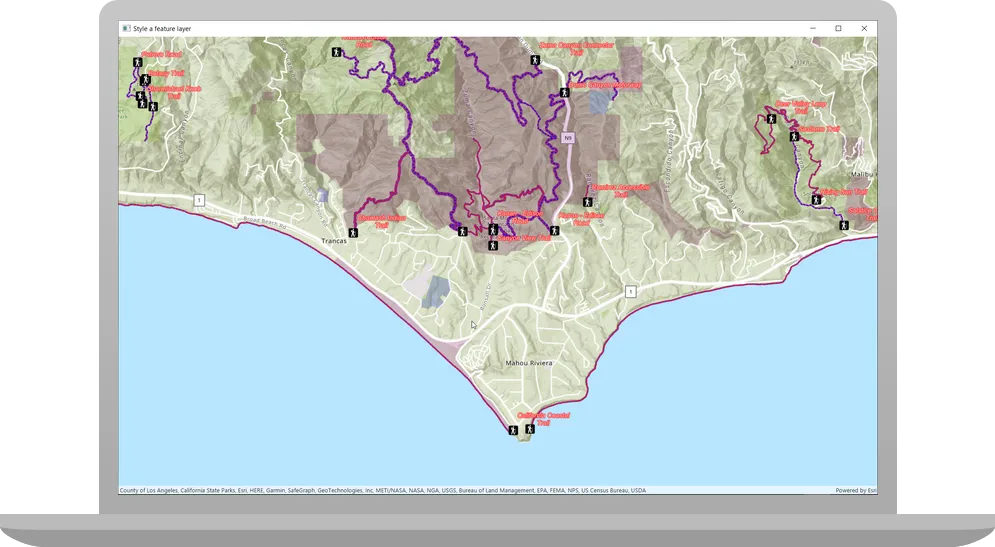
Applications can display feature layer data with different styles to enhance the visualization. The type of Renderer you choose depends on your application. A SimpleRenderer applies the same symbol to all features, a UniqueValueRenderer applies a different symbol to each unique attribute value, and a ClassBreaksRenderer applies a symbol to a range of numeric values. Renderers are responsible for accessing the data and applying the appropriate symbol to each feature when the layer draws. You can also use a LabelDefinition to show attribute information for features. Visit the Styles and data visualization documentation to learn more about styling layers.
You can also author, style and save web maps, web scenes, and layers as portal items and then add them to the map in your application. Visit the following tutorials to learn more about adding portal items.
In this tutorial, you will apply different renderers
Prerequisites
Before starting this tutorial:
-
You need an ArcGIS Location Platform or ArcGIS Online account.
-
Confirm that your system meets the minimum system requirements.
-
An IDE for Java.
Steps
Open a Java project with Gradle
-
To start this tutorial, complete the Display a map tutorial, or download and unzip the Display a map solution into a new folder.
-
Open the build.gradle file as a project in IntelliJ IDEA.
-
If you downloaded the solution, get an access token and set the API key.
An API key
An API key is a long-lived access token created using API key credentials. They are valid for up to one year and are typically embedded directly into client applications. gives your app access to secure resourcesA secure resource is any item or service in an ArcGIS that requires an ArcGIS account and authentication to access. Examples include ArcGIS Location Services, and items and data services in an ArcGIS portal. used in this tutorial.-
Go to the Create an API key tutorial to obtain a new API key access token
An access token is an authorization string that provides access to secure ArcGIS content, data, and services. Its capabilities are determined by the privileges it supports. It is obtained by implementing API key authentication, User authentication, or App authentication. using your ArcGIS Location PlatformAn ArcGIS Location Platform account, formerly known as an ArcGIS Developer account, is an identity associated with an ArcGIS Location Platform subscription. or ArcGIS OnlineAn ArcGIS Online account, also known as an ArcGIS Organization account, is an identity associated with an ArcGIS Online subscription. It can be used to access ArcGIS tools and develop applications with ArcGIS location services for an organization. account. Ensure that the following privilegePrivileges are a set of permissions assigned to ArcGIS accounts, developer credentials, and applications that grant access to secure resources and functionality in ArcGIS. is enabled: Location services > Basemaps > Basemap styles service. Copy the access token as it will be used in the next step. -
In IntelliJ IDEA’s Project tool window, open src/main/java/com.example.app and double-click App.
-
In the
start()method, set the API key property on theArcGISRuntimeEnvironmentwith your access tokenAn access token is an authorization string that provides access to secure ArcGIS content, data, and services. Its capabilities are determined by the privileges it supports. It is obtained by implementing API key authentication, User authentication, or App authentication. . Replace YOUR_ACCESS_TOKEN with your copied access token. Be sure to surround your access token with double quotes as it is a string.App.javaArcGISRuntimeEnvironment.setApiKey("YOUR_ACCESS_TOKEN");
-
Preconfigure app
Modify the files from the Display a map tutorial so they can be used in this tutorial: you will change the app title, modify the viewpoint, and move the declaration of the map variable.
-
In the
start()life-cycle method, change the title that will appear on the application window toStyle a feature layer.App.java63 collapsed lines// Copyright 2022 Esri// Licensed under the Apache License, Version 2.0 (the "License");// you may not use this file except in compliance with the License.// You may obtain a copy of the License at//// http://www.apache.org/licenses/LICENSE-2.0//// Unless required by applicable law or agreed to in writing, software// distributed under the License is distributed on an "AS IS" BASIS,// WITHOUT WARRANTIES OR CONDITIONS OF ANY KIND, either express or implied.// See the License for the specific language governing permissions and// limitations under the License.package com.example.app;import com.esri.arcgisruntime.ArcGISRuntimeEnvironment;import com.esri.arcgisruntime.arcgisservices.LabelDefinition;import com.esri.arcgisruntime.data.ServiceFeatureTable;import com.esri.arcgisruntime.layers.FeatureLayer;import com.esri.arcgisruntime.mapping.ArcGISMap;import com.esri.arcgisruntime.mapping.BasemapStyle;import com.esri.arcgisruntime.mapping.Viewpoint;import com.esri.arcgisruntime.mapping.labeling.ArcadeLabelExpression;import com.esri.arcgisruntime.mapping.view.MapView;import com.esri.arcgisruntime.symbology.ClassBreaksRenderer;import com.esri.arcgisruntime.symbology.ClassBreaksRenderer.ClassBreak;import com.esri.arcgisruntime.symbology.PictureMarkerSymbol;import com.esri.arcgisruntime.symbology.SimpleFillSymbol;import com.esri.arcgisruntime.symbology.SimpleLineSymbol;import com.esri.arcgisruntime.symbology.SimpleRenderer;import com.esri.arcgisruntime.symbology.TextSymbol;import com.esri.arcgisruntime.symbology.UniqueValueRenderer;import com.esri.arcgisruntime.symbology.UniqueValueRenderer.UniqueValue;import javafx.application.Application;import javafx.scene.Scene;import javafx.scene.layout.StackPane;import javafx.scene.paint.Color;import javafx.stage.Stage;import java.util.ArrayList;import java.util.List;public class App extends Application {private MapView mapView;private ArcGISMap map =new ArcGISMap(BasemapStyle.ARCGIS_TOPOGRAPHIC);// Application constants used to connect to data and resources.private final String parksAndOpenSpaces ="https://services3.arcgis.com/GVgbJbqm8hXASVYi/arcgis/rest/services/Parks_and_Open_Space/FeatureServer/0";private final String trails ="https://services3.arcgis.com/GVgbJbqm8hXASVYi/arcgis/rest/services/Trails/FeatureServer/0";private final String trailheads ="https://services3.arcgis.com/GVgbJbqm8hXASVYi/arcgis/rest/services/Trailheads/FeatureServer/0";private final String trailheadImage = "https://static.arcgis.com/images/Symbols/NPS/npsPictograph_0231b.png";public static void main(String[] args) {Application.launch(args);}@Overridepublic void start(Stage stage) {// set the title and size of the stage and show itstage.setTitle("Style a feature layer");stage.setWidth(800);stage.setHeight(700);stage.show();32 collapsed lines// create a JavaFX scene with a stack pane as the root node, and add it to the sceneStackPane stackPane = new StackPane();Scene scene = new Scene(stackPane);stage.setScene(scene);ArcGISRuntimeEnvironment.setApiKey("YOUR_ACCESS_TOKEN");// create a map view to display the map and add it to the stack panemapView = new MapView();stackPane.getChildren().add(mapView);map = new ArcGISMap(BasemapStyle.ARCGIS_TOPOGRAPHIC);// set the map on the map viewmapView.setMap(map);mapView.setViewpoint(new Viewpoint(34.02700, -118.80543, 72000.0));}/*** Stops and releases all resources used in application.*/@Overridepublic void stop() {if (mapView != null) {mapView.dispose();}}} -
Modify the
Viewpointconstructor call so it passes ascaleparameter of 72000.0, which is more appropriate to this tutorial.App.java// create a map view to display the map and add it to the stack panemapView = new MapView();stackPane.getChildren().add(mapView);map = new ArcGISMap(BasemapStyle.ARCGIS_TOPOGRAPHIC);// set the map on the map viewmapView.setMap(map);mapView.setViewpoint(new Viewpoint(34.02700, -118.80543, 72000.0));} -
Move the declaration of the
mapvariable to the top level of theAppclass. Sincemapwill be accessed from a new method later, it must be a field of the class, rather than a local variable in thestart()method.App.java55 collapsed lines// Copyright 2020 Esri// Licensed under the Apache License, Version 2.0 (the "License");// you may not use this file except in compliance with the License.// You may obtain a copy of the License at//// http://www.apache.org/licenses/LICENSE-2.0//// Unless required by applicable law or agreed to in writing, software// distributed under the License is distributed on an "AS IS" BASIS,// WITHOUT WARRANTIES OR CONDITIONS OF ANY KIND, either express or implied.// See the License for the specific language governing permissions and// limitations under the License.package com.example.app;import com.esri.arcgisruntime.ArcGISRuntimeEnvironment;import com.esri.arcgisruntime.mapping.ArcGISMap;import com.esri.arcgisruntime.mapping.BasemapStyle;import com.esri.arcgisruntime.mapping.Viewpoint;import com.esri.arcgisruntime.mapping.view.MapView;import javafx.application.Application;import javafx.scene.Scene;import javafx.scene.layout.StackPane;import javafx.stage.Stage;public class App extends Application {private MapView mapView;public static void main(String[] args) {Application.launch(args);}@Overridepublic void start(Stage stage) {// set the title and size of the stage and show itstage.setTitle("Display a map tutorial");stage.setWidth(800);stage.setHeight(700);stage.show();// create a JavaFX scene with a stack pane as the root node, and add it to the sceneStackPane stackPane = new StackPane();Scene scene = new Scene(stackPane);stage.setScene(scene);ArcGISRuntimeEnvironment.setApiKey("YOUR_ACCESS_TOKEN");// create a map view to display the map and add it to the stack panemapView = new MapView();stackPane.getChildren().add(mapView);ArcGISMap map = new ArcGISMap(BasemapStyle.ARCGIS_TOPOGRAPHIC);// set the map on the map viewmapView.setMap(map);mapView.setViewpoint(new Viewpoint(34.02700, -118.80543, 144447.638572));14 collapsed lines}/*** Stops and releases all resources used in application.*/@Overridepublic void stop() {if (mapView != null) {mapView.dispose();}}}App.java43 collapsed lines// Copyright 2022 Esri// Licensed under the Apache License, Version 2.0 (the "License");// you may not use this file except in compliance with the License.// You may obtain a copy of the License at//// http://www.apache.org/licenses/LICENSE-2.0//// Unless required by applicable law or agreed to in writing, software// distributed under the License is distributed on an "AS IS" BASIS,// WITHOUT WARRANTIES OR CONDITIONS OF ANY KIND, either express or implied.// See the License for the specific language governing permissions and// limitations under the License.package com.example.app;import com.esri.arcgisruntime.ArcGISRuntimeEnvironment;import com.esri.arcgisruntime.arcgisservices.LabelDefinition;import com.esri.arcgisruntime.data.ServiceFeatureTable;import com.esri.arcgisruntime.layers.FeatureLayer;import com.esri.arcgisruntime.mapping.ArcGISMap;import com.esri.arcgisruntime.mapping.BasemapStyle;import com.esri.arcgisruntime.mapping.Viewpoint;import com.esri.arcgisruntime.mapping.labeling.ArcadeLabelExpression;import com.esri.arcgisruntime.mapping.view.MapView;import com.esri.arcgisruntime.symbology.ClassBreaksRenderer;import com.esri.arcgisruntime.symbology.ClassBreaksRenderer.ClassBreak;import com.esri.arcgisruntime.symbology.PictureMarkerSymbol;import com.esri.arcgisruntime.symbology.SimpleFillSymbol;import com.esri.arcgisruntime.symbology.SimpleLineSymbol;import com.esri.arcgisruntime.symbology.SimpleRenderer;import com.esri.arcgisruntime.symbology.TextSymbol;import com.esri.arcgisruntime.symbology.UniqueValueRenderer;import com.esri.arcgisruntime.symbology.UniqueValueRenderer.UniqueValue;import javafx.application.Application;import javafx.scene.Scene;import javafx.scene.layout.StackPane;import javafx.scene.paint.Color;import javafx.stage.Stage;import java.util.ArrayList;import java.util.List;public class App extends Application {private MapView mapView;private ArcGISMap map =new ArcGISMap(BasemapStyle.ARCGIS_TOPOGRAPHIC);public static void main(String[] args) {Application.launch(args);}42 collapsed lines@Overridepublic void start(Stage stage) {// set the title and size of the stage and show itstage.setTitle("Style a feature layer");stage.setWidth(800);stage.setHeight(700);stage.show();// create a JavaFX scene with a stack pane as the root node, and add it to the sceneStackPane stackPane = new StackPane();Scene scene = new Scene(stackPane);stage.setScene(scene);ArcGISRuntimeEnvironment.setApiKey("YOUR_ACCESS_TOKEN");// create a map view to display the map and add it to the stack panemapView = new MapView();stackPane.getChildren().add(mapView);map = new ArcGISMap(BasemapStyle.ARCGIS_TOPOGRAPHIC);// set the map on the map viewmapView.setMap(map);mapView.setViewpoint(new Viewpoint(34.02700, -118.80543, 72000.0));}/*** Stops and releases all resources used in application.*/@Overridepublic void stop() {if (mapView != null) {mapView.dispose();}}}
Import headers and define constants
You will add imports and define colors used in this tutorial.
-
In IntelliJ IDEA’s Project tool window, open src/main/java/com.example.app and double-click App. Add the following imports, replacing those from the
Display a maptutorial.App.javapackage com.example.app;import com.esri.arcgisruntime.ArcGISRuntimeEnvironment;import com.esri.arcgisruntime.arcgisservices.LabelDefinition;import com.esri.arcgisruntime.data.ServiceFeatureTable;import com.esri.arcgisruntime.layers.FeatureLayer;import com.esri.arcgisruntime.mapping.ArcGISMap;import com.esri.arcgisruntime.mapping.BasemapStyle;import com.esri.arcgisruntime.mapping.Viewpoint;import com.esri.arcgisruntime.mapping.labeling.ArcadeLabelExpression;import com.esri.arcgisruntime.mapping.view.MapView;import com.esri.arcgisruntime.symbology.ClassBreaksRenderer;import com.esri.arcgisruntime.symbology.ClassBreaksRenderer.ClassBreak;import com.esri.arcgisruntime.symbology.PictureMarkerSymbol;import com.esri.arcgisruntime.symbology.SimpleFillSymbol;import com.esri.arcgisruntime.symbology.SimpleLineSymbol;import com.esri.arcgisruntime.symbology.SimpleRenderer;import com.esri.arcgisruntime.symbology.TextSymbol;import com.esri.arcgisruntime.symbology.UniqueValueRenderer;import com.esri.arcgisruntime.symbology.UniqueValueRenderer.UniqueValue;import javafx.application.Application;import javafx.scene.Scene;import javafx.scene.layout.StackPane;import javafx.scene.paint.Color;import javafx.stage.Stage;import java.util.ArrayList;import java.util.List;public class App extends Application { -
Add static fields to hold the value of certain JavaFX colors. These are the colors you will be assigning to symbols later in the tutorial.
App.java49 collapsed lines// Copyright 2022 Esri// Licensed under the Apache License, Version 2.0 (the "License");// you may not use this file except in compliance with the License.// You may obtain a copy of the License at//// http://www.apache.org/licenses/LICENSE-2.0//// Unless required by applicable law or agreed to in writing, software// distributed under the License is distributed on an "AS IS" BASIS,// WITHOUT WARRANTIES OR CONDITIONS OF ANY KIND, either express or implied.// See the License for the specific language governing permissions and// limitations under the License.package com.example.app;import com.esri.arcgisruntime.ArcGISRuntimeEnvironment;import com.esri.arcgisruntime.arcgisservices.LabelDefinition;import com.esri.arcgisruntime.data.ServiceFeatureTable;import com.esri.arcgisruntime.layers.FeatureLayer;import com.esri.arcgisruntime.mapping.ArcGISMap;import com.esri.arcgisruntime.mapping.BasemapStyle;import com.esri.arcgisruntime.mapping.Viewpoint;import com.esri.arcgisruntime.mapping.labeling.ArcadeLabelExpression;import com.esri.arcgisruntime.mapping.view.MapView;import com.esri.arcgisruntime.symbology.ClassBreaksRenderer;import com.esri.arcgisruntime.symbology.ClassBreaksRenderer.ClassBreak;import com.esri.arcgisruntime.symbology.PictureMarkerSymbol;import com.esri.arcgisruntime.symbology.SimpleFillSymbol;import com.esri.arcgisruntime.symbology.SimpleLineSymbol;import com.esri.arcgisruntime.symbology.SimpleRenderer;import com.esri.arcgisruntime.symbology.TextSymbol;import com.esri.arcgisruntime.symbology.UniqueValueRenderer;import com.esri.arcgisruntime.symbology.UniqueValueRenderer.UniqueValue;import javafx.application.Application;import javafx.scene.Scene;import javafx.scene.layout.StackPane;import javafx.scene.paint.Color;import javafx.stage.Stage;import java.util.ArrayList;import java.util.List;public class App extends Application {private MapView mapView;private ArcGISMap map =new ArcGISMap(BasemapStyle.ARCGIS_TOPOGRAPHIC);// colors for symbolsprivate static final Color RED = Color.RED;private static final Color GREEN = Color.GREEN;private static final Color BLUE = Color.BLUE;private static final Color PURPLE = Color.PURPLE;private static final Color WHITE = Color.WHITE;47 collapsed linespublic static void main(String[] args) {Application.launch(args);}@Overridepublic void start(Stage stage) {// set the title and size of the stage and show itstage.setTitle("Style a feature layer");stage.setWidth(800);stage.setHeight(700);stage.show();// create a JavaFX scene with a stack pane as the root node, and add it to the sceneStackPane stackPane = new StackPane();Scene scene = new Scene(stackPane);stage.setScene(scene);ArcGISRuntimeEnvironment.setApiKey("YOUR_ACCESS_TOKEN");// create a map view to display the map and add it to the stack panemapView = new MapView();stackPane.getChildren().add(mapView);map = new ArcGISMap(BasemapStyle.ARCGIS_TOPOGRAPHIC);// set the map on the map viewmapView.setMap(map);mapView.setViewpoint(new Viewpoint(34.02700, -118.80543, 72000.0));}/*** Stops and releases all resources used in application.*/@Overridepublic void stop() {if (mapView != null) {mapView.dispose();}}}
Create a method to add a feature layer
You can add a feature layerx,y coordinates and a spatial reference.
Define variables that store feature service URLs used by the app’s layers and then create a helper method to add a layer to the map’s collection of operational layers
-
Create four private final fields of type
String: three for accessing feature layers, and a fourth for accessing a static image for use in a picture marker symbol. You will use these resources in future steps.App.java56 collapsed lines// Copyright 2022 Esri// Licensed under the Apache License, Version 2.0 (the "License");// you may not use this file except in compliance with the License.// You may obtain a copy of the License at//// http://www.apache.org/licenses/LICENSE-2.0//// Unless required by applicable law or agreed to in writing, software// distributed under the License is distributed on an "AS IS" BASIS,// WITHOUT WARRANTIES OR CONDITIONS OF ANY KIND, either express or implied.// See the License for the specific language governing permissions and// limitations under the License.package com.example.app;import com.esri.arcgisruntime.ArcGISRuntimeEnvironment;import com.esri.arcgisruntime.arcgisservices.LabelDefinition;import com.esri.arcgisruntime.data.ServiceFeatureTable;import com.esri.arcgisruntime.layers.FeatureLayer;import com.esri.arcgisruntime.mapping.ArcGISMap;import com.esri.arcgisruntime.mapping.BasemapStyle;import com.esri.arcgisruntime.mapping.Viewpoint;import com.esri.arcgisruntime.mapping.labeling.ArcadeLabelExpression;import com.esri.arcgisruntime.mapping.view.MapView;import com.esri.arcgisruntime.symbology.ClassBreaksRenderer;import com.esri.arcgisruntime.symbology.ClassBreaksRenderer.ClassBreak;import com.esri.arcgisruntime.symbology.PictureMarkerSymbol;import com.esri.arcgisruntime.symbology.SimpleFillSymbol;import com.esri.arcgisruntime.symbology.SimpleLineSymbol;import com.esri.arcgisruntime.symbology.SimpleRenderer;import com.esri.arcgisruntime.symbology.TextSymbol;import com.esri.arcgisruntime.symbology.UniqueValueRenderer;import com.esri.arcgisruntime.symbology.UniqueValueRenderer.UniqueValue;import javafx.application.Application;import javafx.scene.Scene;import javafx.scene.layout.StackPane;import javafx.scene.paint.Color;import javafx.stage.Stage;import java.util.ArrayList;import java.util.List;public class App extends Application {private MapView mapView;private ArcGISMap map =new ArcGISMap(BasemapStyle.ARCGIS_TOPOGRAPHIC);// colors for symbolsprivate static final Color RED = Color.RED;private static final Color GREEN = Color.GREEN;private static final Color BLUE = Color.BLUE;private static final Color PURPLE = Color.PURPLE;private static final Color WHITE = Color.WHITE;// Application constants used to connect to data and resources.private final String parksAndOpenSpaces ="https://services3.arcgis.com/GVgbJbqm8hXASVYi/arcgis/rest/services/Parks_and_Open_Space/FeatureServer/0";private final String trails ="https://services3.arcgis.com/GVgbJbqm8hXASVYi/arcgis/rest/services/Trails/FeatureServer/0";private final String trailheads ="https://services3.arcgis.com/GVgbJbqm8hXASVYi/arcgis/rest/services/Trailheads/FeatureServer/0";private final String trailheadImage = "https://static.arcgis.com/images/Symbols/NPS/npsPictograph_0231b.png";47 collapsed linespublic static void main(String[] args) {Application.launch(args);}@Overridepublic void start(Stage stage) {// set the title and size of the stage and show itstage.setTitle("Style a feature layer");stage.setWidth(800);stage.setHeight(700);stage.show();// create a JavaFX scene with a stack pane as the root node, and add it to the sceneStackPane stackPane = new StackPane();Scene scene = new Scene(stackPane);stage.setScene(scene);ArcGISRuntimeEnvironment.setApiKey("YOUR_ACCESS_TOKEN");// create a map view to display the map and add it to the stack panemapView = new MapView();stackPane.getChildren().add(mapView);map = new ArcGISMap(BasemapStyle.ARCGIS_TOPOGRAPHIC);// set the map on the map viewmapView.setMap(map);mapView.setViewpoint(new Viewpoint(34.02700, -118.80543, 72000.0));}/*** Stops and releases all resources used in application.*/@Overridepublic void stop() {if (mapView != null) {mapView.dispose();}}} -
Add a new private method named
addFeatureLayer()that takes a feature service URI as an argument, creates a feature layer from the URI, and adds it to the list of the map’s operational layers.App.java110 collapsed lines// Copyright 2022 Esri// Licensed under the Apache License, Version 2.0 (the "License");// you may not use this file except in compliance with the License.// You may obtain a copy of the License at//// http://www.apache.org/licenses/LICENSE-2.0//// Unless required by applicable law or agreed to in writing, software// distributed under the License is distributed on an "AS IS" BASIS,// WITHOUT WARRANTIES OR CONDITIONS OF ANY KIND, either express or implied.// See the License for the specific language governing permissions and// limitations under the License.package com.example.app;import com.esri.arcgisruntime.ArcGISRuntimeEnvironment;import com.esri.arcgisruntime.arcgisservices.LabelDefinition;import com.esri.arcgisruntime.data.ServiceFeatureTable;import com.esri.arcgisruntime.layers.FeatureLayer;import com.esri.arcgisruntime.mapping.ArcGISMap;import com.esri.arcgisruntime.mapping.BasemapStyle;import com.esri.arcgisruntime.mapping.Viewpoint;import com.esri.arcgisruntime.mapping.labeling.ArcadeLabelExpression;import com.esri.arcgisruntime.mapping.view.MapView;import com.esri.arcgisruntime.symbology.ClassBreaksRenderer;import com.esri.arcgisruntime.symbology.ClassBreaksRenderer.ClassBreak;import com.esri.arcgisruntime.symbology.PictureMarkerSymbol;import com.esri.arcgisruntime.symbology.SimpleFillSymbol;import com.esri.arcgisruntime.symbology.SimpleLineSymbol;import com.esri.arcgisruntime.symbology.SimpleRenderer;import com.esri.arcgisruntime.symbology.TextSymbol;import com.esri.arcgisruntime.symbology.UniqueValueRenderer;import com.esri.arcgisruntime.symbology.UniqueValueRenderer.UniqueValue;import javafx.application.Application;import javafx.scene.Scene;import javafx.scene.layout.StackPane;import javafx.scene.paint.Color;import javafx.stage.Stage;import java.util.ArrayList;import java.util.List;public class App extends Application {private MapView mapView;private ArcGISMap map =new ArcGISMap(BasemapStyle.ARCGIS_TOPOGRAPHIC);// colors for symbolsprivate static final Color RED = Color.RED;private static final Color GREEN = Color.GREEN;private static final Color BLUE = Color.BLUE;private static final Color PURPLE = Color.PURPLE;private static final Color WHITE = Color.WHITE;// Application constants used to connect to data and resources.private final String parksAndOpenSpaces ="https://services3.arcgis.com/GVgbJbqm8hXASVYi/arcgis/rest/services/Parks_and_Open_Space/FeatureServer/0";private final String trails ="https://services3.arcgis.com/GVgbJbqm8hXASVYi/arcgis/rest/services/Trails/FeatureServer/0";private final String trailheads ="https://services3.arcgis.com/GVgbJbqm8hXASVYi/arcgis/rest/services/Trailheads/FeatureServer/0";private final String trailheadImage = "https://static.arcgis.com/images/Symbols/NPS/npsPictograph_0231b.png";public static void main(String[] args) {Application.launch(args);}@Overridepublic void start(Stage stage) {// set the title and size of the stage and show itstage.setTitle("Style a feature layer");stage.setWidth(800);stage.setHeight(700);stage.show();// create a JavaFX scene with a stack pane as the root node, and add it to the sceneStackPane stackPane = new StackPane();Scene scene = new Scene(stackPane);stage.setScene(scene);ArcGISRuntimeEnvironment.setApiKey("YOUR_ACCESS_TOKEN");// create a map view to display the map and add it to the stack panemapView = new MapView();stackPane.getChildren().add(mapView);map = new ArcGISMap(BasemapStyle.ARCGIS_TOPOGRAPHIC);// set the map on the map viewmapView.setMap(map);mapView.setViewpoint(new Viewpoint(34.02700, -118.80543, 72000.0));}/*** Stops and releases all resources used in application.*/@Overridepublic void stop() {if (mapView != null) {mapView.dispose();}}private FeatureLayer addFeatureLayer(String featureServiceUri){// Create a service feature table from a Uri.ServiceFeatureTable serviceFeatureTable = new ServiceFeatureTable(featureServiceUri);// Create a feature layer from the service feature table.FeatureLayer featureLayer = new FeatureLayer(serviceFeatureTable);// Add the feature layer to the map's list of operational layers.map.getOperationalLayers().add(featureLayer);// return the feature layerreturn featureLayer;}2 collapsed lines}
Add a layer with a unique value renderer
Create a method to apply a different symbol for each type of park area to the Parks and Open Spaces feature layer.
-
Add a new private method named
addOpenSpaceLayer()just after the newly addedaddFeatureLayer()method.UniqueValueassigns a symbol to a value or values. A unique value renderer uses a collection of unique values to assign the appropriate symbol for each feature it renderers.For this example, the renderer uses a feature’s
TYPEattribute value to apply the correct symbol.App.java121 collapsed lines// Copyright 2022 Esri// Licensed under the Apache License, Version 2.0 (the "License");// you may not use this file except in compliance with the License.// You may obtain a copy of the License at//// http://www.apache.org/licenses/LICENSE-2.0//// Unless required by applicable law or agreed to in writing, software// distributed under the License is distributed on an "AS IS" BASIS,// WITHOUT WARRANTIES OR CONDITIONS OF ANY KIND, either express or implied.// See the License for the specific language governing permissions and// limitations under the License.package com.example.app;import com.esri.arcgisruntime.ArcGISRuntimeEnvironment;import com.esri.arcgisruntime.arcgisservices.LabelDefinition;import com.esri.arcgisruntime.data.ServiceFeatureTable;import com.esri.arcgisruntime.layers.FeatureLayer;import com.esri.arcgisruntime.mapping.ArcGISMap;import com.esri.arcgisruntime.mapping.BasemapStyle;import com.esri.arcgisruntime.mapping.Viewpoint;import com.esri.arcgisruntime.mapping.labeling.ArcadeLabelExpression;import com.esri.arcgisruntime.mapping.view.MapView;import com.esri.arcgisruntime.symbology.ClassBreaksRenderer;import com.esri.arcgisruntime.symbology.ClassBreaksRenderer.ClassBreak;import com.esri.arcgisruntime.symbology.PictureMarkerSymbol;import com.esri.arcgisruntime.symbology.SimpleFillSymbol;import com.esri.arcgisruntime.symbology.SimpleLineSymbol;import com.esri.arcgisruntime.symbology.SimpleRenderer;import com.esri.arcgisruntime.symbology.TextSymbol;import com.esri.arcgisruntime.symbology.UniqueValueRenderer;import com.esri.arcgisruntime.symbology.UniqueValueRenderer.UniqueValue;import javafx.application.Application;import javafx.scene.Scene;import javafx.scene.layout.StackPane;import javafx.scene.paint.Color;import javafx.stage.Stage;import java.util.ArrayList;import java.util.List;public class App extends Application {private MapView mapView;private ArcGISMap map =new ArcGISMap(BasemapStyle.ARCGIS_TOPOGRAPHIC);// colors for symbolsprivate static final Color RED = Color.RED;private static final Color GREEN = Color.GREEN;private static final Color BLUE = Color.BLUE;private static final Color PURPLE = Color.PURPLE;private static final Color WHITE = Color.WHITE;// Application constants used to connect to data and resources.private final String parksAndOpenSpaces ="https://services3.arcgis.com/GVgbJbqm8hXASVYi/arcgis/rest/services/Parks_and_Open_Space/FeatureServer/0";private final String trails ="https://services3.arcgis.com/GVgbJbqm8hXASVYi/arcgis/rest/services/Trails/FeatureServer/0";private final String trailheads ="https://services3.arcgis.com/GVgbJbqm8hXASVYi/arcgis/rest/services/Trailheads/FeatureServer/0";private final String trailheadImage = "https://static.arcgis.com/images/Symbols/NPS/npsPictograph_0231b.png";public static void main(String[] args) {Application.launch(args);}@Overridepublic void start(Stage stage) {// set the title and size of the stage and show itstage.setTitle("Style a feature layer");stage.setWidth(800);stage.setHeight(700);stage.show();// create a JavaFX scene with a stack pane as the root node, and add it to the sceneStackPane stackPane = new StackPane();Scene scene = new Scene(stackPane);stage.setScene(scene);ArcGISRuntimeEnvironment.setApiKey("YOUR_ACCESS_TOKEN");// create a map view to display the map and add it to the stack panemapView = new MapView();stackPane.getChildren().add(mapView);map = new ArcGISMap(BasemapStyle.ARCGIS_TOPOGRAPHIC);// set the map on the map viewmapView.setMap(map);mapView.setViewpoint(new Viewpoint(34.02700, -118.80543, 72000.0));}/*** Stops and releases all resources used in application.*/@Overridepublic void stop() {if (mapView != null) {mapView.dispose();}}private FeatureLayer addFeatureLayer(String featureServiceUri){// Create a service feature table from a Uri.ServiceFeatureTable serviceFeatureTable = new ServiceFeatureTable(featureServiceUri);// Create a feature layer from the service feature table.FeatureLayer featureLayer = new FeatureLayer(serviceFeatureTable);// Add the feature layer to the map's list of operational layers.map.getOperationalLayers().add(featureLayer);// return the feature layerreturn featureLayer;}private void addOpenSpaceLayer() {// Create a parks and open spaces feature layer and add it to the map view.FeatureLayer featureLayer = addFeatureLayer(parksAndOpenSpaces);// Create fill symbols.SimpleFillSymbol purpleFillSymbol =new SimpleFillSymbol(SimpleFillSymbol.Style.SOLID, PURPLE, null);SimpleFillSymbol greenFillSymbol =new SimpleFillSymbol(SimpleFillSymbol.Style.SOLID, GREEN, null);SimpleFillSymbol blueFillSymbol =new SimpleFillSymbol(SimpleFillSymbol.Style.SOLID, BLUE, null);SimpleFillSymbol redFillSymbol =new SimpleFillSymbol(SimpleFillSymbol.Style.SOLID, RED, null);// Create a unique value for natural areas, regional open spaces, local parks, and regional recreation parks.List<Object> naturalAreasValue = new ArrayList<>();naturalAreasValue.add("Natural Areas");UniqueValue naturalAreas =new UniqueValue("Natural Areas", "Natural Areas", purpleFillSymbol, naturalAreasValue);List<Object> regionalOpenSpaceValue = new ArrayList<>();naturalAreasValue.add("Regional Open Space");UniqueValue regionalOpenSpace =new UniqueValue("Regional Open Space", "Regional Open Space", greenFillSymbol, regionalOpenSpaceValue);List<Object> localParkValue = new ArrayList<>();localParkValue.add("Local Park");UniqueValue localPark =new UniqueValue("Local Park", "Local Park", blueFillSymbol, localParkValue);List<Object> regionalRecreationParkValue = new ArrayList<>();regionalRecreationParkValue.add("Regional Recreation Park");UniqueValue regionalRecreationPark =new UniqueValue("Regional Recreation Park", "Regional Recreation Park", redFillSymbol, regionalRecreationParkValue);List<UniqueValue> uniqueValuesList = new ArrayList<>();uniqueValuesList.add(naturalAreas);uniqueValuesList.add(regionalOpenSpace);uniqueValuesList.add(localPark);uniqueValuesList.add(regionalRecreationPark);// Create a unique value renderer and set it on the parks and open spaces feature layer.// fieldNames is a List, but in this tutorial there is only one item in the listList<String> fieldNames = new ArrayList<>();fieldNames.add("TYPE");UniqueValueRenderer openSpacesUniqueValueRenderer =new UniqueValueRenderer(fieldNames, uniqueValuesList, "Open Spaces", null);featureLayer.setRenderer(openSpacesUniqueValueRenderer);// Set the layer opacity to semi-transparent.featureLayer.setOpacity(0.2f);}2 collapsed lines} -
Update the
start()method to call the newaddOpenSpaceLayer()method.App.java87 collapsed lines// Copyright 2022 Esri// Licensed under the Apache License, Version 2.0 (the "License");// you may not use this file except in compliance with the License.// You may obtain a copy of the License at//// http://www.apache.org/licenses/LICENSE-2.0//// Unless required by applicable law or agreed to in writing, software// distributed under the License is distributed on an "AS IS" BASIS,// WITHOUT WARRANTIES OR CONDITIONS OF ANY KIND, either express or implied.// See the License for the specific language governing permissions and// limitations under the License.package com.example.app;import com.esri.arcgisruntime.ArcGISRuntimeEnvironment;import com.esri.arcgisruntime.arcgisservices.LabelDefinition;import com.esri.arcgisruntime.data.ServiceFeatureTable;import com.esri.arcgisruntime.layers.FeatureLayer;import com.esri.arcgisruntime.mapping.ArcGISMap;import com.esri.arcgisruntime.mapping.BasemapStyle;import com.esri.arcgisruntime.mapping.Viewpoint;import com.esri.arcgisruntime.mapping.labeling.ArcadeLabelExpression;import com.esri.arcgisruntime.mapping.view.MapView;import com.esri.arcgisruntime.symbology.ClassBreaksRenderer;import com.esri.arcgisruntime.symbology.ClassBreaksRenderer.ClassBreak;import com.esri.arcgisruntime.symbology.PictureMarkerSymbol;import com.esri.arcgisruntime.symbology.SimpleFillSymbol;import com.esri.arcgisruntime.symbology.SimpleLineSymbol;import com.esri.arcgisruntime.symbology.SimpleRenderer;import com.esri.arcgisruntime.symbology.TextSymbol;import com.esri.arcgisruntime.symbology.UniqueValueRenderer;import com.esri.arcgisruntime.symbology.UniqueValueRenderer.UniqueValue;import javafx.application.Application;import javafx.scene.Scene;import javafx.scene.layout.StackPane;import javafx.scene.paint.Color;import javafx.stage.Stage;import java.util.ArrayList;import java.util.List;public class App extends Application {private MapView mapView;private ArcGISMap map =new ArcGISMap(BasemapStyle.ARCGIS_TOPOGRAPHIC);// colors for symbolsprivate static final Color RED = Color.RED;private static final Color GREEN = Color.GREEN;private static final Color BLUE = Color.BLUE;private static final Color PURPLE = Color.PURPLE;private static final Color WHITE = Color.WHITE;// Application constants used to connect to data and resources.private final String parksAndOpenSpaces ="https://services3.arcgis.com/GVgbJbqm8hXASVYi/arcgis/rest/services/Parks_and_Open_Space/FeatureServer/0";private final String trails ="https://services3.arcgis.com/GVgbJbqm8hXASVYi/arcgis/rest/services/Trails/FeatureServer/0";private final String trailheads ="https://services3.arcgis.com/GVgbJbqm8hXASVYi/arcgis/rest/services/Trailheads/FeatureServer/0";private final String trailheadImage = "https://static.arcgis.com/images/Symbols/NPS/npsPictograph_0231b.png";public static void main(String[] args) {Application.launch(args);}@Overridepublic void start(Stage stage) {// set the title and size of the stage and show itstage.setTitle("Style a feature layer");stage.setWidth(800);stage.setHeight(700);stage.show();// create a JavaFX scene with a stack pane as the root node, and add it to the sceneStackPane stackPane = new StackPane();Scene scene = new Scene(stackPane);stage.setScene(scene);ArcGISRuntimeEnvironment.setApiKey("YOUR_ACCESS_TOKEN");// create a map view to display the map and add it to the stack panemapView = new MapView();stackPane.getChildren().add(mapView);map = new ArcGISMap(BasemapStyle.ARCGIS_TOPOGRAPHIC);// set the map on the map viewmapView.setMap(map);mapView.setViewpoint(new Viewpoint(34.02700, -118.80543, 72000.0));addOpenSpaceLayer();}76 collapsed lines/*** Stops and releases all resources used in application.*/@Overridepublic void stop() {if (mapView != null) {mapView.dispose();}}private FeatureLayer addFeatureLayer(String featureServiceUri){// Create a service feature table from a Uri.ServiceFeatureTable serviceFeatureTable = new ServiceFeatureTable(featureServiceUri);// Create a feature layer from the service feature table.FeatureLayer featureLayer = new FeatureLayer(serviceFeatureTable);// Add the feature layer to the map's list of operational layers.map.getOperationalLayers().add(featureLayer);// return the feature layerreturn featureLayer;}private void addOpenSpaceLayer() {// Create a parks and open spaces feature layer and add it to the map view.FeatureLayer featureLayer = addFeatureLayer(parksAndOpenSpaces);// Create fill symbols.SimpleFillSymbol purpleFillSymbol =new SimpleFillSymbol(SimpleFillSymbol.Style.SOLID, PURPLE, null);SimpleFillSymbol greenFillSymbol =new SimpleFillSymbol(SimpleFillSymbol.Style.SOLID, GREEN, null);SimpleFillSymbol blueFillSymbol =new SimpleFillSymbol(SimpleFillSymbol.Style.SOLID, BLUE, null);SimpleFillSymbol redFillSymbol =new SimpleFillSymbol(SimpleFillSymbol.Style.SOLID, RED, null);// Create a unique value for natural areas, regional open spaces, local parks, and regional recreation parks.List<Object> naturalAreasValue = new ArrayList<>();naturalAreasValue.add("Natural Areas");UniqueValue naturalAreas =new UniqueValue("Natural Areas", "Natural Areas", purpleFillSymbol, naturalAreasValue);List<Object> regionalOpenSpaceValue = new ArrayList<>();naturalAreasValue.add("Regional Open Space");UniqueValue regionalOpenSpace =new UniqueValue("Regional Open Space", "Regional Open Space", greenFillSymbol, regionalOpenSpaceValue);List<Object> localParkValue = new ArrayList<>();localParkValue.add("Local Park");UniqueValue localPark =new UniqueValue("Local Park", "Local Park", blueFillSymbol, localParkValue);List<Object> regionalRecreationParkValue = new ArrayList<>();regionalRecreationParkValue.add("Regional Recreation Park");UniqueValue regionalRecreationPark =new UniqueValue("Regional Recreation Park", "Regional Recreation Park", redFillSymbol, regionalRecreationParkValue);List<UniqueValue> uniqueValuesList = new ArrayList<>();uniqueValuesList.add(naturalAreas);uniqueValuesList.add(regionalOpenSpace);uniqueValuesList.add(localPark);uniqueValuesList.add(regionalRecreationPark);// Create a unique value renderer and set it on the parks and open spaces feature layer.// fieldNames is a List, but in this tutorial there is only one item in the listList<String> fieldNames = new ArrayList<>();fieldNames.add("TYPE");UniqueValueRenderer openSpacesUniqueValueRenderer =new UniqueValueRenderer(fieldNames, uniqueValuesList, "Open Spaces", null);featureLayer.setRenderer(openSpacesUniqueValueRenderer);// Set the layer opacity to semi-transparent.featureLayer.setOpacity(0.2f);}} -
Run the app. Ensure to run the app as a Gradle task and not as an application in your IDE. In the Gradle tool window, under Tasks > application, double-click run.
When the app opens, Parks and Open Spaces feature layer is added to the map. The map displays the different types of parks and open spaces with four unique symbols.
Add a layer with a class breaks renderer
Create a method to apply a different symbol for each of the five ranges of elevation gain to the Trails feature layer.
-
Add a new method named
addTrailsLayer()just after theaddOpenSpaceLayer()method you created above.A
ClassBreakassigns a symbol to a range of values.For this example, the renderer uses each feature’s
ELEV_GAINattribute value to classify it into a defined range (class break) and apply the corresponding symbol.App.java176 collapsed lines// Copyright 2022 Esri// Licensed under the Apache License, Version 2.0 (the "License");// you may not use this file except in compliance with the License.// You may obtain a copy of the License at//// http://www.apache.org/licenses/LICENSE-2.0//// Unless required by applicable law or agreed to in writing, software// distributed under the License is distributed on an "AS IS" BASIS,// WITHOUT WARRANTIES OR CONDITIONS OF ANY KIND, either express or implied.// See the License for the specific language governing permissions and// limitations under the License.package com.example.app;import com.esri.arcgisruntime.ArcGISRuntimeEnvironment;import com.esri.arcgisruntime.arcgisservices.LabelDefinition;import com.esri.arcgisruntime.data.ServiceFeatureTable;import com.esri.arcgisruntime.layers.FeatureLayer;import com.esri.arcgisruntime.mapping.ArcGISMap;import com.esri.arcgisruntime.mapping.BasemapStyle;import com.esri.arcgisruntime.mapping.Viewpoint;import com.esri.arcgisruntime.mapping.labeling.ArcadeLabelExpression;import com.esri.arcgisruntime.mapping.view.MapView;import com.esri.arcgisruntime.symbology.ClassBreaksRenderer;import com.esri.arcgisruntime.symbology.ClassBreaksRenderer.ClassBreak;import com.esri.arcgisruntime.symbology.PictureMarkerSymbol;import com.esri.arcgisruntime.symbology.SimpleFillSymbol;import com.esri.arcgisruntime.symbology.SimpleLineSymbol;import com.esri.arcgisruntime.symbology.SimpleRenderer;import com.esri.arcgisruntime.symbology.TextSymbol;import com.esri.arcgisruntime.symbology.UniqueValueRenderer;import com.esri.arcgisruntime.symbology.UniqueValueRenderer.UniqueValue;import javafx.application.Application;import javafx.scene.Scene;import javafx.scene.layout.StackPane;import javafx.scene.paint.Color;import javafx.stage.Stage;import java.util.ArrayList;import java.util.List;public class App extends Application {private MapView mapView;private ArcGISMap map =new ArcGISMap(BasemapStyle.ARCGIS_TOPOGRAPHIC);// colors for symbolsprivate static final Color RED = Color.RED;private static final Color GREEN = Color.GREEN;private static final Color BLUE = Color.BLUE;private static final Color PURPLE = Color.PURPLE;private static final Color WHITE = Color.WHITE;// Application constants used to connect to data and resources.private final String parksAndOpenSpaces ="https://services3.arcgis.com/GVgbJbqm8hXASVYi/arcgis/rest/services/Parks_and_Open_Space/FeatureServer/0";private final String trails ="https://services3.arcgis.com/GVgbJbqm8hXASVYi/arcgis/rest/services/Trails/FeatureServer/0";private final String trailheads ="https://services3.arcgis.com/GVgbJbqm8hXASVYi/arcgis/rest/services/Trailheads/FeatureServer/0";private final String trailheadImage = "https://static.arcgis.com/images/Symbols/NPS/npsPictograph_0231b.png";public static void main(String[] args) {Application.launch(args);}@Overridepublic void start(Stage stage) {// set the title and size of the stage and show itstage.setTitle("Style a feature layer");stage.setWidth(800);stage.setHeight(700);stage.show();// create a JavaFX scene with a stack pane as the root node, and add it to the sceneStackPane stackPane = new StackPane();Scene scene = new Scene(stackPane);stage.setScene(scene);ArcGISRuntimeEnvironment.setApiKey("YOUR_ACCESS_TOKEN");// create a map view to display the map and add it to the stack panemapView = new MapView();stackPane.getChildren().add(mapView);map = new ArcGISMap(BasemapStyle.ARCGIS_TOPOGRAPHIC);// set the map on the map viewmapView.setMap(map);mapView.setViewpoint(new Viewpoint(34.02700, -118.80543, 72000.0));addOpenSpaceLayer();}/*** Stops and releases all resources used in application.*/@Overridepublic void stop() {if (mapView != null) {mapView.dispose();}}private FeatureLayer addFeatureLayer(String featureServiceUri){// Create a service feature table from a Uri.ServiceFeatureTable serviceFeatureTable = new ServiceFeatureTable(featureServiceUri);// Create a feature layer from the service feature table.FeatureLayer featureLayer = new FeatureLayer(serviceFeatureTable);// Add the feature layer to the map's list of operational layers.map.getOperationalLayers().add(featureLayer);// return the feature layerreturn featureLayer;}private void addOpenSpaceLayer() {// Create a parks and open spaces feature layer and add it to the map view.FeatureLayer featureLayer = addFeatureLayer(parksAndOpenSpaces);// Create fill symbols.SimpleFillSymbol purpleFillSymbol =new SimpleFillSymbol(SimpleFillSymbol.Style.SOLID, PURPLE, null);SimpleFillSymbol greenFillSymbol =new SimpleFillSymbol(SimpleFillSymbol.Style.SOLID, GREEN, null);SimpleFillSymbol blueFillSymbol =new SimpleFillSymbol(SimpleFillSymbol.Style.SOLID, BLUE, null);SimpleFillSymbol redFillSymbol =new SimpleFillSymbol(SimpleFillSymbol.Style.SOLID, RED, null);// Create a unique value for natural areas, regional open spaces, local parks, and regional recreation parks.List<Object> naturalAreasValue = new ArrayList<>();naturalAreasValue.add("Natural Areas");UniqueValue naturalAreas =new UniqueValue("Natural Areas", "Natural Areas", purpleFillSymbol, naturalAreasValue);List<Object> regionalOpenSpaceValue = new ArrayList<>();naturalAreasValue.add("Regional Open Space");UniqueValue regionalOpenSpace =new UniqueValue("Regional Open Space", "Regional Open Space", greenFillSymbol, regionalOpenSpaceValue);List<Object> localParkValue = new ArrayList<>();localParkValue.add("Local Park");UniqueValue localPark =new UniqueValue("Local Park", "Local Park", blueFillSymbol, localParkValue);List<Object> regionalRecreationParkValue = new ArrayList<>();regionalRecreationParkValue.add("Regional Recreation Park");UniqueValue regionalRecreationPark =new UniqueValue("Regional Recreation Park", "Regional Recreation Park", redFillSymbol, regionalRecreationParkValue);List<UniqueValue> uniqueValuesList = new ArrayList<>();uniqueValuesList.add(naturalAreas);uniqueValuesList.add(regionalOpenSpace);uniqueValuesList.add(localPark);uniqueValuesList.add(regionalRecreationPark);// Create a unique value renderer and set it on the parks and open spaces feature layer.// fieldNames is a List, but in this tutorial there is only one item in the listList<String> fieldNames = new ArrayList<>();fieldNames.add("TYPE");UniqueValueRenderer openSpacesUniqueValueRenderer =new UniqueValueRenderer(fieldNames, uniqueValuesList, "Open Spaces", null);featureLayer.setRenderer(openSpacesUniqueValueRenderer);// Set the layer opacity to semi-transparent.featureLayer.setOpacity(0.2f);}private void addTrailsLayer() {// Create a trails feature layer and add it to the map view.FeatureLayer featureLayer = addFeatureLayer(trails);// Create simple line symbols.SimpleLineSymbol firstClassSymbol =new SimpleLineSymbol(SimpleLineSymbol.Style.SOLID, PURPLE, 3.0f);SimpleLineSymbol secondClassSymbol =new SimpleLineSymbol(SimpleLineSymbol.Style.SOLID, PURPLE, 4.0f);SimpleLineSymbol thirdClassSymbol =new SimpleLineSymbol(SimpleLineSymbol.Style.SOLID, PURPLE, 5.0f);SimpleLineSymbol fourthClassSymbol =new SimpleLineSymbol(SimpleLineSymbol.Style.SOLID, PURPLE, 6.0f);SimpleLineSymbol fifthClassSymbol =new SimpleLineSymbol(SimpleLineSymbol.Style.SOLID, PURPLE, 7.0f);// Create five class breaks.ClassBreak firstClassBreak =new ClassBreak("Under 500", "0 - 500", 0.0, 500.0, firstClassSymbol);ClassBreaksRenderer.ClassBreak secondClassBreak =new ClassBreak("501 to 1000", "501 - 1000", 501.0, 1000.0, secondClassSymbol);ClassBreak thirdClassBreak =new ClassBreak("1001 to 1500", "1001 - 1500", 1001.0, 1500.0, thirdClassSymbol);ClassBreak fourthClassBreak =new ClassBreak("1501 to 2000", "1501 - 2000", 1501.0, 2000.0, fourthClassSymbol);ClassBreak fifthClassBreak =new ClassBreak("2001 to 2300", "2001 - 2300", 2001.0, 2300.0, fifthClassSymbol);List<ClassBreak> elevationBreaks = new ArrayList<>();elevationBreaks.add(firstClassBreak);elevationBreaks.add(secondClassBreak);elevationBreaks.add(thirdClassBreak);elevationBreaks.add(fourthClassBreak);elevationBreaks.add(fifthClassBreak);// Create a class breaks renderer and set it on the feature layer.ClassBreaksRenderer elevationClassBreaksRenderer =new ClassBreaksRenderer("ELEV_GAIN", elevationBreaks);featureLayer.setRenderer(elevationClassBreaksRenderer);// Set the layer opacity to semi-transparent.featureLayer.setOpacity(0.75f);}2 collapsed lines} -
Update the
start()method to call the newaddTrailsLayer()method.App.java87 collapsed lines// Copyright 2022 Esri// Licensed under the Apache License, Version 2.0 (the "License");// you may not use this file except in compliance with the License.// You may obtain a copy of the License at//// http://www.apache.org/licenses/LICENSE-2.0//// Unless required by applicable law or agreed to in writing, software// distributed under the License is distributed on an "AS IS" BASIS,// WITHOUT WARRANTIES OR CONDITIONS OF ANY KIND, either express or implied.// See the License for the specific language governing permissions and// limitations under the License.package com.example.app;import com.esri.arcgisruntime.ArcGISRuntimeEnvironment;import com.esri.arcgisruntime.arcgisservices.LabelDefinition;import com.esri.arcgisruntime.data.ServiceFeatureTable;import com.esri.arcgisruntime.layers.FeatureLayer;import com.esri.arcgisruntime.mapping.ArcGISMap;import com.esri.arcgisruntime.mapping.BasemapStyle;import com.esri.arcgisruntime.mapping.Viewpoint;import com.esri.arcgisruntime.mapping.labeling.ArcadeLabelExpression;import com.esri.arcgisruntime.mapping.view.MapView;import com.esri.arcgisruntime.symbology.ClassBreaksRenderer;import com.esri.arcgisruntime.symbology.ClassBreaksRenderer.ClassBreak;import com.esri.arcgisruntime.symbology.PictureMarkerSymbol;import com.esri.arcgisruntime.symbology.SimpleFillSymbol;import com.esri.arcgisruntime.symbology.SimpleLineSymbol;import com.esri.arcgisruntime.symbology.SimpleRenderer;import com.esri.arcgisruntime.symbology.TextSymbol;import com.esri.arcgisruntime.symbology.UniqueValueRenderer;import com.esri.arcgisruntime.symbology.UniqueValueRenderer.UniqueValue;import javafx.application.Application;import javafx.scene.Scene;import javafx.scene.layout.StackPane;import javafx.scene.paint.Color;import javafx.stage.Stage;import java.util.ArrayList;import java.util.List;public class App extends Application {private MapView mapView;private ArcGISMap map =new ArcGISMap(BasemapStyle.ARCGIS_TOPOGRAPHIC);// colors for symbolsprivate static final Color RED = Color.RED;private static final Color GREEN = Color.GREEN;private static final Color BLUE = Color.BLUE;private static final Color PURPLE = Color.PURPLE;private static final Color WHITE = Color.WHITE;// Application constants used to connect to data and resources.private final String parksAndOpenSpaces ="https://services3.arcgis.com/GVgbJbqm8hXASVYi/arcgis/rest/services/Parks_and_Open_Space/FeatureServer/0";private final String trails ="https://services3.arcgis.com/GVgbJbqm8hXASVYi/arcgis/rest/services/Trails/FeatureServer/0";private final String trailheads ="https://services3.arcgis.com/GVgbJbqm8hXASVYi/arcgis/rest/services/Trailheads/FeatureServer/0";private final String trailheadImage = "https://static.arcgis.com/images/Symbols/NPS/npsPictograph_0231b.png";public static void main(String[] args) {Application.launch(args);}@Overridepublic void start(Stage stage) {// set the title and size of the stage and show itstage.setTitle("Style a feature layer");stage.setWidth(800);stage.setHeight(700);stage.show();// create a JavaFX scene with a stack pane as the root node, and add it to the sceneStackPane stackPane = new StackPane();Scene scene = new Scene(stackPane);stage.setScene(scene);ArcGISRuntimeEnvironment.setApiKey("YOUR_ACCESS_TOKEN");// create a map view to display the map and add it to the stack panemapView = new MapView();stackPane.getChildren().add(mapView);map = new ArcGISMap(BasemapStyle.ARCGIS_TOPOGRAPHIC);// set the map on the map viewmapView.setMap(map);mapView.setViewpoint(new Viewpoint(34.02700, -118.80543, 72000.0));addOpenSpaceLayer();addTrailsLayer();}121 collapsed lines/*** Stops and releases all resources used in application.*/@Overridepublic void stop() {if (mapView != null) {mapView.dispose();}}private FeatureLayer addFeatureLayer(String featureServiceUri){// Create a service feature table from a Uri.ServiceFeatureTable serviceFeatureTable = new ServiceFeatureTable(featureServiceUri);// Create a feature layer from the service feature table.FeatureLayer featureLayer = new FeatureLayer(serviceFeatureTable);// Add the feature layer to the map's list of operational layers.map.getOperationalLayers().add(featureLayer);// return the feature layerreturn featureLayer;}private void addOpenSpaceLayer() {// Create a parks and open spaces feature layer and add it to the map view.FeatureLayer featureLayer = addFeatureLayer(parksAndOpenSpaces);// Create fill symbols.SimpleFillSymbol purpleFillSymbol =new SimpleFillSymbol(SimpleFillSymbol.Style.SOLID, PURPLE, null);SimpleFillSymbol greenFillSymbol =new SimpleFillSymbol(SimpleFillSymbol.Style.SOLID, GREEN, null);SimpleFillSymbol blueFillSymbol =new SimpleFillSymbol(SimpleFillSymbol.Style.SOLID, BLUE, null);SimpleFillSymbol redFillSymbol =new SimpleFillSymbol(SimpleFillSymbol.Style.SOLID, RED, null);// Create a unique value for natural areas, regional open spaces, local parks, and regional recreation parks.List<Object> naturalAreasValue = new ArrayList<>();naturalAreasValue.add("Natural Areas");UniqueValue naturalAreas =new UniqueValue("Natural Areas", "Natural Areas", purpleFillSymbol, naturalAreasValue);List<Object> regionalOpenSpaceValue = new ArrayList<>();naturalAreasValue.add("Regional Open Space");UniqueValue regionalOpenSpace =new UniqueValue("Regional Open Space", "Regional Open Space", greenFillSymbol, regionalOpenSpaceValue);List<Object> localParkValue = new ArrayList<>();localParkValue.add("Local Park");UniqueValue localPark =new UniqueValue("Local Park", "Local Park", blueFillSymbol, localParkValue);List<Object> regionalRecreationParkValue = new ArrayList<>();regionalRecreationParkValue.add("Regional Recreation Park");UniqueValue regionalRecreationPark =new UniqueValue("Regional Recreation Park", "Regional Recreation Park", redFillSymbol, regionalRecreationParkValue);List<UniqueValue> uniqueValuesList = new ArrayList<>();uniqueValuesList.add(naturalAreas);uniqueValuesList.add(regionalOpenSpace);uniqueValuesList.add(localPark);uniqueValuesList.add(regionalRecreationPark);// Create a unique value renderer and set it on the parks and open spaces feature layer.// fieldNames is a List, but in this tutorial there is only one item in the listList<String> fieldNames = new ArrayList<>();fieldNames.add("TYPE");UniqueValueRenderer openSpacesUniqueValueRenderer =new UniqueValueRenderer(fieldNames, uniqueValuesList, "Open Spaces", null);featureLayer.setRenderer(openSpacesUniqueValueRenderer);// Set the layer opacity to semi-transparent.featureLayer.setOpacity(0.2f);}private void addTrailsLayer() {// Create a trails feature layer and add it to the map view.FeatureLayer featureLayer = addFeatureLayer(trails);// Create simple line symbols.SimpleLineSymbol firstClassSymbol =new SimpleLineSymbol(SimpleLineSymbol.Style.SOLID, PURPLE, 3.0f);SimpleLineSymbol secondClassSymbol =new SimpleLineSymbol(SimpleLineSymbol.Style.SOLID, PURPLE, 4.0f);SimpleLineSymbol thirdClassSymbol =new SimpleLineSymbol(SimpleLineSymbol.Style.SOLID, PURPLE, 5.0f);SimpleLineSymbol fourthClassSymbol =new SimpleLineSymbol(SimpleLineSymbol.Style.SOLID, PURPLE, 6.0f);SimpleLineSymbol fifthClassSymbol =new SimpleLineSymbol(SimpleLineSymbol.Style.SOLID, PURPLE, 7.0f);// Create five class breaks.ClassBreak firstClassBreak =new ClassBreak("Under 500", "0 - 500", 0.0, 500.0, firstClassSymbol);ClassBreaksRenderer.ClassBreak secondClassBreak =new ClassBreak("501 to 1000", "501 - 1000", 501.0, 1000.0, secondClassSymbol);ClassBreak thirdClassBreak =new ClassBreak("1001 to 1500", "1001 - 1500", 1001.0, 1500.0, thirdClassSymbol);ClassBreak fourthClassBreak =new ClassBreak("1501 to 2000", "1501 - 2000", 1501.0, 2000.0, fourthClassSymbol);ClassBreak fifthClassBreak =new ClassBreak("2001 to 2300", "2001 - 2300", 2001.0, 2300.0, fifthClassSymbol);List<ClassBreak> elevationBreaks = new ArrayList<>();elevationBreaks.add(firstClassBreak);elevationBreaks.add(secondClassBreak);elevationBreaks.add(thirdClassBreak);elevationBreaks.add(fourthClassBreak);elevationBreaks.add(fifthClassBreak);// Create a class breaks renderer and set it on the feature layer.ClassBreaksRenderer elevationClassBreaksRenderer =new ClassBreaksRenderer("ELEV_GAIN", elevationBreaks);featureLayer.setRenderer(elevationClassBreaksRenderer);// Set the layer opacity to semi-transparent.featureLayer.setOpacity(0.75f);}} -
Run the app. Ensure to run the app as a Gradle task and not as an application in your IDE. In the Gradle tool window, under Tasks > application, double-click run.
When the app opens, the Trails feature layer is added to the map. The map displays trails with different symbols depending on trail elevation.
Add layers with definition expressions
You can use a definition expression to define a subset of features to display. Features that do not meet the expression criteria are not displayed by the layer. In the following steps, you will create two methods that use a definition expression to apply a symbol to a subset of features in the Trails feature layer.
FeatureLayer.setDefinitionExpression() uses a SQL expression to limit the features available for query and display. Your code will create two layers that each display a different subset of trails based on the value for the USE_BIKE field. Trails that allow bikes will be symbolized with a blue symbol ("USE_BIKE = 'Yes'") and those that don’t will be red ("USE_BIKE = 'No'"). Another way to symbolize these features would be to create a UniqueValueRenderer that applies a different symbol for these values.
-
Add a private method named
addBikeOnlyTrailsLayer()with a definition expression to filter for trails that permit bikes. Add this method just after the newly addedaddTrailsLayer()method.App.java223 collapsed lines// Copyright 2022 Esri// Licensed under the Apache License, Version 2.0 (the "License");// you may not use this file except in compliance with the License.// You may obtain a copy of the License at//// http://www.apache.org/licenses/LICENSE-2.0//// Unless required by applicable law or agreed to in writing, software// distributed under the License is distributed on an "AS IS" BASIS,// WITHOUT WARRANTIES OR CONDITIONS OF ANY KIND, either express or implied.// See the License for the specific language governing permissions and// limitations under the License.package com.example.app;import com.esri.arcgisruntime.ArcGISRuntimeEnvironment;import com.esri.arcgisruntime.arcgisservices.LabelDefinition;import com.esri.arcgisruntime.data.ServiceFeatureTable;import com.esri.arcgisruntime.layers.FeatureLayer;import com.esri.arcgisruntime.mapping.ArcGISMap;import com.esri.arcgisruntime.mapping.BasemapStyle;import com.esri.arcgisruntime.mapping.Viewpoint;import com.esri.arcgisruntime.mapping.labeling.ArcadeLabelExpression;import com.esri.arcgisruntime.mapping.view.MapView;import com.esri.arcgisruntime.symbology.ClassBreaksRenderer;import com.esri.arcgisruntime.symbology.ClassBreaksRenderer.ClassBreak;import com.esri.arcgisruntime.symbology.PictureMarkerSymbol;import com.esri.arcgisruntime.symbology.SimpleFillSymbol;import com.esri.arcgisruntime.symbology.SimpleLineSymbol;import com.esri.arcgisruntime.symbology.SimpleRenderer;import com.esri.arcgisruntime.symbology.TextSymbol;import com.esri.arcgisruntime.symbology.UniqueValueRenderer;import com.esri.arcgisruntime.symbology.UniqueValueRenderer.UniqueValue;import javafx.application.Application;import javafx.scene.Scene;import javafx.scene.layout.StackPane;import javafx.scene.paint.Color;import javafx.stage.Stage;import java.util.ArrayList;import java.util.List;public class App extends Application {private MapView mapView;private ArcGISMap map =new ArcGISMap(BasemapStyle.ARCGIS_TOPOGRAPHIC);// colors for symbolsprivate static final Color RED = Color.RED;private static final Color GREEN = Color.GREEN;private static final Color BLUE = Color.BLUE;private static final Color PURPLE = Color.PURPLE;private static final Color WHITE = Color.WHITE;// Application constants used to connect to data and resources.private final String parksAndOpenSpaces ="https://services3.arcgis.com/GVgbJbqm8hXASVYi/arcgis/rest/services/Parks_and_Open_Space/FeatureServer/0";private final String trails ="https://services3.arcgis.com/GVgbJbqm8hXASVYi/arcgis/rest/services/Trails/FeatureServer/0";private final String trailheads ="https://services3.arcgis.com/GVgbJbqm8hXASVYi/arcgis/rest/services/Trailheads/FeatureServer/0";private final String trailheadImage = "https://static.arcgis.com/images/Symbols/NPS/npsPictograph_0231b.png";public static void main(String[] args) {Application.launch(args);}@Overridepublic void start(Stage stage) {// set the title and size of the stage and show itstage.setTitle("Style a feature layer");stage.setWidth(800);stage.setHeight(700);stage.show();// create a JavaFX scene with a stack pane as the root node, and add it to the sceneStackPane stackPane = new StackPane();Scene scene = new Scene(stackPane);stage.setScene(scene);ArcGISRuntimeEnvironment.setApiKey("YOUR_ACCESS_TOKEN");// create a map view to display the map and add it to the stack panemapView = new MapView();stackPane.getChildren().add(mapView);map = new ArcGISMap(BasemapStyle.ARCGIS_TOPOGRAPHIC);// set the map on the map viewmapView.setMap(map);mapView.setViewpoint(new Viewpoint(34.02700, -118.80543, 72000.0));addOpenSpaceLayer();addTrailsLayer();}/*** Stops and releases all resources used in application.*/@Overridepublic void stop() {if (mapView != null) {mapView.dispose();}}private FeatureLayer addFeatureLayer(String featureServiceUri){// Create a service feature table from a Uri.ServiceFeatureTable serviceFeatureTable = new ServiceFeatureTable(featureServiceUri);// Create a feature layer from the service feature table.FeatureLayer featureLayer = new FeatureLayer(serviceFeatureTable);// Add the feature layer to the map's list of operational layers.map.getOperationalLayers().add(featureLayer);// return the feature layerreturn featureLayer;}private void addOpenSpaceLayer() {// Create a parks and open spaces feature layer and add it to the map view.FeatureLayer featureLayer = addFeatureLayer(parksAndOpenSpaces);// Create fill symbols.SimpleFillSymbol purpleFillSymbol =new SimpleFillSymbol(SimpleFillSymbol.Style.SOLID, PURPLE, null);SimpleFillSymbol greenFillSymbol =new SimpleFillSymbol(SimpleFillSymbol.Style.SOLID, GREEN, null);SimpleFillSymbol blueFillSymbol =new SimpleFillSymbol(SimpleFillSymbol.Style.SOLID, BLUE, null);SimpleFillSymbol redFillSymbol =new SimpleFillSymbol(SimpleFillSymbol.Style.SOLID, RED, null);// Create a unique value for natural areas, regional open spaces, local parks, and regional recreation parks.List<Object> naturalAreasValue = new ArrayList<>();naturalAreasValue.add("Natural Areas");UniqueValue naturalAreas =new UniqueValue("Natural Areas", "Natural Areas", purpleFillSymbol, naturalAreasValue);List<Object> regionalOpenSpaceValue = new ArrayList<>();naturalAreasValue.add("Regional Open Space");UniqueValue regionalOpenSpace =new UniqueValue("Regional Open Space", "Regional Open Space", greenFillSymbol, regionalOpenSpaceValue);List<Object> localParkValue = new ArrayList<>();localParkValue.add("Local Park");UniqueValue localPark =new UniqueValue("Local Park", "Local Park", blueFillSymbol, localParkValue);List<Object> regionalRecreationParkValue = new ArrayList<>();regionalRecreationParkValue.add("Regional Recreation Park");UniqueValue regionalRecreationPark =new UniqueValue("Regional Recreation Park", "Regional Recreation Park", redFillSymbol, regionalRecreationParkValue);List<UniqueValue> uniqueValuesList = new ArrayList<>();uniqueValuesList.add(naturalAreas);uniqueValuesList.add(regionalOpenSpace);uniqueValuesList.add(localPark);uniqueValuesList.add(regionalRecreationPark);// Create a unique value renderer and set it on the parks and open spaces feature layer.// fieldNames is a List, but in this tutorial there is only one item in the listList<String> fieldNames = new ArrayList<>();fieldNames.add("TYPE");UniqueValueRenderer openSpacesUniqueValueRenderer =new UniqueValueRenderer(fieldNames, uniqueValuesList, "Open Spaces", null);featureLayer.setRenderer(openSpacesUniqueValueRenderer);// Set the layer opacity to semi-transparent.featureLayer.setOpacity(0.2f);}private void addTrailsLayer() {// Create a trails feature layer and add it to the map view.FeatureLayer featureLayer = addFeatureLayer(trails);// Create simple line symbols.SimpleLineSymbol firstClassSymbol =new SimpleLineSymbol(SimpleLineSymbol.Style.SOLID, PURPLE, 3.0f);SimpleLineSymbol secondClassSymbol =new SimpleLineSymbol(SimpleLineSymbol.Style.SOLID, PURPLE, 4.0f);SimpleLineSymbol thirdClassSymbol =new SimpleLineSymbol(SimpleLineSymbol.Style.SOLID, PURPLE, 5.0f);SimpleLineSymbol fourthClassSymbol =new SimpleLineSymbol(SimpleLineSymbol.Style.SOLID, PURPLE, 6.0f);SimpleLineSymbol fifthClassSymbol =new SimpleLineSymbol(SimpleLineSymbol.Style.SOLID, PURPLE, 7.0f);// Create five class breaks.ClassBreak firstClassBreak =new ClassBreak("Under 500", "0 - 500", 0.0, 500.0, firstClassSymbol);ClassBreaksRenderer.ClassBreak secondClassBreak =new ClassBreak("501 to 1000", "501 - 1000", 501.0, 1000.0, secondClassSymbol);ClassBreak thirdClassBreak =new ClassBreak("1001 to 1500", "1001 - 1500", 1001.0, 1500.0, thirdClassSymbol);ClassBreak fourthClassBreak =new ClassBreak("1501 to 2000", "1501 - 2000", 1501.0, 2000.0, fourthClassSymbol);ClassBreak fifthClassBreak =new ClassBreak("2001 to 2300", "2001 - 2300", 2001.0, 2300.0, fifthClassSymbol);List<ClassBreak> elevationBreaks = new ArrayList<>();elevationBreaks.add(firstClassBreak);elevationBreaks.add(secondClassBreak);elevationBreaks.add(thirdClassBreak);elevationBreaks.add(fourthClassBreak);elevationBreaks.add(fifthClassBreak);// Create a class breaks renderer and set it on the feature layer.ClassBreaksRenderer elevationClassBreaksRenderer =new ClassBreaksRenderer("ELEV_GAIN", elevationBreaks);featureLayer.setRenderer(elevationClassBreaksRenderer);// Set the layer opacity to semi-transparent.featureLayer.setOpacity(0.75f);}private void addBikeOnlyTrailsLayer() {// Create a trails feature layer and add it to the map view.FeatureLayer featureLayer = addFeatureLayer(trails);// Write a definition expression to filter for trails that permit the use of bikes.featureLayer.setDefinitionExpression("USE_BIKE = 'Yes'");// Create a simple renderer and set it on the feature layer.SimpleLineSymbol bikeTrailSymbol = new SimpleLineSymbol(SimpleLineSymbol.Style.DOT, BLUE, 2.0f);SimpleRenderer bikeTrailRenderer = new SimpleRenderer(bikeTrailSymbol);featureLayer.setRenderer(bikeTrailRenderer);}2 collapsed lines} -
Add another private method named
addNoBikeTrailsLayer()with a definition expression to filter for trails that don’t allow bikes. Add this method just after theaddBikeOnlyTrailsLayer()method.App.java237 collapsed lines// Copyright 2022 Esri// Licensed under the Apache License, Version 2.0 (the "License");// you may not use this file except in compliance with the License.// You may obtain a copy of the License at//// http://www.apache.org/licenses/LICENSE-2.0//// Unless required by applicable law or agreed to in writing, software// distributed under the License is distributed on an "AS IS" BASIS,// WITHOUT WARRANTIES OR CONDITIONS OF ANY KIND, either express or implied.// See the License for the specific language governing permissions and// limitations under the License.package com.example.app;import com.esri.arcgisruntime.ArcGISRuntimeEnvironment;import com.esri.arcgisruntime.arcgisservices.LabelDefinition;import com.esri.arcgisruntime.data.ServiceFeatureTable;import com.esri.arcgisruntime.layers.FeatureLayer;import com.esri.arcgisruntime.mapping.ArcGISMap;import com.esri.arcgisruntime.mapping.BasemapStyle;import com.esri.arcgisruntime.mapping.Viewpoint;import com.esri.arcgisruntime.mapping.labeling.ArcadeLabelExpression;import com.esri.arcgisruntime.mapping.view.MapView;import com.esri.arcgisruntime.symbology.ClassBreaksRenderer;import com.esri.arcgisruntime.symbology.ClassBreaksRenderer.ClassBreak;import com.esri.arcgisruntime.symbology.PictureMarkerSymbol;import com.esri.arcgisruntime.symbology.SimpleFillSymbol;import com.esri.arcgisruntime.symbology.SimpleLineSymbol;import com.esri.arcgisruntime.symbology.SimpleRenderer;import com.esri.arcgisruntime.symbology.TextSymbol;import com.esri.arcgisruntime.symbology.UniqueValueRenderer;import com.esri.arcgisruntime.symbology.UniqueValueRenderer.UniqueValue;import javafx.application.Application;import javafx.scene.Scene;import javafx.scene.layout.StackPane;import javafx.scene.paint.Color;import javafx.stage.Stage;import java.util.ArrayList;import java.util.List;public class App extends Application {private MapView mapView;private ArcGISMap map =new ArcGISMap(BasemapStyle.ARCGIS_TOPOGRAPHIC);// colors for symbolsprivate static final Color RED = Color.RED;private static final Color GREEN = Color.GREEN;private static final Color BLUE = Color.BLUE;private static final Color PURPLE = Color.PURPLE;private static final Color WHITE = Color.WHITE;// Application constants used to connect to data and resources.private final String parksAndOpenSpaces ="https://services3.arcgis.com/GVgbJbqm8hXASVYi/arcgis/rest/services/Parks_and_Open_Space/FeatureServer/0";private final String trails ="https://services3.arcgis.com/GVgbJbqm8hXASVYi/arcgis/rest/services/Trails/FeatureServer/0";private final String trailheads ="https://services3.arcgis.com/GVgbJbqm8hXASVYi/arcgis/rest/services/Trailheads/FeatureServer/0";private final String trailheadImage = "https://static.arcgis.com/images/Symbols/NPS/npsPictograph_0231b.png";public static void main(String[] args) {Application.launch(args);}@Overridepublic void start(Stage stage) {// set the title and size of the stage and show itstage.setTitle("Style a feature layer");stage.setWidth(800);stage.setHeight(700);stage.show();// create a JavaFX scene with a stack pane as the root node, and add it to the sceneStackPane stackPane = new StackPane();Scene scene = new Scene(stackPane);stage.setScene(scene);ArcGISRuntimeEnvironment.setApiKey("YOUR_ACCESS_TOKEN");// create a map view to display the map and add it to the stack panemapView = new MapView();stackPane.getChildren().add(mapView);map = new ArcGISMap(BasemapStyle.ARCGIS_TOPOGRAPHIC);// set the map on the map viewmapView.setMap(map);mapView.setViewpoint(new Viewpoint(34.02700, -118.80543, 72000.0));addOpenSpaceLayer();addTrailsLayer();}/*** Stops and releases all resources used in application.*/@Overridepublic void stop() {if (mapView != null) {mapView.dispose();}}private FeatureLayer addFeatureLayer(String featureServiceUri){// Create a service feature table from a Uri.ServiceFeatureTable serviceFeatureTable = new ServiceFeatureTable(featureServiceUri);// Create a feature layer from the service feature table.FeatureLayer featureLayer = new FeatureLayer(serviceFeatureTable);// Add the feature layer to the map's list of operational layers.map.getOperationalLayers().add(featureLayer);// return the feature layerreturn featureLayer;}private void addOpenSpaceLayer() {// Create a parks and open spaces feature layer and add it to the map view.FeatureLayer featureLayer = addFeatureLayer(parksAndOpenSpaces);// Create fill symbols.SimpleFillSymbol purpleFillSymbol =new SimpleFillSymbol(SimpleFillSymbol.Style.SOLID, PURPLE, null);SimpleFillSymbol greenFillSymbol =new SimpleFillSymbol(SimpleFillSymbol.Style.SOLID, GREEN, null);SimpleFillSymbol blueFillSymbol =new SimpleFillSymbol(SimpleFillSymbol.Style.SOLID, BLUE, null);SimpleFillSymbol redFillSymbol =new SimpleFillSymbol(SimpleFillSymbol.Style.SOLID, RED, null);// Create a unique value for natural areas, regional open spaces, local parks, and regional recreation parks.List<Object> naturalAreasValue = new ArrayList<>();naturalAreasValue.add("Natural Areas");UniqueValue naturalAreas =new UniqueValue("Natural Areas", "Natural Areas", purpleFillSymbol, naturalAreasValue);List<Object> regionalOpenSpaceValue = new ArrayList<>();naturalAreasValue.add("Regional Open Space");UniqueValue regionalOpenSpace =new UniqueValue("Regional Open Space", "Regional Open Space", greenFillSymbol, regionalOpenSpaceValue);List<Object> localParkValue = new ArrayList<>();localParkValue.add("Local Park");UniqueValue localPark =new UniqueValue("Local Park", "Local Park", blueFillSymbol, localParkValue);List<Object> regionalRecreationParkValue = new ArrayList<>();regionalRecreationParkValue.add("Regional Recreation Park");UniqueValue regionalRecreationPark =new UniqueValue("Regional Recreation Park", "Regional Recreation Park", redFillSymbol, regionalRecreationParkValue);List<UniqueValue> uniqueValuesList = new ArrayList<>();uniqueValuesList.add(naturalAreas);uniqueValuesList.add(regionalOpenSpace);uniqueValuesList.add(localPark);uniqueValuesList.add(regionalRecreationPark);// Create a unique value renderer and set it on the parks and open spaces feature layer.// fieldNames is a List, but in this tutorial there is only one item in the listList<String> fieldNames = new ArrayList<>();fieldNames.add("TYPE");UniqueValueRenderer openSpacesUniqueValueRenderer =new UniqueValueRenderer(fieldNames, uniqueValuesList, "Open Spaces", null);featureLayer.setRenderer(openSpacesUniqueValueRenderer);// Set the layer opacity to semi-transparent.featureLayer.setOpacity(0.2f);}private void addTrailsLayer() {// Create a trails feature layer and add it to the map view.FeatureLayer featureLayer = addFeatureLayer(trails);// Create simple line symbols.SimpleLineSymbol firstClassSymbol =new SimpleLineSymbol(SimpleLineSymbol.Style.SOLID, PURPLE, 3.0f);SimpleLineSymbol secondClassSymbol =new SimpleLineSymbol(SimpleLineSymbol.Style.SOLID, PURPLE, 4.0f);SimpleLineSymbol thirdClassSymbol =new SimpleLineSymbol(SimpleLineSymbol.Style.SOLID, PURPLE, 5.0f);SimpleLineSymbol fourthClassSymbol =new SimpleLineSymbol(SimpleLineSymbol.Style.SOLID, PURPLE, 6.0f);SimpleLineSymbol fifthClassSymbol =new SimpleLineSymbol(SimpleLineSymbol.Style.SOLID, PURPLE, 7.0f);// Create five class breaks.ClassBreak firstClassBreak =new ClassBreak("Under 500", "0 - 500", 0.0, 500.0, firstClassSymbol);ClassBreaksRenderer.ClassBreak secondClassBreak =new ClassBreak("501 to 1000", "501 - 1000", 501.0, 1000.0, secondClassSymbol);ClassBreak thirdClassBreak =new ClassBreak("1001 to 1500", "1001 - 1500", 1001.0, 1500.0, thirdClassSymbol);ClassBreak fourthClassBreak =new ClassBreak("1501 to 2000", "1501 - 2000", 1501.0, 2000.0, fourthClassSymbol);ClassBreak fifthClassBreak =new ClassBreak("2001 to 2300", "2001 - 2300", 2001.0, 2300.0, fifthClassSymbol);List<ClassBreak> elevationBreaks = new ArrayList<>();elevationBreaks.add(firstClassBreak);elevationBreaks.add(secondClassBreak);elevationBreaks.add(thirdClassBreak);elevationBreaks.add(fourthClassBreak);elevationBreaks.add(fifthClassBreak);// Create a class breaks renderer and set it on the feature layer.ClassBreaksRenderer elevationClassBreaksRenderer =new ClassBreaksRenderer("ELEV_GAIN", elevationBreaks);featureLayer.setRenderer(elevationClassBreaksRenderer);// Set the layer opacity to semi-transparent.featureLayer.setOpacity(0.75f);}private void addBikeOnlyTrailsLayer() {// Create a trails feature layer and add it to the map view.FeatureLayer featureLayer = addFeatureLayer(trails);// Write a definition expression to filter for trails that permit the use of bikes.featureLayer.setDefinitionExpression("USE_BIKE = 'Yes'");// Create a simple renderer and set it on the feature layer.SimpleLineSymbol bikeTrailSymbol = new SimpleLineSymbol(SimpleLineSymbol.Style.DOT, BLUE, 2.0f);SimpleRenderer bikeTrailRenderer = new SimpleRenderer(bikeTrailSymbol);featureLayer.setRenderer(bikeTrailRenderer);}private void addNoBikesTrailsLayer() {// Create a trails feature layer and add it to the map view.FeatureLayer featureLayer = addFeatureLayer(trails);// Write a definition expression to filter for trails that don't permit the use of bikes.featureLayer.setDefinitionExpression("USE_BIKE = 'No'");// Create a simple renderer and set it on the feature layer.SimpleLineSymbol noBikeTrailSymbol =new SimpleLineSymbol(SimpleLineSymbol.Style.DOT, RED, 2.0f);SimpleRenderer noBikeTrailRenderer =new SimpleRenderer(noBikeTrailSymbol);featureLayer.setRenderer(noBikeTrailRenderer);}2 collapsed lines} -
Update the
start()method to call the newaddBikeOnlyTrailsLayer()andaddNoBikeTrailsLayer()methods.App.java87 collapsed lines// Copyright 2022 Esri// Licensed under the Apache License, Version 2.0 (the "License");// you may not use this file except in compliance with the License.// You may obtain a copy of the License at//// http://www.apache.org/licenses/LICENSE-2.0//// Unless required by applicable law or agreed to in writing, software// distributed under the License is distributed on an "AS IS" BASIS,// WITHOUT WARRANTIES OR CONDITIONS OF ANY KIND, either express or implied.// See the License for the specific language governing permissions and// limitations under the License.package com.example.app;import com.esri.arcgisruntime.ArcGISRuntimeEnvironment;import com.esri.arcgisruntime.arcgisservices.LabelDefinition;import com.esri.arcgisruntime.data.ServiceFeatureTable;import com.esri.arcgisruntime.layers.FeatureLayer;import com.esri.arcgisruntime.mapping.ArcGISMap;import com.esri.arcgisruntime.mapping.BasemapStyle;import com.esri.arcgisruntime.mapping.Viewpoint;import com.esri.arcgisruntime.mapping.labeling.ArcadeLabelExpression;import com.esri.arcgisruntime.mapping.view.MapView;import com.esri.arcgisruntime.symbology.ClassBreaksRenderer;import com.esri.arcgisruntime.symbology.ClassBreaksRenderer.ClassBreak;import com.esri.arcgisruntime.symbology.PictureMarkerSymbol;import com.esri.arcgisruntime.symbology.SimpleFillSymbol;import com.esri.arcgisruntime.symbology.SimpleLineSymbol;import com.esri.arcgisruntime.symbology.SimpleRenderer;import com.esri.arcgisruntime.symbology.TextSymbol;import com.esri.arcgisruntime.symbology.UniqueValueRenderer;import com.esri.arcgisruntime.symbology.UniqueValueRenderer.UniqueValue;import javafx.application.Application;import javafx.scene.Scene;import javafx.scene.layout.StackPane;import javafx.scene.paint.Color;import javafx.stage.Stage;import java.util.ArrayList;import java.util.List;public class App extends Application {private MapView mapView;private ArcGISMap map =new ArcGISMap(BasemapStyle.ARCGIS_TOPOGRAPHIC);// colors for symbolsprivate static final Color RED = Color.RED;private static final Color GREEN = Color.GREEN;private static final Color BLUE = Color.BLUE;private static final Color PURPLE = Color.PURPLE;private static final Color WHITE = Color.WHITE;// Application constants used to connect to data and resources.private final String parksAndOpenSpaces ="https://services3.arcgis.com/GVgbJbqm8hXASVYi/arcgis/rest/services/Parks_and_Open_Space/FeatureServer/0";private final String trails ="https://services3.arcgis.com/GVgbJbqm8hXASVYi/arcgis/rest/services/Trails/FeatureServer/0";private final String trailheads ="https://services3.arcgis.com/GVgbJbqm8hXASVYi/arcgis/rest/services/Trailheads/FeatureServer/0";private final String trailheadImage = "https://static.arcgis.com/images/Symbols/NPS/npsPictograph_0231b.png";public static void main(String[] args) {Application.launch(args);}@Overridepublic void start(Stage stage) {// set the title and size of the stage and show itstage.setTitle("Style a feature layer");stage.setWidth(800);stage.setHeight(700);stage.show();// create a JavaFX scene with a stack pane as the root node, and add it to the sceneStackPane stackPane = new StackPane();Scene scene = new Scene(stackPane);stage.setScene(scene);ArcGISRuntimeEnvironment.setApiKey("YOUR_ACCESS_TOKEN");// create a map view to display the map and add it to the stack panemapView = new MapView();stackPane.getChildren().add(mapView);map = new ArcGISMap(BasemapStyle.ARCGIS_TOPOGRAPHIC);// set the map on the map viewmapView.setMap(map);mapView.setViewpoint(new Viewpoint(34.02700, -118.80543, 72000.0));addOpenSpaceLayer();addTrailsLayer();addBikeOnlyTrailsLayer();addNoBikesTrailsLayer();}150 collapsed lines/*** Stops and releases all resources used in application.*/@Overridepublic void stop() {if (mapView != null) {mapView.dispose();}}private FeatureLayer addFeatureLayer(String featureServiceUri){// Create a service feature table from a Uri.ServiceFeatureTable serviceFeatureTable = new ServiceFeatureTable(featureServiceUri);// Create a feature layer from the service feature table.FeatureLayer featureLayer = new FeatureLayer(serviceFeatureTable);// Add the feature layer to the map's list of operational layers.map.getOperationalLayers().add(featureLayer);// return the feature layerreturn featureLayer;}private void addOpenSpaceLayer() {// Create a parks and open spaces feature layer and add it to the map view.FeatureLayer featureLayer = addFeatureLayer(parksAndOpenSpaces);// Create fill symbols.SimpleFillSymbol purpleFillSymbol =new SimpleFillSymbol(SimpleFillSymbol.Style.SOLID, PURPLE, null);SimpleFillSymbol greenFillSymbol =new SimpleFillSymbol(SimpleFillSymbol.Style.SOLID, GREEN, null);SimpleFillSymbol blueFillSymbol =new SimpleFillSymbol(SimpleFillSymbol.Style.SOLID, BLUE, null);SimpleFillSymbol redFillSymbol =new SimpleFillSymbol(SimpleFillSymbol.Style.SOLID, RED, null);// Create a unique value for natural areas, regional open spaces, local parks, and regional recreation parks.List<Object> naturalAreasValue = new ArrayList<>();naturalAreasValue.add("Natural Areas");UniqueValue naturalAreas =new UniqueValue("Natural Areas", "Natural Areas", purpleFillSymbol, naturalAreasValue);List<Object> regionalOpenSpaceValue = new ArrayList<>();naturalAreasValue.add("Regional Open Space");UniqueValue regionalOpenSpace =new UniqueValue("Regional Open Space", "Regional Open Space", greenFillSymbol, regionalOpenSpaceValue);List<Object> localParkValue = new ArrayList<>();localParkValue.add("Local Park");UniqueValue localPark =new UniqueValue("Local Park", "Local Park", blueFillSymbol, localParkValue);List<Object> regionalRecreationParkValue = new ArrayList<>();regionalRecreationParkValue.add("Regional Recreation Park");UniqueValue regionalRecreationPark =new UniqueValue("Regional Recreation Park", "Regional Recreation Park", redFillSymbol, regionalRecreationParkValue);List<UniqueValue> uniqueValuesList = new ArrayList<>();uniqueValuesList.add(naturalAreas);uniqueValuesList.add(regionalOpenSpace);uniqueValuesList.add(localPark);uniqueValuesList.add(regionalRecreationPark);// Create a unique value renderer and set it on the parks and open spaces feature layer.// fieldNames is a List, but in this tutorial there is only one item in the listList<String> fieldNames = new ArrayList<>();fieldNames.add("TYPE");UniqueValueRenderer openSpacesUniqueValueRenderer =new UniqueValueRenderer(fieldNames, uniqueValuesList, "Open Spaces", null);featureLayer.setRenderer(openSpacesUniqueValueRenderer);// Set the layer opacity to semi-transparent.featureLayer.setOpacity(0.2f);}private void addTrailsLayer() {// Create a trails feature layer and add it to the map view.FeatureLayer featureLayer = addFeatureLayer(trails);// Create simple line symbols.SimpleLineSymbol firstClassSymbol =new SimpleLineSymbol(SimpleLineSymbol.Style.SOLID, PURPLE, 3.0f);SimpleLineSymbol secondClassSymbol =new SimpleLineSymbol(SimpleLineSymbol.Style.SOLID, PURPLE, 4.0f);SimpleLineSymbol thirdClassSymbol =new SimpleLineSymbol(SimpleLineSymbol.Style.SOLID, PURPLE, 5.0f);SimpleLineSymbol fourthClassSymbol =new SimpleLineSymbol(SimpleLineSymbol.Style.SOLID, PURPLE, 6.0f);SimpleLineSymbol fifthClassSymbol =new SimpleLineSymbol(SimpleLineSymbol.Style.SOLID, PURPLE, 7.0f);// Create five class breaks.ClassBreak firstClassBreak =new ClassBreak("Under 500", "0 - 500", 0.0, 500.0, firstClassSymbol);ClassBreaksRenderer.ClassBreak secondClassBreak =new ClassBreak("501 to 1000", "501 - 1000", 501.0, 1000.0, secondClassSymbol);ClassBreak thirdClassBreak =new ClassBreak("1001 to 1500", "1001 - 1500", 1001.0, 1500.0, thirdClassSymbol);ClassBreak fourthClassBreak =new ClassBreak("1501 to 2000", "1501 - 2000", 1501.0, 2000.0, fourthClassSymbol);ClassBreak fifthClassBreak =new ClassBreak("2001 to 2300", "2001 - 2300", 2001.0, 2300.0, fifthClassSymbol);List<ClassBreak> elevationBreaks = new ArrayList<>();elevationBreaks.add(firstClassBreak);elevationBreaks.add(secondClassBreak);elevationBreaks.add(thirdClassBreak);elevationBreaks.add(fourthClassBreak);elevationBreaks.add(fifthClassBreak);// Create a class breaks renderer and set it on the feature layer.ClassBreaksRenderer elevationClassBreaksRenderer =new ClassBreaksRenderer("ELEV_GAIN", elevationBreaks);featureLayer.setRenderer(elevationClassBreaksRenderer);// Set the layer opacity to semi-transparent.featureLayer.setOpacity(0.75f);}private void addBikeOnlyTrailsLayer() {// Create a trails feature layer and add it to the map view.FeatureLayer featureLayer = addFeatureLayer(trails);// Write a definition expression to filter for trails that permit the use of bikes.featureLayer.setDefinitionExpression("USE_BIKE = 'Yes'");// Create a simple renderer and set it on the feature layer.SimpleLineSymbol bikeTrailSymbol = new SimpleLineSymbol(SimpleLineSymbol.Style.DOT, BLUE, 2.0f);SimpleRenderer bikeTrailRenderer = new SimpleRenderer(bikeTrailSymbol);featureLayer.setRenderer(bikeTrailRenderer);}private void addNoBikesTrailsLayer() {// Create a trails feature layer and add it to the map view.FeatureLayer featureLayer = addFeatureLayer(trails);// Write a definition expression to filter for trails that don't permit the use of bikes.featureLayer.setDefinitionExpression("USE_BIKE = 'No'");// Create a simple renderer and set it on the feature layer.SimpleLineSymbol noBikeTrailSymbol =new SimpleLineSymbol(SimpleLineSymbol.Style.DOT, RED, 2.0f);SimpleRenderer noBikeTrailRenderer =new SimpleRenderer(noBikeTrailSymbol);featureLayer.setRenderer(noBikeTrailRenderer);}} -
Run the app. Ensure to run the app as a Gradle task and not as an application in your IDE. In the Gradle tool window, under Tasks > application, double-click run.
When the app opens, two Trails feature layers are added to the map. One shows where bikes are permitted and the other where they are prohibited.
Symbolize a layer with a picture symbol and label features with an attribute
Create a method to style trailheads with hiker images and labels for the Trailheads feature layer.
Feature layers
For feature layers, graphics overlays, and map image sublayers, labeling is implemented using a collection of LabelDefinition objects to define what labels look like (font, size, color, angle, and so on), the scale at which they display, the text they contain, how they handle overlaps, and so on.
If you want to label everything in your layer or overlay to look identical, you can define a single label definition. If you want to use different label formatting for different attribute values, you can add as many label definitions as you need to define distinct sets of geoelements
-
Create a private helper method named
makeLabelDefinition()that defines a label definition based on the passed in feature layer attribute. This method will also define the label placement and text symbol. Add this method just after theaddNoBikeTrailsLayer()method you created earlier.App.java256 collapsed lines// Copyright 2022 Esri// Licensed under the Apache License, Version 2.0 (the "License");// you may not use this file except in compliance with the License.// You may obtain a copy of the License at//// http://www.apache.org/licenses/LICENSE-2.0//// Unless required by applicable law or agreed to in writing, software// distributed under the License is distributed on an "AS IS" BASIS,// WITHOUT WARRANTIES OR CONDITIONS OF ANY KIND, either express or implied.// See the License for the specific language governing permissions and// limitations under the License.package com.example.app;import com.esri.arcgisruntime.ArcGISRuntimeEnvironment;import com.esri.arcgisruntime.arcgisservices.LabelDefinition;import com.esri.arcgisruntime.data.ServiceFeatureTable;import com.esri.arcgisruntime.layers.FeatureLayer;import com.esri.arcgisruntime.mapping.ArcGISMap;import com.esri.arcgisruntime.mapping.BasemapStyle;import com.esri.arcgisruntime.mapping.Viewpoint;import com.esri.arcgisruntime.mapping.labeling.ArcadeLabelExpression;import com.esri.arcgisruntime.mapping.view.MapView;import com.esri.arcgisruntime.symbology.ClassBreaksRenderer;import com.esri.arcgisruntime.symbology.ClassBreaksRenderer.ClassBreak;import com.esri.arcgisruntime.symbology.PictureMarkerSymbol;import com.esri.arcgisruntime.symbology.SimpleFillSymbol;import com.esri.arcgisruntime.symbology.SimpleLineSymbol;import com.esri.arcgisruntime.symbology.SimpleRenderer;import com.esri.arcgisruntime.symbology.TextSymbol;import com.esri.arcgisruntime.symbology.UniqueValueRenderer;import com.esri.arcgisruntime.symbology.UniqueValueRenderer.UniqueValue;import javafx.application.Application;import javafx.scene.Scene;import javafx.scene.layout.StackPane;import javafx.scene.paint.Color;import javafx.stage.Stage;import java.util.ArrayList;import java.util.List;public class App extends Application {private MapView mapView;private ArcGISMap map =new ArcGISMap(BasemapStyle.ARCGIS_TOPOGRAPHIC);// colors for symbolsprivate static final Color RED = Color.RED;private static final Color GREEN = Color.GREEN;private static final Color BLUE = Color.BLUE;private static final Color PURPLE = Color.PURPLE;private static final Color WHITE = Color.WHITE;// Application constants used to connect to data and resources.private final String parksAndOpenSpaces ="https://services3.arcgis.com/GVgbJbqm8hXASVYi/arcgis/rest/services/Parks_and_Open_Space/FeatureServer/0";private final String trails ="https://services3.arcgis.com/GVgbJbqm8hXASVYi/arcgis/rest/services/Trails/FeatureServer/0";private final String trailheads ="https://services3.arcgis.com/GVgbJbqm8hXASVYi/arcgis/rest/services/Trailheads/FeatureServer/0";private final String trailheadImage = "https://static.arcgis.com/images/Symbols/NPS/npsPictograph_0231b.png";public static void main(String[] args) {Application.launch(args);}@Overridepublic void start(Stage stage) {// set the title and size of the stage and show itstage.setTitle("Style a feature layer");stage.setWidth(800);stage.setHeight(700);stage.show();// create a JavaFX scene with a stack pane as the root node, and add it to the sceneStackPane stackPane = new StackPane();Scene scene = new Scene(stackPane);stage.setScene(scene);ArcGISRuntimeEnvironment.setApiKey("YOUR_ACCESS_TOKEN");// create a map view to display the map and add it to the stack panemapView = new MapView();stackPane.getChildren().add(mapView);map = new ArcGISMap(BasemapStyle.ARCGIS_TOPOGRAPHIC);// set the map on the map viewmapView.setMap(map);mapView.setViewpoint(new Viewpoint(34.02700, -118.80543, 72000.0));addOpenSpaceLayer();addTrailsLayer();addBikeOnlyTrailsLayer();addNoBikesTrailsLayer();}/*** Stops and releases all resources used in application.*/@Overridepublic void stop() {if (mapView != null) {mapView.dispose();}}private FeatureLayer addFeatureLayer(String featureServiceUri){// Create a service feature table from a Uri.ServiceFeatureTable serviceFeatureTable = new ServiceFeatureTable(featureServiceUri);// Create a feature layer from the service feature table.FeatureLayer featureLayer = new FeatureLayer(serviceFeatureTable);// Add the feature layer to the map's list of operational layers.map.getOperationalLayers().add(featureLayer);// return the feature layerreturn featureLayer;}private void addOpenSpaceLayer() {// Create a parks and open spaces feature layer and add it to the map view.FeatureLayer featureLayer = addFeatureLayer(parksAndOpenSpaces);// Create fill symbols.SimpleFillSymbol purpleFillSymbol =new SimpleFillSymbol(SimpleFillSymbol.Style.SOLID, PURPLE, null);SimpleFillSymbol greenFillSymbol =new SimpleFillSymbol(SimpleFillSymbol.Style.SOLID, GREEN, null);SimpleFillSymbol blueFillSymbol =new SimpleFillSymbol(SimpleFillSymbol.Style.SOLID, BLUE, null);SimpleFillSymbol redFillSymbol =new SimpleFillSymbol(SimpleFillSymbol.Style.SOLID, RED, null);// Create a unique value for natural areas, regional open spaces, local parks, and regional recreation parks.List<Object> naturalAreasValue = new ArrayList<>();naturalAreasValue.add("Natural Areas");UniqueValue naturalAreas =new UniqueValue("Natural Areas", "Natural Areas", purpleFillSymbol, naturalAreasValue);List<Object> regionalOpenSpaceValue = new ArrayList<>();naturalAreasValue.add("Regional Open Space");UniqueValue regionalOpenSpace =new UniqueValue("Regional Open Space", "Regional Open Space", greenFillSymbol, regionalOpenSpaceValue);List<Object> localParkValue = new ArrayList<>();localParkValue.add("Local Park");UniqueValue localPark =new UniqueValue("Local Park", "Local Park", blueFillSymbol, localParkValue);List<Object> regionalRecreationParkValue = new ArrayList<>();regionalRecreationParkValue.add("Regional Recreation Park");UniqueValue regionalRecreationPark =new UniqueValue("Regional Recreation Park", "Regional Recreation Park", redFillSymbol, regionalRecreationParkValue);List<UniqueValue> uniqueValuesList = new ArrayList<>();uniqueValuesList.add(naturalAreas);uniqueValuesList.add(regionalOpenSpace);uniqueValuesList.add(localPark);uniqueValuesList.add(regionalRecreationPark);// Create a unique value renderer and set it on the parks and open spaces feature layer.// fieldNames is a List, but in this tutorial there is only one item in the listList<String> fieldNames = new ArrayList<>();fieldNames.add("TYPE");UniqueValueRenderer openSpacesUniqueValueRenderer =new UniqueValueRenderer(fieldNames, uniqueValuesList, "Open Spaces", null);featureLayer.setRenderer(openSpacesUniqueValueRenderer);// Set the layer opacity to semi-transparent.featureLayer.setOpacity(0.2f);}private void addTrailsLayer() {// Create a trails feature layer and add it to the map view.FeatureLayer featureLayer = addFeatureLayer(trails);// Create simple line symbols.SimpleLineSymbol firstClassSymbol =new SimpleLineSymbol(SimpleLineSymbol.Style.SOLID, PURPLE, 3.0f);SimpleLineSymbol secondClassSymbol =new SimpleLineSymbol(SimpleLineSymbol.Style.SOLID, PURPLE, 4.0f);SimpleLineSymbol thirdClassSymbol =new SimpleLineSymbol(SimpleLineSymbol.Style.SOLID, PURPLE, 5.0f);SimpleLineSymbol fourthClassSymbol =new SimpleLineSymbol(SimpleLineSymbol.Style.SOLID, PURPLE, 6.0f);SimpleLineSymbol fifthClassSymbol =new SimpleLineSymbol(SimpleLineSymbol.Style.SOLID, PURPLE, 7.0f);// Create five class breaks.ClassBreak firstClassBreak =new ClassBreak("Under 500", "0 - 500", 0.0, 500.0, firstClassSymbol);ClassBreaksRenderer.ClassBreak secondClassBreak =new ClassBreak("501 to 1000", "501 - 1000", 501.0, 1000.0, secondClassSymbol);ClassBreak thirdClassBreak =new ClassBreak("1001 to 1500", "1001 - 1500", 1001.0, 1500.0, thirdClassSymbol);ClassBreak fourthClassBreak =new ClassBreak("1501 to 2000", "1501 - 2000", 1501.0, 2000.0, fourthClassSymbol);ClassBreak fifthClassBreak =new ClassBreak("2001 to 2300", "2001 - 2300", 2001.0, 2300.0, fifthClassSymbol);List<ClassBreak> elevationBreaks = new ArrayList<>();elevationBreaks.add(firstClassBreak);elevationBreaks.add(secondClassBreak);elevationBreaks.add(thirdClassBreak);elevationBreaks.add(fourthClassBreak);elevationBreaks.add(fifthClassBreak);// Create a class breaks renderer and set it on the feature layer.ClassBreaksRenderer elevationClassBreaksRenderer =new ClassBreaksRenderer("ELEV_GAIN", elevationBreaks);featureLayer.setRenderer(elevationClassBreaksRenderer);// Set the layer opacity to semi-transparent.featureLayer.setOpacity(0.75f);}private void addBikeOnlyTrailsLayer() {// Create a trails feature layer and add it to the map view.FeatureLayer featureLayer = addFeatureLayer(trails);// Write a definition expression to filter for trails that permit the use of bikes.featureLayer.setDefinitionExpression("USE_BIKE = 'Yes'");// Create a simple renderer and set it on the feature layer.SimpleLineSymbol bikeTrailSymbol = new SimpleLineSymbol(SimpleLineSymbol.Style.DOT, BLUE, 2.0f);SimpleRenderer bikeTrailRenderer = new SimpleRenderer(bikeTrailSymbol);featureLayer.setRenderer(bikeTrailRenderer);}private void addNoBikesTrailsLayer() {// Create a trails feature layer and add it to the map view.FeatureLayer featureLayer = addFeatureLayer(trails);// Write a definition expression to filter for trails that don't permit the use of bikes.featureLayer.setDefinitionExpression("USE_BIKE = 'No'");// Create a simple renderer and set it on the feature layer.SimpleLineSymbol noBikeTrailSymbol =new SimpleLineSymbol(SimpleLineSymbol.Style.DOT, RED, 2.0f);SimpleRenderer noBikeTrailRenderer =new SimpleRenderer(noBikeTrailSymbol);featureLayer.setRenderer(noBikeTrailRenderer);}private LabelDefinition makeLabelDefinition(String labelAttribute){// Create a new text symbol.TextSymbol labelTextSymbol = new TextSymbol();labelTextSymbol.setColor(WHITE);labelTextSymbol.setSize(12.0f);labelTextSymbol.setHaloColor(RED);labelTextSymbol.setHaloWidth(1.0f);labelTextSymbol.setFontFamily("Arial");labelTextSymbol.setFontStyle(TextSymbol.FontStyle.ITALIC);labelTextSymbol.setFontWeight(TextSymbol.FontWeight.NORMAL);// Create a new Arcade label expression based on the field name.ArcadeLabelExpression labelExpression =new ArcadeLabelExpression("$feature." + labelAttribute);// Create and return the label definition.return new LabelDefinition(labelExpression, labelTextSymbol);}2 collapsed lines} -
Add a method named
addTrailheadsLayer(). Add this method just after the newmakeLabelDefinition()method.Use a
PictureMarkerSymbolto draw a trailhead hiker image. Use theLabelDefinitionto label each trailhead by its name.App.java276 collapsed lines// Copyright 2022 Esri// Licensed under the Apache License, Version 2.0 (the "License");// you may not use this file except in compliance with the License.// You may obtain a copy of the License at//// http://www.apache.org/licenses/LICENSE-2.0//// Unless required by applicable law or agreed to in writing, software// distributed under the License is distributed on an "AS IS" BASIS,// WITHOUT WARRANTIES OR CONDITIONS OF ANY KIND, either express or implied.// See the License for the specific language governing permissions and// limitations under the License.package com.example.app;import com.esri.arcgisruntime.ArcGISRuntimeEnvironment;import com.esri.arcgisruntime.arcgisservices.LabelDefinition;import com.esri.arcgisruntime.data.ServiceFeatureTable;import com.esri.arcgisruntime.layers.FeatureLayer;import com.esri.arcgisruntime.mapping.ArcGISMap;import com.esri.arcgisruntime.mapping.BasemapStyle;import com.esri.arcgisruntime.mapping.Viewpoint;import com.esri.arcgisruntime.mapping.labeling.ArcadeLabelExpression;import com.esri.arcgisruntime.mapping.view.MapView;import com.esri.arcgisruntime.symbology.ClassBreaksRenderer;import com.esri.arcgisruntime.symbology.ClassBreaksRenderer.ClassBreak;import com.esri.arcgisruntime.symbology.PictureMarkerSymbol;import com.esri.arcgisruntime.symbology.SimpleFillSymbol;import com.esri.arcgisruntime.symbology.SimpleLineSymbol;import com.esri.arcgisruntime.symbology.SimpleRenderer;import com.esri.arcgisruntime.symbology.TextSymbol;import com.esri.arcgisruntime.symbology.UniqueValueRenderer;import com.esri.arcgisruntime.symbology.UniqueValueRenderer.UniqueValue;import javafx.application.Application;import javafx.scene.Scene;import javafx.scene.layout.StackPane;import javafx.scene.paint.Color;import javafx.stage.Stage;import java.util.ArrayList;import java.util.List;public class App extends Application {private MapView mapView;private ArcGISMap map =new ArcGISMap(BasemapStyle.ARCGIS_TOPOGRAPHIC);// colors for symbolsprivate static final Color RED = Color.RED;private static final Color GREEN = Color.GREEN;private static final Color BLUE = Color.BLUE;private static final Color PURPLE = Color.PURPLE;private static final Color WHITE = Color.WHITE;// Application constants used to connect to data and resources.private final String parksAndOpenSpaces ="https://services3.arcgis.com/GVgbJbqm8hXASVYi/arcgis/rest/services/Parks_and_Open_Space/FeatureServer/0";private final String trails ="https://services3.arcgis.com/GVgbJbqm8hXASVYi/arcgis/rest/services/Trails/FeatureServer/0";private final String trailheads ="https://services3.arcgis.com/GVgbJbqm8hXASVYi/arcgis/rest/services/Trailheads/FeatureServer/0";private final String trailheadImage = "https://static.arcgis.com/images/Symbols/NPS/npsPictograph_0231b.png";public static void main(String[] args) {Application.launch(args);}@Overridepublic void start(Stage stage) {// set the title and size of the stage and show itstage.setTitle("Style a feature layer");stage.setWidth(800);stage.setHeight(700);stage.show();// create a JavaFX scene with a stack pane as the root node, and add it to the sceneStackPane stackPane = new StackPane();Scene scene = new Scene(stackPane);stage.setScene(scene);ArcGISRuntimeEnvironment.setApiKey("YOUR_ACCESS_TOKEN");// create a map view to display the map and add it to the stack panemapView = new MapView();stackPane.getChildren().add(mapView);map = new ArcGISMap(BasemapStyle.ARCGIS_TOPOGRAPHIC);// set the map on the map viewmapView.setMap(map);mapView.setViewpoint(new Viewpoint(34.02700, -118.80543, 72000.0));addOpenSpaceLayer();addTrailsLayer();addBikeOnlyTrailsLayer();addNoBikesTrailsLayer();}/*** Stops and releases all resources used in application.*/@Overridepublic void stop() {if (mapView != null) {mapView.dispose();}}private FeatureLayer addFeatureLayer(String featureServiceUri){// Create a service feature table from a Uri.ServiceFeatureTable serviceFeatureTable = new ServiceFeatureTable(featureServiceUri);// Create a feature layer from the service feature table.FeatureLayer featureLayer = new FeatureLayer(serviceFeatureTable);// Add the feature layer to the map's list of operational layers.map.getOperationalLayers().add(featureLayer);// return the feature layerreturn featureLayer;}private void addOpenSpaceLayer() {// Create a parks and open spaces feature layer and add it to the map view.FeatureLayer featureLayer = addFeatureLayer(parksAndOpenSpaces);// Create fill symbols.SimpleFillSymbol purpleFillSymbol =new SimpleFillSymbol(SimpleFillSymbol.Style.SOLID, PURPLE, null);SimpleFillSymbol greenFillSymbol =new SimpleFillSymbol(SimpleFillSymbol.Style.SOLID, GREEN, null);SimpleFillSymbol blueFillSymbol =new SimpleFillSymbol(SimpleFillSymbol.Style.SOLID, BLUE, null);SimpleFillSymbol redFillSymbol =new SimpleFillSymbol(SimpleFillSymbol.Style.SOLID, RED, null);// Create a unique value for natural areas, regional open spaces, local parks, and regional recreation parks.List<Object> naturalAreasValue = new ArrayList<>();naturalAreasValue.add("Natural Areas");UniqueValue naturalAreas =new UniqueValue("Natural Areas", "Natural Areas", purpleFillSymbol, naturalAreasValue);List<Object> regionalOpenSpaceValue = new ArrayList<>();naturalAreasValue.add("Regional Open Space");UniqueValue regionalOpenSpace =new UniqueValue("Regional Open Space", "Regional Open Space", greenFillSymbol, regionalOpenSpaceValue);List<Object> localParkValue = new ArrayList<>();localParkValue.add("Local Park");UniqueValue localPark =new UniqueValue("Local Park", "Local Park", blueFillSymbol, localParkValue);List<Object> regionalRecreationParkValue = new ArrayList<>();regionalRecreationParkValue.add("Regional Recreation Park");UniqueValue regionalRecreationPark =new UniqueValue("Regional Recreation Park", "Regional Recreation Park", redFillSymbol, regionalRecreationParkValue);List<UniqueValue> uniqueValuesList = new ArrayList<>();uniqueValuesList.add(naturalAreas);uniqueValuesList.add(regionalOpenSpace);uniqueValuesList.add(localPark);uniqueValuesList.add(regionalRecreationPark);// Create a unique value renderer and set it on the parks and open spaces feature layer.// fieldNames is a List, but in this tutorial there is only one item in the listList<String> fieldNames = new ArrayList<>();fieldNames.add("TYPE");UniqueValueRenderer openSpacesUniqueValueRenderer =new UniqueValueRenderer(fieldNames, uniqueValuesList, "Open Spaces", null);featureLayer.setRenderer(openSpacesUniqueValueRenderer);// Set the layer opacity to semi-transparent.featureLayer.setOpacity(0.2f);}private void addTrailsLayer() {// Create a trails feature layer and add it to the map view.FeatureLayer featureLayer = addFeatureLayer(trails);// Create simple line symbols.SimpleLineSymbol firstClassSymbol =new SimpleLineSymbol(SimpleLineSymbol.Style.SOLID, PURPLE, 3.0f);SimpleLineSymbol secondClassSymbol =new SimpleLineSymbol(SimpleLineSymbol.Style.SOLID, PURPLE, 4.0f);SimpleLineSymbol thirdClassSymbol =new SimpleLineSymbol(SimpleLineSymbol.Style.SOLID, PURPLE, 5.0f);SimpleLineSymbol fourthClassSymbol =new SimpleLineSymbol(SimpleLineSymbol.Style.SOLID, PURPLE, 6.0f);SimpleLineSymbol fifthClassSymbol =new SimpleLineSymbol(SimpleLineSymbol.Style.SOLID, PURPLE, 7.0f);// Create five class breaks.ClassBreak firstClassBreak =new ClassBreak("Under 500", "0 - 500", 0.0, 500.0, firstClassSymbol);ClassBreaksRenderer.ClassBreak secondClassBreak =new ClassBreak("501 to 1000", "501 - 1000", 501.0, 1000.0, secondClassSymbol);ClassBreak thirdClassBreak =new ClassBreak("1001 to 1500", "1001 - 1500", 1001.0, 1500.0, thirdClassSymbol);ClassBreak fourthClassBreak =new ClassBreak("1501 to 2000", "1501 - 2000", 1501.0, 2000.0, fourthClassSymbol);ClassBreak fifthClassBreak =new ClassBreak("2001 to 2300", "2001 - 2300", 2001.0, 2300.0, fifthClassSymbol);List<ClassBreak> elevationBreaks = new ArrayList<>();elevationBreaks.add(firstClassBreak);elevationBreaks.add(secondClassBreak);elevationBreaks.add(thirdClassBreak);elevationBreaks.add(fourthClassBreak);elevationBreaks.add(fifthClassBreak);// Create a class breaks renderer and set it on the feature layer.ClassBreaksRenderer elevationClassBreaksRenderer =new ClassBreaksRenderer("ELEV_GAIN", elevationBreaks);featureLayer.setRenderer(elevationClassBreaksRenderer);// Set the layer opacity to semi-transparent.featureLayer.setOpacity(0.75f);}private void addBikeOnlyTrailsLayer() {// Create a trails feature layer and add it to the map view.FeatureLayer featureLayer = addFeatureLayer(trails);// Write a definition expression to filter for trails that permit the use of bikes.featureLayer.setDefinitionExpression("USE_BIKE = 'Yes'");// Create a simple renderer and set it on the feature layer.SimpleLineSymbol bikeTrailSymbol = new SimpleLineSymbol(SimpleLineSymbol.Style.DOT, BLUE, 2.0f);SimpleRenderer bikeTrailRenderer = new SimpleRenderer(bikeTrailSymbol);featureLayer.setRenderer(bikeTrailRenderer);}private void addNoBikesTrailsLayer() {// Create a trails feature layer and add it to the map view.FeatureLayer featureLayer = addFeatureLayer(trails);// Write a definition expression to filter for trails that don't permit the use of bikes.featureLayer.setDefinitionExpression("USE_BIKE = 'No'");// Create a simple renderer and set it on the feature layer.SimpleLineSymbol noBikeTrailSymbol =new SimpleLineSymbol(SimpleLineSymbol.Style.DOT, RED, 2.0f);SimpleRenderer noBikeTrailRenderer =new SimpleRenderer(noBikeTrailSymbol);featureLayer.setRenderer(noBikeTrailRenderer);}private LabelDefinition makeLabelDefinition(String labelAttribute){// Create a new text symbol.TextSymbol labelTextSymbol = new TextSymbol();labelTextSymbol.setColor(WHITE);labelTextSymbol.setSize(12.0f);labelTextSymbol.setHaloColor(RED);labelTextSymbol.setHaloWidth(1.0f);labelTextSymbol.setFontFamily("Arial");labelTextSymbol.setFontStyle(TextSymbol.FontStyle.ITALIC);labelTextSymbol.setFontWeight(TextSymbol.FontWeight.NORMAL);// Create a new Arcade label expression based on the field name.ArcadeLabelExpression labelExpression =new ArcadeLabelExpression("$feature." + labelAttribute);// Create and return the label definition.return new LabelDefinition(labelExpression, labelTextSymbol);}private void addTrailHeadsLayer() {// Create a trailheads feature layer and add it to the map view.FeatureLayer featureLayer = addFeatureLayer(trailheads);// Create a new picture marker symbol that uses the trailhead image.PictureMarkerSymbol pictureMarkerSymbol = new PictureMarkerSymbol(trailheadImage);pictureMarkerSymbol.setHeight(18.0f);pictureMarkerSymbol.setWidth(18.0f);// Create a new simple renderer based on the picture marker symbol.SimpleRenderer simpleRenderer = new SimpleRenderer(pictureMarkerSymbol);// Set the feature layer's renderer, and enable labels.featureLayer.setRenderer(simpleRenderer);featureLayer.setLabelsEnabled(true);// Create the label definition.LabelDefinition trailHeadsDefinition = makeLabelDefinition("TRL_NAME");// Add the label definition to the layer's list of label definitions.featureLayer.getLabelDefinitions().add(trailHeadsDefinition);}2 collapsed lines} -
Update the
start()method to call the newaddTrailheadsLayer()method.App.java87 collapsed lines// Copyright 2022 Esri// Licensed under the Apache License, Version 2.0 (the "License");// you may not use this file except in compliance with the License.// You may obtain a copy of the License at//// http://www.apache.org/licenses/LICENSE-2.0//// Unless required by applicable law or agreed to in writing, software// distributed under the License is distributed on an "AS IS" BASIS,// WITHOUT WARRANTIES OR CONDITIONS OF ANY KIND, either express or implied.// See the License for the specific language governing permissions and// limitations under the License.package com.example.app;import com.esri.arcgisruntime.ArcGISRuntimeEnvironment;import com.esri.arcgisruntime.arcgisservices.LabelDefinition;import com.esri.arcgisruntime.data.ServiceFeatureTable;import com.esri.arcgisruntime.layers.FeatureLayer;import com.esri.arcgisruntime.mapping.ArcGISMap;import com.esri.arcgisruntime.mapping.BasemapStyle;import com.esri.arcgisruntime.mapping.Viewpoint;import com.esri.arcgisruntime.mapping.labeling.ArcadeLabelExpression;import com.esri.arcgisruntime.mapping.view.MapView;import com.esri.arcgisruntime.symbology.ClassBreaksRenderer;import com.esri.arcgisruntime.symbology.ClassBreaksRenderer.ClassBreak;import com.esri.arcgisruntime.symbology.PictureMarkerSymbol;import com.esri.arcgisruntime.symbology.SimpleFillSymbol;import com.esri.arcgisruntime.symbology.SimpleLineSymbol;import com.esri.arcgisruntime.symbology.SimpleRenderer;import com.esri.arcgisruntime.symbology.TextSymbol;import com.esri.arcgisruntime.symbology.UniqueValueRenderer;import com.esri.arcgisruntime.symbology.UniqueValueRenderer.UniqueValue;import javafx.application.Application;import javafx.scene.Scene;import javafx.scene.layout.StackPane;import javafx.scene.paint.Color;import javafx.stage.Stage;import java.util.ArrayList;import java.util.List;public class App extends Application {private MapView mapView;private ArcGISMap map =new ArcGISMap(BasemapStyle.ARCGIS_TOPOGRAPHIC);// colors for symbolsprivate static final Color RED = Color.RED;private static final Color GREEN = Color.GREEN;private static final Color BLUE = Color.BLUE;private static final Color PURPLE = Color.PURPLE;private static final Color WHITE = Color.WHITE;// Application constants used to connect to data and resources.private final String parksAndOpenSpaces ="https://services3.arcgis.com/GVgbJbqm8hXASVYi/arcgis/rest/services/Parks_and_Open_Space/FeatureServer/0";private final String trails ="https://services3.arcgis.com/GVgbJbqm8hXASVYi/arcgis/rest/services/Trails/FeatureServer/0";private final String trailheads ="https://services3.arcgis.com/GVgbJbqm8hXASVYi/arcgis/rest/services/Trailheads/FeatureServer/0";private final String trailheadImage = "https://static.arcgis.com/images/Symbols/NPS/npsPictograph_0231b.png";public static void main(String[] args) {Application.launch(args);}@Overridepublic void start(Stage stage) {// set the title and size of the stage and show itstage.setTitle("Style a feature layer");stage.setWidth(800);stage.setHeight(700);stage.show();// create a JavaFX scene with a stack pane as the root node, and add it to the sceneStackPane stackPane = new StackPane();Scene scene = new Scene(stackPane);stage.setScene(scene);ArcGISRuntimeEnvironment.setApiKey("YOUR_ACCESS_TOKEN");// create a map view to display the map and add it to the stack panemapView = new MapView();stackPane.getChildren().add(mapView);map = new ArcGISMap(BasemapStyle.ARCGIS_TOPOGRAPHIC);// set the map on the map viewmapView.setMap(map);mapView.setViewpoint(new Viewpoint(34.02700, -118.80543, 72000.0));addOpenSpaceLayer();addTrailsLayer();addBikeOnlyTrailsLayer();addNoBikesTrailsLayer();addTrailHeadsLayer();}196 collapsed lines/*** Stops and releases all resources used in application.*/@Overridepublic void stop() {if (mapView != null) {mapView.dispose();}}private FeatureLayer addFeatureLayer(String featureServiceUri){// Create a service feature table from a Uri.ServiceFeatureTable serviceFeatureTable = new ServiceFeatureTable(featureServiceUri);// Create a feature layer from the service feature table.FeatureLayer featureLayer = new FeatureLayer(serviceFeatureTable);// Add the feature layer to the map's list of operational layers.map.getOperationalLayers().add(featureLayer);// return the feature layerreturn featureLayer;}private void addOpenSpaceLayer() {// Create a parks and open spaces feature layer and add it to the map view.FeatureLayer featureLayer = addFeatureLayer(parksAndOpenSpaces);// Create fill symbols.SimpleFillSymbol purpleFillSymbol =new SimpleFillSymbol(SimpleFillSymbol.Style.SOLID, PURPLE, null);SimpleFillSymbol greenFillSymbol =new SimpleFillSymbol(SimpleFillSymbol.Style.SOLID, GREEN, null);SimpleFillSymbol blueFillSymbol =new SimpleFillSymbol(SimpleFillSymbol.Style.SOLID, BLUE, null);SimpleFillSymbol redFillSymbol =new SimpleFillSymbol(SimpleFillSymbol.Style.SOLID, RED, null);// Create a unique value for natural areas, regional open spaces, local parks, and regional recreation parks.List<Object> naturalAreasValue = new ArrayList<>();naturalAreasValue.add("Natural Areas");UniqueValue naturalAreas =new UniqueValue("Natural Areas", "Natural Areas", purpleFillSymbol, naturalAreasValue);List<Object> regionalOpenSpaceValue = new ArrayList<>();naturalAreasValue.add("Regional Open Space");UniqueValue regionalOpenSpace =new UniqueValue("Regional Open Space", "Regional Open Space", greenFillSymbol, regionalOpenSpaceValue);List<Object> localParkValue = new ArrayList<>();localParkValue.add("Local Park");UniqueValue localPark =new UniqueValue("Local Park", "Local Park", blueFillSymbol, localParkValue);List<Object> regionalRecreationParkValue = new ArrayList<>();regionalRecreationParkValue.add("Regional Recreation Park");UniqueValue regionalRecreationPark =new UniqueValue("Regional Recreation Park", "Regional Recreation Park", redFillSymbol, regionalRecreationParkValue);List<UniqueValue> uniqueValuesList = new ArrayList<>();uniqueValuesList.add(naturalAreas);uniqueValuesList.add(regionalOpenSpace);uniqueValuesList.add(localPark);uniqueValuesList.add(regionalRecreationPark);// Create a unique value renderer and set it on the parks and open spaces feature layer.// fieldNames is a List, but in this tutorial there is only one item in the listList<String> fieldNames = new ArrayList<>();fieldNames.add("TYPE");UniqueValueRenderer openSpacesUniqueValueRenderer =new UniqueValueRenderer(fieldNames, uniqueValuesList, "Open Spaces", null);featureLayer.setRenderer(openSpacesUniqueValueRenderer);// Set the layer opacity to semi-transparent.featureLayer.setOpacity(0.2f);}private void addTrailsLayer() {// Create a trails feature layer and add it to the map view.FeatureLayer featureLayer = addFeatureLayer(trails);// Create simple line symbols.SimpleLineSymbol firstClassSymbol =new SimpleLineSymbol(SimpleLineSymbol.Style.SOLID, PURPLE, 3.0f);SimpleLineSymbol secondClassSymbol =new SimpleLineSymbol(SimpleLineSymbol.Style.SOLID, PURPLE, 4.0f);SimpleLineSymbol thirdClassSymbol =new SimpleLineSymbol(SimpleLineSymbol.Style.SOLID, PURPLE, 5.0f);SimpleLineSymbol fourthClassSymbol =new SimpleLineSymbol(SimpleLineSymbol.Style.SOLID, PURPLE, 6.0f);SimpleLineSymbol fifthClassSymbol =new SimpleLineSymbol(SimpleLineSymbol.Style.SOLID, PURPLE, 7.0f);// Create five class breaks.ClassBreak firstClassBreak =new ClassBreak("Under 500", "0 - 500", 0.0, 500.0, firstClassSymbol);ClassBreaksRenderer.ClassBreak secondClassBreak =new ClassBreak("501 to 1000", "501 - 1000", 501.0, 1000.0, secondClassSymbol);ClassBreak thirdClassBreak =new ClassBreak("1001 to 1500", "1001 - 1500", 1001.0, 1500.0, thirdClassSymbol);ClassBreak fourthClassBreak =new ClassBreak("1501 to 2000", "1501 - 2000", 1501.0, 2000.0, fourthClassSymbol);ClassBreak fifthClassBreak =new ClassBreak("2001 to 2300", "2001 - 2300", 2001.0, 2300.0, fifthClassSymbol);List<ClassBreak> elevationBreaks = new ArrayList<>();elevationBreaks.add(firstClassBreak);elevationBreaks.add(secondClassBreak);elevationBreaks.add(thirdClassBreak);elevationBreaks.add(fourthClassBreak);elevationBreaks.add(fifthClassBreak);// Create a class breaks renderer and set it on the feature layer.ClassBreaksRenderer elevationClassBreaksRenderer =new ClassBreaksRenderer("ELEV_GAIN", elevationBreaks);featureLayer.setRenderer(elevationClassBreaksRenderer);// Set the layer opacity to semi-transparent.featureLayer.setOpacity(0.75f);}private void addBikeOnlyTrailsLayer() {// Create a trails feature layer and add it to the map view.FeatureLayer featureLayer = addFeatureLayer(trails);// Write a definition expression to filter for trails that permit the use of bikes.featureLayer.setDefinitionExpression("USE_BIKE = 'Yes'");// Create a simple renderer and set it on the feature layer.SimpleLineSymbol bikeTrailSymbol = new SimpleLineSymbol(SimpleLineSymbol.Style.DOT, BLUE, 2.0f);SimpleRenderer bikeTrailRenderer = new SimpleRenderer(bikeTrailSymbol);featureLayer.setRenderer(bikeTrailRenderer);}private void addNoBikesTrailsLayer() {// Create a trails feature layer and add it to the map view.FeatureLayer featureLayer = addFeatureLayer(trails);// Write a definition expression to filter for trails that don't permit the use of bikes.featureLayer.setDefinitionExpression("USE_BIKE = 'No'");// Create a simple renderer and set it on the feature layer.SimpleLineSymbol noBikeTrailSymbol =new SimpleLineSymbol(SimpleLineSymbol.Style.DOT, RED, 2.0f);SimpleRenderer noBikeTrailRenderer =new SimpleRenderer(noBikeTrailSymbol);featureLayer.setRenderer(noBikeTrailRenderer);}private LabelDefinition makeLabelDefinition(String labelAttribute){// Create a new text symbol.TextSymbol labelTextSymbol = new TextSymbol();labelTextSymbol.setColor(WHITE);labelTextSymbol.setSize(12.0f);labelTextSymbol.setHaloColor(RED);labelTextSymbol.setHaloWidth(1.0f);labelTextSymbol.setFontFamily("Arial");labelTextSymbol.setFontStyle(TextSymbol.FontStyle.ITALIC);labelTextSymbol.setFontWeight(TextSymbol.FontWeight.NORMAL);// Create a new Arcade label expression based on the field name.ArcadeLabelExpression labelExpression =new ArcadeLabelExpression("$feature." + labelAttribute);// Create and return the label definition.return new LabelDefinition(labelExpression, labelTextSymbol);}private void addTrailHeadsLayer() {// Create a trailheads feature layer and add it to the map view.FeatureLayer featureLayer = addFeatureLayer(trailheads);// Create a new picture marker symbol that uses the trailhead image.PictureMarkerSymbol pictureMarkerSymbol = new PictureMarkerSymbol(trailheadImage);pictureMarkerSymbol.setHeight(18.0f);pictureMarkerSymbol.setWidth(18.0f);// Create a new simple renderer based on the picture marker symbol.SimpleRenderer simpleRenderer = new SimpleRenderer(pictureMarkerSymbol);// Set the feature layer's renderer, and enable labels.featureLayer.setRenderer(simpleRenderer);featureLayer.setLabelsEnabled(true);// Create the label definition.LabelDefinition trailHeadsDefinition = makeLabelDefinition("TRL_NAME");// Add the label definition to the layer's list of label definitions.featureLayer.getLabelDefinitions().add(trailHeadsDefinition);}} -
Run the app. Ensure to run the app as a Gradle task and not as an application in your IDE. In the Gradle tool window, under Tasks > application, double-click run.
When the app opens, all the layers you’ve created and symbolized are displayed on the map.
- Parks and open spaces are displayed with four unique symbols
- Trails use different symbols (line widths) depending on trail elevation
- Trails are blue where bikes are permitted and red where they are prohibited
- Trailheads are displayed with a hiker icon and labels display each trail’s name
What’s next?
Learn how to use additional API features, ArcGIS location services, and ArcGIS tools in these tutorials: