<meta name="viewport" content="width=device-width, initial-scale=1, shrink-to-fit=no" />
<title>Sunlight analysis | Sample | ArcGIS Maps SDK for JavaScript</title>
<!-- Load the ArcGIS Maps SDK for JavaScript from CDN -->
<script type="module" src="https://js.arcgis.com/5.1/"></script>
--calcite-panel-background-color: var(--calcite-color-foreground-1);
background-color: var(--calcite-color-foreground-1);
--calcite-panel-corner-radius: 15px;
color: var(--calcite-color-text-2);
font-size: var(--calcite-font-size--1);
--calcite-block-background-color: rgba(140, 226, 170, 0.48);
background-color: rgba(140, 226, 170, 0.48);
--calcite-block-background-color: rgba(247, 157, 157, 0.48);
background-color: rgba(247, 157, 157, 0.48);
<arcgis-scene item-id="04e2c5fc23d34e5fbf55319e30fc414e" popup-disabled>
<arcgis-zoom slot="top-left"></arcgis-zoom>
<arcgis-navigation-toggle slot="top-left"></arcgis-navigation-toggle>
<arcgis-compass slot="top-left"></arcgis-compass>
<calcite-panel slot="bottom-right" class="ui-panel" expanded id="project-panel" label="Project panel" loading>
<div class="content-container">
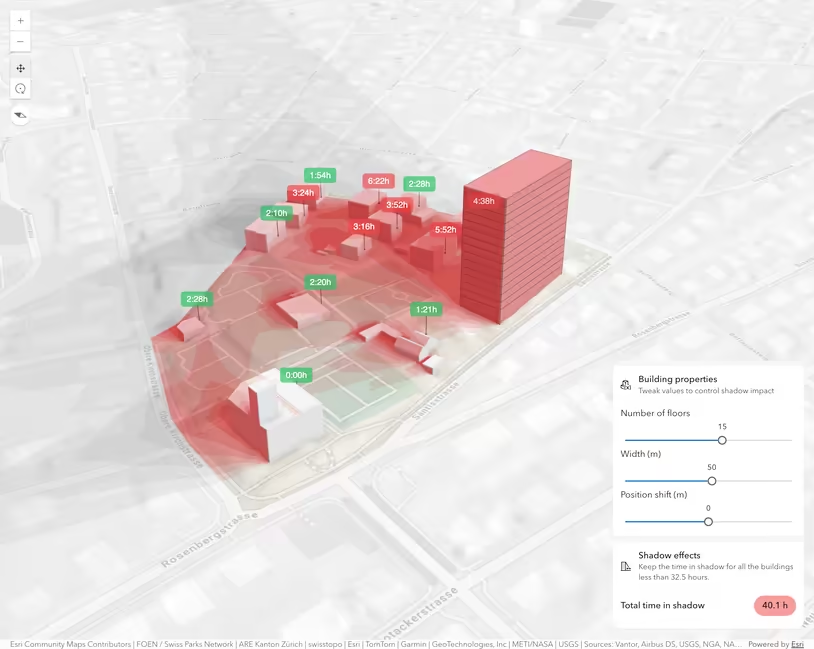
heading="Building properties"
description="Tweak values to control sunlight impact on neighbours"
icon-start="3d-building-parameter"
label-text="Number of floors"
label-text="Position shift"
icon-start="measure-building-height-shadow"
<calcite-chip id="design-status-chip" scale="l" kind="neutral" icon="circle" appearance="solid">
<p id="design-status-detail" class="status-detail">Estimating sunlight impact on neighbours.</p>
] = await $arcgis.import([
"@arcgis/core/Graphic.js",
"@arcgis/core/analysis/ShadowCastAnalysis.js",
"@arcgis/core/core/promiseUtils.js",
"@arcgis/core/core/reactiveUtils.js",
"@arcgis/core/geometry/Mesh.js",
"@arcgis/core/geometry/Point.js",
"@arcgis/core/geometry/support/meshUtils.js",
"@arcgis/core/layers/GraphicsLayer.js",
"@arcgis/core/symbols/FillSymbol3DLayer.js",
"@arcgis/core/symbols/MeshSymbol3D.js",
"@arcgis/core/symbols/PointSymbol3D.js",
"@arcgis/core/symbols/TextSymbol3DLayer.js",
"@arcgis/core/symbols/callouts/LineCallout3D.js",
"@arcgis/core/symbols/edges/SolidEdges3D.js",
// === VISUAL ELEMENTS ===
const analysisAlpha = 1.0;
const failColorLabel = [247, 157, 157, analysisAlpha];
spatialReference: { wkid: 102100 },
minDurationMilliseconds: 5.5 * 60 * 60 * 1000,
const analysisStartTimeOfDay = 8.25 * 60 * 60 * 1000;
const analysisEndTimeOfDay = 16.5 * 60 * 60 * 1000;
const mainBuildingLayer = new GraphicsLayer();
const shadowTooltipsLayer = new GraphicsLayer({
title: "Shadow duration tooltips",
// === DOM REFERENCES ===
const viewElement = document.querySelector("arcgis-scene");
const floorsSlider = document.getElementById("floors-slider");
const widthSlider = document.getElementById("width");
const sideShiftSlider = document.getElementById("side-shift-slider");
const projectPanel = document.getElementById("project-panel");
const statusBlock = document.getElementById("status-block");
const designStatusChip = document.getElementById("design-status-chip");
const designStatusDetail = document.getElementById("design-status-detail");
await customElements.whenDefined("arcgis-scene");
await viewElement.viewOnReady();
const focusAreas = viewElement.view.map.focusAreas.areas;
const focusAreaPolygon = focusAreas.at(0)?.geometries.at(0);
viewElement.map.addMany([mainBuildingLayer, shadowTooltipsLayer]);
const totalSunlightDuration = new ShadowCastAnalysis({
date: new Date("2025-12-21"),
startTimeOfDay: analysisStartTimeOfDay,
endTimeOfDay: analysisEndTimeOfDay,
geometry: focusAreaPolygon,
{ value: 1 * 3600 * 1000, color: [67, 97, 141, analysisAlpha] }, // dark blue for the 0 ≤ 1h range
{ value: 2 * 3600 * 1000, color: [127, 99, 151, analysisAlpha] },
{ value: 3 * 3600 * 1000, color: [181, 120, 162, analysisAlpha] },
{ value: 4 * 3600 * 1000, color: [201, 133, 147, analysisAlpha] }, // dusty rose for the 3 ≤ 4h range
{ value: 5 * 3600 * 1000, color: [218, 152, 138, analysisAlpha] },
{ value: 6 * 3600 * 1000, color: [222, 170, 126, analysisAlpha] },
{ value: 9 * 3600 * 1000, color: [254, 248, 124, analysisAlpha] }, // bright yellow for the > 8h range
let hasInitialShadowResult = false;
const buildingGraphic = new Graphic({
geometry: createBuildingGeometry(),
symbol: createBuildingSymbol(),
mainBuildingLayer.add(buildingGraphic);
const shadowPointsLayer = findLayerByTitle("ShadowCastAnalysisPoints");
const points = await getShadowPoints(shadowPointsLayer);
viewElement.analyses.add(totalSunlightDuration);
const analysisView = await viewElement.whenAnalysisView(totalSunlightDuration);
await reactiveUtils.whenOnce(() => !viewElement.updating);
const durationGraphics = createDurationLabelGraphics(points);
shadowTooltipsLayer.addMany(durationGraphics);
// Debounced function that refreshes all duration labels (never runs concurrently).
const scheduleDurationUpdate = promiseUtils.debounce(async () => {
const graphicDurations = await Promise.all(
durationGraphics.map(async (g) => {
const screenPoint = viewElement.toScreen(g.geometry);
setDurationLabel(g, null);
durationMs: await analysisView.getDurationAtScreen({
for (const { graphic, durationMs } of graphicDurations) {
setDurationLabel(graphic, durationMs);
if (Number.isFinite(durationMs)) {
sumDurationMs += durationMs;
updateAggregate(sumDurationMs);
// Refresh tooltip durations only when the view is settled.
() => !viewElement.updating && !viewElement.interacting && !viewElement.navigating,
() => scheduleDurationUpdate(),
// === EVENT LISTENERS ===
floorsSlider.addEventListener("calciteSliderInput", (event) => {
buildingState.floors = event.target.value;
widthSlider.addEventListener("calciteSliderInput", (event) => {
buildingState.width = event.target.value;
sideShiftSlider.addEventListener("calciteSliderInput", (event) => {
buildingState.sideShift = event.target.value;
// --- HELPER FUNCTIONS ---
function updateBuilding() {
buildingGraphic.geometry = createBuildingGeometry();
function createBuildingSymbol() {
return new MeshSymbol3D({
material: { color: [255, 255, 255, 1.0] },
edges: new SolidEdges3D({
function createBuildingGeometry() {
const rotationRadians = (buildingState.rotation * Math.PI) / 180;
const offsetX = -buildingState.sideShift * Math.cos(rotationRadians);
const offsetY = -buildingState.sideShift * Math.sin(rotationRadians);
let currentZ = buildingState.location.z;
for (let i = 0; i < buildingState.floors; i++) {
const floorHeight = i === 0 ? buildingState.firstFloorHeight : buildingState.floorHeight;
const floorOrigin = new Point({
x: buildingState.location.x + offsetX,
y: buildingState.location.y + offsetY,
spatialReference: buildingState.location.spatialReference,
const floorMesh = Mesh.createBox(floorOrigin, {
width: buildingState.width,
depth: buildingState.depth,
let mesh = meshUtils.merge(meshes);
mesh = mesh.clone().rotate(0, 0, buildingState.rotation);
function findLayerByTitle(layerTitle) {
return viewElement.map.allLayers.find((item) => item.title === layerTitle);
function createDurationLabelGraphics(points) {
symbol: createFailLabelSymbol("…"),
// Only failing measurement points get a chip so the scene is calm and red labels mean something.
function createFailLabelSymbol(text) {
return new PointSymbol3D({
material: { color: [20, 30, 20, 1.0] },
callout: new LineCallout3D({
color: [0, 0, 0, analysisAlpha],
function updateAggregate(sumDurationMs) {
const sumHours = sumDurationMs / (60 * 60 * 1000);
const target = sunlightDesign.minTotalHours;
const isOk = sumHours >= target;
if (Number.isFinite(sumHours)) {
designStatusChip.kind = "success";
designStatusChip.icon = "check-circle-f";
designStatusChip.textContent = "Design passes";
const margin = sumHours - target;
designStatusDetail.textContent = `${sumHours.toFixed(1)} of ${target} h sunlight, ${margin.toFixed(1)} h above target.`;
statusBlock.classList.add("is-pass");
statusBlock.classList.remove("is-fail");
designStatusChip.kind = "danger";
designStatusChip.icon = "x-circle-f";
designStatusChip.textContent = "Design fails";
const gap = target - sumHours;
designStatusDetail.textContent = `${sumHours.toFixed(1)} of ${target} h sunlight, short by ${gap.toFixed(1)} h.`;
statusBlock.classList.add("is-fail");
statusBlock.classList.remove("is-pass");
if (!hasInitialShadowResult && Number.isFinite(sumHours)) {
projectPanel.loading = false;
hasInitialShadowResult = true;
function setDurationLabel(graphic, duration) {
const isOk = duration == null ? null : duration >= sunlightDesign.minDurationMilliseconds;
graphic.visible = isOk === false;
const text = duration == null ? "—" : formatDuration(duration);
if (graphic.attributes.durationText === text && graphic.attributes.durationIsOk === isOk) return;
graphic.attributes.durationText = text;
graphic.attributes.durationIsOk = isOk;
graphic.symbol = createFailLabelSymbol(text);
// Format a duration in milliseconds as H:MMh (e.g. 2:30h).
function formatDuration(durationMs) {
const totalMinutes = Math.round(durationMs / 60000);
const hours = Math.floor(totalMinutes / 60);
const minutes = totalMinutes % 60;
return `${hours}:${String(minutes).padStart(2, "0")}h`;
// Query 3D point geometries (with Z) from a feature layer in the web scene.
async function getShadowPoints(shadowPointsLayer) {
await shadowPointsLayer.load();
const query = shadowPointsLayer.createQuery();
query.returnGeometry = true;
const featureSet = await shadowPointsLayer.queryFeatures(query);
return featureSet.features.map((f) => f.geometry);