Specify a map’s spatial reference.
Use case
Choosing the correct spatial reference is important for ensuring accurate projection of data points to a map.
How to use the sample
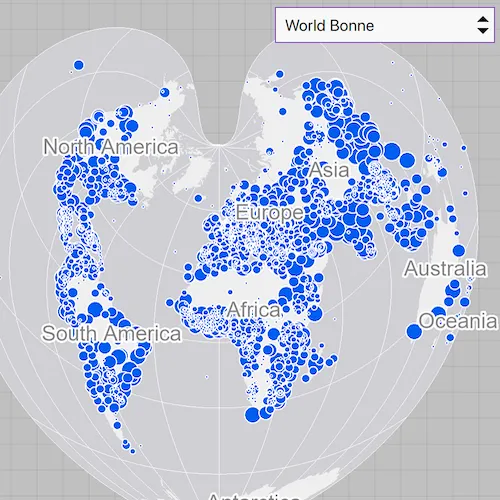
Pan and zoom around the map. Observe how the map is displayed in the World Bonne spatial reference. Pick a different spatial reference and see the map reproject.
How it works
- Create a
Mapobject using a spatial reference e.g.Map(SpatialReference.create(54024)). - Create a
Basemapobject using anArcGISMapImageLayerobject. - Set the base map to the map.
- Set the map to a
MapViewobject. - Change the map’s spatial reference using
setSpatialReferencemethod.
The ArcGIS map image layer will reproject into the spatial reference set to the map (such as World Bonne (WKID: 54024)), and not the map service’s default spatial reference.
Relevant API
- ArcGISMapImageLayer
- Basemap
- Map
- MapView
- SpatialReference
About the data
This sample uses a World Cities Population map service that displays world cities symbolized based on population.
Additional information
Operational layers will automatically project to this spatial reference when possible. There are 3 kinds of layer reprojection behaviors:
- Reprojected on device (on-the-fly reprojection), such as a
FeatureLayercreated from a mobile geodatabase - Reprojected from the service, such as an
ArcGISMapImageLayer - Not able to reproject, such as an
ArcGISTiledLayerwith defined spatial reference in its tile cache. These layer might be able to reproject in a future update
For more information, check out the API reference doc for setSpatialReference method.
Tags
coordinate system, project, projection, spatial reference, Web Mercator, WGS84, WKID
Sample code
// [WriteFile Name=SetMapSpatialReference, Category=Maps]// [Legal]// Copyright 2016 Esri.//// Licensed under the Apache License, Version 2.0 (the "License");// you may not use this file except in compliance with the License.// You may obtain a copy of the License at// http://www.apache.org/licenses/LICENSE-2.0//// Unless required by applicable law or agreed to in writing, software// distributed under the License is distributed on an "AS IS" BASIS,// WITHOUT WARRANTIES OR CONDITIONS OF ANY KIND, either express or implied.// See the License for the specific language governing permissions and// limitations under the License.// [Legal]
#ifdef PCH_BUILD#include "pch.hpp"#endif // PCH_BUILD
// sample headers#include "SetMapSpatialReference.h"
// ArcGIS Maps SDK headers#include "ArcGISMapImageLayer.h"#include "Basemap.h"#include "Map.h"#include "MapQuickView.h"#include "MapViewTypes.h"#include "SpatialReference.h"
// Qt headers#include <QUrl>
using namespace Esri::ArcGISRuntime;
SetMapSpatialReference::SetMapSpatialReference(QQuickItem* parent) :  QQuickItem(parent){}
SetMapSpatialReference::~SetMapSpatialReference() = default;
void SetMapSpatialReference::init(){  qmlRegisterType<MapQuickView>("Esri.Samples", 1, 0, "MapView");  qmlRegisterType<SetMapSpatialReference>("Esri.Samples", 1, 0, "SetMapSpatialReferenceSample");}
void SetMapSpatialReference::componentComplete(){  QQuickItem::componentComplete();
  // find QML MapView component  m_mapView = findChild<MapQuickView*>("mapView");  m_mapView->setWrapAroundMode(WrapAroundMode::Disabled);
  // Create a new map with the spatial reference  m_map = new Map(SpatialReference(54024), this);
  // create the URL pointing to the map image layer  QUrl imageLayerUrl("https://sampleserver6.arcgisonline.com/arcgis/rest/services/SampleWorldCities/MapServer");
  // construct the ArcGISMapImageLayer using the URL  m_imageLayer = new ArcGISMapImageLayer(imageLayerUrl, this);
  // create a Basemap and pass in the ArcGISMapImageLayer  m_basemap = new Basemap(m_imageLayer, this);
  // set the ArcGISMapImageLayer as basemap  m_map->setBasemap(m_basemap);  // set map on the map view  m_mapView->setMap(m_map);}
QStringList SetMapSpatialReference::spatialReferenceNames() const{  QStringList names;  for (const auto& option : m_srOptions)  {    names << option.first;  }  return names;}
void SetMapSpatialReference::setSpatialReference(int index){  if (index < 0 || index >= m_srOptions.size())  {    return;  }  m_map->setSpatialReference(SpatialReference(m_srOptions[index].second));}
// [WriteFile Name=SetMapSpatialReference, Category=Maps]// [Legal]// Copyright 2016 Esri.//// Licensed under the Apache License, Version 2.0 (the "License");// you may not use this file except in compliance with the License.// You may obtain a copy of the License at// http://www.apache.org/licenses/LICENSE-2.0//// Unless required by applicable law or agreed to in writing, software// distributed under the License is distributed on an "AS IS" BASIS,// WITHOUT WARRANTIES OR CONDITIONS OF ANY KIND, either express or implied.// See the License for the specific language governing permissions and// limitations under the License.// [Legal]
#ifndef SET_MAP_SPATIAL_REFERENCE_H#define SET_MAP_SPATIAL_REFERENCE_H
// Qt headers#include <QQuickItem>
namespace Esri::ArcGISRuntime{ class Map; class MapQuickView; class Basemap; class ArcGISMapImageLayer;} // namespace Esri::ArcGISRuntime
class SetMapSpatialReference : public QQuickItem{ Q_OBJECT Q_PROPERTY(QStringList spatialReferenceNames READ spatialReferenceNames CONSTANT)
public: explicit SetMapSpatialReference(QQuickItem* parent = nullptr); ~SetMapSpatialReference() override;
void componentComplete() override; static void init();
QStringList spatialReferenceNames() const;
public slots: void setSpatialReference(int index);
private: Esri::ArcGISRuntime::Map* m_map = nullptr; Esri::ArcGISRuntime::MapQuickView* m_mapView = nullptr; Esri::ArcGISRuntime::Basemap* m_basemap = nullptr; Esri::ArcGISRuntime::ArcGISMapImageLayer* m_imageLayer = nullptr;
const QList<QPair<QString, int>> m_srOptions = {{"Berghaus Star AAG", 102299}, {"Fuller", 54050}, {"New Zealand Map Grid", 27200}, {"North Pole Stereographic", 102018}, {"Peirce Quincuncial", 54090}, {"UTM Zone 10 N", 32610}, {"World Bonne", 54024}, {"World Goode Homolosine", 54052}, {"World Orthographic", 102038}, {"Web Mercator", 3857}, {"WGS 84", 4326}};};
#endif // SET_MAP_SPATIAL_REFERENCE_H// [WriteFile Name=SetMapSpatialReference, Category=Maps]// [Legal]// Copyright 2016 Esri.//// Licensed under the Apache License, Version 2.0 (the "License");// you may not use this file except in compliance with the License.// You may obtain a copy of the License at// http://www.apache.org/licenses/LICENSE-2.0//// Unless required by applicable law or agreed to in writing, software// distributed under the License is distributed on an "AS IS" BASIS,// WITHOUT WARRANTIES OR CONDITIONS OF ANY KIND, either express or implied.// See the License for the specific language governing permissions and// limitations under the License.// [Legal]
import QtQuickimport QtQuick.Controlsimport Esri.Samples
SetMapSpatialReferenceSample { id: srSample width: 800 height: 600
// add a mapView component MapView { anchors.fill: parent objectName: "mapView"
Component.onCompleted: { // Set the focus on MapView to initially enable keyboard navigation forceActiveFocus(); } } ComboBox { id: srComboBox anchors { top: parent.top right: parent.right margins: 10 } width: 220 model: srSample.spatialReferenceNames currentIndex: 6 onActivated: srSample.setSpatialReference(currentIndex) }}