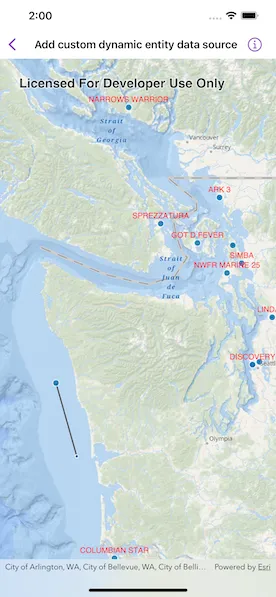
Create a custom dynamic entity data source and display it using a dynamic entity layer.
Use case
Developers can create a CustomDynamicEntityDataSource to be able to visualize data from a variety of different feeds as dynamic entities using a DynamicEntityLayer. An example of this is in a mobile situational awareness app, where CustomDynamicEntityDataSource can be used to connect to peer-to-peer feeds in order to visualize real-time location tracks from teammates in the field.
How to use the sample
Run the sample to view the map and the dynamic entity layer displaying the latest observation from the custom data source. Tap on a dynamic entity to view its attributes in a callout.
How it works
- Create the metadata for the data source using
DynamicEntityDataSourceInfofor a given unique entity ID field and an array ofFieldobjects matching the fields in the data source. - Create your custom feed type that conforms to
CustomDynamicEntityFeedwhich will implement the data feed that will asynchronously emitCustomDynamicEntityFeedEvent. - The feed should loop through the observations JSON and deserialize each observation into a
Pointobject and aDictionary<String, Any>containing the attributes. - Use
CustomDynamicEntityFeedEvent.newObservation(geometry:attributes:)to add each event to the feed. - Create a custom data source using
CustomDynamicEntityDataSource.
Relevant API
- CustomDynamicEntityDataSource
- CustomDynamicEntityFeed
- CustomDynamicEntityFeedEvent
- DynamicEntity
- DynamicEntityDataSource
- DynamicEntityLayer
- LabelDefinition
- TrackDisplayProperties
About the data
This sample uses a JSON Lines file containing observations of marine vessels in the Pacific North West hosted on ArcGIS Online.
Tags
data, dynamic, entity, label, labeling, live, real-time, stream, track
Sample code
// Copyright 2023 Esri//// Licensed under the Apache License, Version 2.0 (the "License");// you may not use this file except in compliance with the License.// You may obtain a copy of the License at////   https://www.apache.org/licenses/LICENSE-2.0//// Unless required by applicable law or agreed to in writing, software// distributed under the License is distributed on an "AS IS" BASIS,// WITHOUT WARRANTIES OR CONDITIONS OF ANY KIND, either express or implied.// See the License for the specific language governing permissions and// limitations under the License.
import ArcGISimport SwiftUI
struct AddCustomDynamicEntityDataSourceView: View {    /// A map with an ArcGIS oceans basemap style and a dynamic entity layer.    @State private var map = makeMap()
    /// The dynamic entity layer that is displaying our custom data.    private var dynamicEntityLayer: DynamicEntityLayer {        map.operationalLayers.first as! DynamicEntityLayer    }
    /// The point on the screen the user tapped.    @State private var tappedScreenPoint: CGPoint?
    /// The placement of the callout.    @State private var calloutPlacement: CalloutPlacement?
    var body: some View {        MapViewReader { proxy in            MapView(map: map)                .onSingleTapGesture { screenPoint, _ in                    tappedScreenPoint = screenPoint                }                .callout(placement: $calloutPlacement.animation(.default.speed(2))) { placement in                    let attributes = (placement.geoElement as! DynamicEntityObservation).attributes                    VStack(alignment: .leading) {                        // Display all the attributes in the callout.                        ForEach(attributes.sorted(by: { $0.key < $1.key }), id: \.key) { item in                            Text("\(item.key): \(String(describing: item.value))")                        }                    }                }                .task(id: tappedScreenPoint) {                    let newCalloutPlacement: CalloutPlacement?                    if let tappedScreenPoint,                       let identifyResult = try? await proxy.identify(                        on: dynamicEntityLayer,                        screenPoint: tappedScreenPoint,                        tolerance: 2                       ) {                        // Set the callout placement to the observation that was tapped on.                        newCalloutPlacement = identifyResult.geoElements.first.map { .geoElement($0) }                    } else {                        // Hides the callout.                        newCalloutPlacement = nil                    }                    calloutPlacement = newCalloutPlacement                }        }    }
    /// Makes a map with a dynamic entity layer.    private static func makeMap() -> Map {        let map = Map(basemapStyle: .arcGISOceans)        map.initialViewpoint = Viewpoint(            latitude: 47.984,            longitude: -123.657,            scale: 3e6        )
        // The meta data for the custom dynamic entity data source.        let info = DynamicEntityDataSourceInfo(            entityIDFieldName: "MMSI",            fields: [                Field(type: .text, name: "MMSI", alias: "MMSI", length: 256),                Field(type: .float64, name: "SOG", alias: "SOG", length: 8),                Field(type: .float64, name: "COG", alias: "COG", length: 8),                Field(type: .text, name: "VesselName", alias: "VesselName", length: 256),                Field(type: .text, name: "CallSign", alias: "CallSign", length: 256)            ]        )
        info.spatialReference = .wgs84
        // Create our custom data source from our custom data feed.        let customDataSource = CustomDynamicEntityDataSource(info: info) { VesselFeed() }
        let dynamicEntityLayer = DynamicEntityLayer(dataSource: customDataSource)
        // Set display tracking properties on the layer.        let trackDisplayProperties = dynamicEntityLayer.trackDisplayProperties        trackDisplayProperties.showsPreviousObservations = true        trackDisplayProperties.showsTrackLine = true        trackDisplayProperties.maximumObservations = 20
        // Create the label definition so we can show the vessel name on top of        // each dynamic entity.        let labelDefinition = LabelDefinition(            labelExpression: SimpleLabelExpression(simpleExpression: "[VesselName]"),            textSymbol: TextSymbol(color: .red, size: 12)        )        labelDefinition.placement = .pointAboveCenter
        dynamicEntityLayer.addLabelDefinition(labelDefinition)        dynamicEntityLayer.labelsAreEnabled = true
        map.addOperationalLayer(dynamicEntityLayer)
        return map    }}
/// The vessel feed that is emitting custom dynamic entity events.private struct VesselFeed: CustomDynamicEntityFeed {    let events = URL.selectedVesselsDataSource.lines.map { line in        // Delay observations to simulate live data.        try await Task.sleep(nanoseconds: 10_000_000)
        let decoder = JSONDecoder()        let vessel = try decoder.decode(            AddCustomDynamicEntityDataSourceView.Vessel.self,            from: line.data(using: .utf8)!        )
        // We successfully decoded the vessel JSON so we should        // add that vessel as a new observation.        return CustomDynamicEntityFeedEvent.newObservation(            geometry: vessel.geometry,            attributes: vessel.attributes        )    }}
private extension URL {    /// The URL to the selected vessels JSON Lines data.    static var selectedVesselsDataSource: URL {        Bundle.main.url(            forResource: "AIS_MarineCadastre_SelectedVessels_CustomDataSource",            withExtension: "jsonl"        )!    }}
// Copyright 2023 Esri//// Licensed under the Apache License, Version 2.0 (the "License");// you may not use this file except in compliance with the License.// You may obtain a copy of the License at//// https://www.apache.org/licenses/LICENSE-2.0//// Unless required by applicable law or agreed to in writing, software// distributed under the License is distributed on an "AS IS" BASIS,// WITHOUT WARRANTIES OR CONDITIONS OF ANY KIND, either express or implied.// See the License for the specific language governing permissions and// limitations under the License.
import ArcGIS
extension AddCustomDynamicEntityDataSourceView { /// A marine vessel that can be decoded from the vessel JSON. struct Vessel { /// The location of the vessel. let geometry: Point /// The attributes of the vessel. let attributes: [String: any Sendable] }}
extension AddCustomDynamicEntityDataSourceView.Vessel: Decodable { private enum CodingKeys: CodingKey { case geometry case attributes }
init(from decoder: Decoder) throws { /// The attributes that define meta data for the vessel. struct Attributes: Decodable { enum CodingKeys: String, CodingKey { // swiftlint:disable:this nesting case mmsi = "MMSI" case sog = "SOG" case cog = "COG" case vesselName = "VesselName" case callSign = "CallSign" }
let mmsi: String let sog: Double let cog: Double let vesselName: String let callSign: String }
let container = try decoder.container(keyedBy: CodingKeys.self)
let geometry = try container.decode(Point.self, forKey: .geometry) let attributes: [String: any Sendable] = try { let attributes = try container.decode(Attributes.self, forKey: .attributes) return [ Attributes.CodingKeys.mmsi.rawValue: attributes.mmsi, Attributes.CodingKeys.sog.rawValue: attributes.sog, Attributes.CodingKeys.cog.rawValue: attributes.cog, Attributes.CodingKeys.vesselName.rawValue: attributes.vesselName, Attributes.CodingKeys.callSign.rawValue: attributes.callSign ] }() self.init(geometry: geometry, attributes: attributes) }}