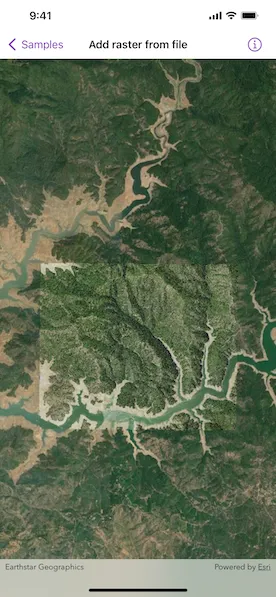
Create and use a raster layer made from a local raster file.
Use case
Rasters can be digital aerial photographs, imagery from satellites, digital pictures, or even scanned maps. An end-user will frequently need to import raster files acquired through various data-collection methods into their map to view and analyze the data.
How to use the sample
Upon launch, a raster will be loaded from a file and displayed in the map view. Pan and zoom to explore.
How it works
- Create a
Rasterfrom a raster file. - Create a
RasterLayerfrom the raster. - Add the raster layer to the map’s operational layers.
Relevant API
- Raster
- RasterLayer
About the data
This sample shows a Shasta Raster hosted on ArcGIS Online.
Additional information
See the topic What is raster data? in the ArcMap documentation for more information about raster images.
Tags
data, image, import, layer, raster, visualization
Sample code
AddRasterFromFileView.swift
// Copyright 2022 Esri//// Licensed under the Apache License, Version 2.0 (the "License");// you may not use this file except in compliance with the License.// You may obtain a copy of the License at////   https://www.apache.org/licenses/LICENSE-2.0//// Unless required by applicable law or agreed to in writing, software// distributed under the License is distributed on an "AS IS" BASIS,// WITHOUT WARRANTIES OR CONDITIONS OF ANY KIND, either express or implied.// See the License for the specific language governing permissions and// limitations under the License.
import ArcGISimport SwiftUI
struct AddRasterFromFileView: View {    /// A map with imagery basemap and a raster layer.    @State private var map = Map(basemapStyle: .arcGISImageryStandard)
    /// The error shown in the error alert.    @State private var error: (any Error)?
    /// The current viewpoint of the map view.    @State private var viewpoint: Viewpoint?
    var body: some View {        // Creates a map view with a viewpoint to display the map.        MapView(map: map, viewpoint: viewpoint)            .onViewpointChanged(kind: .centerAndScale) { viewpoint = $0 }            .errorAlert(presentingError: $error)            .task {                guard map.operationalLayers.isEmpty else { return }                do {                    // Gets the Shasta.tif file URL.                    let shastaURL = Bundle.main.url(forResource: "Shasta", withExtension: "tif", subdirectory: "raster-file/raster-file")!                    // Creates a raster with the file URL.                    let raster = Raster(fileURL: shastaURL)                    // Creates a raster layer using the raster object.                    let rasterLayer = RasterLayer(raster: raster)                    try await rasterLayer.load()                    // Adds the raster layer to the map's operational layer.                    map.addOperationalLayer(rasterLayer)                    viewpoint = Viewpoint(center: rasterLayer.fullExtent!.center, scale: 8e4)                } catch {                    // Presents an error message if the raster fails to load.                    self.error = error                }            }    }}