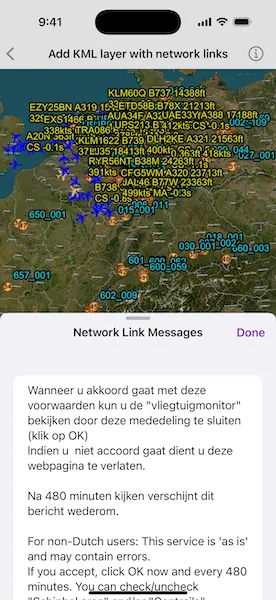
Display a file with a KML network link, including displaying any network link control messages at launch.
Use case
KML files can reference other KML files on the network and support automatically refreshing content. For example, survey workers will benefit from KML data shown on their devices automatically refreshing to show the most up-to-date state. Additionally, discovering KML files linked to the data they are currently viewing provides additional information to make better decisions in the field.
How to use the sample
The sample will load the KML file automatically. The data shown should refresh automatically every few seconds. Tap the “Network Link Messages” button to view the messages. Pan and zoom to explore the map.
How it works
- Create a
KMLDatasetfrom a KML source that has network links. - Construct a
KMLLayerwith the dataset and add the layer to the scene as an operational layer. - To listen for network messages, use the KML dataset’s
networkLinkMessages.
Relevant API
- KMLDataset
- KMLDataset.networkLinkMessages
- KMLLayer
Offline data
This sample uses the “radar.kmz” file, which can be found on ArcGIS Online.
About the data
This map shows the current air traffic in parts of Europe with heading, altitude, and ground speed. Additionally, noise levels from ground monitoring stations are shown.
Tags
keyhole, KML, KMZ, network link, network link control, OGC
Sample code
// Copyright 2024 Esri//// Licensed under the Apache License, Version 2.0 (the "License");// you may not use this file except in compliance with the License.// You may obtain a copy of the License at////   https://www.apache.org/licenses/LICENSE-2.0//// Unless required by applicable law or agreed to in writing, software// distributed under the License is distributed on an "AS IS" BASIS,// WITHOUT WARRANTIES OR CONDITIONS OF ANY KIND, either express or implied.// See the License for the specific language governing permissions and// limitations under the License.
import ArcGISimport SwiftUI
struct AddKMLLayerWithNetworkLinksView: View {    /// A scene with the current air traffic in parts of Europe.    @State private var scene: ArcGIS.Scene = {        let scene = Scene(basemapStyle: .arcGISImagery)
        // Creates a KML dataset from a remote KMZ file.        let kmlDataset = KMLDataset(url: .radarKMZFile)
        // Creates a KML layer from the dataset and adds it to the scene's operational layers.        let kmlLayer = KMLLayer(dataset: kmlDataset)        scene.addOperationalLayer(kmlLayer)
        // Sets the viewpoint to be initially centered on the data coverage.        scene.initialViewpoint = Viewpoint(latitude: 50.472421, longitude: 8.150526, scale: 1e7)
        return scene    }()
    /// The messages from the KML dataset's network links.    @State private var networkLinkMessages: [String] = []
    /// A Boolean value indicating whether network link messages popover is showing.    @State private var isShowingMessages = false
    var body: some View {        SceneView(scene: scene)            .toolbar {                ToolbarItem(placement: .bottomBar) {                    Button("Network Link Messages") {                        isShowingMessages = true                    }                    .popover(isPresented: $isShowingMessages) { [networkLinkMessages] in                        MessagesList(messages: networkLinkMessages)                            .presentationDetents([.fraction(0.5), .large])                            .frame(idealWidth: 320, idealHeight: 380)                    }                }            }            .task {                // Listens for new KML network link messages.                let kmlLayer = scene.operationalLayers.first as! KMLLayer
                for await (_, message) in kmlLayer.dataset.networkLinkMessages {                    networkLinkMessages.append(message)                }            }    }
    /// A list of KML network link messages.    private struct MessagesList: View {        /// The messages to show in the list.        let messages: [String]
        /// The action to dismiss the view.        @Environment(\.dismiss) private var dismiss
        var body: some View {            NavigationStack {                List(messages, id: \.self) { message in                    Text(message)                }                .navigationTitle("Network Link Messages")                .navigationBarTitleDisplayMode(.inline)                .toolbar {                    ToolbarItem(placement: .confirmationAction) {                        Button("Done") { dismiss() }                    }                }            }        }    }}
private extension URL {    /// The web URL to the "radar" KMZ file containing network links for the current air traffic in parts of Europe.    static var radarKMZFile: URL {        URL(string: "https://www.arcgis.com/sharing/rest/content/items/600748d4464442288f6db8a4ba27dc95/data")!    }}
#Preview {    AddKMLLayerWithNetworkLinksView()}