Change the visibility of sublayers.
Use case
A map image layer may contain many sublayers such as different types of roads in a road network or city, county, and state borders in a US map. The user may only be interested in a subset of these sublayers. Or, perhaps showing all of the sublayers would show too much detail. In these cases, you can hide certain sublayers by changing their visibility.
How to use the sample
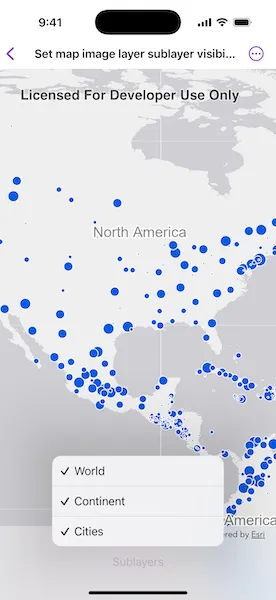
Each sublayer has a check box which can be used to toggle the visibility of the sublayer.
How it works
- Create an
ArcGISMapImageLayerobject with the URL to a map image service. - Get an array of
ArcGISMapImageSublayerafter loading the map image layer. - For each layer in the sublayer array, set its visible property to true or false.
Relevant API
- ArcGISMapImageLayer
- ArcGISMapImageSublayer
Tags
layer, sublayer, visibility
Sample code
SetMapImageLayerSublayerVisibilityView.swift
// Copyright 2025 Esri//// Licensed under the Apache License, Version 2.0 (the "License");// you may not use this file except in compliance with the License.// You may obtain a copy of the License at////   https://www.apache.org/licenses/LICENSE-2.0//// Unless required by applicable law or agreed to in writing, software// distributed under the License is distributed on an "AS IS" BASIS,// WITHOUT WARRANTIES OR CONDITIONS OF ANY KIND, either express or implied.// See the License for the specific language governing permissions and// limitations under the License.
import ArcGISimport SwiftUI
struct SetMapImageLayerSublayerVisibilityView: View {    /// The error shown in the error alert.    @State private var error: (any Error)?
    /// A map with no specified style and initial viewpoint.    @State private var map: Map = {        let map = Map()        map.initialViewpoint = Viewpoint(            center: Point(                x: -11e6,                y: 6e6,                spatialReference: .webMercator            ),            scale: 9e7        )
        return map    }()
    /// The map image layer.    @State private var mapImageLayer = ArcGISMapImageLayer(url: .arcGISMapImageLayerSample)
    /// The sublayer options to control the visibility.    @State private var sublayerOptions: [SublayerOption] = []
    var body: some View {        MapView(map: map)            .task {                do {                    // Loads the map image layer.                    try await mapImageLayer.load()                    // Adds the map image layer to the map.                    map.addOperationalLayer(mapImageLayer)                    sublayerOptions = mapImageLayer.mapImageSublayers.map { mapImageSublayer in                        SublayerOption(                            name: mapImageSublayer.name,                            id: mapImageSublayer.id,                            isVisible: mapImageSublayer.isVisible,                            sublayer: mapImageSublayer                        )                    }                } catch {                    self.error = error                }            }            .toolbar {                ToolbarItem(placement: .bottomBar) {                    Menu {                        ForEach($sublayerOptions, id: \.id) { $sublayerOption in                            Toggle(isOn: $sublayerOption.isVisible) {                                Text(sublayerOption.name)                            }                            .onChange(of: sublayerOption.isVisible) {                                sublayerOption.sublayer.isVisible = sublayerOption.isVisible                            }                        }                    } label: {                        Text("Sublayers")                    }                }            }            .errorAlert(presentingError: $error)    }}
private struct SublayerOption: Equatable, Identifiable {    let name: String    let id: Int    var isVisible = true    let sublayer: ArcGISMapImageSublayer}
extension SublayerOption: Hashable {    func hash(into hasher: inout Hasher) {        hasher.combine(id)    }}
extension URL {    static var arcGISMapImageLayerSample: URL {        URL(            string: "https://sampleserver6.arcgisonline.com/arcgis/rest/services/SampleWorldCities/MapServer"        )!    }}
#Preview {    SetMapImageLayerSublayerVisibilityView()}