Display data from an ArcGIS stream service using a dynamic entity layer.
Use case
A stream service is a type of service provided by ArcGIS Velocity and GeoEvent Server that allows clients to receive a stream of data observations via a web socket. ArcGIS Maps SDK allows you to connect to a stream service and manage the information as dynamic entities and display them in a dynamic entity layer. Displaying information from feeds such as a stream service is important in applications like dashboards where users need to visualize and track updates of real-world objects in real-time.
Use ArcGISStreamService to manage the connection to the stream service and purge options to manage how much data is stored and maintained by the application. The dynamic entity layer will display the latest received observation, and you can set track display properties to determine how to display historical information for each dynamic entity. This includes the number of previous observations to show, whether to display track lines in-between previous observations, and setting renderers.
How to use the sample
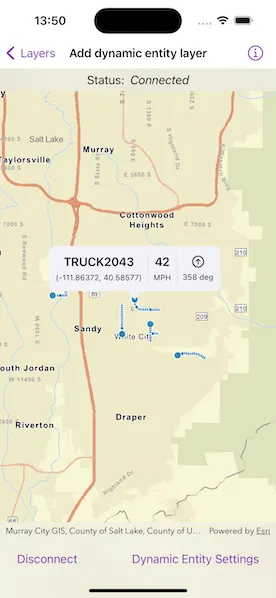
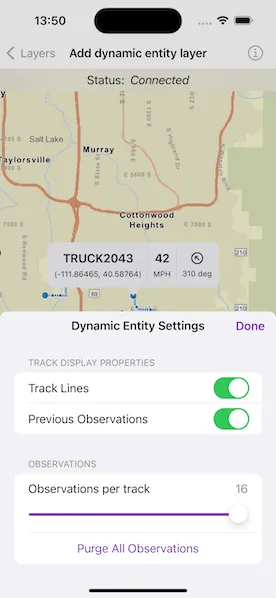
Use the controls to connect to or disconnect from the stream service, modify display properties in the dynamic entity layer, and purge all observations from the application.
How it works
- Create an
ArcGIStreamServiceusing a stream service URL. - Set an
ArcGISStreamServiceFilteron the stream service to limit the amount of data coming from the server. - Set the
maximumDurationproperty of the stream service’spurgeOptionsto limit the amount of data managed by the application. - Create a
DynamicEntityLayerusing the stream service. - Update values in the layer’s
trackDisplayPropertiesto customize the layer’s appearance. - Add the
DynamicEntityLayerto the map. - Use the
onSingleTapGesturemodifier and callMapViewProxy.identify(on:screenPoint:tolerance:returnPopupsOnly:maximumResults:)to select a dynamic entity and display the entity’s attributes in a callout.
Relevant API
- ArcGISStreamService
- ArcGISStreamServiceFilter
- ConnectionStatus
- DynamicEntity
- DynamicEntityDataSource.PurgeOptions
- DynamicEntityLayer
- TrackDisplayProperties
About the data
This sample uses a stream service that simulates live data coming from snowplows near Sandy, Utah. There are multiple vehicle types and multiple agencies operating the snowplows.
Tags
data, dynamic, entity, live, purge, real-time, service, stream, track
Sample code
// Copyright 2023 Esri//// Licensed under the Apache License, Version 2.0 (the "License");// you may not use this file except in compliance with the License.// You may obtain a copy of the License at////   https://www.apache.org/licenses/LICENSE-2.0//// Unless required by applicable law or agreed to in writing, software// distributed under the License is distributed on an "AS IS" BASIS,// WITHOUT WARRANTIES OR CONDITIONS OF ANY KIND, either express or implied.// See the License for the specific language governing permissions and// limitations under the License.
import ArcGISimport SwiftUI
struct AddDynamicEntityLayerView: View {    /// The view model for the sample.    @StateObject private var model = Model()
    /// A Boolean value indicating whether the settings view should be presented.    @State private var isShowingSettings = false
    /// The initial viewpoint for the map.    @State private var viewpoint = Viewpoint(        center: Point(x: -12452361.486, y: 4949774.965),        scale: 200_000    )
    /// The callout placement.    @State private var placement: CalloutPlacement?
    /// A Boolean value indicating if the stream service is connected.    private var isConnected: Bool {        model.streamService.connectionStatus == .connected    }
    var body: some View {        MapViewReader { proxy in            MapView(map: model.map, viewpoint: viewpoint)                .callout(placement: $placement) { placement in                    VehicleCallout(dynamicEntity: placement.geoElement as! DynamicEntity)                }                .onSingleTapGesture { screenPoint, _ in                    placement = nil                    Task {                        guard let result = try? await proxy.identify(on: model.dynamicEntityLayer, screenPoint: screenPoint, tolerance: 12),                              let observation = result.geoElements.first as? DynamicEntityObservation,                              let entity = observation.dynamicEntity                        else {                            return                        }                        placement = .geoElement(entity)                    }                }                .toolbar {                    ToolbarItemGroup(placement: .bottomBar) {                        Button(isConnected ? "Disconnect" : "Connect") {                            Task {                                if isConnected {                                    await model.streamService.disconnect()                                } else {                                    try? await model.streamService.connect()                                }                            }                        }                        Spacer()                        Button("Dynamic Entity Settings") {                            isShowingSettings = true                        }                        .popover(isPresented: $isShowingSettings) {                            SettingsView(model: model, calloutPlacement: $placement)                                .presentationDetents([.fraction(0.5)])                                .frame(idealWidth: 320, idealHeight: 380)                        }                    }                }                .overlay(alignment: .top) {                    HStack {                        Text("Status:")                        Text(model.connectionStatus)                            .italic()                    }                    .frame(maxWidth: .infinity)                    .padding(.vertical, 6)                    .background(.thinMaterial, ignoresSafeAreaEdges: .horizontal)                }                .task {                    // This will update `connectionStatus` when the stream service                    // connection status changes.                    for await status in model.streamService.$connectionStatus {                        model.connectionStatus = status.description                    }                }        }    }}
#Preview {    NavigationStack {        AddDynamicEntityLayerView()    }}
// Copyright 2023 Esri//// Licensed under the Apache License, Version 2.0 (the "License");// you may not use this file except in compliance with the License.// You may obtain a copy of the License at//// https://www.apache.org/licenses/LICENSE-2.0//// Unless required by applicable law or agreed to in writing, software// distributed under the License is distributed on an "AS IS" BASIS,// WITHOUT WARRANTIES OR CONDITIONS OF ANY KIND, either express or implied.// See the License for the specific language governing permissions and// limitations under the License.
import ArcGISimport Combineimport Foundation
extension AddDynamicEntityLayerView { /// The model used to store the geo model and other expensive objects /// used in this view. class Model: ObservableObject { /// A map with a streets basemap style. let map = Map(basemapStyle: .arcGISStreets)
/// The data source for the dynamic entity layer. let streamService: ArcGISStreamService = { let streamService = ArcGISStreamService(url: .streamService)
let filter = ArcGISStreamServiceFilter() filter.whereClause = "speed > 0" streamService.filter = filter
streamService.purgeOptions.maximumDuration = TimeInterval(5 * 60) return streamService }()
/// The layer displaying the dynamic entities on the map. let dynamicEntityLayer: DynamicEntityLayer
/// A Boolean value indicating whether track lines should be displayed. @Published var showsTrackLine: Bool { didSet { dynamicEntityLayer.trackDisplayProperties.showsTrackLine = showsTrackLine } }
/// A Boolean value indicating whether previous observations should be displayed. @Published var showsPreviousObservations: Bool { didSet { dynamicEntityLayer.trackDisplayProperties.showsPreviousObservations = showsPreviousObservations } }
/// The maximum number of previous observations to display. @Published var maximumObservations: CGFloat { didSet { dynamicEntityLayer.trackDisplayProperties.maximumObservations = Int(maximumObservations) } }
/// The maximum observations range. /// Used by slider, which requires `CGFloat` values. let maxObservationRange = CGFloat(1)...CGFloat(16)
/// The stream service connection status. @Published var connectionStatus: String
init() { // Creates the dynamic entity layer. dynamicEntityLayer = DynamicEntityLayer(dataSource: streamService)
// Initializes properties from the dynamic entity layer and stream service. showsTrackLine = dynamicEntityLayer.trackDisplayProperties.showsTrackLine showsPreviousObservations = dynamicEntityLayer.trackDisplayProperties.showsPreviousObservations maximumObservations = CGFloat(dynamicEntityLayer.trackDisplayProperties.maximumObservations) connectionStatus = streamService.connectionStatus.description
// Adds the dynamic entity layer to the map's operational layers. map.addOperationalLayer(dynamicEntityLayer) } }}
private extension URL { static let streamService = URL( string: "https://realtimegis2016.esri.com:6443/arcgis/rest/services/SandyVehicles/StreamServer" )!}
extension ConnectionStatus { /// A user-friendly string for `ConnectionStatus`. var description: String { switch self { case .connecting: return "Connecting" case .connected: return "Connected" case .disconnected: return "Disconnected" case .failed: return "Failed" @unknown default: return "Unknown" } }}// Copyright 2023 Esri//// Licensed under the Apache License, Version 2.0 (the "License");// you may not use this file except in compliance with the License.// You may obtain a copy of the License at//// https://www.apache.org/licenses/LICENSE-2.0//// Unless required by applicable law or agreed to in writing, software// distributed under the License is distributed on an "AS IS" BASIS,// WITHOUT WARRANTIES OR CONDITIONS OF ANY KIND, either express or implied.// See the License for the specific language governing permissions and// limitations under the License.
import ArcGISimport SwiftUI
extension AddDynamicEntityLayerView { struct SettingsView: View { /// The view model for the sample. @ObservedObject var model: Model
/// The action to dismiss the settings sheet. @Environment(\.dismiss) private var dismiss: DismissAction
/// The callout placement. @Binding var calloutPlacement: CalloutPlacement?
var body: some View { NavigationStack { Form { Section("Track display properties") { Toggle("Track Lines", isOn: $model.showsTrackLine) Toggle("Previous Observations", isOn: $model.showsPreviousObservations) }
Section("Observations") { VStack { LabeledContent( "Observations per track", value: model.maximumObservations, format: .number ) Slider(value: $model.maximumObservations, in: model.maxObservationRange, step: 1) } HStack { Spacer() Button("Purge All Observations") { Task { try? await model.streamService.purgeAll() calloutPlacement = nil } } Spacer() } } } .toggleStyle(.switch) .navigationTitle("Dynamic Entity Settings") .navigationBarTitleDisplayMode(.inline) .toolbar { ToolbarItem(placement: .confirmationAction) { Button("Done") { dismiss() } } } } } }}// Copyright 2023 Esri//// Licensed under the Apache License, Version 2.0 (the "License");// you may not use this file except in compliance with the License.// You may obtain a copy of the License at//// https://www.apache.org/licenses/LICENSE-2.0//// Unless required by applicable law or agreed to in writing, software// distributed under the License is distributed on an "AS IS" BASIS,// WITHOUT WARRANTIES OR CONDITIONS OF ANY KIND, either express or implied.// See the License for the specific language governing permissions and// limitations under the License.
import ArcGISimport SwiftUI
extension AddDynamicEntityLayerView { struct VehicleCallout: View { /// The dynamic entity that represents a vehicle. let dynamicEntity: DynamicEntity
/// The name of the vehicle. @State private var name: String = ""
/// The location of the vehicle. @State private var location: String = ""
/// The speed of the vehicle. @State private var speed: Double = .nan
/// The heading of the vehicle. @State private var heading: Double = .nan
var body: some View { HStack { VStack(alignment: .center, spacing: 6) { Text(name) .bold() .evaluateArcadeExpression("$feature.vehiclename", for: dynamicEntity) { evaluation in name = evaluation.stringValue } Text(location) .font(.caption2) .evaluateArcadeExpression( "concatenate(\"(\", Round($feature.point_x,6), \", \", Round($feature.point_y,6), \")\")", for: dynamicEntity ) { evaluation in location = evaluation.stringValue } }
Divider() .frame(maxHeight: 44) VStack(spacing: 6) { Text(speed, format: .number.precision(.fractionLength(0))) .bold() Text("MPH") .font(.caption2) }
Divider() .frame(maxHeight: 44) VStack(spacing: 6) { Image(systemName: "arrow.up.circle") .rotationEffect(.degrees(heading)) Text(Measurement<UnitAngle>(value: heading, unit: .degrees), format: .measurement(width: .abbreviated)) .font(.caption2) } } .padding(10) .task { // Show initial heading and speed. updateHeadingAndSpeed() for await _ in dynamicEntity.changes { // Update heading and speed as the dynamic entity changes. updateHeadingAndSpeed() } } }
/// Updates the heading and the speed from the dynamic entity. private func updateHeadingAndSpeed() { withAnimation { heading = dynamicEntity.attributes["heading"] as? Double ?? .nan } speed = dynamicEntity.attributes["speed"] as? Double ?? .nan } }}
private extension Result<ArcadeEvaluationResult, Error> { /// The evaluation as a string. If the evaluation results in an error, `nil`, /// or a type other than a string, then an empty string is returned. var stringValue: String { switch self { case .success(let evaluationResult): if let resultString = evaluationResult.result(as: .string) as? String { return resultString } fallthrough default: return "" } }}