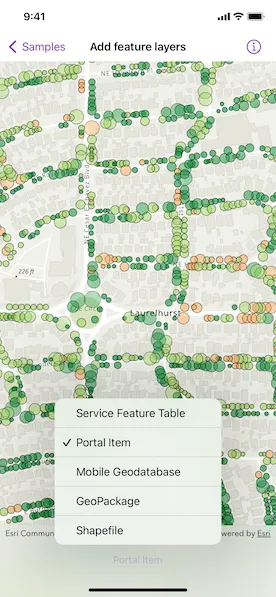
Display feature layers from various data sources.
Use case
Feature layers, like all other layers, are visual representations of data and are used on a map or scene. In the case of feature layers, the underlying data is held in a feature table or feature service.
Feature services are useful for sharing vector GIS data with clients so that individual features can be queried, displayed, and edited. There are various online and offline methods to load feature services.
How to use the sample
Tap the button on the toolbar to add feature layers, from different sources, to the map. Pan and zoom the map to view the feature layers.
How it works
- Create a
Mapinstance with a topographic basemap style. - Load a feature layer with a feature table.
i. Create aServiceFeatureTableinstance from a URL.
ii. Create aFeatureLayerinstance with the feature table. - Load a feature layer with a portal item.
i. Create aFeatureLayerinstance with a portal item. - Load a feature layer with a geodatabase.
i. Instantiate and load aGeodatabaseusing the file name.
ii. Get the feature table from the geodatabase with the feature table’s name by using thegetGeodatabaseFeatureTable(tableName:)geodatabase method.
iii. Create aFeatureLayerinstance from the feature table. - Load a feature layer with a GeoPackage.
i. Instantiate and load a GeoPackage using its file name.
ii. Get the firstGeoPackageFeatureTablefrom thegeoPackageFeatureTablesarray.
iii. Create aFeatureLayerinstance from the feature table. - Load a feature layer with a shapefile.
i. Create aShapefileFeatureTableinstance using the shapefile name.
ii. Create aFeatureLayerinstance from the feature table. - Add the feature layer to the map’s operational layers.
- Create a
MapViewinstance with the map.
Relevant API
- FeatureLayer
- Geodatabase
- GeoPackage
- PortalItem
- ServiceFeatureTable
- ShapefileFeatureTable
About the data
This sample uses the Naperville damage assessment service, Trees of Portland portal item, Los Angeles Trailheads geodatabase, Aurora, Colorado GeoPackage, and Scottish Wildlife Trust Reserves Shapefile.
The Scottish Wildlife Trust shapefile data is provided from Scottish Wildlife Trust under CC-BY license. Data © Scottish Wildlife Trust (2022).
Tags
feature, geodatabase, geopackage, layers, service, shapefile, table
Sample code
// Copyright 2022 Esri//// Licensed under the Apache License, Version 2.0 (the "License");// you may not use this file except in compliance with the License.// You may obtain a copy of the License at////   https://www.apache.org/licenses/LICENSE-2.0//// Unless required by applicable law or agreed to in writing, software// distributed under the License is distributed on an "AS IS" BASIS,// WITHOUT WARRANTIES OR CONDITIONS OF ANY KIND, either express or implied.// See the License for the specific language governing permissions and// limitations under the License.
import ArcGISimport SwiftUI
struct AddFeatureLayersView: View {    /// The error shown in the error alert.    @State private var error: (any Error)?
    /// The current viewpoint of the map view.    @State private var viewpoint: Viewpoint?
    /// The view model for the sample.    @StateObject private var model = Model()
    var body: some View {        MapView(map: model.map, viewpoint: viewpoint)            .onViewpointChanged(kind: .centerAndScale) { viewpoint = $0 }            .toolbar {                ToolbarItem(placement: .bottomBar) {                    Picker("Feature Layer", selection: $model.selectedFeatureLayerSource) {                        ForEach(FeatureLayerSource.allCases, id: \.self) { source in                            Text(source.label)                        }                    }                    .task(id: model.selectedFeatureLayerSource) {                        do {                            // Loads the selected feature layer.                            try await model.updateFeatureLayer()                            viewpoint = model.featureLayerViewpoint                        } catch {                            // Updates the error and shows an alert if any failures occur.                            self.error = error                        }                    }                }            }            .errorAlert(presentingError: $error)            .onAppear {                // Updates the URL session challenge handler to use the                // specified credentials and tokens for any challenges.                ArcGISEnvironment.authenticationManager.arcGISAuthenticationChallengeHandler = ChallengeHandler()            }            .onTeardown {                // Resets the URL session challenge handler to use default handling                // and removes all credentials.                ArcGISEnvironment.authenticationManager.arcGISAuthenticationChallengeHandler = nil                ArcGISEnvironment.authenticationManager.arcGISCredentialStore.removeAll()            }    }}
/// The authentication model used to handle challenges and credentials.private struct ChallengeHandler: ArcGISAuthenticationChallengeHandler {    func handleArcGISAuthenticationChallenge(        _ challenge: ArcGISAuthenticationChallenge    ) async throws -> ArcGISAuthenticationChallenge.Disposition {        // NOTE: Never hardcode login information in a production application.        // This is done solely for the sake of the sample.        return .continueWithCredential(            try await TokenCredential.credential(for: challenge, username: "viewer01", password: "I68VGU^nMurF")        )    }}
private extension AddFeatureLayersView {    /// The model used to store the geo model and other expensive objects    /// used in this view.    @MainActor    class Model: ObservableObject {        /// A map with a topographic basemap style.        let map = Map(basemapStyle: .arcGISTopographic)
        /// The geodatabase used to create the feature layer.        private var geodatabase: Geodatabase!
        /// The GeoPackage used to create the feature layer.        private var geoPackage: GeoPackage!
        /// The viewpoint for a specific feature layer.        var featureLayerViewpoint: Viewpoint?
        /// The feature layer source that is displayed.        @Published var selectedFeatureLayerSource: FeatureLayerSource = .serviceFeatureTable
        /// Loads a feature layer with a service feature table.        private func loadServiceFeatureTable() async throws {            // Creates a service feature table from a feature service.            let featureTable = ServiceFeatureTable(url: .damageAssessment)            try await featureTable.load()            let featureLayer = FeatureLayer(featureTable: featureTable)            setFeatureLayer(featureLayer, viewpoint: .napervilleIL)        }
        /// Loads a feature layer with a portal item.        private func loadPortalItemFeatureTable() async throws {            let portalItem = PortalItem(                portal: .arcGISOnline(connection: .anonymous),                id: .treesOfPortland            )            try await portalItem.load()            let featureLayer = FeatureLayer(item: portalItem)            setFeatureLayer(featureLayer, viewpoint: .portlandOR)        }
        /// Loads a feature layer with a local geodatabase.        private func loadGeodatabaseFeatureTable() async throws {            // Loads the geodatabase if it does not exist.            if geodatabase == nil {                geodatabase = Geodatabase(fileURL: .laTrails)                try await geodatabase.load()            }            // Creates a feature layer from the geodatabase's feature table and            // sets the current feature layer to it.            let featureTable = geodatabase.featureTable(named: "Trailheads")!            let featureLayer = FeatureLayer(featureTable: featureTable)            setFeatureLayer(featureLayer, viewpoint: .losAngelesCA)        }
        /// Loads a feature layer with a local GeoPackage.        private func loadGeoPackageFeatureTable() async throws {            // Loads the GeoPackage if it does not exist.            if geoPackage == nil {                geoPackage = GeoPackage(fileURL: .auroraCO)                try await geoPackage.load()            }            // Creates a feature layer from the GeoPackage's feature tables and            // sets the current feature layer to the first one.            let featureTable = geoPackage.featureTables.first!            let featureLayer = FeatureLayer(featureTable: featureTable)            setFeatureLayer(featureLayer, viewpoint: .auroraCO)        }
        /// Loads a feature layer with a local shapefile.        private func loadShapefileFeatureTable() async throws {            let shapefileFeatureTable = ShapefileFeatureTable(fileURL: .reserveBoundaries)            try await shapefileFeatureTable.load()            let featureLayer = FeatureLayer(featureTable: shapefileFeatureTable)            setFeatureLayer(featureLayer, viewpoint: .scotland)        }
        /// Sets the map's operational layers to the given feature layer and updates the current viewpoint.        private func setFeatureLayer(_ featureLayer: FeatureLayer, viewpoint: Viewpoint) {            // Updates the map's operational layers.            map.removeAllOperationalLayers()            map.addOperationalLayer(featureLayer)            // Updates the current viewpoint.            featureLayerViewpoint = viewpoint        }
        /// Updates the feature layer to reflect the source chosen by the user.        func updateFeatureLayer() async throws {            switch selectedFeatureLayerSource {            case .serviceFeatureTable:                try await loadServiceFeatureTable()            case .portalItem:                try await loadPortalItemFeatureTable()            case .geodatabase:                try await loadGeodatabaseFeatureTable()            case .geoPackage:                try await loadGeoPackageFeatureTable()            case .shapefile:                try await loadShapefileFeatureTable()            }        }    }}
private extension AddFeatureLayersView {    /// The various feature layer sources for the sample.    enum FeatureLayerSource: CaseIterable, Equatable {        case shapefile, geoPackage, geodatabase, portalItem, serviceFeatureTable
        /// A human-readable label for each feature layer source.        var label: String {            switch self {            case .serviceFeatureTable: return "Service Feature Table"            case .portalItem: return "Portal Item"            case .geodatabase: return "Mobile Geodatabase"            case .geoPackage: return "GeoPackage"            case .shapefile: return "Shapefile"            }        }    }}
private extension Viewpoint {    /// The viewpoint for Naperville, IL.    static var napervilleIL: Viewpoint {        Viewpoint(latitude: 41.7735, longitude: -88.1431, scale: 4e3)    }
    /// The viewpoint for Portland, OR.    static var portlandOR: Viewpoint {        Viewpoint(latitude: 45.5266, longitude: -122.6219, scale: 6e3)    }
    /// The viewpoint for Los Angeles, CA.    static var losAngelesCA: Viewpoint {        Viewpoint(latitude: 34.0772, longitude: -118.7989, scale: 6e5)    }
    /// The viewpoint for Aurora, CO.    static var auroraCO: Viewpoint {        Viewpoint(latitude: 39.7294, longitude: -104.8319, scale: 5e5)    }
    /// The viewpoint for Scotland.    static var scotland: Viewpoint {        Viewpoint(latitude: 56.6413, longitude: -3.8890, scale: 6e6)    }}
private extension PortalItem.ID {    /// The ID used in the "Trees of Portland" portal item.    static var treesOfPortland: Self { Self("1759fd3e8a324358a0c58d9a687a8578")! }}
private extension URL {    /// Naperville damage assessment service.    static var damageAssessment: URL { .init(string: "https://sampleserver7.arcgisonline.com/server/rest/services/DamageAssessment/FeatureServer/0")! }
    /// Los Angeles Trailheads geodatabase.    static var laTrails: URL { Bundle.main.url(forResource: "LA_Trails", withExtension: "geodatabase")! }
    /// Aurora, Colorado GeoPackage.    static var auroraCO: URL { Bundle.main.url(forResource: "AuroraCO", withExtension: "gpkg")! }
    /// Scottish Wildlife Trust Reserves Shapefile.    static var reserveBoundaries: URL { Bundle.main.url(forResource: "ScottishWildlifeTrust_ReserveBoundaries_20201102", withExtension: "shp", subdirectory: "ScottishWildlifeTrust_reserves")! }}