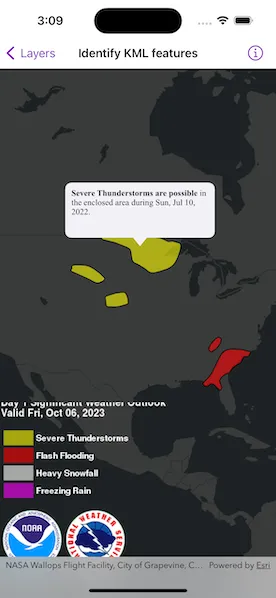
Show a callout with formatted content for a KML feature.
Use case
A user may wish to select a KML feature to view relevant information about it.
How to use the sample
Tap a feature to identify it. Feature information will be displayed in a callout.
Note: the KML layer used in this sample contains a screen overlay. The screen overlay contains a legend and the logos for NOAA and the NWS. You cannot identify the screen overlay.
How it works
- Use the
onSingleTapGesture(perform:)modifier onMapViewto get the screen point where a user tapped. - On tap:
- Call
MapViewProxy.identify(on:screenPoint:tolerance:returnPopupsOnly:maximumResults:)passing in theKMLLayer, screen point, and tolerance. - Await the result of the identify and then get the
KMLPlacemarkfrom the result. - Create a callout at the calculated map point and populate the callout content with text from the placemark’s
balloonContent. NOTE: KML supports defining HTML for balloon content and may need to be converted from HTML to text. - Show the callout.
Note: There are several types of KML features. This sample only identifies features of type KMLPlacemark.
Relevant API
- GeoViewProxy
- IdentifyLayerResult
- KMLLayer
- KMLPlacemark
About the data
This sample shows a forecast for significant weather within the U.S. Regions of severe thunderstorms, flooding, snowfall, and freezing rain are shown.
Additional information
KML features can have rich HTML content, including images.
Tags
Keyhole, KML, KMZ, NOAA, NWS, OGC, weather
Sample code
IdentifyKMLFeaturesView.swift
// Copyright 2023 Esri//// Licensed under the Apache License, Version 2.0 (the "License");// you may not use this file except in compliance with the License.// You may obtain a copy of the License at////   https://www.apache.org/licenses/LICENSE-2.0//// Unless required by applicable law or agreed to in writing, software// distributed under the License is distributed on an "AS IS" BASIS,// WITHOUT WARRANTIES OR CONDITIONS OF ANY KIND, either express or implied.// See the License for the specific language governing permissions and// limitations under the License.
import ArcGISimport SwiftUI
struct IdentifyKMLFeaturesView: View {    /// A map with a dark gray base basemap centered on the USA.    @State private var map: Map = {        let map = Map(basemapStyle: .arcGISDarkGrayBase)        let center = Point(x: -48_885, y: 1_718_235, spatialReference: SpatialReference(wkid: WKID(5070)!))        map.initialViewpoint = Viewpoint(center: center, scale: 5e7)        return map    }()
    /// The KML layer with forecast data that is on the map.    @State private var forecastLayer: KMLLayer?
    /// The placement of the callout on the map.    @State private var calloutPlacement: CalloutPlacement?
    /// The text of a KML placemark's balloon content that is shown in the callout.    @State private var calloutText = AttributedString()
    /// The error shown in the error alert.    @State private var error: (any Error)?
    var body: some View {        MapViewReader { mapViewProxy in            GeometryReader { geometry in                MapView(map: map)                    .callout(placement: $calloutPlacement.animation(.default.speed(2))) { _ in                        Text(calloutText)                            .frame(maxWidth: geometry.size.width / 2)                            .font(.callout)                            .padding(8)                    }                    .onSingleTapGesture { screenPoint, _ in                        Task {                            do {                                // Get the KML placemark for the screen point.                                if let placemark = try await kmlPlacemark(for: screenPoint, using: mapViewProxy) {                                    // Update the callout's text and placement.                                    try updateCalloutText(using: placemark)                                    if let location = mapViewProxy.location(fromScreenPoint: screenPoint) {                                        calloutPlacement = .location(location)                                    }                                } else {                                    // Dismiss the callout if a placemark was not found.                                    calloutPlacement = nil                                }                            } catch {                                self.error = error                            }                        }                    }                    .task {                        do {                            // Load a KML dataset from a URL.                            let dataset = KMLDataset(url: .forecastKML)                            try await dataset.load()
                            // Create a KML layer with the dataset.                            forecastLayer = KMLLayer(dataset: dataset)
                            // Add the layer to the map.                            map.addOperationalLayer(forecastLayer!)                        } catch {                            self.error = error                        }                    }            }        }        .errorAlert(presentingError: $error)    }}
private extension IdentifyKMLFeaturesView {    /// Identifies the placemark for a given point on the KML layer.    /// - Parameters:    ///   - screenPoint: The screen point corresponding to a placemark.    ///   - proxy: The map view proxy used identify the screen point.    /// - Precondition: `forecastLayer != nil`    /// - Returns: The first KML placemark in the identify result.    func kmlPlacemark(for screenPoint: CGPoint, using proxy: MapViewProxy) async throws -> KMLPlacemark? {        guard let forecastLayer else { return nil }
        // Identify the screen point on the KML layer using the map view proxy.        let identifyResult = try await proxy.identify(on: forecastLayer, screenPoint: screenPoint, tolerance: 2)
        // Get the first KML placemark from the result's geo elements.        let placemark = identifyResult.geoElements.first(where: { $0 is KMLPlacemark })        return placemark as? KMLPlacemark    }
    /// Updates the callout text using the balloon content of a given placemark.    /// - Parameter placemark: The KML placemark to get the data from.    func updateCalloutText(using placemark: KMLPlacemark) throws {        // Google Earth only displays the placemarks with description or extended data.        // To match its behavior, add a description placeholder if it is empty.        if placemark.description.isEmpty {            placemark.description = "Weather condition"        }
        // Convert the placemark's html balloon content to text.        let data = Data(placemark.balloonContent.utf8)        let text = try NSAttributedString(            data: data,            options: [.documentType: NSAttributedString.DocumentType.html],            documentAttributes: nil        )
        // Update the callout text.        var attributedText = AttributedString(text)        attributedText.foregroundColor = .label        calloutText = attributedText    }}
private extension URL {    /// A URL to an online KML file with forecast data.    static var forecastKML: URL {        URL(string: "https://www.wpc.ncep.noaa.gov/kml/noaa_chart/WPC_Day1_SigWx_latest.kml")!    }}
#Preview {    IdentifyKMLFeaturesView()}