Create symbol styles from a style file hosted on a portal.
Use case
Style files hosted on an ArcGIS Online or Enterprise portal are known as web styles. They can be used to style symbols on a feature layer or graphic overlay. Since styles are published from ArcGIS Pro, you can author and design your own beautiful multilayer vector symbols. These vector symbols look good at any resolution and scale well. Users can now access these styles from their native applications, and make use of the vector symbols within them to enhance features and graphics in the map.
How to use the sample
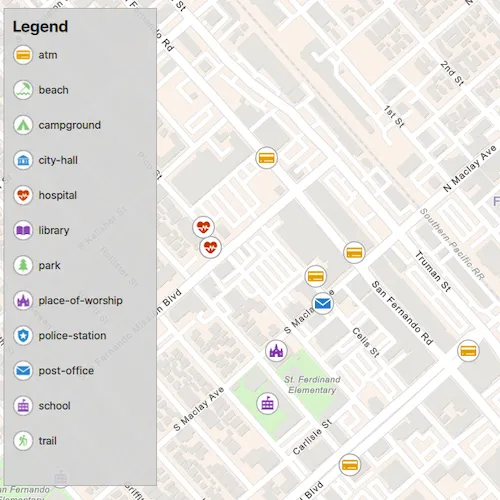
The sample displays a map with a set of symbols that represent the categories of the features within the dataset. Pan and zoom on the map and view the legend to explore the appearance and names of the different symbols from the selected symbol style.
How it works
- Create a
FeatureLayerand add it to the map. - Create a
UniqueValueRendererand set it to the feature layer. - Create a
SymbolStylefrom a portal by passing in the web style name and portal URL. * Note: passingnullas the portal will default to ArcGIS.com. - Create a
SymbolStylesSearchParametersclass and set itskeysparameter to the names of the symbols in the web style that you want to use. - Call
searchSymbolsAsync(SymbolStylesSearchParameters)to create aSymbolStyleSearchResultListModel. - For each
SymbolStyleSearchResultin the returned list model, fetch the symbol usingfetchSymbolAsync(SymbolStyle) - When
fetchSymbolAsynchas completed, createUniqueValueobjects using the returnedSymboland the values of the features to apply it to. - Add each
UniqueValueto theUniqueValueRenderer.
Relevant API
- FeatureLayer
- Symbol
- SymbolStyle
- UniqueValue
- UniqueValueRenderer
About the data
The sample uses the ‘Esri2DPointSymbolsStyle’ Web Style.
The map shows features from the LA County Points of Interest service hosted on ArcGIS Online.
Additional information
2D web styles, dictionary web styles, and 3D web styles can all be hosted on an ArcGIS Online or Enterprise portal.
Tags
renderer, symbol, symbology, web style
Sample code
// [WriteFile Name=CreateSymbolStylesFromWebStyles, Category=DisplayInformation]// [Legal]// Copyright 2021 Esri.//// Licensed under the Apache License, Version 2.0 (the "License");// you may not use this file except in compliance with the License.// You may obtain a copy of the License at// http://www.apache.org/licenses/LICENSE-2.0//// Unless required by applicable law or agreed to in writing, software// distributed under the License is distributed on an "AS IS" BASIS,// WITHOUT WARRANTIES OR CONDITIONS OF ANY KIND, either express or implied.// See the License for the specific language governing permissions and// limitations under the License.// [Legal]
#ifdef PCH_BUILD#include "pch.hpp"#endif // PCH_BUILD
// sample headers#include "CreateSymbolStylesFromWebStyles.h"
// ArcGIS Maps SDK headers#include "FeatureLayer.h"#include "LayerListModel.h"#include "Map.h"#include "MapQuickView.h"#include "MapTypes.h"#include "Point.h"#include "ServiceFeatureTable.h"#include "SpatialReference.h"#include "Symbol.h"#include "SymbolStyle.h"#include "SymbolStyleSearchParameters.h"#include "SymbolStyleSearchResult.h"#include "SymbolStyleSearchResultListModel.h"#include "UniqueValue.h"#include "UniqueValueListModel.h"#include "UniqueValueRenderer.h"
// Qt headers#include <QFuture>#include <QUuid>
using namespace Esri::ArcGISRuntime;
CreateSymbolStylesFromWebStyles::CreateSymbolStylesFromWebStyles(QObject* parent /* = nullptr */):  QObject(parent),  m_map(new Map(BasemapStyle::ArcGISNavigation, this)){  const QUrl webStyleLayerUrl = QUrl("https://services.arcgis.com/V6ZHFr6zdgNZuVG0/arcgis/rest/services/LA_County_Points_of_Interest/FeatureServer/0");  m_webStyleLayer = new FeatureLayer(new ServiceFeatureTable(webStyleLayerUrl, this), this);
  m_uniqueValueRenderer = new UniqueValueRenderer(this);
  // The UniqueValueRenderer will affect specific features based on the values of the specified FieldName(s)  m_uniqueValueRenderer->setFieldNames({"cat2"});
  // The UniqueValueRenderer defines how features of a FeatureLayer are stylized  // Without an overriding UniqueValueRenderer, features from m_webStyleLayer will use the web layer's default gray circle style  m_webStyleLayer->setRenderer(m_uniqueValueRenderer);
  m_map->operationalLayers()->append(m_webStyleLayer);
  // Set the scale at which feature symbols and text will appear at their default size  m_map->setReferenceScale(100'000);
  performSymbolSearch();}
void CreateSymbolStylesFromWebStyles::performSymbolSearch(){  QMap<QString,QStringList> categoriesMap = createCategoriesMap();  SymbolStyleSearchParameters searchParams;  searchParams.setKeys(categoriesMap.keys());  searchParams.setKeysStrictlyMatch(true);
  SymbolStyle* symbolStyle = new SymbolStyle("Esri2DPointSymbolsStyle", nullptr, this);  symbolStyle->searchSymbolsAsync(searchParams).then(this,  [this, symbolStyle, categoriesMap](SymbolStyleSearchResultListModel* searchResults)  {    m_legendInfoListModel = searchResults;    emit legendInfoListModelChanged();
    auto results = searchResults->searchResults();    for (SymbolStyleSearchResult& symbolStyleSearchResult : results)    {      // We pass symbolStyle as the QObject parent for fetchSymbol() because we don't need access to the resulting class outside the lifetime of this SymbolStyle      symbolStyleSearchResult.fetchSymbolAsync(symbolStyle).then(this,      [this, symbolStyleSearchResult, categoriesMap](Symbol* symbol)      {        const QString symbolLabel = symbolStyleSearchResult.key();        // If multiple field names are set, we can pass multiple values from each field,        // However, even though we are using the same symbol, we must create a UniqueValue for each value from the same field        // When the FeatureLayer is rendered, all features with a matching value in the specified FieldNames will appear with the defined UniqueValue        for (const QString &category : categoriesMap[symbolLabel])        {          m_uniqueValueRenderer->uniqueValues()->append(new UniqueValue(symbolLabel, "", {category}, symbol, this));        }      });    }
  });}
CreateSymbolStylesFromWebStyles::~CreateSymbolStylesFromWebStyles() = default;
void CreateSymbolStylesFromWebStyles::init(){  // Register the map view for QML  qmlRegisterType<MapQuickView>("Esri.Samples", 1, 0, "MapView");  qmlRegisterType<CreateSymbolStylesFromWebStyles>("Esri.Samples", 1, 0, "CreateSymbolStylesFromWebStylesSample");  qmlRegisterUncreatableType<QAbstractListModel>("Esri.Samples", 1, 0, "AbstractListModel", "AbstractListModel is uncreateable");}
MapQuickView* CreateSymbolStylesFromWebStyles::mapView() const{  return m_mapView;}
void CreateSymbolStylesFromWebStyles::setMapView(MapQuickView* mapView){  if (!mapView || mapView == m_mapView)    return;
  m_mapView = mapView;  m_mapView->setMap(m_map);
  constexpr double x_longitude = -118.44186;  constexpr double y_latitude = 34.28301;  constexpr double scale = 7000;  const Point centerPt(x_longitude, y_latitude, SpatialReference::wgs84());
  m_mapView->setViewpointCenterAsync(centerPt, scale);
  connect(m_mapView, &MapQuickView::mapScaleChanged, this, [this]()  {    // Set scale symbols to true when we zoom in so the symbols don't take up the entire view    m_webStyleLayer->setScaleSymbols(m_mapView->mapScale() >= 80'000);  });
  emit mapViewChanged();}
QMap<QString,QStringList> CreateSymbolStylesFromWebStyles::createCategoriesMap(){  QMap<QString,QStringList> categories =  {    {"atm", {"Banking and Finance"}},    {"beach", {"Beaches and Marinas"}},    {"campground", {"Campgrounds"}},    {"city-hall", {"City Halls", "Government Offices"}},    {"hospital", {"Hospitals and Medical Centers", "Health Screening and Testing", "Health Centers", "Mental Health Centers"}},    {"library", {"Libraries"}},    {"park", {"Parks and Gardens"}},    {"place-of-worship", {"Churches"}},    {"police-station", {"Sheriff and Police Stations"}},    {"post-office", {"DHL Locations", "Federal Express Locations"}},    {"school", {"Public High Schools", "Public Elementary Schools", "Private and Charter Schools"}},    {"trail", {"Trails"}}  };
  return categories;}
// [WriteFile Name=CreateSymbolStylesFromWebStyles, Category=DisplayInformation]// [Legal]// Copyright 2021 Esri.//// Licensed under the Apache License, Version 2.0 (the "License");// you may not use this file except in compliance with the License.// You may obtain a copy of the License at// http://www.apache.org/licenses/LICENSE-2.0//// Unless required by applicable law or agreed to in writing, software// distributed under the License is distributed on an "AS IS" BASIS,// WITHOUT WARRANTIES OR CONDITIONS OF ANY KIND, either express or implied.// See the License for the specific language governing permissions and// limitations under the License.// [Legal]
#ifndef CREATESYMBOLSTYLESFROMWEBSTYLES_H#define CREATESYMBOLSTYLESFROMWEBSTYLES_H
// Qt headers#include <QAbstractListModel>#include <QMap>#include <QObject>
namespace Esri::ArcGISRuntime{ class FeatureLayer; class Map; class MapQuickView; class UniqueValue; class UniqueValueRenderer; class LegendInfo; class SymbolStyle;}
class QAbstractListModel;
Q_MOC_INCLUDE("MapQuickView.h")Q_MOC_INCLUDE("QAbstractListModel")
class CreateSymbolStylesFromWebStyles : public QObject{ Q_OBJECT
Q_PROPERTY(Esri::ArcGISRuntime::MapQuickView* mapView READ mapView WRITE setMapView NOTIFY mapViewChanged) Q_PROPERTY(QAbstractListModel* legendInfoListModel MEMBER m_legendInfoListModel NOTIFY legendInfoListModelChanged)
public: explicit CreateSymbolStylesFromWebStyles(QObject* parent = nullptr); ~CreateSymbolStylesFromWebStyles();
static void init();
signals: void mapViewChanged(); void legendInfoListModelChanged();
private: Esri::ArcGISRuntime::MapQuickView* mapView() const; void setMapView(Esri::ArcGISRuntime::MapQuickView* mapView); QMap<QString,QStringList> createCategoriesMap(); void performSymbolSearch();
Esri::ArcGISRuntime::FeatureLayer* m_webStyleLayer = nullptr; Esri::ArcGISRuntime::Map* m_map = nullptr; Esri::ArcGISRuntime::MapQuickView* m_mapView = nullptr; Esri::ArcGISRuntime::UniqueValueRenderer* m_uniqueValueRenderer = nullptr; QAbstractListModel* m_legendInfoListModel = nullptr;};
#endif // CREATESYMBOLSTYLESFROMWEBSTYLES_H// [WriteFile Name=CreateSymbolStylesFromWebStyles, Category=DisplayInformation]// [Legal]// Copyright 2021 Esri.//// Licensed under the Apache License, Version 2.0 (the "License");// you may not use this file except in compliance with the License.// You may obtain a copy of the License at// http://www.apache.org/licenses/LICENSE-2.0//// Unless required by applicable law or agreed to in writing, software// distributed under the License is distributed on an "AS IS" BASIS,// WITHOUT WARRANTIES OR CONDITIONS OF ANY KIND, either express or implied.// See the License for the specific language governing permissions and// limitations under the License.// [Legal]
import QtQuickimport QtQuick.Controlsimport Esri.Samples
Item { id: window
// add a mapView component MapView { id: view anchors.fill: parent
Component.onCompleted: { // Set the focus on MapView to initially enable keyboard navigation forceActiveFocus(); } }
// Declare the C++ instance which creates the map etc. and supply the view CreateSymbolStylesFromWebStylesSample { id: sample mapView: view }
Rectangle { id: legendRect anchors { margins: 10 left: parent.left top: parent.top } height: 545 width: 175 color: "lightgrey" opacity: 0.9 clip: true border { color: "darkgrey" width: 1 }
// Catch mouse signals so they don't propagate to the map MouseArea { anchors.fill: parent onClicked: mouse => mouse.accepted = true onWheel: wheel => wheel.accepted = true }
Column { anchors { fill: parent margins: 10 } spacing: 2
Row { spacing: 55
Text { text: qsTr("Legend") font { pixelSize: 18 bold: true } } }
// Create a list view to display the legend ListView { id: legendListView anchors.margins: 10 model: sample.legendInfoListModel width: parent.width * .9 height: parent.height * .9 clip: true
// Create delegate to display the name with an image delegate: Item { id: legendItem width: 175 height: 40 clip: true
Row { spacing: 5 anchors.verticalCenter: parent.verticalCenter
Image { anchors.verticalCenter: parent.verticalCenter width: 25 height: width source: symbolUrl }
Text { id: symbolText anchors.verticalCenter: parent.verticalCenter width: 110 text: name wrapMode: Text.Wrap font.pixelSize: 12 } } } } } }}