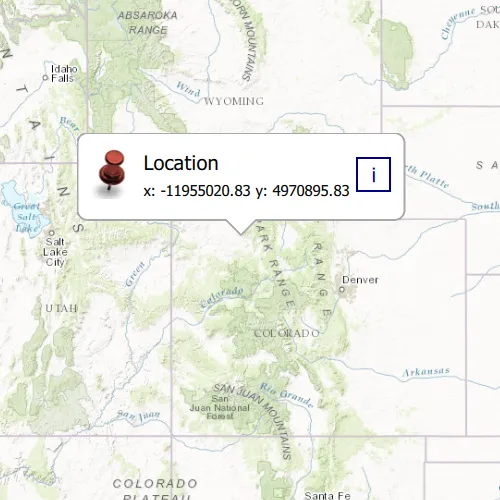
Show a callout with the latitude and longitude of user-tapped points.
Use case
Callouts are used to display temporary detail content on a map. You can display text and arbitrary UI controls in callouts.
How to use the sample
Tap anywhere on the map. A callout showing the WGS84 coordinates for the tapped point will appear.
How it works
- Listen for
mouseClickedsignal on the map view. - When the user taps, get the tapped location using the mouseEvent x and y coordinates,
MapQuickView::screenToLocation(mouseEvent.position().x(), mouseEvent.position().y()). - Create a string to display the coordinates; note that latitude and longitude in WGS84 map to the Y and X coordinates.
- Create a new callout definition using a title and the coordinate string.
- Display the callout by calling
setVisibleandsetLocationon theCalloutData.
Relevant API
- CalloutDefinition
- GeometryEngine::project
- GeoViewTappedEventArgs
- MapView::geoViewTapped
- MapView::showCalloutAt
Tags
balloon, bubble, callout, flyout, flyover, info window, popup, tap
Sample code
// [WriteFile Name=ShowCallout, Category=DisplayInformation]// [Legal]// Copyright 2016 Esri.//// Licensed under the Apache License, Version 2.0 (the "License");// you may not use this file except in compliance with the License.// You may obtain a copy of the License at// http://www.apache.org/licenses/LICENSE-2.0//// Unless required by applicable law or agreed to in writing, software// distributed under the License is distributed on an "AS IS" BASIS,// WITHOUT WARRANTIES OR CONDITIONS OF ANY KIND, either express or implied.// See the License for the specific language governing permissions and// limitations under the License.// [Legal]
#ifdef PCH_BUILD#include "pch.hpp"#endif // PCH_BUILD
// sample headers#include "ShowCallout.h"
// ArcGIS Maps SDK headers#include "CalloutData.h"#include "Map.h"#include "MapQuickView.h"#include "MapTypes.h"#include "MapViewTypes.h"#include "Point.h"#include "SpatialReference.h"#include "Viewpoint.h"
// Qt headers#include <QImage>
using namespace Esri::ArcGISRuntime;
ShowCallout::ShowCallout(QQuickItem* parent):  QQuickItem(parent){}
ShowCallout::~ShowCallout() = default;
void ShowCallout::init(){  qmlRegisterType<MapQuickView>("Esri.Samples", 1, 0, "MapView");  qmlRegisterType<ShowCallout>("Esri.Samples", 1, 0, "ShowCalloutSample");  qmlRegisterUncreatableType<CalloutData>("Esri.Samples", 1, 0, "CalloutData", "CalloutData is an uncreatable type");}
void ShowCallout::componentComplete(){  QQuickItem::componentComplete();
  // find QML MapView component  m_mapView = findChild<MapQuickView*>("mapView");  m_mapView->setWrapAroundMode(WrapAroundMode::Disabled);
  // Create a map using the topographic basemap  m_map = new Map(BasemapStyle::ArcGISTopographic, this);  m_map->setInitialViewpoint(Viewpoint(Point(-1.2e7, 5e6, SpatialReference::webMercator()), 1e7));
  // Set map to map view  m_mapView->setMap(m_map);
  //! [initialize callout]  m_mapView->calloutData()->setVisible(false);  m_mapView->calloutData()->setTitle("Location");  QImage image(":/Samples/DisplayInformation/ShowCallout/RedShinyPin.png");  m_mapView->calloutData()->setImage(image);  //! [initialize callout]
  // display callout on mouseClicked  connect(m_mapView, &MapQuickView::mouseClicked, this, [this](QMouseEvent& mouseEvent){    if (m_mapView->calloutData()->isVisible())      m_mapView->calloutData()->setVisible(false);    else    {      // set callout position      Point mapPoint(m_mapView->screenToLocation(mouseEvent.position().x(), mouseEvent.position().y()));      m_mapView->calloutData()->setLocation(mapPoint);
      // set detail as coordinates formatted to decimal numbers with precision 2      m_mapView->calloutData()->setDetail("x: " + QString::number(mapPoint.x(), 'f', 2) + " y: " + QString::number(mapPoint.y(), 'f', 2));      m_mapView->calloutData()->setVisible(true);    }  });}
// [WriteFile Name=ShowCallout, Category=DisplayInformation]// [Legal]// Copyright 2016 Esri.//// Licensed under the Apache License, Version 2.0 (the "License");// you may not use this file except in compliance with the License.// You may obtain a copy of the License at// http://www.apache.org/licenses/LICENSE-2.0//// Unless required by applicable law or agreed to in writing, software// distributed under the License is distributed on an "AS IS" BASIS,// WITHOUT WARRANTIES OR CONDITIONS OF ANY KIND, either express or implied.// See the License for the specific language governing permissions and// limitations under the License.// [Legal]
#ifndef SHOWCALLOUT_H#define SHOWCALLOUT_H
// Qt headers#include <QQuickItem>
namespace Esri::ArcGISRuntime{ class Map; class MapQuickView;}
class ShowCallout : public QQuickItem{ Q_OBJECT
public: explicit ShowCallout(QQuickItem* parent = nullptr); ~ShowCallout() override;
void componentComplete() override; static void init();
private: Esri::ArcGISRuntime::Map* m_map = nullptr; Esri::ArcGISRuntime::MapQuickView* m_mapView = nullptr;};
#endif // SHOWCALLOUT_H// [WriteFile Name=ShowCallout, Category=DisplayInformation]// [Legal]// Copyright 2016 Esri.//// Licensed under the Apache License, Version 2.0 (the "License");// you may not use this file except in compliance with the License.// You may obtain a copy of the License at// http://www.apache.org/licenses/LICENSE-2.0//// Unless required by applicable law or agreed to in writing, software// distributed under the License is distributed on an "AS IS" BASIS,// WITHOUT WARRANTIES OR CONDITIONS OF ANY KIND, either express or implied.// See the License for the specific language governing permissions and// limitations under the License.// [Legal]
import QtQuickimport Esri.Samplesimport Esri.ArcGISRuntime.Toolkit
ShowCalloutSample { id: showCalloutSample clip: true width: 800 height: 600
// add a mapView component MapView { id: mapView anchors.fill: parent objectName: "mapView" clip: true
Component.onCompleted: { // Set the focus on MapView to initially enable keyboard navigation forceActiveFocus(); }
//! [set callout data] Callout { id: callout calloutData: mapView.calloutData // bind to the property that is exposed accessoryButtonVisible: false leaderPosition: Callout.LeaderPosition.Automatic } //! [set callout data] }}