Use pictures for markers.
Use case
When marking geoelements on a map, using custom, unique symbols can be helpful for highlighting and differentiating between locations. For example, a tourism office may use pictures of landmarks as symbols on an online map or app, to help prospective visitors to orient themselves more easily around a city.
How to use the sample
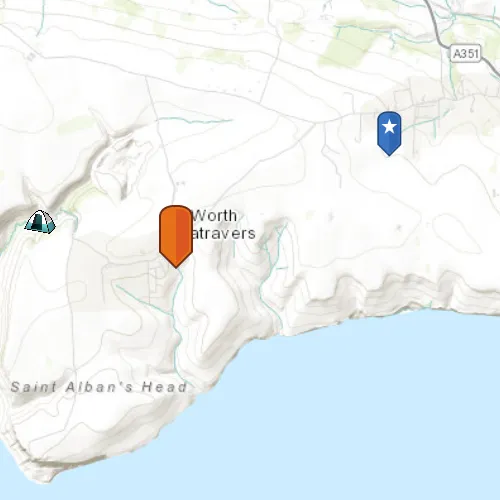
When launched, this sample displays a map with three picture marker symbols. Pan and zoom to explore the map.
How it works
- Create a
PictureMarkerSymbolusing the URL to an online or local image. - Create a
Graphicand set its symbol to the picture marker symbol.
Relevant API
- PictureMarkerSymbol
Offline Data
To set up the sample’s offline data, see the Use offline data in the samples section of the Qt Samples repository overview.
| Link | Local Location |
|---|---|
| orange_symbol Png File | <userhome>/ArcGIS/Runtime/Data/symbol/orange_symbol.png |
About the data
The picture marker symbols in this sample are all constructed from different types of resources:
- Campsite symbol constructed from a URL
- Blue pin with a star stored in the resource folder that comes with the application
- Orange pin created from a file path on disk (which is written to disk when the app starts and cleaned up when the app closes).
Tags
graphics, marker, picture, symbol, visualization
Sample code
// [WriteFile Name=Picture_Marker_Symbol, Category=DisplayInformation]// [Legal]// Copyright 2016 Esri.//// Licensed under the Apache License, Version 2.0 (the "License");// you may not use this file except in compliance with the License.// You may obtain a copy of the License at// http://www.apache.org/licenses/LICENSE-2.0//// Unless required by applicable law or agreed to in writing, software// distributed under the License is distributed on an "AS IS" BASIS,// WITHOUT WARRANTIES OR CONDITIONS OF ANY KIND, either express or implied.// See the License for the specific language governing permissions and// limitations under the License.// [Legal]
#ifdef PCH_BUILD#include "pch.hpp"#endif // PCH_BUILD
// sample headers#include "Picture_Marker_Symbol.h"
// ArcGIS Maps SDK headers#include "Envelope.h"#include "Graphic.h"#include "GraphicListModel.h"#include "GraphicsOverlay.h"#include "GraphicsOverlayListModel.h"#include "Map.h"#include "MapQuickView.h"#include "MapTypes.h"#include "MapViewTypes.h"#include "PictureMarkerSymbol.h"#include "Point.h"#include "SpatialReference.h"#include "Viewpoint.h"
// Qt headers#include <QStandardPaths>#include <QString>#include <QUrl>#include <QtCore/qglobal.h>
using namespace Esri::ArcGISRuntime;
// helper method to get cross platform data pathnamespace{  QString defaultDataPath()  {    QString dataPath;
  #ifdef Q_OS_IOS    dataPath = QStandardPaths::writableLocation(QStandardPaths::DocumentsLocation);  #else    dataPath = QStandardPaths::writableLocation(QStandardPaths::HomeLocation);  #endif
    return dataPath;  }} // namespace
Picture_Marker_Symbol::Picture_Marker_Symbol(QQuickItem* parent) :  QQuickItem(parent),  m_dataPath(defaultDataPath() + "/ArcGIS/Runtime/Data"){}
Picture_Marker_Symbol::~Picture_Marker_Symbol() = default;
void Picture_Marker_Symbol::init(){  qmlRegisterType<MapQuickView>("Esri.Samples", 1, 0, "MapView");  qmlRegisterType<Picture_Marker_Symbol>("Esri.Samples", 1, 0, "Picture_Marker_SymbolSample");}
void Picture_Marker_Symbol::componentComplete(){  QQuickItem::componentComplete();
  // find QML MapView component  m_mapView = findChild<MapQuickView*>("mapView");  m_mapView->setWrapAroundMode(WrapAroundMode::Disabled);
  // Create a map using the topographic basemap  m_map = new Map(BasemapStyle::ArcGISTopographic, this);
  // Set map to map view  m_mapView->setMap(m_map);
  // set initial viewpoint  m_map->setInitialViewpoint(Viewpoint(Envelope(-229100, 6550700, -223300, 6552100, SpatialReference::webMercator())));
  // create graphics overlay  m_graphicsOverlay = new GraphicsOverlay(this);
  // create a campsite symbol from a URL  PictureMarkerSymbol* campSymbol = new PictureMarkerSymbol(QUrl("https://static.arcgis.com/images/Symbols/OutdoorRecreation/Camping.png"), this);  setWidthAndHeight(campSymbol, 38.0f);  Point campPoint(-228835, 6550763, SpatialReference::webMercator());  addGraphic(campPoint, campSymbol);
  // create a blue symbol from a local resource  PictureMarkerSymbol* blueSymbol = new PictureMarkerSymbol(QUrl("qrc:/Samples/DisplayInformation/Picture_Marker_Symbol/blue_symbol.png"), this);  setWidthAndHeight(blueSymbol, 80.0f);  Point blueSymbolPoint(-223560, 6552021, SpatialReference::webMercator());  addGraphic(blueSymbolPoint, blueSymbol);
  // create an orange symbol from a file path  PictureMarkerSymbol* orangeSymbol = new PictureMarkerSymbol(QUrl(m_dataPath + "/symbol/orange_symbol.png"), this);  setWidthAndHeight(orangeSymbol, 64.0f);  Point orangeSymbolPoint(-226773, 6550477, SpatialReference::webMercator());  addGraphic(orangeSymbolPoint, orangeSymbol);
  // add GraphicsOverlay to MapView  m_mapView->graphicsOverlays()->append(m_graphicsOverlay);}
void Picture_Marker_Symbol::addGraphic(Point &point, PictureMarkerSymbol* symbol){  // create graphic  Graphic* graphic = new Graphic(point, symbol, this);  // append to graphicsoverlay  m_graphicsOverlay->graphics()->append(graphic);}
void Picture_Marker_Symbol::setWidthAndHeight(PictureMarkerSymbol* symbol, float size){  symbol->setWidth(size);  symbol->setHeight(size);}
// [WriteFile Name=Picture_Marker_Symbol, Category=DisplayInformation]// [Legal]// Copyright 2016 Esri.//// Licensed under the Apache License, Version 2.0 (the "License");// you may not use this file except in compliance with the License.// You may obtain a copy of the License at// http://www.apache.org/licenses/LICENSE-2.0//// Unless required by applicable law or agreed to in writing, software// distributed under the License is distributed on an "AS IS" BASIS,// WITHOUT WARRANTIES OR CONDITIONS OF ANY KIND, either express or implied.// See the License for the specific language governing permissions and// limitations under the License.// [Legal]
#ifndef PICTURE_MARKER_SYMBOL_H#define PICTURE_MARKER_SYMBOL_H
// Qt headers#include <QQuickItem>#include <QString>
namespace Esri::ArcGISRuntime{ class Map; class MapQuickView; class GraphicsOverlay; class PictureMarkerSymbol; class Point;}
class Picture_Marker_Symbol : public QQuickItem{ Q_OBJECT
public: explicit Picture_Marker_Symbol(QQuickItem* parent = nullptr); ~Picture_Marker_Symbol() override;
void componentComplete() override; static void init();
private: void setWidthAndHeight(Esri::ArcGISRuntime::PictureMarkerSymbol* symbol, float size); void addGraphic(Esri::ArcGISRuntime::Point &point, Esri::ArcGISRuntime::PictureMarkerSymbol* symbol);
QString m_dataPath; Esri::ArcGISRuntime::Map* m_map = nullptr; Esri::ArcGISRuntime::MapQuickView* m_mapView = nullptr; Esri::ArcGISRuntime::GraphicsOverlay* m_graphicsOverlay = nullptr;};
#endif // PICTURE_MARKER_SYMBOL_H// [WriteFile Name=Picture_Marker_Symbol, Category=DisplayInformation]// [Legal]// Copyright 2016 Esri.//// Licensed under the Apache License, Version 2.0 (the "License");// you may not use this file except in compliance with the License.// You may obtain a copy of the License at// http://www.apache.org/licenses/LICENSE-2.0//// Unless required by applicable law or agreed to in writing, software// distributed under the License is distributed on an "AS IS" BASIS,// WITHOUT WARRANTIES OR CONDITIONS OF ANY KIND, either express or implied.// See the License for the specific language governing permissions and// limitations under the License.// [Legal]
import QtQuickimport Esri.Samples
Picture_Marker_SymbolSample { clip: true width: 800 height: 600
// add a mapView component MapView { anchors.fill: parent objectName: "mapView"
Component.onCompleted: { // Set the focus on MapView to initially enable keyboard navigation forceActiveFocus(); } }}