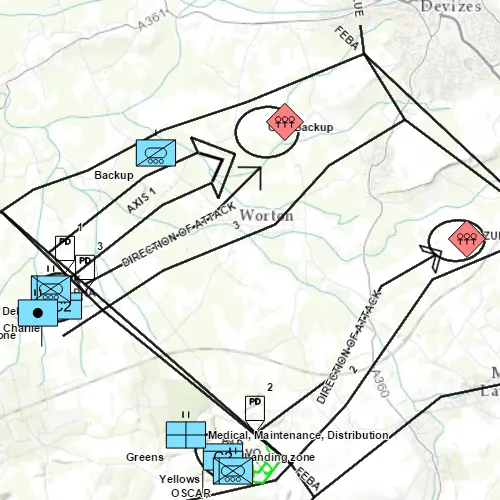
This sample demonstrates applying a dictionary renderer to graphics, in order to display military symbology without the need for a feature table.
Use case
Use a dictionary renderer on a graphics overlay to display more transient data, such as military messages coming through a local tactical network.
How to use the sample
Pan and zoom to explore military symbols on the map.
How it works
- Create a new
DictionarySymbolStyle(dictionaryPath). - Create a new
DictionaryRenderer(symbolDictionary). - Create a new
GraphicsOverlay - Set the dictionary renderer to the graphics overlay.
- Parse through the XML and create a
Graphicfor each element: i. Use the_wkidkey to get the geometry’s spatial reference. ii. Use the_control_pointskey to get the geometry’s shape. iii. Create a geometry using the spatial reference and shape from above. iv. Create aGraphicfor each attribute, utilizing its defined geometry. v. Add the graphic to the graphics overlay.
Relevant API
- DictionaryRenderer
- DictionarySymbolStyle
- GraphicsOverlay
Offline data
To set up the sample’s offline data, see the Use offline data in the samples section of the Qt Samples repository overview.
| Link | Local Location |
|---|---|
| Mil2525d Stylx File | <userhome>/ArcGIS/Runtime/Data/styles/arcade_style/mil2525d.stylx |
| MIL-STD-2525D XML Message File | <userhome>/ArcGIS/Runtime/Data/xml/arcade_style/Mil2525DMessages.xml |
About the data
The sample opens to a view of the county Wiltshire, United Kingdom. It displays military symbols illustrating a simulated combat situation in the area.
Tags
defense, military, situational awareness, tactical, visualization
Sample code
// [WriteFile Name=GODictionaryRenderer, Category=DisplayInformation]// [Legal]// Copyright 2016 Esri.//// Licensed under the Apache License, Version 2.0 (the "License");// you may not use this file except in compliance with the License.// You may obtain a copy of the License at// http://www.apache.org/licenses/LICENSE-2.0//// Unless required by applicable law or agreed to in writing, software// distributed under the License is distributed on an "AS IS" BASIS,// WITHOUT WARRANTIES OR CONDITIONS OF ANY KIND, either express or implied.// See the License for the specific language governing permissions and// limitations under the License.// [Legal]
#ifdef PCH_BUILD#include "pch.hpp"#endif // PCH_BUILD
// sample headers#include "GODictionaryRenderer.h"
// ArcGIS Maps SDK headers#include "DictionaryRenderer.h"#include "DictionarySymbolStyle.h"#include "DictionarySymbolStyleConfiguration.h"#include "Graphic.h"#include "GraphicListModel.h"#include "GraphicsOverlay.h"#include "GraphicsOverlayListModel.h"#include "Map.h"#include "MapQuickView.h"#include "MapTypes.h"#include "MultipointBuilder.h"#include "Point.h"#include "PointCollection.h"#include "SpatialReference.h"
// Qt headers#include <QFile>#include <QFuture>#include <QStandardPaths>#include <QtCore/qglobal.h>
using namespace Esri::ArcGISRuntime;
// helper method to get cross platform data pathnamespace{QString defaultDataPath(){  QString dataPath;
#ifdef Q_OS_IOS  dataPath = QStandardPaths::writableLocation(QStandardPaths::DocumentsLocation);#else  dataPath = QStandardPaths::writableLocation(QStandardPaths::HomeLocation);#endif
  return dataPath;}} // namespace
const QString GODictionaryRenderer::FIELD_CONTROL_POINTS = QStringLiteral("_control_points");const QString GODictionaryRenderer::FIELD_WKID = QStringLiteral("_wkid");
GODictionaryRenderer::GODictionaryRenderer(QQuickItem* parent) :  QQuickItem(parent),  m_dataPath(defaultDataPath() + "/ArcGIS/Runtime/Data"){}
GODictionaryRenderer::~GODictionaryRenderer() = default;
void GODictionaryRenderer::init(){  qmlRegisterType<MapQuickView>("Esri.Samples", 1, 0, "MapView");  qmlRegisterType<GODictionaryRenderer>("Esri.Samples", 1, 0, "GODictionaryRendererSample");}
bool GODictionaryRenderer::graphicsLoaded() const{  return m_graphicsLoaded;}
void GODictionaryRenderer::componentComplete(){  QQuickItem::componentComplete();
  //! [Apply Dictionary Renderer Graphics Overlay Cpp]  // Create graphics overlay  m_graphicsOverlay = new GraphicsOverlay(this);
  // Create dictionary renderer and apply to the graphics overlay  const QString specType = QStringLiteral("mil2525d");  const QString styleLocation = m_dataPath + "/styles/arcade_style/mil2525d.stylx";  DictionarySymbolStyle* dictionarySymbolStyle = DictionarySymbolStyle::createFromFile(styleLocation, this);
  // The style will be loaded automatically  connect(dictionarySymbolStyle, &DictionarySymbolStyle::loadStatusChanged, this, [dictionarySymbolStyle]()  {    if (dictionarySymbolStyle->loadStatus() == LoadStatus::Loaded)    {      const QList<DictionarySymbolStyleConfiguration*> dictionarySymbolStyleConfigurations = dictionarySymbolStyle->configurations();      for (DictionarySymbolStyleConfiguration* dictionarySymbolStyleConfiguration : dictionarySymbolStyleConfigurations)      {        if (dictionarySymbolStyleConfiguration->name() == "model")        {          dictionarySymbolStyleConfiguration->setValue("ORDERED ANCHOR POINTS");        }      }    }  });
  //! [Apply Dictionary Renderer Graphics Overlay Cpp]  Q_UNUSED(specType)
  DictionaryRenderer* renderer = new DictionaryRenderer(dictionarySymbolStyle, this);  m_graphicsOverlay->setRenderer(renderer);  // Create a map and give it to the MapView  m_mapView = findChild<MapQuickView*>("mapView");  m_map = new Map(BasemapStyle::ArcGISTopographic, this);
  parseXmlFile();
  m_mapView->graphicsOverlays()->append(m_graphicsOverlay);
  // The GraphicsOverlay will not have a valid extent until it is part of  // a MapQuickView with a valid spatial referenence  connect(m_mapView, &MapQuickView::spatialReferenceChanged, this, [this]()  {    zoomToGraphics();  });
  m_mapView->setMap(m_map);}
void GODictionaryRenderer::parseXmlFile(){  bool readingMessage = false;  QVariantMap elementValues;  QString currentElementName;
  QFile xmlFile(m_dataPath + "/xml/arcade_style/Mil2525DMessages.xml");
  // Open the file for reading  if (xmlFile.isOpen())  {    xmlFile.reset();  }  else  {    xmlFile.open(QIODevice::ReadOnly | QIODevice::Text);  }  m_xmlParser.setDevice(&xmlFile);
  // Traverse the XML in a loop  while (!m_xmlParser.atEnd())  {    m_xmlParser.readNext();
    // Is this the start or end of a message element?    if (m_xmlParser.name() == QString("message"))    {      if (!readingMessage)      {        // This is the start of a message element.        elementValues.clear();      }      else      {        // This is the end of a message element. Here we have a complete message that defines        // a military feature to display on the map. Create a graphic from its attributes.        createGraphic(elementValues);      }      // Either we just started reading a message, or we just finished reading a message.      readingMessage = !readingMessage;    }    // Are we already inside a message element?    else if (readingMessage)    {      // Is this the start of an element inside a message?      if (m_xmlParser.isStartElement())      {        // Remember which element we're reading        currentElementName = m_xmlParser.name().toString();      }      // Is this text?      else if (m_xmlParser.isCharacters())      {        // Is this text inside an element?        if (!currentElementName.isEmpty())        {          // Get the text and store it as the current element's value          const QStringView trimmedText = m_xmlParser.text().trimmed();          if (!trimmedText.isEmpty())          {            elementValues[currentElementName] = trimmedText.toString();          }        }      }    }  }
  emit graphicsLoadedChanged();}
void GODictionaryRenderer::createGraphic(QVariantMap rawAttributes){  // If _wkid was absent, use WGS 1984 (4326) by default.  const int wkid = rawAttributes.count(FIELD_WKID) > 0 ? rawAttributes[FIELD_WKID].toInt() : 4326;  const SpatialReference sr(wkid);  const QStringList pointStrings = rawAttributes[FIELD_CONTROL_POINTS].toString().split(";");
  Geometry geom;  if (pointStrings.length() == 1)  {    // It's a point    const QStringList coords = pointStrings[0].split(",");    geom = Point(coords[0].toDouble(), coords[1].toDouble(), sr);  }  else {    // It's a multipoint    MultipointBuilder* builder = new MultipointBuilder(sr, this);    PointCollection* collection = new PointCollection(sr, this);    for (const QString& pointString : pointStrings)    {      const QStringList coords = pointString.split(",");      if (coords.length() >= 2)        collection->addPoint(coords[0].toDouble(), coords[1].toDouble());    }    builder->setPoints(collection);    geom = builder->toGeometry();  }
  if (!geom.isEmpty())  {    // Get rid of _control_points and _wkid. They are not needed in the graphic's    // attributes.    rawAttributes.remove(FIELD_CONTROL_POINTS);    rawAttributes.remove(FIELD_WKID);
    Graphic* graphic = new Graphic(geom, rawAttributes, this);    m_graphicsOverlay->graphics()->append(graphic);  }}
void GODictionaryRenderer::zoomToGraphics(){  if (m_graphicsOverlay)    m_mapView->setViewpointGeometryAsync(m_graphicsOverlay->extent(), 20);}
// [WriteFile Name=GODictionaryRenderer, Category=DisplayInformation]// [Legal]// Copyright 2016 Esri.//// Licensed under the Apache License, Version 2.0 (the "License");// you may not use this file except in compliance with the License.// You may obtain a copy of the License at// http://www.apache.org/licenses/LICENSE-2.0//// Unless required by applicable law or agreed to in writing, software// distributed under the License is distributed on an "AS IS" BASIS,// WITHOUT WARRANTIES OR CONDITIONS OF ANY KIND, either express or implied.// See the License for the specific language governing permissions and// limitations under the License.// [Legal]
#ifndef GraphicsOverlayDictionaryRenderer_H#define GraphicsOverlayDictionaryRenderer_H
// ArcGIS Maps SDK headers#include "Envelope.h"
// Qt headers#include <QQuickItem>#include <QXmlStreamReader>
namespace Esri::ArcGISRuntime{ class Map; class GraphicsOverlay; class MapQuickView;}
class GODictionaryRenderer : public QQuickItem{ Q_OBJECT
Q_PROPERTY(bool graphicsLoaded READ graphicsLoaded NOTIFY graphicsLoadedChanged)
public: explicit GODictionaryRenderer(QQuickItem* parent = nullptr); ~GODictionaryRenderer() override;
void componentComplete() override; static void init();
signals: void graphicsLoadedChanged();
private: static const QString FIELD_CONTROL_POINTS; static const QString FIELD_WKID;
bool graphicsLoaded() const; void parseXmlFile(); void createGraphic(QVariantMap rawAttributes); void zoomToGraphics();
bool m_graphicsLoaded = false; QString m_dataPath; QXmlStreamReader m_xmlParser; Esri::ArcGISRuntime::Map* m_map = nullptr; Esri::ArcGISRuntime::MapQuickView* m_mapView = nullptr; Esri::ArcGISRuntime::GraphicsOverlay* m_graphicsOverlay = nullptr;};
#endif // GraphicsOverlayDictionaryRenderer_H// [WriteFile Name=GODictionaryRenderer, Category=DisplayInformation]// [Legal]// Copyright 2016 Esri.//// Licensed under the Apache License, Version 2.0 (the "License");// you may not use this file except in compliance with the License.// You may obtain a copy of the License at// http://www.apache.org/licenses/LICENSE-2.0//// Unless required by applicable law or agreed to in writing, software// distributed under the License is distributed on an "AS IS" BASIS,// WITHOUT WARRANTIES OR CONDITIONS OF ANY KIND, either express or implied.// See the License for the specific language governing permissions and// limitations under the License.// [Legal]
import QtQuickimport QtQuick.Controlsimport Esri.Samples
GODictionaryRendererSample { id: graphicsOverlayDictionaryRendererSample width: 800 height: 600
// Create MapView here, and create its Map and GraphicsOverlay in C++ code MapView { objectName: "mapView" anchors.fill: parent
Component.onCompleted: { // Set the focus on MapView to initially enable keyboard navigation forceActiveFocus(); } }
ProgressBar { anchors { horizontalCenter: parent.horizontalCenter bottom: parent.bottom margins: 5 } indeterminate: true visible: graphicsLoaded }}