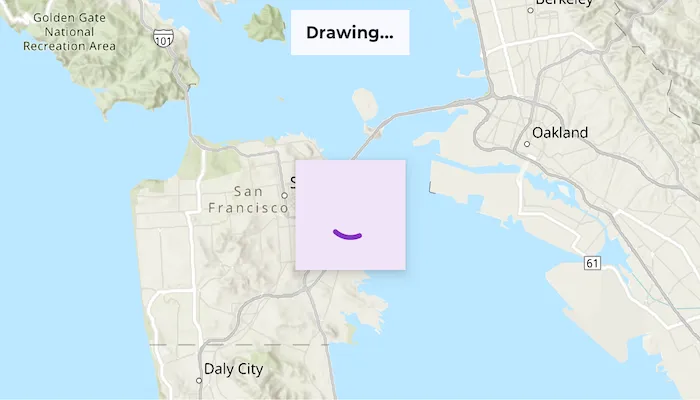
Get the draw status of your map view or scene view to know when all layers in the map or scene have finished drawing.
Use case
Display an indicator of layers drawing.
How to use the sample
- Pan and zoom around the map.
- Observe the draw status text in the toolbar and the progress indicator while the map is drawing.
How it works
- Create an
ArcGISMap. - Pass the
ArcGISMapto the ComposeMapView. - Use the MapView’s
onDrawStatusChangedcallback to receiveDrawStatusupdates
Relevant API
- ArcGISMap
- DrawStatus
- MapView
Tags
draw, loading, map, render
Sample code
/* Copyright 2025 Esri * * Licensed under the Apache License, Version 2.0 (the "License"); * you may not use this file except in compliance with the License. * You may obtain a copy of the License at * *    http://www.apache.org/licenses/LICENSE-2.0 * * Unless required by applicable law or agreed to in writing, software * distributed under the License is distributed on an "AS IS" BASIS, * WITHOUT WARRANTIES OR CONDITIONS OF ANY KIND, either express or implied. * See the License for the specific language governing permissions and * limitations under the License. * */
package com.esri.arcgismaps.sample.monitorchangestodrawstatus.components
import android.app.Applicationimport androidx.lifecycle.AndroidViewModelimport androidx.lifecycle.viewModelScopeimport com.arcgismaps.mapping.ArcGISMapimport com.arcgismaps.mapping.BasemapStyleimport com.arcgismaps.mapping.Viewpointimport com.arcgismaps.geometry.Pointimport com.arcgismaps.geometry.SpatialReferenceimport com.arcgismaps.mapping.view.DrawStatusimport com.esri.arcgismaps.sample.sampleslib.components.MessageDialogViewModelimport kotlinx.coroutines.flow.MutableStateFlowimport kotlinx.coroutines.flow.asStateFlowimport kotlinx.coroutines.launch
/** * ViewModel for the Monitor changes to draw status sample. * * Exposes an ArcGISMap and a flow indicating whether the map is currently drawing * so the UI can react (show a progress indicator and status text). */class MonitorDrawStatusViewModel(application: Application) : AndroidViewModel(application) {
    // Create a map shown by the sample    val arcGISMap: ArcGISMap = ArcGISMap(BasemapStyle.ArcGISTopographic).apply {        // Center the map on San Francisco        initialViewpoint = Viewpoint(            center = Point(                x = -13623300.0,                y = 4548100.0,                spatialReference = SpatialReference.webMercator()            ),            scale = 32e4        )    }
    // Flow exposing whether the map is currently drawing.    // true when DrawStatus is InProgress, false otherwise.    private val _mapIsDrawing = MutableStateFlow(false)    val mapIsDrawing = _mapIsDrawing.asStateFlow()
    // Message dialog view model to show errors if map load fails    val messageDialogVM = MessageDialogViewModel()
    init {        // Load the map and surface any errors via the MessageDialogViewModel.        viewModelScope.launch {            arcGISMap.load().onFailure { error ->                // Surface the error so the UI can present a dialog                messageDialogVM.showMessageDialog(error)            }        }    }
    /**     * Update the draw status observed from the MapView composable.     */    fun updateDrawStatus(drawStatus: DrawStatus) {        _mapIsDrawing.value = drawStatus == DrawStatus.InProgress    }}
/* Copyright 2025 Esri * * Licensed under the Apache License, Version 2.0 (the "License"); * you may not use this file except in compliance with the License. * You may obtain a copy of the License at * * http://www.apache.org/licenses/LICENSE-2.0 * * Unless required by applicable law or agreed to in writing, software * distributed under the License is distributed on an "AS IS" BASIS, * WITHOUT WARRANTIES OR CONDITIONS OF ANY KIND, either express or implied. * See the License for the specific language governing permissions and * limitations under the License. * */
package com.esri.arcgismaps.sample.monitorchangestodrawstatus
import android.os.Bundleimport androidx.activity.ComponentActivityimport androidx.activity.enableEdgeToEdgeimport androidx.activity.compose.setContentimport androidx.compose.material3.MaterialThemeimport androidx.compose.material3.Surfaceimport androidx.compose.runtime.Composableimport com.esri.arcgismaps.sample.sampleslib.theme.SampleAppThemeimport com.esri.arcgismaps.sample.monitorchangestodrawstatus.screens.MonitorDrawStatusScreen
class MainActivity : ComponentActivity() {
override fun onCreate(savedInstanceState: Bundle?) { super.onCreate(savedInstanceState)
enableEdgeToEdge() setContent { SampleAppTheme { MonitorChangesToDrawStatusApp() } } }
@Composable private fun MonitorChangesToDrawStatusApp() { Surface(color = MaterialTheme.colorScheme.background) { MonitorDrawStatusScreen( sampleName = getString(R.string.monitor_changes_to_draw_status_app_name) ) } }}/* Copyright 2025 Esri * * Licensed under the Apache License, Version 2.0 (the "License"); * you may not use this file except in compliance with the License. * You may obtain a copy of the License at * * http://www.apache.org/licenses/LICENSE-2.0 * * Unless required by applicable law or agreed to in writing, software * distributed under the License is distributed on an "AS IS" BASIS, * WITHOUT WARRANTIES OR CONDITIONS OF ANY KIND, either express or implied. * See the License for the specific language governing permissions and * limitations under the License. * */
package com.esri.arcgismaps.sample.monitorchangestodrawstatus.screens
import androidx.compose.foundation.layout.Boximport androidx.compose.foundation.layout.Columnimport androidx.compose.foundation.layout.fillMaxSizeimport androidx.compose.foundation.layout.paddingimport androidx.compose.material3.CircularProgressIndicatorimport androidx.compose.material3.MaterialThemeimport androidx.compose.material3.Surfaceimport androidx.compose.material3.Textimport androidx.compose.material3.Scaffoldimport androidx.compose.runtime.Composableimport androidx.compose.runtime.getValueimport androidx.compose.ui.Alignmentimport androidx.compose.ui.Modifierimport androidx.compose.ui.draw.shadowimport androidx.compose.ui.unit.dpimport androidx.lifecycle.compose.collectAsStateWithLifecycleimport androidx.lifecycle.viewmodel.compose.viewModelimport com.arcgismaps.toolkit.geoviewcompose.MapViewimport com.esri.arcgismaps.sample.monitorchangestodrawstatus.components.MonitorDrawStatusViewModelimport com.esri.arcgismaps.sample.sampleslib.components.MessageDialogimport com.esri.arcgismaps.sample.sampleslib.components.SampleTopAppBar
/** * Main screen for the Monitor changes to draw status sample. * * The composable observes the ViewModel's mapIsDrawing flow and updates the UI * when the draw status changes. The MapView's onDrawStatusChanged callback * is used to notify the ViewModel of draw status changes. */@Composablefun MonitorDrawStatusScreen(sampleName: String) { val viewModel: MonitorDrawStatusViewModel = viewModel()
// Observe whether the map is currently drawing val mapIsDrawing by viewModel.mapIsDrawing.collectAsStateWithLifecycle(false)
Scaffold( topBar = { SampleTopAppBar(title = sampleName) }, content = { padding -> Column(modifier = Modifier .fillMaxSize() .padding(padding)) {
Box(modifier = Modifier.fillMaxSize()) { // Pass in the ArcGISMap from the ViewModel and the draw status callback. MapView( modifier = Modifier .fillMaxSize(), arcGISMap = viewModel.arcGISMap, // Forward draw status updates to the ViewModel onDrawStatusChanged = viewModel::updateDrawStatus )
// Top overlay text showing current draw status Surface( modifier = Modifier .align(Alignment.TopCenter) .padding(8.dp), color = MaterialTheme.colorScheme.surface.copy(alpha = 0.9f), tonalElevation = 2.dp ) { Text( modifier = Modifier.padding(horizontal = 12.dp, vertical = 8.dp), text = if (mapIsDrawing) "Drawing…" else "Drawing completed.", style = MaterialTheme.typography.labelLarge ) }
// Center overlay: show a circular progress indicator while drawing if (mapIsDrawing) { Surface( modifier = Modifier .align(Alignment.Center) .shadow(8.dp), tonalElevation = 8.dp ) { CircularProgressIndicator(modifier = Modifier.padding(24.dp)) } } }
// Message dialog shown when ViewModel surfaces an error viewModel.messageDialogVM.apply { if (dialogStatus) { MessageDialog( title = messageTitle, description = messageDescription, onDismissRequest = ::dismissDialog ) } } } } )}