Display the map at an initial viewpoint representing a bounding geometry.
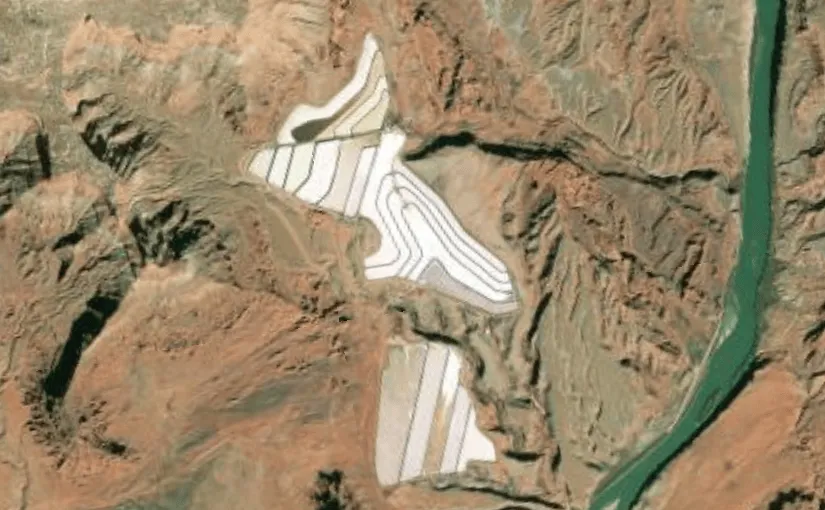
Use case
Setting the initial viewpoint is useful when a user wishes to first load the map at a particular area of interest.
How to use the sample
When the sample loads, note the map is opened at the initial view point that is set to it.
How it works
- Create an ArcGISMap and specify a basemap style (for example, BasemapStyle.ArcGISImageryStandard).
- Define an Envelope in Web Mercator representing the bounding coordinates of the desired startup area.
- Construct a Viewpoint using the envelope (Viewpoint(boundingGeometry = envelope)).
- Assign the Viewpoint to the map using arcGISMap.initialViewpoint.
- Provide the ArcGISMap to the MapView composable so the MapView opens at the configured initial viewpoint.
Relevant API
- ArcGISMap
- Envelope
- MapView
- SpatialReference
- Viewpoint
Tags
envelope, extent, initial viewpoint, zoom
Sample code
/* Copyright 2025 Esri * * Licensed under the Apache License, Version 2.0 (the "License"); * you may not use this file except in compliance with the License. * You may obtain a copy of the License at * *    http://www.apache.org/licenses/LICENSE-2.0 * * Unless required by applicable law or agreed to in writing, software * distributed under the License is distributed on an "AS IS" BASIS, * WITHOUT WARRANTIES OR CONDITIONS OF ANY KIND, either express or implied. * See the License for the specific language governing permissions and * limitations under the License. * */
package com.esri.arcgismaps.sample.setinitialviewpoint.components
import android.app.Applicationimport androidx.lifecycle.AndroidViewModelimport androidx.lifecycle.viewModelScopeimport com.arcgismaps.geometry.Envelopeimport com.arcgismaps.geometry.SpatialReferenceimport com.arcgismaps.mapping.ArcGISMapimport com.arcgismaps.mapping.BasemapStyleimport com.arcgismaps.mapping.Viewpointimport com.esri.arcgismaps.sample.sampleslib.components.MessageDialogViewModelimport kotlinx.coroutines.launch
/** * ViewModel for the SetInitialViewpoint sample. * * Exposes an ArcGISMap with an initial viewpoint defined by a bounding Envelope. */class SetInitialViewpointViewModel(application: Application) : AndroidViewModel(application) {
    /**     * ArcGISMap configured with an imagery basemap and an initial viewpoint.     * The initial viewpoint is set using a bounding geometry (Envelope) in Web Mercator.     */    val arcGISMap = ArcGISMap(BasemapStyle.ArcGISImageryStandard).apply {        initialViewpoint = Viewpoint(            // Web Mercator coordinates around Potash Ponds, Moab, Utah.            boundingGeometry = Envelope(                xMin = -12211308.778729,                yMin = 4645116.003309,                xMax = -12208257.879667,                yMax = 4650542.535773,                spatialReference = SpatialReference.webMercator()            )        )    }

    // Message dialog VM to show errors    val messageDialogVM = MessageDialogViewModel()
    init {        // Load the map and report errors through the message dialog        viewModelScope.launch {            arcGISMap.load().onFailure { throwable ->                messageDialogVM.showMessageDialog(throwable)            }        }    }}
/* Copyright 2025 Esri * * Licensed under the Apache License, Version 2.0 (the "License"); * you may not use this file except in compliance with the License. * You may obtain a copy of the License at * * http://www.apache.org/licenses/LICENSE-2.0 * * Unless required by applicable law or agreed to in writing, software * distributed under the License is distributed on an "AS IS" BASIS, * WITHOUT WARRANTIES OR CONDITIONS OF ANY KIND, either express or implied. * See the License for the specific language governing permissions and * limitations under the License. * */
package com.esri.arcgismaps.sample.setinitialviewpoint
import android.os.Bundleimport androidx.activity.ComponentActivityimport androidx.activity.enableEdgeToEdgeimport androidx.activity.compose.setContentimport androidx.compose.material3.MaterialThemeimport androidx.compose.material3.Surfaceimport androidx.compose.runtime.Composableimport com.esri.arcgismaps.sample.sampleslib.theme.SampleAppThemeimport com.esri.arcgismaps.sample.setinitialviewpoint.screens.SetInitialViewpointScreen
class MainActivity : ComponentActivity() {
override fun onCreate(savedInstanceState: Bundle?) { super.onCreate(savedInstanceState)
enableEdgeToEdge() setContent { SampleAppTheme { SetInitialViewpointApp() } } }
@Composable private fun SetInitialViewpointApp() { Surface(color = MaterialTheme.colorScheme.background) { SetInitialViewpointScreen( sampleName = getString(R.string.set_initial_viewpoint_app_name) ) } }}/* Copyright 2025 Esri * * Licensed under the Apache License, Version 2.0 (the "License"); * you may not use this file except in compliance with the License. * You may obtain a copy of the License at * * http://www.apache.org/licenses/LICENSE-2.0 * * Unless required by applicable law or agreed to in writing, software * distributed under the License is distributed on an "AS IS" BASIS, * WITHOUT WARRANTIES OR CONDITIONS OF ANY KIND, either express or implied. * See the License for the specific language governing permissions and * limitations under the License. * */
package com.esri.arcgismaps.sample.setinitialviewpoint.screens
import androidx.compose.foundation.layout.fillMaxSizeimport androidx.compose.foundation.layout.paddingimport androidx.compose.material3.Scaffoldimport androidx.compose.runtime.Composableimport androidx.compose.ui.Modifierimport androidx.lifecycle.viewmodel.compose.viewModelimport com.arcgismaps.toolkit.geoviewcompose.MapViewimport com.esri.arcgismaps.sample.setinitialviewpoint.components.SetInitialViewpointViewModelimport com.esri.arcgismaps.sample.sampleslib.components.MessageDialogimport com.esri.arcgismaps.sample.sampleslib.components.SampleTopAppBar
/** * Screen composable that hosts the MapView and observes the ViewModel. * The MapView receives the ArcGISMap from the ViewModel which contains the initial viewpoint. */@Composablefun SetInitialViewpointScreen(sampleName: String) { val mapViewModel: SetInitialViewpointViewModel = viewModel()
Scaffold( topBar = { SampleTopAppBar(title = sampleName) } ) { paddingValues -> // MapView displays the map configured in the ViewModel MapView( modifier = Modifier .fillMaxSize() .padding(paddingValues), arcGISMap = mapViewModel.arcGISMap ) }
// Show message dialog when the viewmodel reports an error mapViewModel.messageDialogVM.apply { if (dialogStatus) { MessageDialog( title = messageTitle, description = messageDescription, onDismissRequest = ::dismissDialog ) } }}