Display a basemap centered at an initial location and scale.
Use case
You can set a map’s initial location when you want to highlight a particular feature or area to establish the context.
How to use the sample
When the map loads, note the specific location and scale of the initial map view.
How it works
- Create a
Map, specifying a basemap type, latitude and longitude in WGS84, and a level of detail. - Display the map in a map view.
Relevant API
- BasemapType
- Map
- MapView
About the data
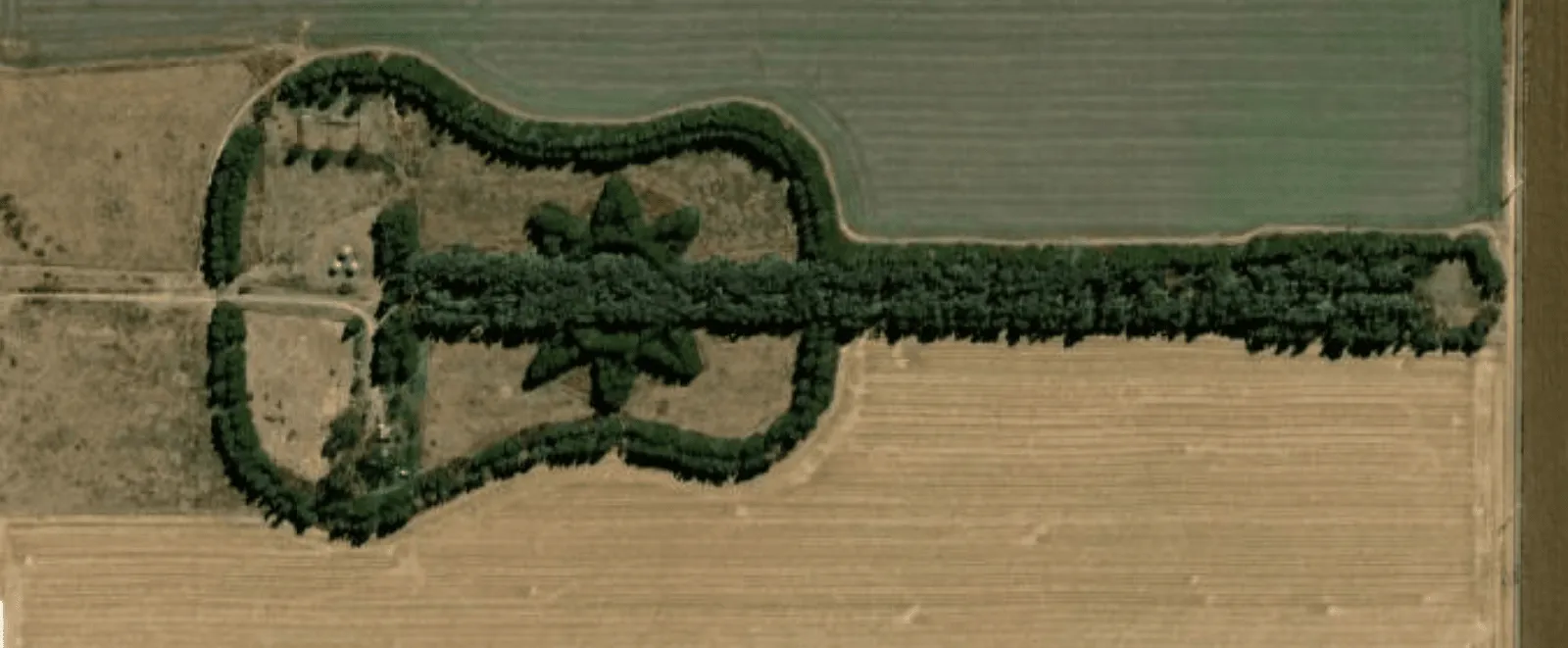
The map opens with satellite imagery of a guitar-shaped field in the Pampas region of north central Argentina.
Tags
basemap, center, envelope, extent, initial, lat, latitude, level of detail, location, LOD, long, longitude, scale, zoom level
Sample code
/* Copyright 2025 Esri * * Licensed under the Apache License, Version 2.0 (the "License"); * you may not use this file except in compliance with the License. * You may obtain a copy of the License at * *    http://www.apache.org/licenses/LICENSE-2.0 * * Unless required by applicable law or agreed to in writing, software * distributed under the License is distributed on an "AS IS" BASIS, * WITHOUT WARRANTIES OR CONDITIONS OF ANY KIND, either express or implied. * See the License for the specific language governing permissions and * limitations under the License. * */
package com.esri.arcgismaps.sample.setinitialmaplocation.components
import android.app.Applicationimport androidx.lifecycle.AndroidViewModelimport androidx.lifecycle.viewModelScopeimport com.arcgismaps.mapping.ArcGISMapimport com.arcgismaps.mapping.BasemapStyleimport com.arcgismaps.mapping.Viewpointimport com.esri.arcgismaps.sample.sampleslib.components.MessageDialogViewModelimport kotlinx.coroutines.launch
/** * ViewModel that prepares an ArcGISMap with an initial viewpoint. */class SetInitialMapLocationViewModel(application: Application) : AndroidViewModel(application) {
    // Create an ArcGISMap with an imagery basemap and set an initial viewpoint.    val arcGISMap = ArcGISMap(BasemapStyle.ArcGISImagery).apply {            initialViewpoint = Viewpoint(latitude = -33.867886, longitude = -63.985, scale = 10_000.0)    }
    // Message dialog view model used to present errors to the user    val messageDialogVM = MessageDialogViewModel()
    init {        // Load the map asynchronously and handle possible failures by showing a message dialog.        viewModelScope.launch {            arcGISMap.load().onFailure { throwable ->                messageDialogVM.showMessageDialog(throwable)            }        }    }}
/* Copyright 2025 Esri * * Licensed under the Apache License, Version 2.0 (the "License"); * you may not use this file except in compliance with the License. * You may obtain a copy of the License at * * http://www.apache.org/licenses/LICENSE-2.0 * * Unless required by applicable law or agreed to in writing, software * distributed under the License is distributed on an "AS IS" BASIS, * WITHOUT WARRANTIES OR CONDITIONS OF ANY KIND, either express or implied. * See the License for the specific language governing permissions and * limitations under the License. * */
package com.esri.arcgismaps.sample.setinitialmaplocation
import android.os.Bundleimport androidx.activity.ComponentActivityimport androidx.activity.enableEdgeToEdgeimport androidx.activity.compose.setContentimport androidx.compose.material3.MaterialThemeimport androidx.compose.material3.Surfaceimport androidx.compose.runtime.Composableimport com.esri.arcgismaps.sample.sampleslib.theme.SampleAppThemeimport com.esri.arcgismaps.sample.setinitialmaplocation.screens.SetInitialMapLocationScreen
class MainActivity : ComponentActivity() {
override fun onCreate(savedInstanceState: Bundle?) { super.onCreate(savedInstanceState)
enableEdgeToEdge() setContent { SampleAppTheme { SetInitialMapLocationApp() } } }
@Composable private fun SetInitialMapLocationApp() { Surface(color = MaterialTheme.colorScheme.background) { SetInitialMapLocationScreen( sampleName = getString(R.string.set_initial_map_location_app_name) ) } }}/* Copyright 2025 Esri * * Licensed under the Apache License, Version 2.0 (the "License"); * you may not use this file except in compliance with the License. * You may obtain a copy of the License at * * http://www.apache.org/licenses/LICENSE-2.0 * * Unless required by applicable law or agreed to in writing, software * distributed under the License is distributed on an "AS IS" BASIS, * WITHOUT WARRANTIES OR CONDITIONS OF ANY KIND, either express or implied. * See the License for the specific language governing permissions and * limitations under the License. * */
package com.esri.arcgismaps.sample.setinitialmaplocation.screens
import androidx.compose.foundation.layout.fillMaxWidthimport androidx.compose.foundation.layout.paddingimport androidx.compose.material3.Scaffoldimport androidx.compose.runtime.Composableimport androidx.compose.ui.Modifierimport androidx.lifecycle.viewmodel.compose.viewModelimport com.arcgismaps.toolkit.geoviewcompose.MapViewimport com.esri.arcgismaps.sample.setinitialmaplocation.components.SetInitialMapLocationViewModelimport com.esri.arcgismaps.sample.sampleslib.components.MessageDialogimport com.esri.arcgismaps.sample.sampleslib.components.SampleTopAppBar
/** * A simple screen that displays the map provided by [SetInitialMapLocationViewModel]. * The map is centered at the initial viewpoint defined in the ViewModel. */@Composablefun SetInitialMapLocationScreen(sampleName: String) { val viewModel: SetInitialMapLocationViewModel = viewModel()
Scaffold( topBar = { SampleTopAppBar(title = sampleName) }, content = { padding -> MapView( modifier = Modifier .fillMaxWidth() .padding(padding), arcGISMap = viewModel.arcGISMap )
// Display any error messages surfaced by the ViewModel viewModel.messageDialogVM.apply { if (dialogStatus) { MessageDialog( title = messageTitle, description = messageDescription, onDismissRequest = ::dismissDialog ) } } } )}