Specify a map’s spatial reference.
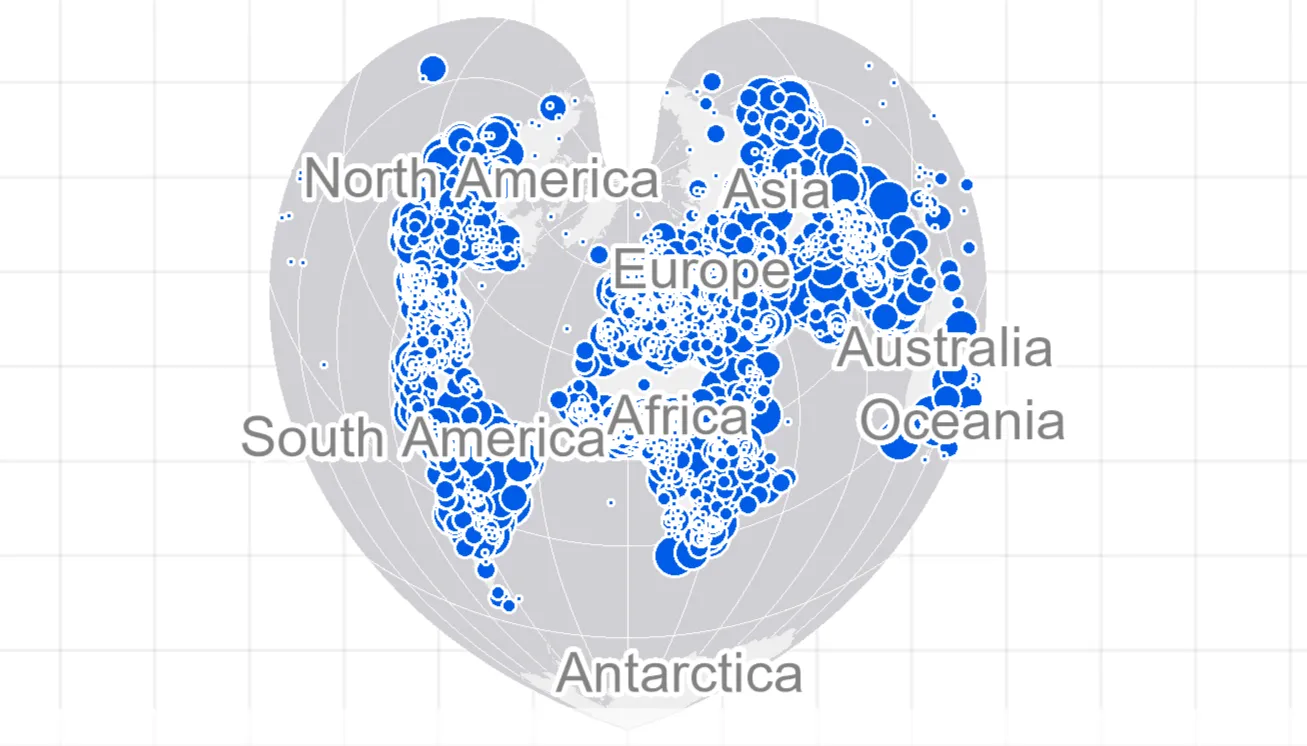
Use case
Choosing the correct spatial reference is important for ensuring accurate projection of data points to a map.
How to use the sample
Pan and zoom around the map. Observe how the map is displayed using the World Bonne spatial reference.
How it works
- Instantiate an
ArcGISMapobject using a spatial reference e.g.ArcGISMap(SpatialReference(54024)). - Instantiate a
Basemapobject using anArcGISMapImageLayerobject. - Set the base map to the map.
- Set the map to the
MapView.
The ArcGIS map image layer will now use the spatial reference set to the ArcGIS map (World Bonne (WKID: 54024)) and not it’s default spatial reference.
Relevant API
- ArcGISMap
- ArcGISMapImageLayer
- Basemap
- MapView
- SpatialReference
Additional information
Operational layers will automatically project to this spatial reference when possible.
Tags
project, WKID
Sample code
/* Copyright 2025 Esri * * Licensed under the Apache License, Version 2.0 (the "License"); * you may not use this file except in compliance with the License. * You may obtain a copy of the License at * *    http://www.apache.org/licenses/LICENSE-2.0 * * Unless required by applicable law or agreed to in writing, software * distributed under the License is distributed on an "AS IS" BASIS, * WITHOUT WARRANTIES OR CONDITIONS OF ANY KIND, either express or implied. * See the License for the specific language governing permissions and * limitations under the License. * */
package com.esri.arcgismaps.sample.setspatialreference.components
import android.app.Applicationimport androidx.lifecycle.AndroidViewModelimport androidx.lifecycle.viewModelScopeimport com.arcgismaps.mapping.ArcGISMapimport com.arcgismaps.mapping.Basemapimport com.arcgismaps.geometry.SpatialReferenceimport com.arcgismaps.mapping.layers.ArcGISMapImageLayerimport com.esri.arcgismaps.sample.sampleslib.components.MessageDialogViewModelimport kotlinx.coroutines.launch
/** * ViewModel for the "Set Spatial Reference" sample. */class SetSpatialReferenceViewModel(application: Application) : AndroidViewModel(application) {
    // Message dialog view model for presenting errors    val messageDialogVM = MessageDialogViewModel()
    // Create a map using World Bonne spatial reference (WKID: 54024)    var arcGISMap = ArcGISMap(spatialReference = SpatialReference(wkid = WORLD_BONNE_WKID)).apply {        // Use an ArcGISMapImageLayer as the basemap's base layer so the        // map image service will be displayed in the map's spatial reference.        setBasemap(basemap = Basemap(baseLayer = ArcGISMapImageLayer(url = WORLD_CITIES_MAP_SERVICE)))    }
    init {        viewModelScope.launch {
                // Load the map and show an error dialog if loading fails.                arcGISMap.load().onFailure { throwable ->                    messageDialogVM.showMessageDialog(throwable)                }        }    }
    companion object {        // The spatial reference for the sample, World Bonne (WKID: 54024)        private const val WORLD_BONNE_WKID = 54024
        // Map image service URL with World Bonne spatial reference.        private const val WORLD_CITIES_MAP_SERVICE =            "https://sampleserver6.arcgisonline.com/arcgis/rest/services/SampleWorldCities/MapServer"    }}
/* Copyright 2025 Esri * * Licensed under the Apache License, Version 2.0 (the "License"); * you may not use this file except in compliance with the License. * You may obtain a copy of the License at * * http://www.apache.org/licenses/LICENSE-2.0 * * Unless required by applicable law or agreed to in writing, software * distributed under the License is distributed on an "AS IS" BASIS, * WITHOUT WARRANTIES OR CONDITIONS OF ANY KIND, either express or implied. * See the License for the specific language governing permissions and * limitations under the License. * */
package com.esri.arcgismaps.sample.setspatialreference
import android.os.Bundleimport androidx.activity.ComponentActivityimport androidx.activity.enableEdgeToEdgeimport androidx.activity.compose.setContentimport androidx.compose.material3.MaterialThemeimport androidx.compose.material3.Surfaceimport androidx.compose.runtime.Composableimport com.esri.arcgismaps.sample.sampleslib.theme.SampleAppThemeimport com.esri.arcgismaps.sample.setspatialreference.screens.SetSpatialReferenceScreen
class MainActivity : ComponentActivity() {
override fun onCreate(savedInstanceState: Bundle?) { super.onCreate(savedInstanceState)
enableEdgeToEdge() setContent { SampleAppTheme { SetSpatialReferenceApp() } } }
@Composable private fun SetSpatialReferenceApp() { Surface(color = MaterialTheme.colorScheme.background) { SetSpatialReferenceScreen( sampleName = getString(R.string.set_spatial_reference_app_name) ) } }}/* Copyright 2025 Esri * * Licensed under the Apache License, Version 2.0 (the "License"); * you may not use this file except in compliance with the License. * You may obtain a copy of the License at * * http://www.apache.org/licenses/LICENSE-2.0 * * Unless required by applicable law or agreed to in writing, software * distributed under the License is distributed on an "AS IS" BASIS, * WITHOUT WARRANTIES OR CONDITIONS OF ANY KIND, either express or implied. * See the License for the specific language governing permissions and * limitations under the License. * */
package com.esri.arcgismaps.sample.setspatialreference.screens
import androidx.compose.foundation.layout.fillMaxSizeimport androidx.compose.foundation.layout.paddingimport androidx.compose.material3.Scaffoldimport androidx.compose.runtime.Composableimport androidx.compose.ui.Modifierimport androidx.lifecycle.viewmodel.compose.viewModelimport com.arcgismaps.toolkit.geoviewcompose.MapViewimport com.esri.arcgismaps.sample.sampleslib.components.MessageDialogimport com.esri.arcgismaps.sample.sampleslib.components.SampleTopAppBarimport com.esri.arcgismaps.sample.setspatialreference.components.SetSpatialReferenceViewModel
/** * Simple screen that displays a MapView using a map created with a custom spatial reference. * The ViewModel is responsible for constructing and loading the ArcGISMap. */@Composablefun SetSpatialReferenceScreen(sampleName: String) { // Obtain the ViewModel scoped to this composable val viewModel: SetSpatialReferenceViewModel = viewModel()
Scaffold(topBar = { SampleTopAppBar(title = sampleName) }) { padding -> MapView( modifier = Modifier.fillMaxSize() .padding(padding), arcGISMap = viewModel.arcGISMap )
// Display an error dialog if the ViewModel requests it viewModel.messageDialogVM.apply { if (dialogStatus) { MessageDialog( title = messageTitle, description = messageDescription, onDismissRequest = ::dismissDialog ) } } }}