Set the map’s reference scale and which feature layers should honor the reference scale.
Use case
Setting a reference scale on a map fixes the size of symbols and text to the desired height and width at that scale. As you zoom in and out, symbols and text will increase or decrease in size accordingly. When no reference scale is set, symbol and text sizes remain the same size relative to the map view.
Map annotations are typically only relevant at certain scales. For instance, annotations to a map showing a construction site are only relevant at that construction site’s scale. When the map is zoomed out, that information shouldn’t scale with the map view but should instead remain scaled with the map.
How to use the sample
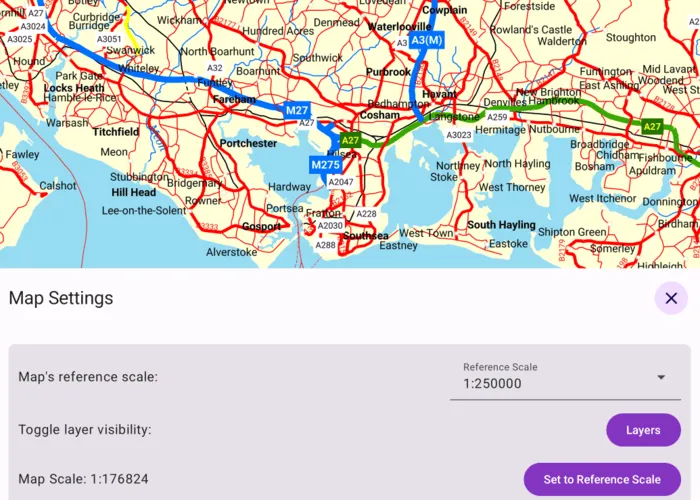
When the sample loads, tap or click the “Map Settings” button. Use the “Reference Scale” picker to set the map’s reference scale (1:500,000, 1:250,000, 1:100,000, or 1:50,000). Then tap or click the “Set to Reference Scale” button to set the map scale to the reference scale.
Tap or click “Layers” to show a list of the map’s feature layers. Tap or click a layer to toggle whether that layer should honor the reference scale. Tap or click Done to dismiss the settings view.
How it works
- Get and set the
referenceScaleproperty on theArcGISMapobject. - Get and set the
scaleSymbolsproperty on individualFeatureLayerobjects.
Relevant API
- FeatureLayer
- Map
Additional information
The map reference scale should normally be set by the map’s author and not exposed to the end user like it is in this sample.
Tags
map, reference scale, scene
Sample code
/* Copyright 2025 Esri * * Licensed under the Apache License, Version 2.0 (the "License"); * you may not use this file except in compliance with the License. * You may obtain a copy of the License at * *    http://www.apache.org/licenses/LICENSE-2.0 * * Unless required by applicable law or agreed to in writing, software * distributed under the License is distributed on an "AS IS" BASIS, * WITHOUT WARRANTIES OR CONDITIONS OF ANY KIND, either express or implied. * See the License for the specific language governing permissions and * limitations under the License. * */
package com.esri.arcgismaps.sample.setreferencescale.components
import android.app.Applicationimport androidx.lifecycle.AndroidViewModelimport androidx.lifecycle.viewModelScopeimport com.arcgismaps.mapping.ArcGISMapimport com.arcgismaps.mapping.PortalItemimport com.arcgismaps.mapping.layers.FeatureLayerimport com.arcgismaps.portal.Portalimport com.arcgismaps.toolkit.geoviewcompose.MapViewProxyimport com.esri.arcgismaps.sample.sampleslib.components.MessageDialogViewModelimport kotlinx.coroutines.flow.MutableStateFlowimport kotlinx.coroutines.flow.asStateFlowimport kotlinx.coroutines.launch
/** * ViewModel to manage map, reference scale and layer toggles for the SetReferenceScale sample. */class SetReferenceScaleViewModel(application: Application) : AndroidViewModel(application) {
    // Create the map from the Isle of Wight portal item.    val arcGISMap = ArcGISMap(        item = PortalItem(            portal = Portal("https://www.arcgis.com"),            itemId = "3953413f3bd34e53a42bf70f2937a408"        )    ).apply {        // Set the initial reference scale.        referenceScale = 250_000.0    }
    // Proxy for controlling the MapView viewpoint scale.    val mapViewProxy = MapViewProxy()
    // Reference scale options.    val referenceScaleOptions = listOf(500_000.0, 250_000.0, 100_000.0, 50_000.0)
    // Expose the selected reference scale as a StateFlow.    private val _selectedReferenceScale = MutableStateFlow(arcGISMap.referenceScale)    val selectedReferenceScale = _selectedReferenceScale.asStateFlow()
    // Expose the current map scale as a StateFlow (NaN until the MapView reports a scale).    private val _mapScale = MutableStateFlow(Double.NaN)    val mapScale = _mapScale.asStateFlow()
    // Expose a list of layers with the map's reference scale state.    private val _layers = MutableStateFlow<List<LayerToggleState>>(emptyList())    val layers = _layers.asStateFlow()
    // Helper for showing errors/messages in the UI.    val messageDialogVM = MessageDialogViewModel()
    init {        // Load the map then build the layers list.        viewModelScope.launch {            arcGISMap.load().onSuccess {                val layerStates = arcGISMap.operationalLayers                    .filterIsInstance<FeatureLayer>()                    .map { layer ->                        // If layer is a FeatureLayer, access its properties.                        LayerToggleState(                            name = layer.name,                            scaleSymbols = layer.scaleSymbols                        )                    }                _layers.value = layerStates            }.onFailure { throwable ->                messageDialogVM.showMessageDialog(throwable)            }        }    }
    /**     * Called when new reference scale is selected and update the map's reference scale.     */    fun onReferenceScaleSelected(index: Int) {        val scale = referenceScaleOptions[index]        _selectedReferenceScale.value = scale        arcGISMap.referenceScale = scale    }
    /**     * Called by the MapView when the map scale changes.     */    fun onMapScaleChanged(scale: Double) {        _mapScale.value = scale    }
    /**     * Toggle whether a [FeatureLayer] instance operational layer honors the map reference scale.     */    fun onLayerScaleSymbolToggled(toggleState: LayerToggleState, enabled: Boolean) {        // Set the new value for the layer's scale symbols.        val newLayerState = toggleState.copy(scaleSymbols = enabled)        // Update the new layer state on the map.        arcGISMap.operationalLayers            .filterIsInstance<FeatureLayer>()            .find { newLayerState.name == it.name }?.apply {                scaleSymbols = newLayerState.scaleSymbols            }        // Update the UI state.        _layers.value = _layers.value.map { existingLayerState ->            if (existingLayerState.name == newLayerState.name) newLayerState else existingLayerState        }    }
    /**     * Set the map scale to the currently selected reference scale using the [mapViewProxy].     */    fun setMapScaleToReference() {        viewModelScope.launch {            mapViewProxy.setViewpointScale(_selectedReferenceScale.value)        }    }}
// Data class representing a UI row for an operational layer of the map.data class LayerToggleState(val name: String, val scaleSymbols: Boolean)
/* Copyright 2025 Esri * * Licensed under the Apache License, Version 2.0 (the "License"); * you may not use this file except in compliance with the License. * You may obtain a copy of the License at * * http://www.apache.org/licenses/LICENSE-2.0 * * Unless required by applicable law or agreed to in writing, software * distributed under the License is distributed on an "AS IS" BASIS, * WITHOUT WARRANTIES OR CONDITIONS OF ANY KIND, either express or implied. * See the License for the specific language governing permissions and * limitations under the License. * */
package com.esri.arcgismaps.sample.setreferencescale
import android.os.Bundleimport androidx.activity.ComponentActivityimport androidx.activity.enableEdgeToEdgeimport androidx.activity.compose.setContentimport androidx.compose.material3.MaterialThemeimport androidx.compose.material3.Surfaceimport androidx.compose.runtime.Composableimport com.esri.arcgismaps.sample.sampleslib.theme.SampleAppThemeimport com.esri.arcgismaps.sample.setreferencescale.screens.SetReferenceScaleScreen
class MainActivity : ComponentActivity() {
override fun onCreate(savedInstanceState: Bundle?) { super.onCreate(savedInstanceState)
enableEdgeToEdge() setContent { SampleAppTheme { SetReferenceScaleApp() } } }
@Composable private fun SetReferenceScaleApp() { Surface(color = MaterialTheme.colorScheme.background) { SetReferenceScaleScreen( sampleName = getString(R.string.set_reference_scale_app_name) ) } }}/* Copyright 2025 Esri * * Licensed under the Apache License, Version 2.0 (the "License"); * you may not use this file except in compliance with the License. * You may obtain a copy of the License at * * http://www.apache.org/licenses/LICENSE-2.0 * * Unless required by applicable law or agreed to in writing, software * distributed under the License is distributed on an "AS IS" BASIS, * WITHOUT WARRANTIES OR CONDITIONS OF ANY KIND, either express or implied. * See the License for the specific language governing permissions and * limitations under the License. * */
package com.esri.arcgismaps.sample.setreferencescale.screens
import android.content.res.Configurationimport androidx.compose.foundation.layout.Arrangementimport androidx.compose.foundation.layout.Columnimport androidx.compose.foundation.layout.Rowimport androidx.compose.foundation.layout.fillMaxSizeimport androidx.compose.foundation.layout.fillMaxWidthimport androidx.compose.foundation.layout.paddingimport androidx.compose.material.icons.Iconsimport androidx.compose.material.icons.filled.Settingsimport androidx.compose.material3.Buttonimport androidx.compose.material3.Cardimport androidx.compose.material3.FloatingActionButtonimport androidx.compose.material3.Iconimport androidx.compose.material3.MaterialThemeimport androidx.compose.material3.OutlinedButtonimport androidx.compose.material3.Scaffoldimport androidx.compose.material3.Switchimport androidx.compose.material3.Textimport androidx.compose.runtime.Composableimport androidx.compose.runtime.getValueimport androidx.compose.runtime.mutableStateOfimport androidx.compose.runtime.rememberimport androidx.compose.runtime.setValueimport androidx.compose.ui.Alignmentimport androidx.compose.ui.Modifierimport androidx.compose.ui.text.style.TextAlignimport androidx.compose.ui.tooling.preview.Previewimport androidx.compose.ui.unit.dpimport androidx.lifecycle.compose.collectAsStateWithLifecycleimport androidx.lifecycle.viewmodel.compose.viewModelimport com.arcgismaps.toolkit.geoviewcompose.MapViewimport com.esri.arcgismaps.sample.sampleslib.components.BottomSheetimport com.esri.arcgismaps.sample.sampleslib.components.DropDownMenuBoximport com.esri.arcgismaps.sample.sampleslib.components.MessageDialogimport com.esri.arcgismaps.sample.sampleslib.components.SampleDialogimport com.esri.arcgismaps.sample.sampleslib.components.SamplePreviewSurfaceimport com.esri.arcgismaps.sample.sampleslib.components.SampleTopAppBarimport com.esri.arcgismaps.sample.setreferencescale.components.LayerToggleStateimport com.esri.arcgismaps.sample.setreferencescale.components.SetReferenceScaleViewModel
/** * Main screen containing the MapView and bottom-sheet controls for reference scale and layers. */@Composablefun SetReferenceScaleScreen(sampleName: String) { val mapViewModel: SetReferenceScaleViewModel = viewModel()
// UI state for the bottom sheet visibility and layers dialog. var isBottomSheetVisible by remember { mutableStateOf(false) } var isLayersDialogVisible by remember { mutableStateOf(false) }
// Collect flows from the viewmodel. val selectedReferenceScale by mapViewModel.selectedReferenceScale.collectAsStateWithLifecycle() val mapScale by mapViewModel.mapScale.collectAsStateWithLifecycle() val layers by mapViewModel.layers.collectAsStateWithLifecycle()
Scaffold( topBar = { SampleTopAppBar(title = sampleName) }, floatingActionButton = { if (!isBottomSheetVisible) { FloatingActionButton( modifier = Modifier.padding(bottom = 36.dp, end = 12.dp), onClick = { isBottomSheetVisible = true } ) { Icon(Icons.Filled.Settings, contentDescription = "Show options") } } }, content = { padding -> Column( modifier = Modifier .fillMaxSize() .padding(padding) ) { // MapView fills the screen. When map is interacted with, dismiss the bottom sheet. MapView( modifier = Modifier .fillMaxSize() .weight(1f), arcGISMap = mapViewModel.arcGISMap, mapViewProxy = mapViewModel.mapViewProxy, onMapScaleChanged = { mapViewModel.onMapScaleChanged(it) }, onVisibleAreaChanged = { isBottomSheetVisible = false } ) }
BottomSheet( isVisible = isBottomSheetVisible, sheetTitle = "Map Settings", onDismissRequest = { isBottomSheetVisible = false } ) { SettingsControls( referenceScaleOptions = mapViewModel.referenceScaleOptions, selectedReferenceScale = selectedReferenceScale, onReferenceScaleSelected = mapViewModel::onReferenceScaleSelected, currentMapScale = mapScale, onShowLayers = { isLayersDialogVisible = true }, onSetToReferenceScale = { mapViewModel.setMapScaleToReference() } ) }
// Layers dialog: show a togglable list of operational layers. if (isLayersDialogVisible) { SampleDialog(onDismissRequest = { isLayersDialogVisible = false }) { LayersDialogContent( layers = layers, onLayerScaleSymbolToggled = mapViewModel::onLayerScaleSymbolToggled, onDone = { isLayersDialogVisible = false } ) } }
// Display message dialogs from the ViewModel. mapViewModel.messageDialogVM.apply { if (dialogStatus) { MessageDialog( title = messageTitle, description = messageDescription, onDismissRequest = ::dismissDialog ) } } } )}
/** * Encapsulated settings controls arranged so labels are on the left and controls on the right. */@Composablefun SettingsControls( referenceScaleOptions: List<Double>, selectedReferenceScale: Double, onReferenceScaleSelected: (Int) -> Unit, onShowLayers: () -> Unit, currentMapScale: Double, onSetToReferenceScale: () -> Unit) { // A Left column of hints and right of controls Card(Modifier.padding(12.dp)) { Column( modifier = Modifier .fillMaxWidth() .padding(12.dp), verticalArrangement = Arrangement.spacedBy(12.dp) ) { Row( modifier = Modifier.fillMaxWidth(), horizontalArrangement = Arrangement.SpaceBetween, verticalAlignment = Alignment.CenterVertically ) { Text(text = "Map's reference scale:") DropDownMenuBox( modifier = Modifier.padding(start = 12.dp), textFieldValue = "1:${selectedReferenceScale.toInt()}", textFieldLabel = "Reference Scale", dropDownItemList = referenceScaleOptions.map { "1:${it.toInt()}" }, onIndexSelected = onReferenceScaleSelected ) }
Row( modifier = Modifier.fillMaxWidth(), horizontalArrangement = Arrangement.SpaceBetween, verticalAlignment = Alignment.CenterVertically ) { Text(text = "Toggle layer visibility:") Button(onClick = onShowLayers) { Text(text = "Layers") } }
Row( modifier = Modifier.fillMaxWidth(), horizontalArrangement = Arrangement.SpaceBetween, verticalAlignment = Alignment.CenterVertically ) { Text(text = "Map Scale: 1:${if (currentMapScale.isNaN()) "..." else currentMapScale.toInt()}") Button( onClick = onSetToReferenceScale, enabled = !currentMapScale.isNaN() && (currentMapScale != selectedReferenceScale) ) { Text(text = "Set to reference scale") } } } }}
/** * Dialog composable that displays a list of operational [layers] and a toggle for * each layer's scalesSymbols property. */@Composablefun LayersDialogContent( layers: List<LayerToggleState>, onLayerScaleSymbolToggled: (LayerToggleState, Boolean) -> Unit, onDone: () -> Unit) { Column( modifier = Modifier .fillMaxWidth() .padding(12.dp), horizontalAlignment = Alignment.End, verticalArrangement = Arrangement.spacedBy(12.dp) ) { Text( modifier = Modifier.fillMaxWidth(), text = "Layers Symbol Scaling", textAlign = TextAlign.Center, style = MaterialTheme.typography.titleLarge ) layers.forEach { layerState -> Row( modifier = Modifier.fillMaxWidth(), horizontalArrangement = Arrangement.SpaceBetween, verticalAlignment = Alignment.CenterVertically ) { Text(layerState.name) Switch( checked = layerState.scaleSymbols, onCheckedChange = { isChecked -> onLayerScaleSymbolToggled(layerState, isChecked) } ) } } OutlinedButton(onClick = onDone) { Text("Done") } }}
// Previews@Preview(showBackground = true)@Preview(uiMode = Configuration.UI_MODE_NIGHT_YES, showBackground = true)@Composablefun PreviewSettingsControls() { SamplePreviewSurface { SettingsControls( referenceScaleOptions = listOf(50_000.0), selectedReferenceScale = 250_000.0, onReferenceScaleSelected = {}, onShowLayers = {}, currentMapScale = 123_456.0, onSetToReferenceScale = {} ) }}
@Preview(showBackground = true)@Preview(uiMode = Configuration.UI_MODE_NIGHT_YES, showBackground = true)@Composablefun PreviewLayersDialog() { SamplePreviewSurface { LayersDialogContent( layers = listOf( LayerToggleState( name = "Land", scaleSymbols = true ), LayerToggleState( name = "Roads", scaleSymbols = false ) ), onLayerScaleSymbolToggled = { _, _ -> }, onDone = {}) }}