Change a map’s basemap.
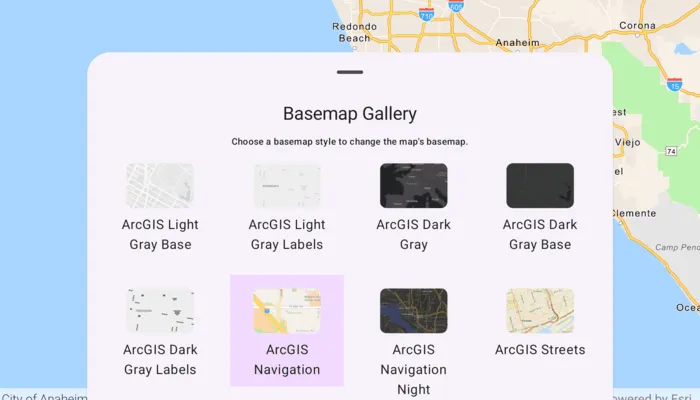
Use case
A basemap draws beneath all layers on a Map or Scene and is used to provide visual reference for the operational layers. Basemaps should be selected contextually. For example, in maritime applications, it would be more appropriate to use a basemap of the world’s oceans as opposed to a basemap of the world’s streets.
How to use the sample
Open the sample and browse the basemap list shown in the bottom sheet. Tap a basemap to set it as the map’s basemap. The map updates immediately to reflect the new style.
How it works
- Create a
Mapobject with thearcGISImagerybasemap style. - Display the map using the MapView composable from the ArcGIS Maps SDK for Kotlin Toolkit.
- Load
BasemapStylesServiceto retrieve the available basemap styles. - For each
BasemapStyleInforeturned, create aBasemapGalleryItemand display them in theBasemapGalleryToolkit composable. - When BasemapGalleryItem is tapped, update the current map’s basemap using:
arcGISMap.setBasemap(Basemap(basemapStyleInfo.style))
Relevant API
- ArcGISMap
- Basemap
- BasemapGallery
- BasemapGalleryItem
- BasemapStyle
- BasemapStyleInfo
- BasemapStylesService
- MapView
Additional information
Organizational basemaps are a Portal feature allowing organizations to specify basemaps for use throughout the organization. Customers expect that they will have access to their organization’s standard basemap set when they connect to a Portal. Organizational basemaps are useful when certain basemaps are particularly relevant to the organization, or if the organization wants to make premium basemap content available to their workers.
This sample uses the BasemapGallery toolkit component, which requires the ArcGIS Maps SDK for Kotlin Toolkit. The BasemapGallery toolkit component supports selecting 2D and 3D basemaps from any kind of source, such as ArcGIS Online, a user-defined portal, or a collection of Basemaps.
Tags
basemap, map
Sample code
/* Copyright 2026 Esri * * Licensed under the Apache License, Version 2.0 (the "License"); * you may not use this file except in compliance with the License. * You may obtain a copy of the License at * *    http://www.apache.org/licenses/LICENSE-2.0 * * Unless required by applicable law or agreed to in writing, software * distributed under the License is distributed on an "AS IS" BASIS, * WITHOUT WARRANTIES OR CONDITIONS OF ANY KIND, either express or implied. * See the License for the specific language governing permissions and * limitations under the License. * */
package com.esri.arcgismaps.sample.setbasemap.components
import android.app.Applicationimport androidx.compose.runtime.getValueimport androidx.compose.runtime.mutableStateListOfimport androidx.compose.runtime.mutableStateOfimport androidx.lifecycle.AndroidViewModelimport androidx.lifecycle.viewModelScopeimport com.arcgismaps.geometry.Pointimport com.arcgismaps.geometry.SpatialReferenceimport com.arcgismaps.mapping.ArcGISMapimport com.arcgismaps.mapping.Basemapimport com.arcgismaps.mapping.BasemapStyleimport com.arcgismaps.mapping.BasemapStyleInfoimport com.arcgismaps.mapping.BasemapStylesServiceimport com.arcgismaps.mapping.Viewpointimport com.arcgismaps.toolkit.basemapgallery.BasemapGalleryItemimport com.esri.arcgismaps.sample.sampleslib.components.MessageDialogViewModelimport kotlinx.coroutines.launch
class SetBasemapViewModel(application: Application) : AndroidViewModel(application) {    // Map initialized with an imagery basemap to match the Swift sample    val arcGISMap by mutableStateOf(        ArcGISMap(BasemapStyle.ArcGISImagery).apply {            // Initial viewpoint centered near Los Angeles, CA at a scale of 1:1,000,000            initialViewpoint = Viewpoint(                center = Point(                    x = -118.4,                    y = 33.7,                    spatialReference = SpatialReference.wgs84()                ),                scale = 1e6            )        }    )
    // Items displayed by the Basemap Gallery    val basemapGalleryItems = mutableStateListOf<BasemapGalleryItem>()
    // Message dialog view model for handling error messages    val messageDialogVM = MessageDialogViewModel()
    init {        viewModelScope.launch {            // Load the map and report any errors            arcGISMap.load().onFailure { error ->                messageDialogVM.showMessageDialog(                    title = "Failed to load map",                    description = error.message.toString()                )            }
            // Load available basemap styles from the BasemapStyles service and create gallery items            val service = BasemapStylesService()            service.load().onSuccess {                val stylesInfo = service.info?.stylesInfo                if (!stylesInfo.isNullOrEmpty()) {                    stylesInfo.forEach { basemapStyleInfo ->                        basemapGalleryItems.add(BasemapGalleryItem(basemapStyleInfo))                    }                } else {                    messageDialogVM.showMessageDialog(                        title = "No basemap styles available",                        description = "BasemapStylesService returned no styles."                    )                }            }.onFailure { error ->                messageDialogVM.showMessageDialog(                    title = "Failed to load basemap styles",                    description = error.message.toString()                )            }        }    }
    /**     * Updates the map's basemap using the selected [BasemapStyleInfo].     */    fun updateBasemapFromStyleInfo(basemapStyleInfo: BasemapStyleInfo) {        arcGISMap.setBasemap(Basemap(basemapStyleInfo.style))    }
    /**     * Convenience function to handle a BasemapGalleryItem click.     */    fun onBasemapGalleryItemClick(item: BasemapGalleryItem) {        when (val tag = item.tag) {            is BasemapStyleInfo -> updateBasemapFromStyleInfo(tag)            else -> {                messageDialogVM.showMessageDialog(                    title = "Unsupported item type",                    description = "The selected gallery item is not a BasemapStyleInfo."                )            }        }    }}
/* Copyright 2026 Esri * * Licensed under the Apache License, Version 2.0 (the "License"); * you may not use this file except in compliance with the License. * You may obtain a copy of the License at * * http://www.apache.org/licenses/LICENSE-2.0 * * Unless required by applicable law or agreed to in writing, software * distributed under the License is distributed on an "AS IS" BASIS, * WITHOUT WARRANTIES OR CONDITIONS OF ANY KIND, either express or implied. * See the License for the specific language governing permissions and * limitations under the License. * */
package com.esri.arcgismaps.sample.setbasemap
import android.os.Bundleimport androidx.activity.ComponentActivityimport androidx.activity.enableEdgeToEdgeimport androidx.activity.compose.setContentimport androidx.compose.material3.MaterialThemeimport androidx.compose.material3.Surfaceimport androidx.compose.runtime.Composableimport com.esri.arcgismaps.sample.sampleslib.theme.SampleAppThemeimport com.esri.arcgismaps.sample.setbasemap.screens.SetBasemapScreen
class MainActivity : ComponentActivity() {
override fun onCreate(savedInstanceState: Bundle?) { super.onCreate(savedInstanceState)
enableEdgeToEdge() setContent { SampleAppTheme { SetBasemapApp() } } }
@Composable private fun SetBasemapApp() { Surface(color = MaterialTheme.colorScheme.background) { SetBasemapScreen( sampleName = getString(R.string.set_basemap_app_name) ) } }}/* Copyright 2026 Esri * * Licensed under the Apache License, Version 2.0 (the "License"); * you may not use this file except in compliance with the License. * You may obtain a copy of the License at * * http://www.apache.org/licenses/LICENSE-2.0 * * Unless required by applicable law or agreed to in writing, software * distributed under the License is distributed on an "AS IS" BASIS, * WITHOUT WARRANTIES OR CONDITIONS OF ANY KIND, either express or implied. * See the License for the specific language governing permissions and * limitations under the License. * */
package com.esri.arcgismaps.sample.setbasemap.screens
import androidx.compose.foundation.layout.Arrangementimport androidx.compose.foundation.layout.Boximport androidx.compose.foundation.layout.Columnimport androidx.compose.foundation.layout.fillMaxSizeimport androidx.compose.foundation.layout.fillMaxWidthimport androidx.compose.foundation.layout.heightInimport androidx.compose.foundation.layout.paddingimport androidx.compose.material3.BottomSheetDefaultsimport androidx.compose.material3.BottomSheetScaffoldimport androidx.compose.material3.ExperimentalMaterial3Apiimport androidx.compose.material3.MaterialThemeimport androidx.compose.material3.SheetValueimport androidx.compose.material3.Textimport androidx.compose.material3.rememberBottomSheetScaffoldStateimport androidx.compose.material3.rememberStandardBottomSheetStateimport androidx.compose.runtime.Composableimport androidx.compose.runtime.rememberCoroutineScopeimport androidx.compose.ui.Alignmentimport androidx.compose.ui.Modifierimport androidx.compose.ui.platform.LocalWindowInfoimport androidx.compose.ui.unit.dpimport androidx.lifecycle.viewmodel.compose.viewModelimport com.arcgismaps.toolkit.basemapgallery.BasemapGalleryimport com.arcgismaps.toolkit.basemapgallery.BasemapGalleryItemimport com.arcgismaps.toolkit.geoviewcompose.MapViewimport com.esri.arcgismaps.sample.sampleslib.components.MessageDialogimport com.esri.arcgismaps.sample.sampleslib.components.SampleTopAppBarimport com.esri.arcgismaps.sample.setbasemap.components.SetBasemapViewModelimport kotlinx.coroutines.launch
@OptIn(ExperimentalMaterial3Api::class)@Composablefun SetBasemapScreen(sampleName: String) { val mapViewModel: SetBasemapViewModel = viewModel() val maxSheetHeight = LocalWindowInfo.current.containerDpSize.height / 2
// Create a sheet state that starts expanded and allows dragging to collapse/expand val scaffoldState = rememberBottomSheetScaffoldState( bottomSheetState = rememberStandardBottomSheetState(initialValue = SheetValue.Expanded) )
val scope = rememberCoroutineScope()
BottomSheetScaffold( topBar = { SampleTopAppBar(title = sampleName) }, scaffoldState = scaffoldState, sheetDragHandle = { BottomSheetDefaults.DragHandle() }, sheetContent = { Column( modifier = Modifier .fillMaxWidth() .heightIn(max = maxSheetHeight) .padding(12.dp), horizontalAlignment = Alignment.CenterHorizontally, verticalArrangement = Arrangement.spacedBy(4.dp) ) { Text( text = "Basemap Gallery", style = MaterialTheme.typography.titleLarge, modifier = Modifier.padding(bottom = 8.dp) ) Text( text = "Choose a basemap style to change the map's basemap.", style = MaterialTheme.typography.labelSmall, modifier = Modifier.padding(bottom = 8.dp) )
BasemapGallery( basemapGalleryItems = mapViewModel.basemapGalleryItems, onItemClick = { item: BasemapGalleryItem -> mapViewModel.onBasemapGalleryItemClick(item) } ) } } ) { padding -> Box(modifier = Modifier.padding(padding)) { MapView( modifier = Modifier.fillMaxSize(), arcGISMap = mapViewModel.arcGISMap, onDown = { scope.launch { scaffoldState.bottomSheetState.partialExpand() } } ) }
// Display a dialog if the sample encounters an error mapViewModel.messageDialogVM.apply { if (dialogStatus) { MessageDialog( title = messageTitle, description = messageDescription, onDismissRequest = ::dismissDialog ) } } }}