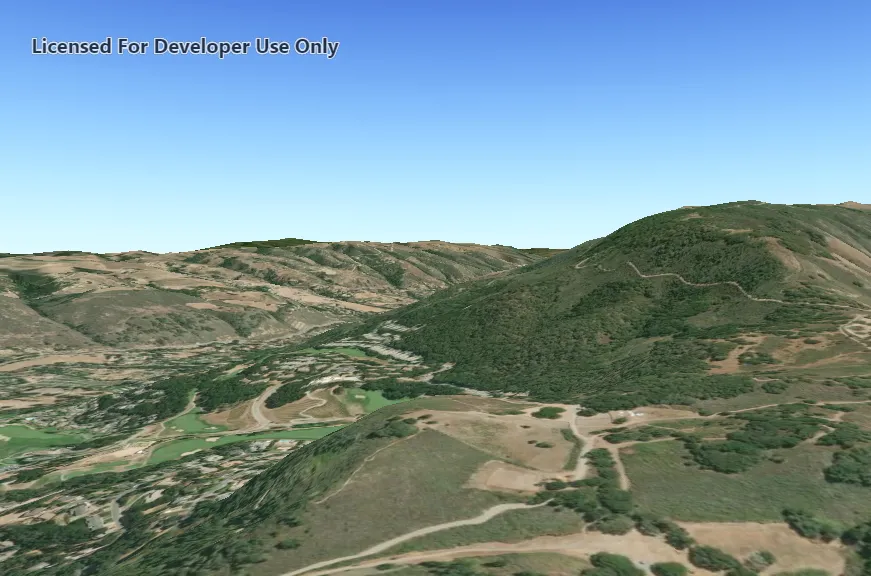
Set the terrain surface with elevation described by a raster file.
Use case
In a scene view, the terrain surface is what the basemap, operational layers, and graphics are draped onto. For example, when viewing a scene in a mountainous region, applying a terrain surface to the scene will help in recognizing the slopes, valleys, and elevated areas.
How to use the sample
When loaded, the sample will show a scene with a terrain surface applied. Pan and zoom to explore the scene and observe how the terrain surface allows visualizing elevation differences.
How it works
- Create a
Sceneand add it to aSceneView. - Create a
RasterElevationSourcewith a list of local raster file paths, in this case a single .dt2 file - Add this source to the scene’s base surface:
Scene::baseSurface::elevationSources::append(rasterElevationSource).
Relevant API
- RasterElevationSource
- Surface
Offline data
Read more about how to set up the sample’s offline data here.
| Link | Local Location |
|---|---|
| MontereyElevation Raster | <userhome>/ArcGIS/Runtime/Data/raster/MontereyElevation.dt2 |
Additional information
Supported raster formats include:
- ASRP/USRP
- CIB1, 5, 10
- DTED0, 1, 2
- GeoTIFF
- HFA
- HRE
- IMG
- JPEG
- JPEG 2000
- NITF
- PNG
- RPF
- SRTM1, 2
Tags
3D, Raster, Elevation, Surface
Sample code
// [WriteFile Name=CreateTerrainSurfaceFromLocalRaster, Category=Scenes]// [Legal]// Copyright 2019 Esri.//// Licensed under the Apache License, Version 2.0 (the "License");// you may not use this file except in compliance with the License.// You may obtain a copy of the License at// http://www.apache.org/licenses/LICENSE-2.0//// Unless required by applicable law or agreed to in writing, software// distributed under the License is distributed on an "AS IS" BASIS,// WITHOUT WARRANTIES OR CONDITIONS OF ANY KIND, either express or implied.// See the License for the specific language governing permissions and// limitations under the License.// [Legal]
#ifdef PCH_BUILD#include "pch.hpp"#endif // PCH_BUILD
// sample headers#include "CreateTerrainSurfaceFromLocalRaster.h"
// ArcGIS Maps SDK headers#include "Camera.h"#include "ElevationSourceListModel.h"#include "Error.h"#include "MapTypes.h"#include "RasterElevationSource.h"#include "Scene.h"#include "SceneQuickView.h"#include "Surface.h"
// Qt headers#include <QFileInfo>#include <QStandardPaths>#include <QUrl>
using namespace Esri::ArcGISRuntime;
// helper method to get cross platform data pathnamespace{  QString defaultDataPath()  {    QString dataPath;
    #ifdef Q_OS_IOS      dataPath = QStandardPaths::writableLocation(QStandardPaths::DocumentsLocation);    #else      dataPath = QStandardPaths::writableLocation(QStandardPaths::HomeLocation);    #endif
    return dataPath;  }}
CreateTerrainSurfaceFromLocalRaster::CreateTerrainSurfaceFromLocalRaster(QObject* parent /* = nullptr */):  QObject(parent),  m_scene(new Scene(BasemapStyle::ArcGISImageryStandard, this)){  // create the MontereyElevation data path  // data is downloaded automatically by the sample viewer app. Instructions to download  // separately are specified in the readme.  const QString montereyRasterElevationPath = QString{defaultDataPath() + "/ArcGIS/Runtime/Data/raster/MontereyElevation.dt2"};
  //Before attempting to add any layers, check that the file for the elevation source exists at all.  const bool srcElevationFileExists = QFileInfo::exists(montereyRasterElevationPath);
  if(srcElevationFileExists)  {    //Create the elevation source from the local raster(s). RasterElevationSource can take multiple files as inputs, but in this case only takes one.    RasterElevationSource* elevationSrc = new RasterElevationSource{QStringList{montereyRasterElevationPath}, this};
    //When the elevation source is finished loading, call the elevationSrcFinishedLoading callback, so we can tell if it loaded succesfully.    connect(elevationSrc, &RasterElevationSource::doneLoading, this, &CreateTerrainSurfaceFromLocalRaster::elevationSrcFinishedLoading, Qt::UniqueConnection);
    // add the elevation source to the scene to display elevation    m_scene->baseSurface()->elevationSources()->append(elevationSrc);  }  else  {    qWarning() << "Could not find file at : " << montereyRasterElevationPath << ". Elevation source not set.";  }}
void CreateTerrainSurfaceFromLocalRaster::elevationSrcFinishedLoading(const Error& loadError){  if(loadError.isEmpty())  {    //Succesful load    qInfo() << "Loaded raster elevation source succesfully";  }  else {    //Log failure to load    qWarning() << "Error loading elevation source : " << loadError.message();  }}
CreateTerrainSurfaceFromLocalRaster::~CreateTerrainSurfaceFromLocalRaster() = default;
void CreateTerrainSurfaceFromLocalRaster::init(){  // Register classes for QML  qmlRegisterType<SceneQuickView>("Esri.Samples", 1, 0, "SceneView");  qmlRegisterType<CreateTerrainSurfaceFromLocalRaster>("Esri.Samples", 1, 0, "CreateTerrainSurfaceFromLocalRasterSample");}
SceneQuickView* CreateTerrainSurfaceFromLocalRaster::sceneView() const{  return m_sceneView;}
// Set the view (created in QML)void CreateTerrainSurfaceFromLocalRaster::setSceneView(SceneQuickView* sceneView){  if (!sceneView || sceneView == m_sceneView)  {    return;  }
  m_sceneView = sceneView;  m_sceneView->setArcGISScene(m_scene);
  // Create a camera, looking at Monterey, California.  constexpr double latitude = 36.51;  constexpr double longitude = -121.80;  constexpr double altitude = 300.0;  constexpr double heading = 0.0;  constexpr double pitch = 70.0;  constexpr double roll = 0.0;  Camera camera{latitude, longitude, altitude, heading, pitch, roll};
  // Set the sceneview to use above camera, waits for load so scene is immediately displayed in appropriate place.  m_sceneView->setViewpointCameraAndWait(camera);
  emit sceneViewChanged();}
// [WriteFile Name=CreateTerrainSurfaceFromLocalRaster, Category=Scenes]// [Legal]// Copyright 2019 Esri.//// Licensed under the Apache License, Version 2.0 (the "License");// you may not use this file except in compliance with the License.// You may obtain a copy of the License at// http://www.apache.org/licenses/LICENSE-2.0//// Unless required by applicable law or agreed to in writing, software// distributed under the License is distributed on an "AS IS" BASIS,// WITHOUT WARRANTIES OR CONDITIONS OF ANY KIND, either express or implied.// See the License for the specific language governing permissions and// limitations under the License.// [Legal]
#ifndef CREATETERRAINSURFACEFROMLOCALRASTER_H#define CREATETERRAINSURFACEFROMLOCALRASTER_H
// ArcGIS Maps SDK headers#include "Error.h"
// Qt headers#include <QObject>
namespace Esri::ArcGISRuntime{ class Scene; class SceneQuickView;}
Q_MOC_INCLUDE("SceneQuickView.h")
class CreateTerrainSurfaceFromLocalRaster : public QObject{ Q_OBJECT
Q_PROPERTY(Esri::ArcGISRuntime::SceneQuickView* sceneView READ sceneView WRITE setSceneView NOTIFY sceneViewChanged)
public: explicit CreateTerrainSurfaceFromLocalRaster(QObject* parent = nullptr); ~CreateTerrainSurfaceFromLocalRaster();
static void init();
signals: void sceneViewChanged();
private slots: void elevationSrcFinishedLoading(const Esri::ArcGISRuntime::Error& loadError);
private: Esri::ArcGISRuntime::SceneQuickView* sceneView() const; void setSceneView(Esri::ArcGISRuntime::SceneQuickView* sceneView);
Esri::ArcGISRuntime::Scene* m_scene = nullptr; Esri::ArcGISRuntime::SceneQuickView* m_sceneView = nullptr;};
#endif // CREATETERRAINSURFACEFROMLOCALRASTER_H// [WriteFile Name=CreateTerrainSurfaceFromLocalRaster, Category=Scenes]// [Legal]// Copyright 2019 Esri.//// Licensed under the Apache License, Version 2.0 (the "License");// you may not use this file except in compliance with the License.// You may obtain a copy of the License at// http://www.apache.org/licenses/LICENSE-2.0//// Unless required by applicable law or agreed to in writing, software// distributed under the License is distributed on an "AS IS" BASIS,// WITHOUT WARRANTIES OR CONDITIONS OF ANY KIND, either express or implied.// See the License for the specific language governing permissions and// limitations under the License.// [Legal]
import QtQuickimport QtQuick.Controlsimport Esri.Samples
Item {
SceneView { id: view anchors.fill: parent
Component.onCompleted: { // Set the focus on SceneView to initially enable keyboard navigation forceActiveFocus(); } }
// Declare the C++ instance which creates the scene etc. and supply the view CreateTerrainSurfaceFromLocalRasterSample { id: model sceneView: view }}