Update the orientation of a graphic using expressions based on its attributes.
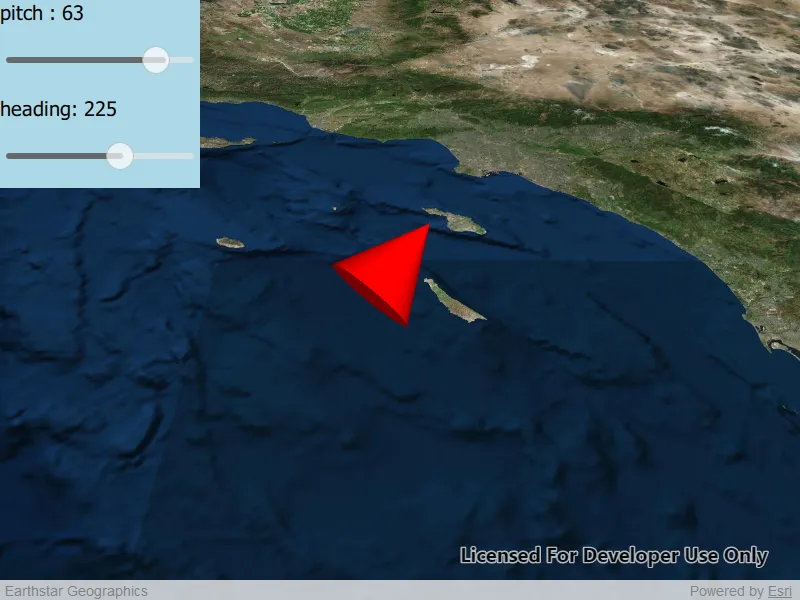
Use case
Instead of reading the attribute and changing the rotation on the symbol for a single graphic (a manual CPU operation), you can bind the rotation to an expression that applies to the whole overlay (an automatic GPU operation). This usually results in a noticeable performance boost (smooth rotations).
How to use the sample
Adjust the heading and pitch sliders to rotate the cone.
How it works
- Create a new graphics overlay.
- Create a simple renderer and set its scene properties.
- Set the heading expression to
[HEADING]. - Apply the renderer to the graphics overlay.
- Create a graphic and add it to the overlay.
- To update the graphic’s rotation, update the
HEADINGorPITCHproperty in the graphic’s attributes.
Relevant API
- Graphic::attributes
- GraphicsOverlay
- SceneProperties
- SceneProperties::headingExpression
- SceneProperties::pitchExpression
- SimpleRenderer
- SimpleRenderer::sceneProperties
Tags
3D, expression, graphics, heading, pitch, rotation, scene, symbology
Sample code
// [WriteFile Name=ScenePropertiesExpressions, Category=Scenes]// [Legal]// Copyright 2019 Esri.//// Licensed under the Apache License, Version 2.0 (the "License");// you may not use this file except in compliance with the License.// You may obtain a copy of the License at// http://www.apache.org/licenses/LICENSE-2.0//// Unless required by applicable law or agreed to in writing, software// distributed under the License is distributed on an "AS IS" BASIS,// WITHOUT WARRANTIES OR CONDITIONS OF ANY KIND, either express or implied.// See the License for the specific language governing permissions and// limitations under the License.// [Legal]
#ifdef PCH_BUILD#include "pch.hpp"#endif // PCH_BUILD
// sample headers#include "ScenePropertiesExpressions.h"
// ArcGIS Maps SDK headers#include "ArcGISTiledElevationSource.h"#include "AttributeListModel.h"#include "Basemap.h"#include "Camera.h"#include "ElevationSourceListModel.h"#include "Graphic.h"#include "GraphicListModel.h"#include "GraphicsOverlay.h"#include "GraphicsOverlayListModel.h"#include "LayerSceneProperties.h"#include "MapTypes.h"#include "Point.h"#include "RendererSceneProperties.h"#include "Scene.h"#include "SceneQuickView.h"#include "SceneViewTypes.h"#include "SimpleMarkerSceneSymbol.h"#include "SimpleRenderer.h"#include "SpatialReference.h"#include "Surface.h"#include "SymbolTypes.h"
using namespace Esri::ArcGISRuntime;
namespace{  const QString HEADING("HEADING");  const QString PITCH("PITCH");}
ScenePropertiesExpressions::ScenePropertiesExpressions(QObject* parent /* = nullptr */):  QObject(parent),  m_scene(new Scene(BasemapStyle::ArcGISImageryStandard, this)){  // create a new elevation source from Terrain3D REST service  ArcGISTiledElevationSource* elevationSource = new ArcGISTiledElevationSource(        QUrl("https://elevation3d.arcgis.com/arcgis/rest/services/WorldElevation3D/Terrain3D/ImageServer"), this);
  // add the elevation source to the scene to display elevation  m_scene->baseSurface()->elevationSources()->append(elevationSource);
  m_graphicsOverlay = new GraphicsOverlay(this);  m_graphicsOverlay->setSceneProperties(LayerSceneProperties(SurfacePlacement::Relative));
  // Create a SimpleRenderer and set expressions on its scene properties.  // Then, set the renderer to the graphics overlay with GraphicsOverlay.setRenderer(renderer).  SimpleRenderer* renderer3D = new SimpleRenderer(this);  RendererSceneProperties renderProperties = renderer3D->sceneProperties();  renderProperties.setHeadingExpression(QString("[%1]").arg(HEADING));  renderProperties.setPitchExpression(QString("[%1]").arg(PITCH));  renderer3D->setSceneProperties(renderProperties);  m_graphicsOverlay->setRenderer(renderer3D);}
ScenePropertiesExpressions::~ScenePropertiesExpressions() = default;
void ScenePropertiesExpressions::init(){  // Register classes for QML  qmlRegisterType<SceneQuickView>("Esri.Samples", 1, 0, "SceneView");  qmlRegisterType<ScenePropertiesExpressions>("Esri.Samples", 1, 0, "ScenePropertiesExpressionsSample");}
SceneQuickView* ScenePropertiesExpressions::sceneView() const{  return m_sceneView;}
// Set the view (created in QML)void ScenePropertiesExpressions::setSceneView(SceneQuickView* sceneView){  if (!sceneView || sceneView == m_sceneView)  {    return;  }
  m_sceneView = sceneView;  m_sceneView->setArcGISScene(m_scene);
  // create a camera  const double latitude = 32.09;  const double longitude = -118.71;  const double altitude = 100000.0;  const double heading = 0.0;  const double pitch = 45.0;  const double roll = 0.0;  const int coneDimension = 10000;
  Camera camera(latitude - 1.0, // place the camera arbitrarily south of the cone                longitude,                altitude * 2, // place the camera arbitrarily higher than the cone                heading,                pitch,                roll);
  // set the viewpoint  m_sceneView->setViewpointCameraAndWait(camera);
  // add the graphics overlay to the scene view  m_sceneView->graphicsOverlays()->append(m_graphicsOverlay);
  // create a scene symbol based on the current type  SimpleMarkerSceneSymbol* smss = new SimpleMarkerSceneSymbol(SimpleMarkerSceneSymbolStyle::Cone, QColor("red"), 200, 200, 200, SceneSymbolAnchorPosition::Center, this);  smss->setWidth(coneDimension);  smss->setDepth(coneDimension);  smss->setHeight(coneDimension * 2);
  // create a graphic using the symbol above and a point location  m_graphic = new Graphic(Point(longitude, latitude, altitude, m_sceneView->spatialReference()), smss, this);  m_graphic->attributes()->insertAttribute(HEADING, 0);  m_graphic->attributes()->insertAttribute(PITCH, 0);
  // add the graphic to the graphics overlay  m_graphicsOverlay->graphics()->append(m_graphic);
  emit sceneViewChanged();}
void ScenePropertiesExpressions::setPitch(double pitchInDegrees){  m_graphic->attributes()->replaceAttribute(PITCH, pitchInDegrees);
  emit pitchChanged();}
double ScenePropertiesExpressions::pitch() const{  return m_graphic->attributes()->attributeValue(PITCH).toDouble();}
void ScenePropertiesExpressions::setHeading(double headingInDegrees){  m_graphic->attributes()->replaceAttribute(HEADING, headingInDegrees);
  emit headingChanged();}
double ScenePropertiesExpressions::heading() const{  return m_graphic->attributes()->attributeValue(HEADING).toDouble();}
// [WriteFile Name=ScenePropertiesExpressions, Category=Scenes]// [Legal]// Copyright 2019 Esri.//// Licensed under the Apache License, Version 2.0 (the "License");// you may not use this file except in compliance with the License.// You may obtain a copy of the License at// http://www.apache.org/licenses/LICENSE-2.0//// Unless required by applicable law or agreed to in writing, software// distributed under the License is distributed on an "AS IS" BASIS,// WITHOUT WARRANTIES OR CONDITIONS OF ANY KIND, either express or implied.// See the License for the specific language governing permissions and// limitations under the License.// [Legal]
#ifndef SCENEPROPERTIESEXPRESSIONS_H#define SCENEPROPERTIESEXPRESSIONS_H
// Qt headers#include <QObject>
namespace Esri::ArcGISRuntime{class Graphic;class GraphicsOverlay;class Scene;class SceneQuickView;}
Q_MOC_INCLUDE("SceneQuickView.h")
class ScenePropertiesExpressions : public QObject{ Q_OBJECT
Q_PROPERTY(Esri::ArcGISRuntime::SceneQuickView* sceneView READ sceneView WRITE setSceneView NOTIFY sceneViewChanged) Q_PROPERTY(double pitch READ pitch WRITE setPitch NOTIFY pitchChanged) Q_PROPERTY(double heading READ heading WRITE setHeading NOTIFY headingChanged)
public: explicit ScenePropertiesExpressions(QObject* parent = nullptr); ~ScenePropertiesExpressions();
static void init();
signals: void sceneViewChanged(); void pitchChanged(); void headingChanged();
private: Esri::ArcGISRuntime::SceneQuickView* sceneView() const; void setSceneView(Esri::ArcGISRuntime::SceneQuickView* sceneView); void setPitch(double pitchInDegress); double pitch() const; void setHeading(double headingInDegrees); double heading() const;
Esri::ArcGISRuntime::Scene* m_scene = nullptr; Esri::ArcGISRuntime::SceneQuickView* m_sceneView = nullptr; Esri::ArcGISRuntime::Graphic* m_graphic = nullptr; Esri::ArcGISRuntime::GraphicsOverlay* m_graphicsOverlay;};
#endif // SCENEPROPERTIESEXPRESSIONS_H// [WriteFile Name=ScenePropertiesExpressions, Category=Scenes]// [Legal]// Copyright 2019 Esri.//// Licensed under the Apache License, Version 2.0 (the "License");// you may not use this file except in compliance with the License.// You may obtain a copy of the License at// http://www.apache.org/licenses/LICENSE-2.0//// Unless required by applicable law or agreed to in writing, software// distributed under the License is distributed on an "AS IS" BASIS,// WITHOUT WARRANTIES OR CONDITIONS OF ANY KIND, either express or implied.// See the License for the specific language governing permissions and// limitations under the License.// [Legal]
import QtQuickimport QtQuick.Controlsimport QtQuick.Layoutsimport Esri.Samples
Item { id: root width: 800 height: 800
SceneView { id: sceneView anchors.fill: parent objectName: "sceneView"
Component.onCompleted: { // Set the focus on SceneView to initially enable keyboard navigation forceActiveFocus(); } }
Rectangle { anchors.fill: sliderColumn color: "lightblue" }
Column{ id: sliderColumn
spacing: 4
anchors { left: parent.left top: parent.top }
height: childrenRect.height
Text { anchors { margins: 5 } text: "pitch : " + model.pitch.toFixed(0) font.pixelSize: 20 verticalAlignment: Text.AlignTop }
Slider{ id: pitchSlider opacity: 0.7 height: 64
// slider controls degrees of rotation: from: -90 to: 90 value: 90 anchors { margins: 5 } }
Text { anchors { margins: 5 } text: "heading: " + model.heading.toFixed(0) verticalAlignment: Text.AlignTop font.pixelSize: 20 }
Slider{ id: headingSlider opacity: 0.7 height: 64
// slider controls degrees of rotation: from: 0 to: 360 value: 180 anchors { margins: 5 } } }
// Declare the C++ instance which creates the scene etc. and supply the view ScenePropertiesExpressionsSample { id: model sceneView: sceneView pitch: pitchSlider.value heading: headingSlider.value }}