Add a scene layer to a scene.
Use case
Each scene layer added to a scene can assist in performing helpful visual analysis. For example, if presenting the results of a shadow analysis of a major metropolitan downtown area in 3D, adding a scene layer of 3D buildings to the scene that could be toggled on/off would help to better contextualize the source of the shadows.
How to use the sample
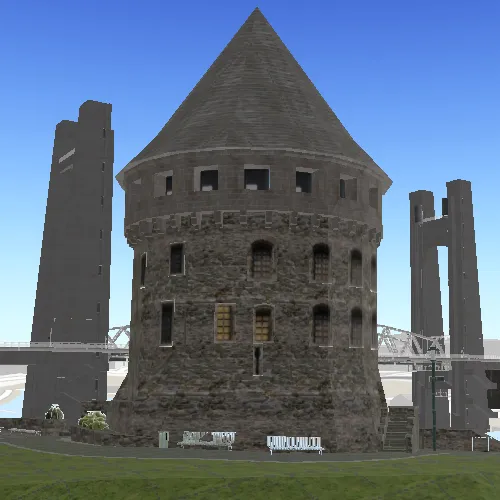
When launched, this sample displays a scene service with an ArcGISSceneLayer. Pan and zoom to explore the scene.
How it works
- Create a
Sceneand set itsBasemapwithScene::setBasemap(). - Create a
Surfaceand add an elevation source to it:surface::elevationSources()::append(arcGISTiledElevationSource). - Add the created surface to the scene:
Scene::setBaseSurface(surface). - Create a
SceneViewand set the scene to the view withSceneView::setArcGISScene(scene). - Create an
ArcGISSceneLayerusing a data source URL:new ArcGISSceneLayer(URL). - Add the new scene layer to the scene as an operational layer with
ArcGISScene::operationalLayers()::append(sceneLayer).
Relevant API
- ArcGISSceneLayer
- ArcGISTiledElevationSource
- Scene
- SceneView
- Surface
About the data
The scene launches with a northward view of the city of Brest, France. A 3D scene layer representing buildings (some textured) is used as an example.
Tags
3D, layer, scene
Sample code
// [WriteFile Name=DisplaySceneLayer, Category=Scenes]// [Legal]// Copyright 2016 Esri.//// Licensed under the Apache License, Version 2.0 (the "License");// you may not use this file except in compliance with the License.// You may obtain a copy of the License at// http://www.apache.org/licenses/LICENSE-2.0//// Unless required by applicable law or agreed to in writing, software// distributed under the License is distributed on an "AS IS" BASIS,// WITHOUT WARRANTIES OR CONDITIONS OF ANY KIND, either express or implied.// See the License for the specific language governing permissions and// limitations under the License.// [Legal]
#ifdef PCH_BUILD#include "pch.hpp"#endif // PCH_BUILD
// sample headers#include "DisplaySceneLayer.h"
// ArcGIS Maps SDK headers#include "ArcGISSceneLayer.h"#include "ArcGISTiledElevationSource.h"#include "Basemap.h"#include "Camera.h"#include "ElevationSourceListModel.h"#include "LayerListModel.h"#include "MapTypes.h"#include "Point.h"#include "Scene.h"#include "SceneQuickView.h"#include "SpatialReference.h"#include "Surface.h"#include "Viewpoint.h"
using namespace Esri::ArcGISRuntime;
DisplaySceneLayer::DisplaySceneLayer(QQuickItem* parent) :  QQuickItem(parent){}
DisplaySceneLayer::~DisplaySceneLayer() = default;
void DisplaySceneLayer::init(){  qmlRegisterType<SceneQuickView>("Esri.Samples", 1, 0, "SceneView");  qmlRegisterType<DisplaySceneLayer>("Esri.Samples", 1, 0, "DisplaySceneLayerSample");}
void DisplaySceneLayer::componentComplete(){  QQuickItem::componentComplete();
  // find QML SceneView component  m_sceneView = findChild<SceneQuickView*>("sceneView");
  // create a new scene instance  Basemap* basemap = new Basemap(BasemapStyle::ArcGISTopographic, this);  m_scene = new Scene(basemap, this);
  //! [add a scene service with ArcGISSceneLayer]  m_sceneLayer = new ArcGISSceneLayer(QUrl("https://tiles.arcgis.com/tiles/P3ePLMYs2RVChkJx/arcgis/rest/services/Buildings_Brest/SceneServer/layers/0"), this);  m_scene->operationalLayers()->append(m_sceneLayer);  //! [add a scene service with ArcGISSceneLayer]
  // create a new elevation source and add to scene  ArcGISTiledElevationSource* elevationSource = new ArcGISTiledElevationSource(QUrl("https://elevation3d.arcgis.com/arcgis/rest/services/WorldElevation3D/Terrain3D/ImageServer"), this);  m_scene->baseSurface()->elevationSources()->append(elevationSource);
  // create a camera and set the initial viewpoint  Point pt(-4.49779155626782, 48.38282454039932, 62.013264927081764, SpatialReference(4326));  Camera camera(pt, 41.64729875588979, 71.2017391571523, 2.194677223e-314);  Viewpoint initViewpoint(pt, camera);  m_scene->setInitialViewpoint(initViewpoint);
  // set scene on the scene view  m_sceneView->setArcGISScene(m_scene);}
// [WriteFile Name=DisplaySceneLayer, Category=Scenes]// [Legal]// Copyright 2016 Esri.//// Licensed under the Apache License, Version 2.0 (the "License");// you may not use this file except in compliance with the License.// You may obtain a copy of the License at// http://www.apache.org/licenses/LICENSE-2.0//// Unless required by applicable law or agreed to in writing, software// distributed under the License is distributed on an "AS IS" BASIS,// WITHOUT WARRANTIES OR CONDITIONS OF ANY KIND, either express or implied.// See the License for the specific language governing permissions and// limitations under the License.// [Legal]
#ifndef DISPLAYSCENELAYER_H#define DISPLAYSCENELAYER_H
// Qt headers#include <QQuickItem>
namespace Esri::ArcGISRuntime{ class Scene; class SceneQuickView; class ArcGISSceneLayer;}
class DisplaySceneLayer : public QQuickItem{ Q_OBJECT
public: explicit DisplaySceneLayer(QQuickItem* parent = nullptr); ~DisplaySceneLayer() override;
void componentComplete() override; static void init();
private: Esri::ArcGISRuntime::Scene* m_scene = nullptr; Esri::ArcGISRuntime::SceneQuickView* m_sceneView = nullptr; Esri::ArcGISRuntime::ArcGISSceneLayer* m_sceneLayer = nullptr;};
#endif // DISPLAYSCENELAYER_H// [WriteFile Name=DisplaySceneLayer, Category=Scenes]// [Legal]// Copyright 2016 Esri.//// Licensed under the Apache License, Version 2.0 (the "License");// you may not use this file except in compliance with the License.// You may obtain a copy of the License at// http://www.apache.org/licenses/LICENSE-2.0//// Unless required by applicable law or agreed to in writing, software// distributed under the License is distributed on an "AS IS" BASIS,// WITHOUT WARRANTIES OR CONDITIONS OF ANY KIND, either express or implied.// See the License for the specific language governing permissions and// limitations under the License.// [Legal]
import QtQuickimport QtQuick.Controlsimport Esri.Samples
DisplaySceneLayerSample { width: 800 height: 600
// add a mapView component SceneView { anchors.fill: parent objectName: "sceneView"
Component.onCompleted: { // Set the focus on SceneView to initially enable keyboard navigation forceActiveFocus(); } }}