See through terrain in a scene and move the camera underground.
Use case
By default, a scene’s terrain is fully opaque and the camera cannot go underground. To see underground features such as pipes in a utility network, you can lower the opacity of the terrain surface and set the navigation constraint on the surface to allow underground navigation.
How to use the sample
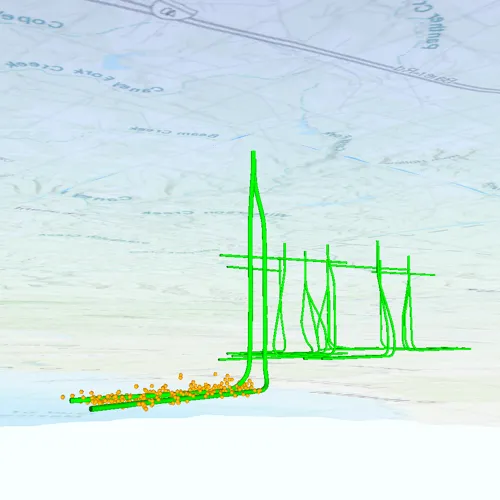
The sample loads a scene with underground features. Pan and zoom to explore the scene. Observe how the opacity of the base surface is reduced and the navigation constraint is removed, allowing you to pan and zoom through the base surface.
How it works
- Display a
Scenein aSceneViewwhich contains layers with underground features. - To see underground, get the scene’s base surface and set its opacity to a value between 0 and 1.
- To allow the camera to go underground, set the surface’s navigation constraint to
NONE.
Relevant API
- Surface
- NavigationConstraint
About the data
This data is a point scene layer showing underground wellbore paths (green polylines) and seismic events (brown points).
Tags
3D, subsurface, underground, utilities
Sample code
// [WriteFile Name=ViewContentBeneathTerrainSurface, Category=Scenes]// [Legal]// Copyright 2019 Esri.//// Licensed under the Apache License, Version 2.0 (the "License");// you may not use this file except in compliance with the License.// You may obtain a copy of the License at// http://www.apache.org/licenses/LICENSE-2.0//// Unless required by applicable law or agreed to in writing, software// distributed under the License is distributed on an "AS IS" BASIS,// WITHOUT WARRANTIES OR CONDITIONS OF ANY KIND, either express or implied.// See the License for the specific language governing permissions and// limitations under the License.// [Legal]
#ifdef PCH_BUILD#include "pch.hpp"#endif // PCH_BUILD
// sample headers#include "ViewContentBeneathTerrainSurface.h"
// ArcGIS Maps SDK headers#include "Error.h"#include "Scene.h"#include "SceneQuickView.h"#include "SceneViewTypes.h"#include "Surface.h"
using namespace Esri::ArcGISRuntime;
ViewContentBeneathTerrainSurface::ViewContentBeneathTerrainSurface(QObject* parent /* = nullptr */):  QObject(parent){  const auto url = QUrl("https://www.arcgis.com/home/item.html?id=91a4fafd747a47c7bab7797066cb9272");  m_scene = new Scene(url, this);
  connect(m_scene, &Scene::doneLoading, this, [this](const Error& loadError)  {    if (!loadError.isEmpty())      return;
    m_scene->baseSurface()->setOpacity(0.4f);    m_scene->baseSurface()->setNavigationConstraint(NavigationConstraint::None);  });}
ViewContentBeneathTerrainSurface::~ViewContentBeneathTerrainSurface() = default;
void ViewContentBeneathTerrainSurface::init(){  // Register classes for QML  qmlRegisterType<SceneQuickView>("Esri.Samples", 1, 0, "SceneView");  qmlRegisterType<ViewContentBeneathTerrainSurface>("Esri.Samples", 1, 0, "ViewContentBeneathTerrainSurfaceSample");}
SceneQuickView* ViewContentBeneathTerrainSurface::sceneView() const{  return m_sceneView;}
// Set the view (created in QML)void ViewContentBeneathTerrainSurface::setSceneView(SceneQuickView* sceneView){  if (!sceneView || sceneView == m_sceneView)    return;
  m_sceneView = sceneView;  m_sceneView->setArcGISScene(m_scene);
  emit sceneViewChanged();}
// [WriteFile Name=ViewContentBeneathTerrainSurface, Category=Scenes]// [Legal]// Copyright 2019 Esri.//// Licensed under the Apache License, Version 2.0 (the "License");// you may not use this file except in compliance with the License.// You may obtain a copy of the License at// http://www.apache.org/licenses/LICENSE-2.0//// Unless required by applicable law or agreed to in writing, software// distributed under the License is distributed on an "AS IS" BASIS,// WITHOUT WARRANTIES OR CONDITIONS OF ANY KIND, either express or implied.// See the License for the specific language governing permissions and// limitations under the License.// [Legal]
#ifndef VIEWCONTENTBENEATHTERRAINSURFACE_H#define VIEWCONTENTBENEATHTERRAINSURFACE_H
// Qt headers#include <QObject>
namespace Esri::ArcGISRuntime{class Scene;class SceneQuickView;}
Q_MOC_INCLUDE("SceneQuickView.h")
class ViewContentBeneathTerrainSurface : public QObject{ Q_OBJECT
Q_PROPERTY(Esri::ArcGISRuntime::SceneQuickView* sceneView READ sceneView WRITE setSceneView NOTIFY sceneViewChanged)
public: explicit ViewContentBeneathTerrainSurface(QObject* parent = nullptr); ~ViewContentBeneathTerrainSurface();
static void init();
signals: void sceneViewChanged();
private: Esri::ArcGISRuntime::SceneQuickView* sceneView() const; void setSceneView(Esri::ArcGISRuntime::SceneQuickView* sceneView);
Esri::ArcGISRuntime::Scene* m_scene = nullptr; Esri::ArcGISRuntime::SceneQuickView* m_sceneView = nullptr;};
#endif // VIEWCONTENTBENEATHTERRAINSURFACE_H// [WriteFile Name=ViewContentBeneathTerrainSurface, Category=Scenes]// [Legal]// Copyright 2019 Esri.//// Licensed under the Apache License, Version 2.0 (the "License");// you may not use this file except in compliance with the License.// You may obtain a copy of the License at// http://www.apache.org/licenses/LICENSE-2.0//// Unless required by applicable law or agreed to in writing, software// distributed under the License is distributed on an "AS IS" BASIS,// WITHOUT WARRANTIES OR CONDITIONS OF ANY KIND, either express or implied.// See the License for the specific language governing permissions and// limitations under the License.// [Legal]
import QtQuickimport QtQuick.Controlsimport Esri.Samples
Item {
SceneView { id: view anchors.fill: parent
Component.onCompleted: { // Set the focus on SceneView to initially enable keyboard navigation forceActiveFocus(); } }
// Declare the C++ instance which creates the scene etc. and supply the view ViewContentBeneathTerrainSurfaceSample { id: model sceneView: view }}