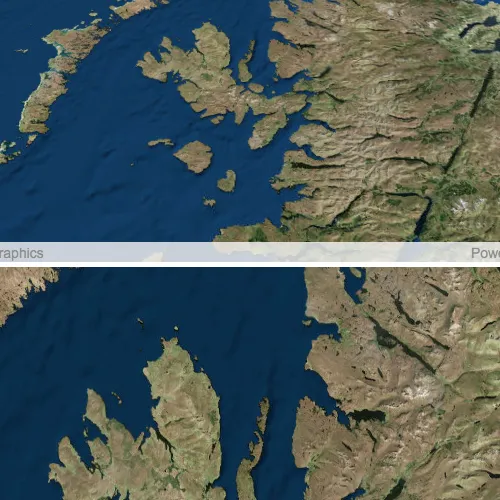
Keep the viewpoints of two views (e.g. MapView and SceneView) synchronized with each other.
Use case
You might need to synchronize GeoView viewpoints if you had two map views in one application - a main map and an inset. An inset map view could display all the layers at their full extent and contain a hollow rectangular graphic that represents the visible extent of the main map view. As you zoom or pan in the main map view, the extent graphic in the inset map would adjust accordingly.
How to use the sample
Interact with the MapView or SceneView by zooming or panning. The other MapView or SceneView will automatically focus on the same viewpoint.
How it works
- Wire up both
SceneQuickView::viewpointChangedandMapQuickView::viewpointChangedsignals for both geo views. - In each slot, get the current viewpoint from the geo view that is being interacted with and then set the viewpoint of the other geo view to the same value.
- Note: The reason for setting the viewpoints in multiple slots is to account for different types of interactions that can occur (ie. single click pan -vs- continuous pan, single click zoom in -vs- mouse scroll wheel zoom, etc.).
Relevant API
- currentViewpoint
- GeoView
- MapView
- SceneView
- setViewpoint
- viewpointChanged
About the data
This application provides two different perspectives of the Imagery basemap. A 2D MapView as well as a 3D SceneView, displayed side by side.
Tags
3D, automatic refresh, event, event handler, events, extent, interaction, interactions, pan, sync, synchronize, zoom
Sample code
// [WriteFile Name=SyncMapViewSceneView, Category=Scenes]// [Legal]// Copyright 2018 Esri.//// Licensed under the Apache License, Version 2.0 (the "License");// you may not use this file except in compliance with the License.// You may obtain a copy of the License at// http://www.apache.org/licenses/LICENSE-2.0//// Unless required by applicable law or agreed to in writing, software// distributed under the License is distributed on an "AS IS" BASIS,// WITHOUT WARRANTIES OR CONDITIONS OF ANY KIND, either express or implied.// See the License for the specific language governing permissions and// limitations under the License.// [Legal]
#ifdef PCH_BUILD#include "pch.hpp"#endif // PCH_BUILD
// sample headers#include "SyncMapViewSceneView.h"
// ArcGIS Maps SDK headers#include "Map.h"#include "MapQuickView.h"#include "MapTypes.h"#include "Scene.h"#include "SceneQuickView.h"#include "Viewpoint.h"
// Qt headers#include <QFuture>
using namespace Esri::ArcGISRuntime;
SyncMapViewSceneView::SyncMapViewSceneView(QObject* parent /* = nullptr */):  QObject(parent),  m_scene(new Scene(BasemapStyle::ArcGISImageryStandard, this)),  m_map(new Map(BasemapStyle::ArcGISImageryStandard, this)){}
SyncMapViewSceneView::~SyncMapViewSceneView() = default;
void SyncMapViewSceneView::init(){  // Register classes for QML  qmlRegisterType<SceneQuickView>("Esri.Samples", 1, 0, "SceneView");  qmlRegisterType<MapQuickView>("Esri.Samples", 1, 0, "MapView");  qmlRegisterType<SyncMapViewSceneView>("Esri.Samples", 1, 0, "SyncMapViewSceneViewSample");}
SceneQuickView* SyncMapViewSceneView::sceneView() const{  return m_sceneView;}
// Set the view (created in QML)void SyncMapViewSceneView::setSceneView(SceneQuickView* sceneView){  if (!sceneView || sceneView == m_sceneView)  {    return;  }
  m_sceneView = sceneView;  m_sceneView->setArcGISScene(m_scene);
  connect(m_sceneView, &SceneQuickView::viewpointChanged, this,          [this]  {    if (m_mapView && m_sceneView->isNavigating())      m_mapView->setViewpointAsync(m_sceneView->currentViewpoint(ViewpointType::CenterAndScale), 0);  });
  emit sceneViewChanged();}
MapQuickView* SyncMapViewSceneView::mapView() const{  return m_mapView;}
// Set the view (created in QML)void SyncMapViewSceneView::setMapView(MapQuickView* mapView){  if (!mapView || mapView == m_mapView)  {    return;  }
  m_mapView = mapView;  m_mapView->setMap(m_map);  m_mapView->setRotationByPinchingEnabled(true);
  connect(m_mapView, &MapQuickView::viewpointChanged, this,          [this]  {    if (m_sceneView && m_mapView->isNavigating())      m_sceneView->setViewpointAsync(m_mapView->currentViewpoint(ViewpointType::CenterAndScale), 0);  });
  emit mapViewChanged();}
// [WriteFile Name=SyncMapViewSceneView, Category=Scenes]// [Legal]// Copyright 2018 Esri.//// Licensed under the Apache License, Version 2.0 (the "License");// you may not use this file except in compliance with the License.// You may obtain a copy of the License at// http://www.apache.org/licenses/LICENSE-2.0//// Unless required by applicable law or agreed to in writing, software// distributed under the License is distributed on an "AS IS" BASIS,// WITHOUT WARRANTIES OR CONDITIONS OF ANY KIND, either express or implied.// See the License for the specific language governing permissions and// limitations under the License.// [Legal]
#ifndef SYNCMAPVIEWSCENEVIEW_H#define SYNCMAPVIEWSCENEVIEW_H
// Qt headers#include <QObject>
namespace Esri::ArcGISRuntime{class Scene;class SceneQuickView;
class Map;class MapQuickView;}
Q_MOC_INCLUDE("MapQuickView.h")Q_MOC_INCLUDE("SceneQuickView.h")
class SyncMapViewSceneView : public QObject{ Q_OBJECT
Q_PROPERTY(Esri::ArcGISRuntime::SceneQuickView* sceneView READ sceneView WRITE setSceneView NOTIFY sceneViewChanged) Q_PROPERTY(Esri::ArcGISRuntime::MapQuickView* mapView READ mapView WRITE setMapView NOTIFY mapViewChanged)
public: explicit SyncMapViewSceneView(QObject* parent = nullptr); ~SyncMapViewSceneView() override;
static void init();
signals: void sceneViewChanged(); void mapViewChanged();
private: Esri::ArcGISRuntime::SceneQuickView* sceneView() const; void setSceneView(Esri::ArcGISRuntime::SceneQuickView* sceneView);
Esri::ArcGISRuntime::MapQuickView* mapView() const; void setMapView(Esri::ArcGISRuntime::MapQuickView* mapView);
Esri::ArcGISRuntime::Scene* m_scene = nullptr; Esri::ArcGISRuntime::SceneQuickView* m_sceneView = nullptr;
Esri::ArcGISRuntime::Map* m_map = nullptr; Esri::ArcGISRuntime::MapQuickView* m_mapView = nullptr;};
#endif // SYNCMAPVIEWSCENEVIEW_H// [WriteFile Name=SyncMapViewSceneView, Category=Scenes]// [Legal]// Copyright 2018 Esri.//// Licensed under the Apache License, Version 2.0 (the "License");// you may not use this file except in compliance with the License.// You may obtain a copy of the License at// http://www.apache.org/licenses/LICENSE-2.0//// Unless required by applicable law or agreed to in writing, software// distributed under the License is distributed on an "AS IS" BASIS,// WITHOUT WARRANTIES OR CONDITIONS OF ANY KIND, either express or implied.// See the License for the specific language governing permissions and// limitations under the License.// [Legal]
import QtQuickimport QtQuick.Controlsimport QtQuick.Layoutsimport Esri.Samples
Item { states: [ State { name: "orientHorizontal" when: width > height PropertyChanges { target: layout flow: GridLayout.LeftToRight } }, State { name: "orientVertical" when: width <= height PropertyChanges { target: layout flow: GridLayout.TopToBottom } } ]
GridLayout { id: layout anchors.fill: parent SceneView { id: sceneView Layout.fillHeight: true Layout.fillWidth: true
Component.onCompleted: { // Set the focus on SceneView to initially enable keyboard navigation forceActiveFocus(); } } MapView { id: mapView Layout.fillHeight: true Layout.fillWidth: true } }
// Declare the C++ instance which creates the scene etc. and supply the view SyncMapViewSceneViewSample { id: model sceneView: sceneView mapView: mapView }}