Open a web scene from a portal item.
Use case
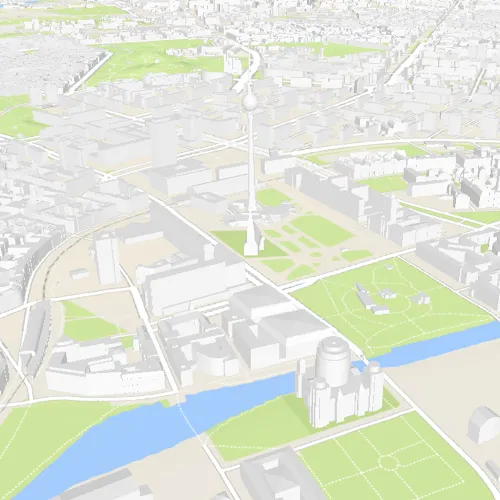
A scene is symbolized geospatial content that allows you to visualize and analyze geographic information in an intuitive and interactive 3D environment. Web scenes are an ArcGIS format for storing scenes in ArcGIS Online or portal. Scenes can be used to visualize a complex 3D environment like a city.
How to use the sample
When the sample opens, it will automatically display the scene from ArcGIS Online. Pan and zoom to explore the scene.
How it works
To open a web scene from a portal item:
- Create a
PortalItemwith an item ID pointing to a web scene. - Create a
Scenepassing in the portal item. - Set the scene to a
SceneViewto display it.
Relevant API
- PortalItem
- Scene
- SceneView
About the data
This sample uses a Berlin, Germany scene hosted on ArcGIS Online.
Tags
portal, scene, web scene
Sample code
// [WriteFile Name=OpenScene, Category=Scenes]// [Legal]// Copyright 2018 Esri.//// Licensed under the Apache License, Version 2.0 (the "License");// you may not use this file except in compliance with the License.// You may obtain a copy of the License at// http://www.apache.org/licenses/LICENSE-2.0//// Unless required by applicable law or agreed to in writing, software// distributed under the License is distributed on an "AS IS" BASIS,// WITHOUT WARRANTIES OR CONDITIONS OF ANY KIND, either express or implied.// See the License for the specific language governing permissions and// limitations under the License.// [Legal]
#ifdef PCH_BUILD#include "pch.hpp"#endif // PCH_BUILD
// sample headers#include "OpenScene.h"
// ArcGIS Maps SDK headers#include "PortalItem.h"#include "Scene.h"#include "SceneQuickView.h"
using namespace Esri::ArcGISRuntime;
OpenScene::OpenScene(QQuickItem* parent /* = nullptr */):  QQuickItem(parent){}
void OpenScene::init(){  // Register classes for QML  qmlRegisterType<SceneQuickView>("Esri.Samples", 1, 0, "SceneView");  qmlRegisterType<OpenScene>("Esri.Samples", 1, 0, "OpenSceneSample");}
void OpenScene::componentComplete(){  QQuickItem::componentComplete();
  m_sceneView = findChild<SceneQuickView*>("sceneView");
  // Create a PortalItem with an Item ID  PortalItem* item = new PortalItem(QStringLiteral("31874da8a16d45bfbc1273422f772270"), this);
  // Create a scene with the Item  Scene* scene = new Scene(item, this);
  // Set the Scene on the SceneView  m_sceneView->setArcGISScene(scene);}
// [WriteFile Name=OpenScene, Category=Scenes]// [Legal]// Copyright 2018 Esri.//// Licensed under the Apache License, Version 2.0 (the "License");// you may not use this file except in compliance with the License.// You may obtain a copy of the License at// http://www.apache.org/licenses/LICENSE-2.0//// Unless required by applicable law or agreed to in writing, software// distributed under the License is distributed on an "AS IS" BASIS,// WITHOUT WARRANTIES OR CONDITIONS OF ANY KIND, either express or implied.// See the License for the specific language governing permissions and// limitations under the License.// [Legal]
#ifndef OPENSCENE_H#define OPENSCENE_H
// Qt headers#include <QQuickItem>
namespace Esri::ArcGISRuntime{class SceneQuickView;}
class OpenScene : public QQuickItem{ Q_OBJECT
public: explicit OpenScene(QQuickItem* parent = nullptr); ~OpenScene() override = default;
void componentComplete() override; static void init();
private: Esri::ArcGISRuntime::SceneQuickView* m_sceneView = nullptr;};
#endif // OPENSCENE_H// [WriteFile Name=OpenScene, Category=Scenes]// [Legal]// Copyright 2018 Esri.//// Licensed under the Apache License, Version 2.0 (the "License");// you may not use this file except in compliance with the License.// You may obtain a copy of the License at// http://www.apache.org/licenses/LICENSE-2.0//// Unless required by applicable law or agreed to in writing, software// distributed under the License is distributed on an "AS IS" BASIS,// WITHOUT WARRANTIES OR CONDITIONS OF ANY KIND, either express or implied.// See the License for the specific language governing permissions and// limitations under the License.// [Legal]
import QtQuickimport QtQuick.Controlsimport Esri.Samples
OpenSceneSample { id: rootRectangle clip: true width: 800 height: 600
SceneView { objectName: "sceneView" anchors.fill: parent
Component.onCompleted: { // Set the focus on SceneView to initially enable keyboard navigation forceActiveFocus(); } }}